


Unmesh walks through Maya’s week (a composite of the grant leads he talks with) and the order he recommends for bringing AI into a grant cycle. Watch on YouTube, with captions ↗
Jump to: 2:29 — why the cycle is long · 3:29 — bought, barely used · 6:30 — start with applications · 9:30 — one step at a time
5 lessons · About 3 hours of reading and practice, plus the videos · 13 optional deep dives when you need more detail. Work at your own pace. No software purchase or coding required.
For grant teams who are shopping, or about to be
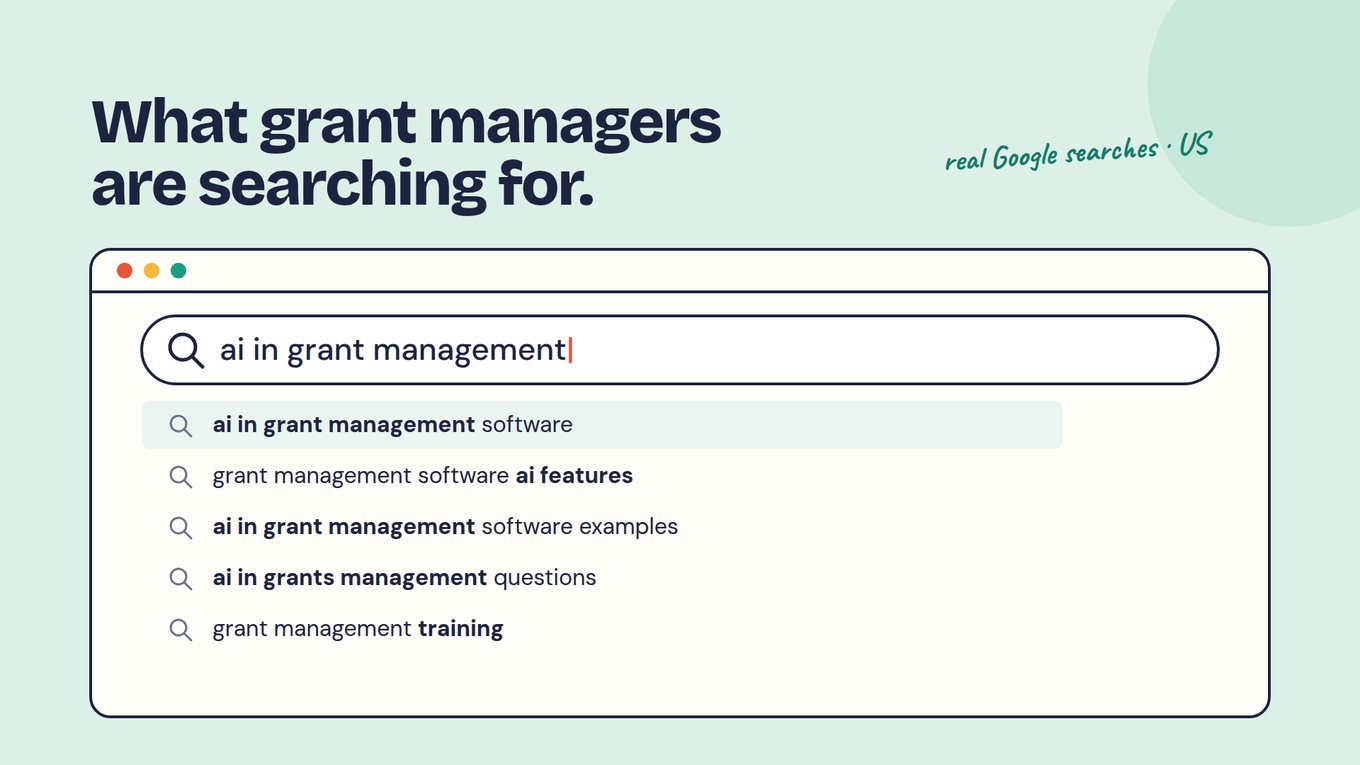
You may be comparing grant management software right now. You may have typed “AI in grant management” into a search bar after another cycle of reading applications late into the evening. Or you run a platform that has been configured for years and you are wondering whether the next contract should be a renewal, a replacement or something smaller.
This course is written for that moment. It does not ask you to pick a vendor. It walks you through one complete cycle on a program you choose, and it leaves you with the evidence to decide: keep what you have, extend it, or replace one workflow at a time.
Why the next system with more features may not fix it
Traditional grant management systems are good at what they were built for: forms, routing, approvals, payment schedules and a record of who did what. Their limit is that they store evidence rather than read it. A proposal arrives as a PDF, a budget as a spreadsheet, a progress report as a narrative, and a person still has to open each one, interpret it against the criteria and type a judgment somewhere.
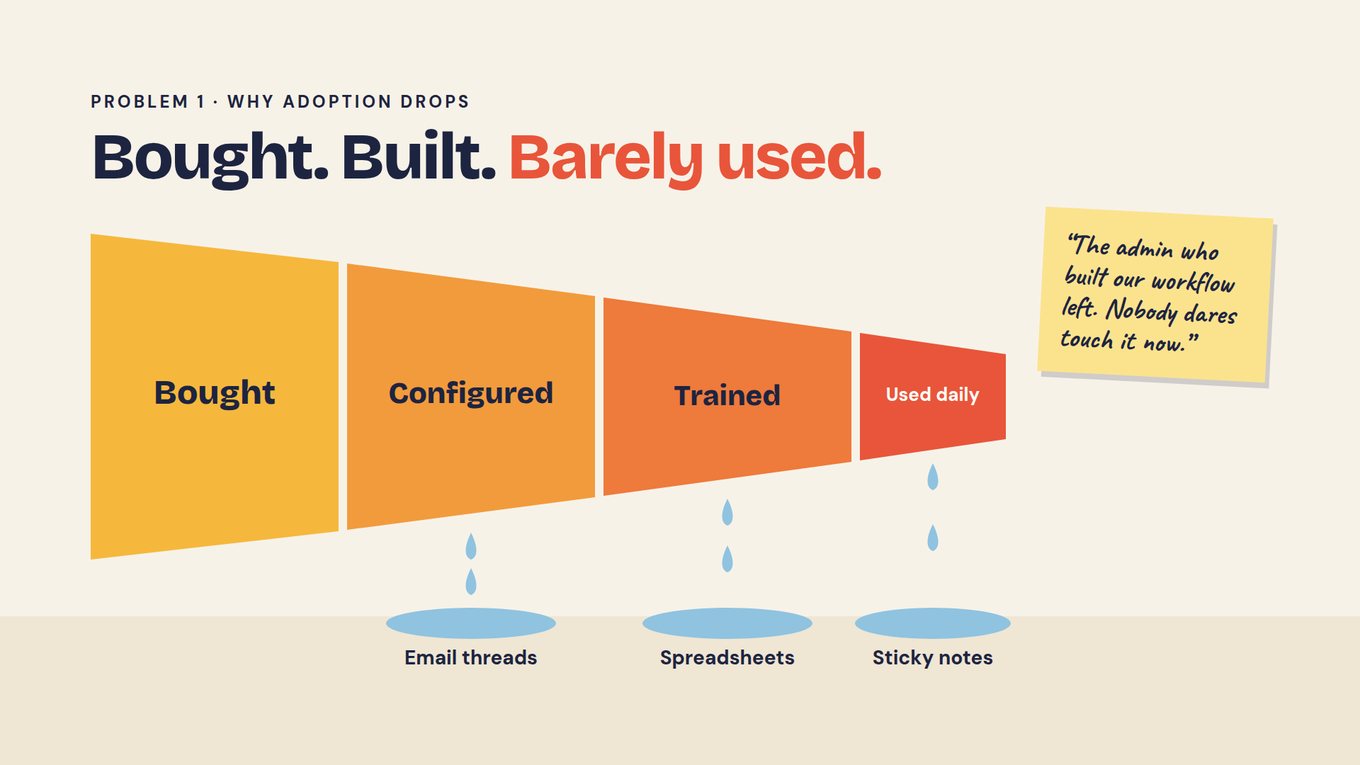
So the work moves to configuration. Each cycle needs its custom fields, reviewer preferences, rubric versions and approval steps set up again, often with a vendor call along the way. Teams buy hundreds of features, configure some, train people on fewer, and use a slice every day. The rest leaks into email, spreadsheets and sticky notes, and the admin who built the workflow eventually leaves.
Adding an AI button to that setup changes little if the system still cannot read the narrative, the PDF or the interview transcript against your rubric. In the video, Unmesh calls that kind of add-on cosmetic. The questions a board or an auditor asks were often never collected as fields, so the dashboard shows the tip of the evidence and the rest is rebuilt by hand in Excel.
Where the months actually go
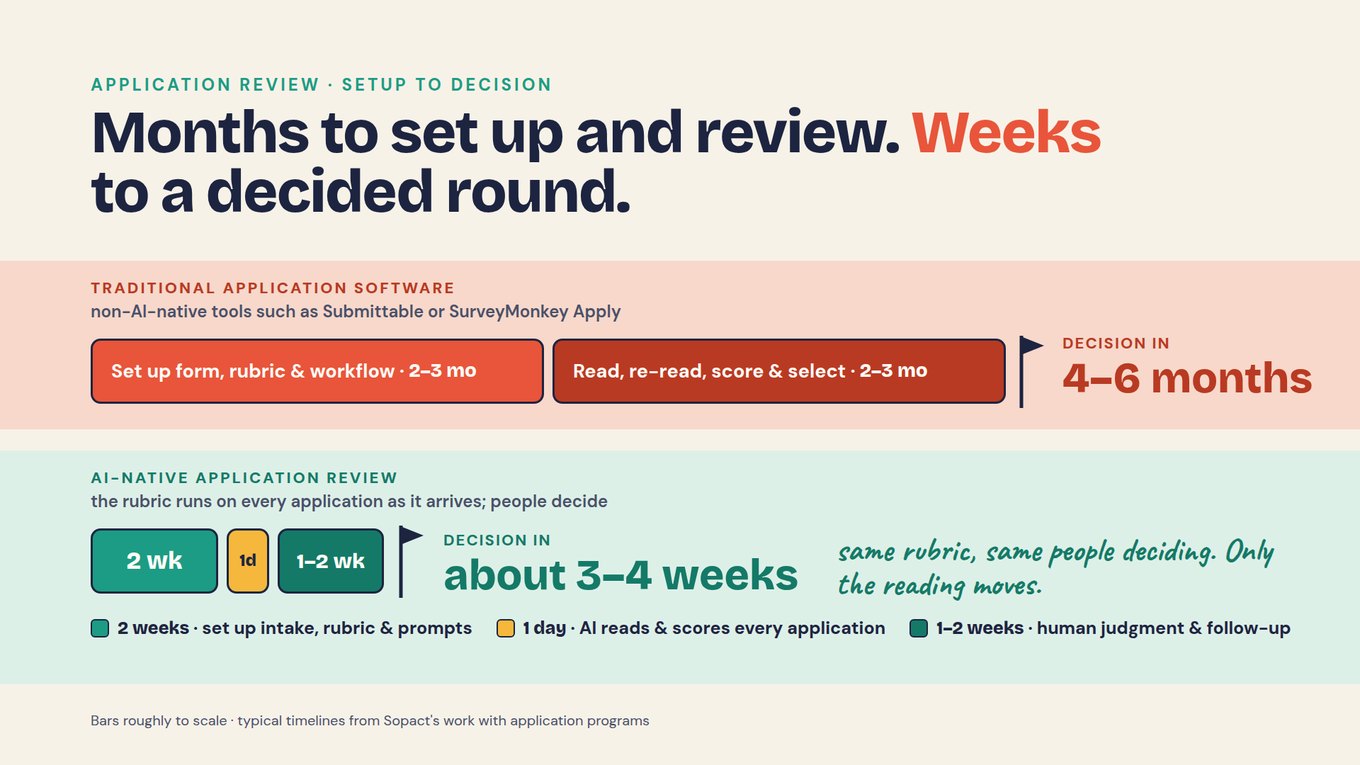
Look at an application round from setup to decision. With traditional application software, non-AI-native tools such as Submittable or SurveyMonkey Apply, the typical timelines from Sopact’s work with application programs are 2–3 months to set up the form, rubric and workflow, then 2–3 months to read, re-read, score and select: four to six months to a decision. With AI-native review, setup of the intake, rubric and prompts takes about 2 weeks, AI reads and scores every application in about a day, and people spend 1–2 weeks on judgment and follow-up with applicants. That is about three to four weeks.
The form collects answers and files. Reviewers download attachments, keep their own score sheets and reconcile in a meeting. The award is filed as a PDF, reporting starts from a generic template, and each board question becomes an export.
Each application is read against your rubric as it arrives, with the passage behind every suggested score. Reviewers verify and decide. The award and the onboarding conversation become the reporting plan on the same record, and questions are answered with sources.
People still decide. The committee still owns every award, every override and every exception, and AI output is checked against the source before anyone relies on it. The course treats that line as a design requirement, not a disclaimer.
How to move forward: boil a kettle, not the ocean
A 6–9 month implementation is a large first bet, which is how long Unmesh says traditional grant-system implementations take. Migrating every record, retraining everyone and signing a long contract before anything has been tested on your own applications carries most of the risk up front. The course takes the opposite order.
- Keep your systemLarge grants, payments and existing records stay where they are.
- Pick the smallest programA small grant round, fellowship or scholarship: low dollars at risk, a short cycle.
- Run one full cycleIntake, review, award, first report, questions answered with sources.
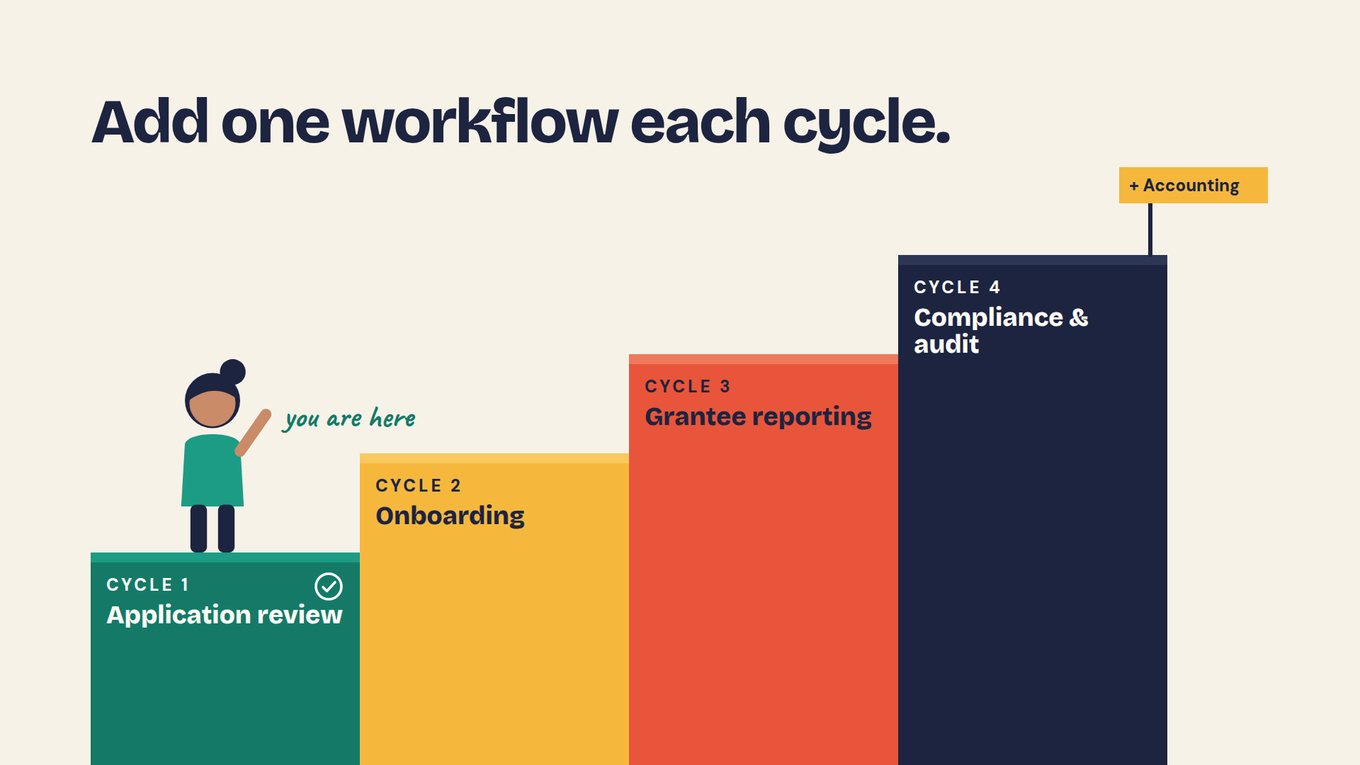
- Add one workflow each cycleDecide keep, extend or replace from what you saw.
Your five lessons
Each lesson follows one step of the cycle, shows what the traditional setup makes hard at that step, and ends with an exercise that produces one piece of your plan.
- Design an application process around the decision, not the formA one-page decision brief and an intake specification for one pilot program.
- Review applications without reviewer bias: one rubric, read on arrival, people decideAn anchored rubric, a calibration record and a cited shortlist brief your committee can inspect and overrule.
- Turn the award into the reporting plan, on the same recordA record map from applicant to first report, an onboarding call agenda and a draft reporting plan.
- Collect grantee reports that hold up, without re-keyingA small data dictionary, a report-completeness rubric and one clarification request ready to send.
- Run the pilot with clear ownership, then decide what to move nextA pilot test log and a one-page requirements brief that doubles as a vendor test script.
13 deep dives, grouped by lesson
Lesson 1 · Design the intake
- What is grant intelligence? Trace one grant from application to first report, then test your current system against that path.
- How do you collect applications clean at the source? Keep answers and documents usable and tell missing from ineligible.
- How do you reduce applicant burden? Cut work before automating it, then ask for exactly what is missing.
Lesson 2 · Review with AI, decide as people
- How do you design a grant rubric and eligibility rules? Gates, anchors, weights and a calibration record.
- How do you analyze a batch of grant applications? Read the whole pool as a set, with sources behind every count.
- How do you track reviewer conflicts of interest? Declare, decide, reassign, then test that access changed.
Lesson 3 · Turn the award into a plan
- Turn a proposed outcome into a reporting definition Write a promise as a measure both sides can count the same way.
- How to read Form 990 for a grant review Due diligence in proportion to the grant.
Lesson 4 · Collect reports that hold up
- How do you track budget, invoices and actual spend? From the approved budget version to a reconciled total.
- How do you produce grant compliance reports? Reuse verified evidence without forcing totals to match.
Lesson 5 · Run the pilot, then extend
- Ask your whole grant round anything Plain-language questions with sources, coverage and unknowns, through the AI Assistant or MCP.
- How do you build a grant audit trail? Reconstruct a decision and a budget change from sources and approvals.
- How do you onboard a grant or RFP program? Launch the next program on the workflow you tested.
The example you will follow
Horizon Foundation · fictional
Horizon has run its grantmaking in the same configured system for eight years. It keeps that system for its large grants and pilots an AI-native cycle on its smallest program: the Youth Pathways Fund, round R-2, one-year grants of up to $25,000 for youth employment programs in Lake County. Sixty-four applications arrive for about ten awards, read by six reviewers.
You follow A-31, Eastgate Youth Works, from its application through calibration, a conditional award, a 60–90 minute onboarding call, and a first quarterly report that says 180 registrations when the agreement promised enrollments. Along the way you handle a missing fiscal-sponsor letter (A-44), a reviewer conflict (A-17) and a Monday morning when the board chair, finance and the auditor all want answers.
Bring one real program when you are ready. A small grant round, a fellowship or a scholarship works best as a first pilot. The Institute of the Americas’ CaliBaja leadership academy is designing its selection the same way, with one bilingual application pathway and one rubric shared by reviewers in Mexico and the United States.
Use the course to test any vendor, including us
Demos are built to look good on the vendor’s data. The five lesson artifacts turn into a test script you can run on yours. Lesson 5 builds the full version; here is its shape.
| Test | Bring | A passing answer shows |
|---|---|---|
| Intake that listens | Your form and three past applications, one incomplete | The gap raised as a clarification on the same record, not scored as zero |
| Rubric scoring with sources | Your rubric and five applications your team already scored | A suggested score per criterion with the passage behind it; differences from your team explained |
| Award to reporting plan | Onboarding notes or a transcript and the award terms | Measures, targets and due dates on the same record as the application |
| Report checked on arrival | A real grantee report and budget workbook | Missing or inconsistent items flagged, with a request back to the grantee |
| Ask the round | Three questions your board, finance and auditor asked last quarter | Sources, coverage and what is unknown, repeatable next week |
Run the same script with every vendor, on the same permitted data, with the same people watching. If you want a structured comparison of platforms first, the grant management software guide and alternatives overview cover the market.
Practice with Horizon’s files first
The practice pack holds the fictional R-2 round: 64 applications, the rubric, the A-31 calibration record, Eastgate’s first quarterly update, and a workbook with one step per lesson, a pilot checklist and a vendor test script template. No real applicant data is included.
Practice data (CSV): horizon-r2-applications.csv · horizon-rubric.csv · calibration-scores.csv · eastgate-q1-update.csv · README
What the course adds to the videos
The videos show the destination: read on arrival, ask anything, one record from application to audit. The lessons make you test the joins. A suggested score needs its source passage and a reviewer who can overrule it. A conflict has to change what a reviewer can open, not only a label. A report with 180 registrations does not answer a target of 200 enrollments. A shared definition does not make every AI answer correct, so each answer carries its sources, coverage and what is still unknown.
The seven-minute version · companion video
The illustrated field guide behind the slides in this course: Maya’s Monday, the feature drop-off, and the one-workflow-per-cycle roadmap. Share it with the colleague who has to agree to the pilot. Watch on YouTube ↗
For the review step on its own, the four-minute AI-native application review walkthrough appears in lessons 1 and 2.
Review your completed plan
When you finish lesson 5, you hold a decision brief, an intake specification, an anchored rubric with its calibration record, a record map and reporting plan, a data dictionary and completeness rubric, a pilot test log and a requirements brief. Ask a colleague who was not involved to trace one application from intake to the first report using only those documents. Every place they have to ask you a question is a gap to fix before the next cycle.
Then make the call for each workflow: keep it where it is, extend it to the next program, or replace it. Most teams keep their current system for a while and add one workflow each cycle.
Questions grant teams ask before starting
Do we have to replace our grant management system to take this course?
No. The course assumes you keep it. Your current system can go on handling large grants, payments and historical records while one small program runs through an AI-native cycle alongside it. After one full cycle you decide, workflow by workflow, whether to keep, extend or replace, based on what happened with your own applications rather than a demo.
What makes a good first program to pilot?
Your smallest, lowest-risk program: a small grant round, a fellowship or a scholarship. Look for low dollars at risk, a short cycle, clean enough data and a rubric the team already argues about. Unmesh recommends starting with applications rather than large grants that need heavy due diligence, then adding onboarding, grantee reporting and compliance in later cycles.
Does AI make the funding decision?
No. In this course AI reads each application against your rubric and prepares a suggested score with the passage behind it. Reviewers verify, disagree, override with a recorded reason, and the committee decides. The value is consistency and time: every application gets the same careful first reading, and people spend their hours on judgment instead of re-reading.
How long does the course take?
About three hours for the five lessons with their exercises, plus the videos. The 13 deep dives are optional; open one when an exercise raises that question. Each lesson leaves you with one usable piece of the plan, so you can stop after any lesson and still have something to take to your team.
Is this only for foundations?
No. The example is a foundation’s small grant round, but the same method applies to fellowships, scholarships, awards, accelerator selection, corporate giving and public programs. The fellowship and scholarship guides show how the review step changes for individual applicants.
When you want a second opinion
If you would like help choosing which program to pilot, or want to run the vendor test script on your own records, the Sopact team can work through it with you. Book a working session or read how the applications and grants solution supports each step.