


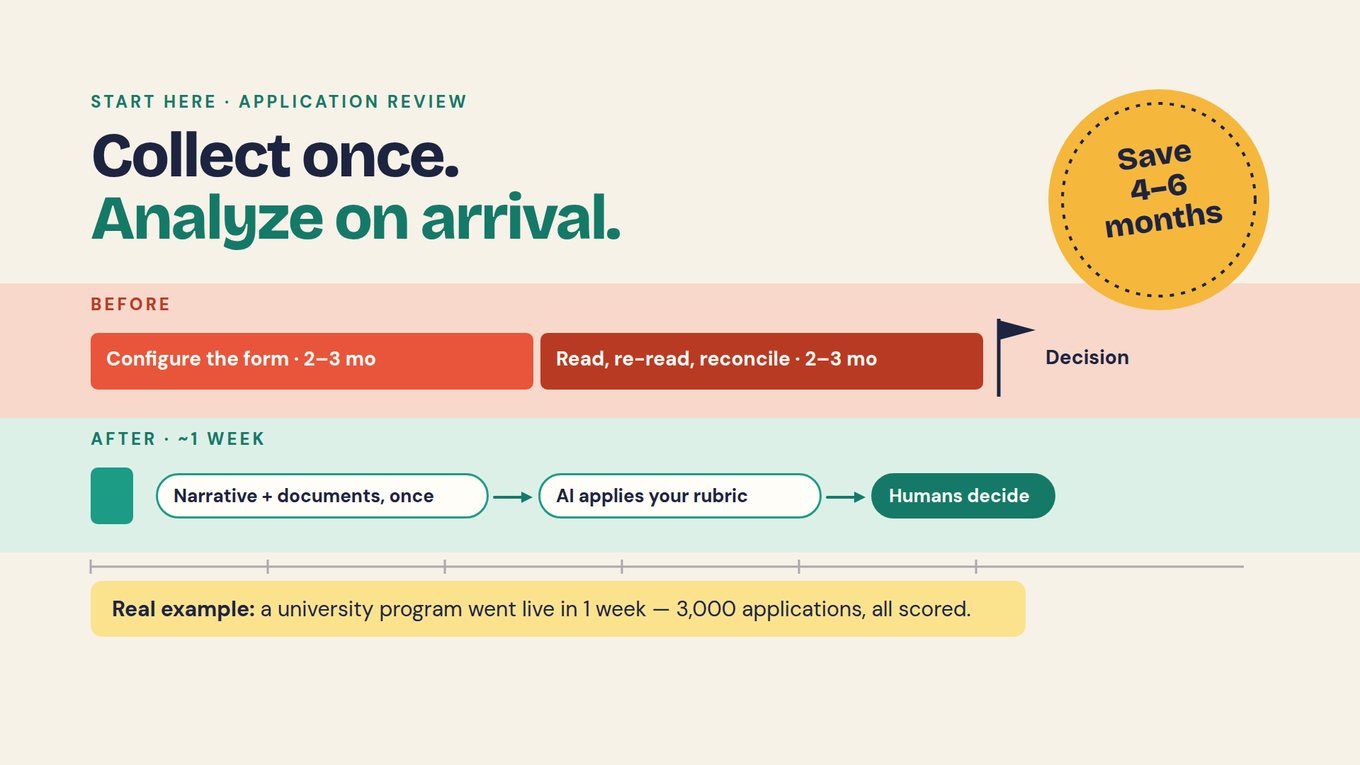
Watch · 2:13–4:43 · read on arrival, then ask for the ten best
Unmesh shows 80 applications read as each one arrives, then asks which 10 are the best. Watch what the report carries: the analysis behind each choice, which is what your committee will inspect. Watch on YouTube ↗
Jump to: 2:13 — 80 applications, read on arrival · 2:42 — ask questions, get reliable answers · 3:25 — "which 10 are the best" · 4:15 — months become daily business
You cannot remove every bias from application review, but you can remove the conditions it grows in: vague criteria, tired reading and unrecorded decisions. Write anchors that point to evidence, calibrate reviewers on the same sample, and let AI read every application against that rubric with the passage behind each score. People verify, decide and record their overrides, then check the results across groups, languages and formats before the round closes.
Sixty-four applications and six calendars
Round R-2 of the Youth Pathways Fund closed on Friday. You have 64 applications, six reviewers (four staff and two community volunteers) and money for about 10 awards. In the grants system Horizon has configured for eight years, the next step is familiar: split the stack, send out the shares with the rubric attached, and wait.
The rubric is the one the team already argues about, copied and renamed for years, and "feasible" means something slightly different to each person using it. Reviewers read in the evenings. Someone re-reads the borderline cases. You reconcile scores in a spreadsheet and chase the reviewers whose numbers look out of line.
That reading is where a traditional cycle spends its time. In typical timelines from Sopact's work with application programs, traditional application software (non-AI-native tools such as Submittable or SurveyMonkey Apply) takes 2–3 months to set up the form, rubric and workflow, plus 2–3 months to read, re-read, score and select. AI-native review takes about 2 weeks to set up intake, rubric and prompts, 1 day for AI to read and score every application, and 1–2 weeks for human judgment and follow-up with applicants.
Length is not the only cost. Application 1 reaches a fresh reviewer on a Tuesday morning; application 60 reaches the same reviewer on a Sunday night, after 59 others. Nobody intends that difference and nobody records it. When people suspect a review was biased, this is often what they sense: not prejudice, but uneven attention.
Each reviewer reads their share on their own schedule. Scores arrive in a spreadsheet without the passage behind them. Disagreements surface late, in the committee meeting.
Every application is read against the same anchored rubric as it arrives, with the passage behind each score. Reviewers start from the evidence and spend their time on disagreements and gaps.
Name the problem before you fix it
Three different things get called bias in a review meeting, and each needs a different fix. Disagreement can be legitimate: one reviewer notices a dependency another missed. Inspect the difference; do not force matching scores.
Missing evidence is its own state. If one reviewer treats an absent letter as failure and another assumes it is on its way, their scores are not comparable. Bias is the concern when judgments consistently depend on something the rubric does not ask about: a familiar name, polished prose, the language an applicant writes in.
| What you see | What it may be | The check |
|---|---|---|
| A well-known organization scores high on thin evidence | An unstated criterion: reputation | Require the criterion and the passage behind each score |
| Fluent writing outscores a stronger plan | Writing polish | Score the evidence against the anchor, not the prose |
| Two reviewers give 4 and 2 on the same answer | Two meanings of one anchor | Calibrate on the same sample and rewrite the anchor |
| An absent attachment becomes a low score | Missing evidence | Hold the item, send one clarification, then score |
| A reviewer accepts the AI draft without opening the source | Anchoring on the suggestion | Open the cited passage; review unflagged cases too |
Check the criteria too. The NIH simplified peer-review framework assesses expertise and resources for sufficiency rather than scoring them, a change NIH describes as intended to reduce undue influence from general reputation. Ask the same of Horizon's rubric: does it reward what the work needs, or prestige?
Write anchors that point to evidence
Horizon's R-2 rubric has four criteria on a five-point anchored scale: outcome pathway 30, delivery feasibility 30, budget justification 20, learning and reporting plan 20. Each contribution is weight × score ÷ 5, so a 4 on a 30-point criterion adds 24 points.
"Strong delivery plan" is an adjective. An anchor names what a reviewer must find to justify the score. For delivery feasibility, a 4 means roles, milestones and major dependencies are supported, with only limited gaps. A 3 means the plan is workable but at least one material dependency still needs a credible resolution. A 2 means a major dependency is unsupported.
Anchors also say where to look: delivery feasibility points to the delivery-plan answer and the partner letter. If an anchor cannot name its source, it will be scored from impression.
If writing the anchors is the hard part, or you are unsure whether the fiscal-sponsor rule is an eligibility gate or part of a score, work through the rubric and eligibility deep dive, then come back.
Calibrate on one application before the live round
Before the live batch, give every reviewer the same application and ask for scores with the passage behind each. Horizon uses A-31, Eastgate Youth Works, which requests $24,000 for a 12-week job-readiness and placement program.
On delivery feasibility one reviewer gave a 4 and another a 2: 24 points against 12. Averaging would have produced an 18 that neither reviewer believed.
Horizon example · fictional
Calibration record · A-31 · delivery feasibility
Evidence in question: the employer letter that placements depend on. It expresses interest in hosting participants. It does not confirm a placement role.
Reading behind the 4: the letter was treated as a commitment.
Reading behind the 2: the missing confirmation was treated as an unsupported major dependency.
Resolution: the team agreed that an expression of interest is a named but unconfirmed dependency, which is what the 3 anchor describes. Both reviewers rescored to 3. The original scores and the reason stay in the record.
Anchor change: added to the 3 and 4 anchors: "A letter of interest counts as a named dependency, not a confirmed commitment."
The source resolved it, not the average. Run a weak and a borderline application the same way, then freeze that rubric version before the live round opens.
Let every application be read the same way, as it arrives
Once calibrated, the rubric becomes the reading instruction. The Intelligence Cell reads each application the moment it is submitted, with a prompt you configure from the rubric, and returns for each criterion the score the anchors support, the passage behind it and what is missing. Application 1 and application 60 get the same reading.
Sample reading · A-31 Eastgate Youth Works · fictional
Outcome pathway · 4 of 5 · 24 points. Clear pathway from job-readiness sessions to placement. Source: program and pathway answer. Open question: follow-up assumptions.
Delivery feasibility · 3 of 5 · 18 points. Roles and milestones described. Source: employer letter. Gap: the essential employer expresses interest but has not confirmed a placement role.
Budget justification · 4 of 5 · 16 points. Costs linked to activities. Source: budget upload. Open question: one estimate needs support.
Learning and reporting plan · 3 of 5 · 12 points. Follow-up method described. Source: "how you will know it worked" answer. Gap: how missing responses are treated.
Draft total: 70/100. For reviewer verification, not a decision.
Missing evidence is flagged, not scored down. A-44's fiscal-sponsor letter is absent, so the application is held. One clarification request goes out, the applicant answers within the window, and A-44 is scored like everyone else.
In Sopact Sense, each application sits on one record with a persistent unique ID, so answers, uploads, clarifications and scores stay together. The Intelligence Row summarizes each applicant, the AI Assistant answers questions across the round with sources, and Claude or ChatGPT can query the same data through MCP, as in the video.
Read the batch, then ask for the shortlist
With every application read, the batch view shows all 64 side by side: criterion scores, flagged gaps and each applicant's Intelligence Row. Here you see what no single reviewer could: the barriers applicants describe for young people, such as transportation and childcare, and which criterion is thin across the round.
Then ask the question the committee needs answered. In the video, "which 10 are the best" builds a shareable report in seconds. Make your request specific enough that every line can be inspected:
Using the frozen R-2 rubric, list the 10 strongest eligible applications. For each, give the four criterion scores and total, the passage behind each score, and the gaps a reviewer must resolve before funding. Then list, separately, the applications ranked immediately below the tenth, any application held for missing evidence, and any reading where the source did not clearly support the score.
The answer is a shortlist brief, not a decision: any claim in it opens onto its passage. If the batch view raises counting questions, use the batch analysis deep dive before you trust the headline numbers.
Reviewers verify, override and say why
Your six reviewers now do different work. Each verifies the readings assigned to them: open the cited passage, check it supports the score under the anchor, look for what the reading missed. Include some applications the AI did not flag, or its misses stay invisible.
When a reviewer disagrees, they override the score and record the reason in a sentence. An override is not a failure; it is the record that people are deciding. The committee then awards from the brief, the overrides and the open questions.
A-31 shows the shape of it. The committee accepts 70/100 and approves Eastgate with a condition: confirm the employer placement role before the second payment. The condition comes directly from the gap the reading surfaced, and it travels with the award into Lesson 3.
Be clear about the limits. AI can miss a document or give a plausible reason the cited text does not support, which is why every score is checked against its source. The NIST AI Risk Management Framework is voluntary guidance that fits this step: define the task, test for likely errors, keep responsibility clear. A consistent reading makes decisions easier to examine, not automatically fair, and one pilot round is not proof of fairness. People decide.
Clear conflicts before anyone is assigned
Conflicts belong at the start of review. Each reviewer declares against the application list before receiving anything. At Horizon, reviewer R3 sits on the board of the organization behind A-17. That is a declared conflict: A-17 is reassigned before scoring, R3 cannot open it, and the record shows the declaration, the decision and the reassignment.
For the register, and for a conflict that surfaces after a score is entered, work through the conflicts of interest deep dive.
Check fairness across groups, languages and formats
Before the round closes, compare criterion scores and override rates across the groups your program cares about, where you have permission to hold that data: first-time and returning applicants, smaller and larger organizations, staff and volunteer reviewers. A gap is a question, not a verdict. With 64 applications, small groups will swing.
Language and format need their own check. Does an application written in a second language score lower on the same evidence? Is a scanned budget read as completely as a spreadsheet? Compare a few pairs by hand.
The same question shapes the CaliBaja North American Leadership Academy, a planning-stage design by the Institute of the Americas: one bilingual application pathway and one rubric shared by reviewers in Mexico and the United States. It has not opened, so there are no results yet; what transfers is the design choice.
Put it into practice
Review R-2 and write the shortlist brief
Use step 2 of the workbook with horizon-rubric.csv, horizon-r2-applications.csv and calibration-scores.csv.
- Rewrite the delivery-feasibility anchors in
horizon-rubric.csvso each level names the evidence required and where it lives in the application. - Score A-31 on all four criteria, citing the passage behind each score. Compare your scores with
calibration-scores.csvand write a calibration record for the feasibility split: the evidence, both readings, the anchor change and the agreed score. - Mark A-44 as held for missing evidence and A-17 as reassigned for a declared conflict. Note what happens next for each.
- Write the instruction you would give the AI Assistant for the 10 strongest applications, with evidence and gaps.
- Draft a one-page shortlist brief: for each shortlisted application, the total, the cited evidence and the gap the committee must resolve. Add one override with its reason.
Download the workbook (PDF)
Practice data: horizon-r2-applications.csv · horizon-rubric.csv · calibration-scores.csv · eastgate-q1-update.csv
Check your reasoning before moving on
Your 3 anchor should name an unconfirmed dependency and your 4 anchor should require the major ones to be confirmed, both pointing to the delivery-plan answer and the partner letter. A-31 totals 24 + 18 + 16 + 12 = 70. The feasibility split resolves to 3 because the employer letter expresses interest without confirming a placement role; the record keeps the 4 and the 2 with the reason. A-44 is held, clarified once and then scored, never marked down. A-17 never reaches R3. In a good shortlist brief, anyone can open a claim and find its source; a line with no passage is an opinion and should be marked as one.
Ask any vendor, including us
Load ten of your own past applications and your real rubric, and ask for scores with the passage behind each. Open three citations and check they say what the tool claims. Change one anchor and rerun: the scores that should move, move, and the rest do not. Ask for the strongest five with their gaps, override one, and confirm the reason is kept on the record. Finally, declare a test conflict and try to open that application from the conflicted reviewer's account.
Questions grant teams ask
Can an application review be completely free of bias?
No process can guarantee that. You can remove the conditions bias grows in: criteria that reward what the program does not need, anchors that mean different things to different people, uneven attention across a long stack, and decisions nobody records. Anchors, calibration, conflict checks, cited evidence and recorded overrides make each decision examinable, which is how you find and fix a problem.
Does AI remove reviewer bias?
No. AI applies the same rubric to every application, which removes fatigue and uneven attention, but it can repeat an unfair criterion at scale or give a reason the source does not support. That is why each score carries its cited passage, reviewers check a sample that includes unflagged cases, and people make and record the decision. People still own fairness.
Is reviewer disagreement proof of bias?
No. Reviewers may read ambiguous evidence differently or notice different risks, and some disagreement is useful. Look at the criterion, the passage and each reviewer's reasoning. At Horizon, a 4 and a 2 on A-31's feasibility came from two readings of one employer letter. The fix was a clearer anchor, not a verdict on either reviewer.
Should applications be anonymized?
Withhold what reviewers do not need to assess the criteria, but keep the context the rubric depends on. For a youth employment fund, the partner letter and service area are evidence, not noise. Documents can reveal identity indirectly, so anonymization has limits and does not replace sound anchors, conflict declarations and cited evidence. Decide field by field what each stage needs.
Should we check only the applications the AI flags?
No. Flags catch some problems and miss others, and if reviewers only open flagged applications, the misses stay invisible. Give each reviewer a sample of unflagged applications, including some that scored high, and check their cited passages the same way. A pattern of misses tells you the prompt or an anchor needs work.
Should the highest AI score automatically win?
No. A score summarizes a reading; it is not a decision. The committee weighs the shortlist brief, the gaps, the overrides and the round's own rules, such as available funds or a condition like Eastgate's placement role. The authorized people decide and record why, so the award can be explained to the applicant, the board or an auditor.
Deep dives for this lesson
Open one when the exercise raises that question, then come back. Each uses the same Horizon example.
- How do you design a grant rubric and eligibility rules?Gates, anchors and weights for R-2, with A-31 scored to 70/100 and a calibration record.
- How do you analyze a batch of grant applications?Read all 64 R-2 applications as a set: overlapping barrier counts, sources and a decision brief.
- How do you track reviewer conflicts of interest?A-17 and reviewer R3: declare, decide, reassign, then test that access actually changed.