What is a case management CRM?
A case management CRM is a system that keeps one record for each person you serve and links their cases, intake, assessments, services, notes and follow-up to it, so staff can see what happened and what changed.
Salesforce, Microsoft Dynamics and dedicated case systems can all do this. The harder question for an operations or program manager is who builds the structure, who can change it after launch, and whether the surveys, notes and spreadsheets outside the CRM ever reach the same record.
THE SHORT VERSION
- A CRM can run case work, but it needs structure and an administrator first, and the evidence in surveys, notes and spreadsheets usually stays outside it.
- Govern that evidence where it is born: one ID at the first intake form, every later form on the same record, each site in its own folder.
- Keep the CRM for what it does well, keep personal details out of AI with field selection, and make every AI answer trace to a record you can open.
Can Salesforce or another CRM run case management?
Yes: Salesforce and Microsoft Dynamics 365 both support case work, so the real question is who will build it, own it and change it after launch. See the Salesforce care-plan documentation, its participant case-management guidance and the Microsoft case-management overview.
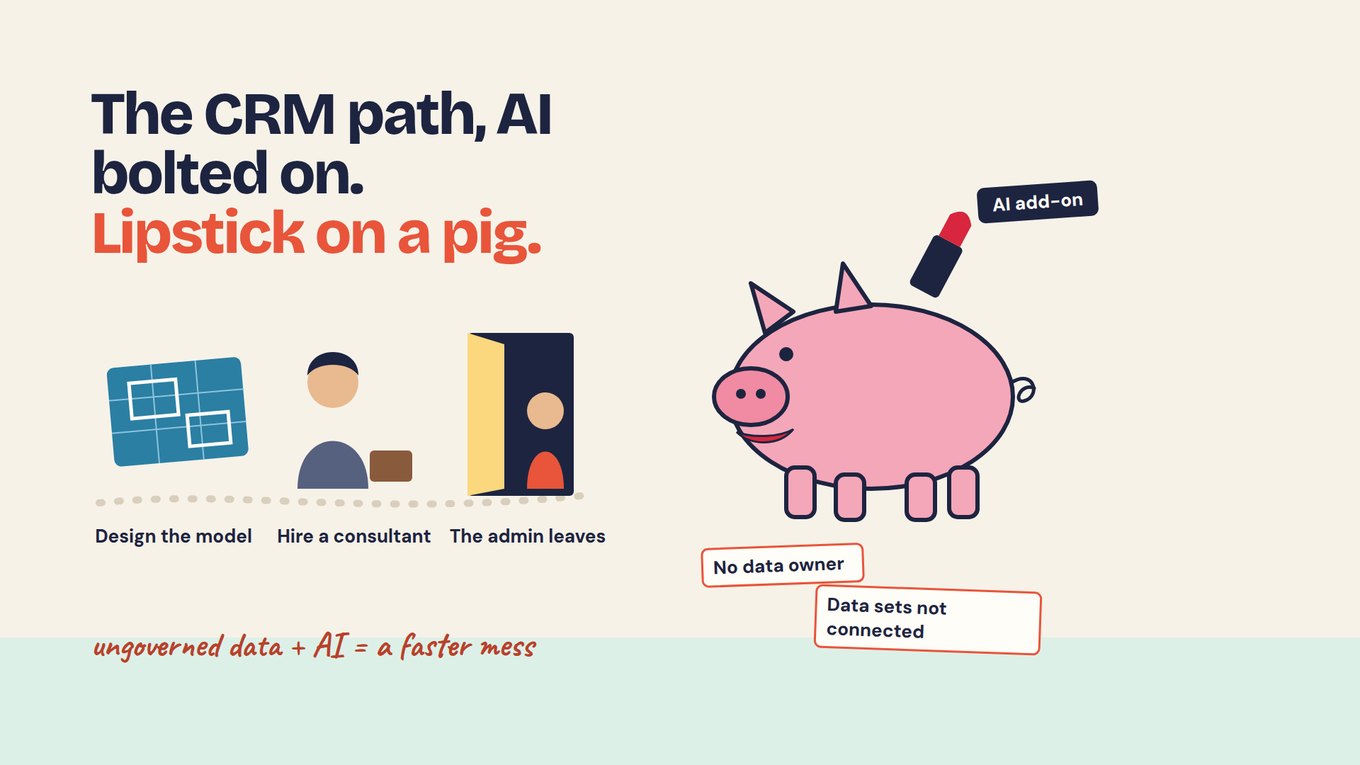
The CRM path starts with structure. Someone designs the data model and a consultant builds it; then the admin who built it leaves, nobody dares change a field in case a report breaks, and nobody on the program team owns the data.
Meanwhile the evidence that shows whether a case went well lives elsewhere: an intake survey one site set up, caseworker notes in a shared drive, a follow-up survey in another tool. Adding an AI assistant on top is lipstick on a pig: it looks new, and its answers are only as good as the records underneath.
The CRM still handles contacts, referrals and tasks well. Lesson 2 of the course explains why AI added to an existing system behaves differently from AI built into collection.
Why should the person be separate from each case?
Because one person can have several cases, and the record has to hold them all without splitting the person or blurring the cases. Take a fictional service organization with three sites, A, B and C. Luis (ID 1182, fictional) had housing help at Site A last year, opened an employment case at Site B this spring and later got a transport referral.
The organization needs one Luis and three cases, each with its own site, caseworker, dates, status and closure reason. If his Site B intake creates a new contact because he gave a different email, his housing history drops out of view and every count of people served is off.
So the person holds the stable ID and contact details, and each case holds the service, site, owner and status. Goals, sessions, referrals, assessments, follow-up answers and notes each carry a date and a source and link to their case. Closing a case is an administrative event, not evidence that Luis is working.
What should a case management CRM include?
It should hold the person, their cases and the evidence around them, and you should test each part with a difficult record rather than a clean demo.
| Capability | Test it in the demo | Where it often breaks |
|---|---|---|
| Person and cases | Open a second case for one client without creating a second person. | A returning client uses a new email and becomes two people. |
| Plans and services | Mark a referral complete while the goal stays open. | One status field, so "closed" reads as "succeeded". |
| Notes and documents | Find every note on one case with its date, author and site. | Notes sit in a shared drive, filed by name. |
| Surveys and follow-up | Attach a 90-day follow-up answer to the same client. | No shared ID, so exports are matched by hand. |
| Access by site | Show what a Site B caseworker can and cannot see. | Everyone sees everything, or every change is an admin ticket. |
| Changes after launch | Have a program lead add a field without the consultant. | The admin has left and nobody dares touch it. |
| AI on the record | Open the record behind each line of an answer. | The add-on summarizes whatever it reaches, names included. |
Bring your own hard cases: a duplicate contact, a corrected assessment, a person in two programs, a late follow-up answer and a note one role must not see. They show what the launch presentation will not.
How can three sites keep their own records and still give the director one picture?
Give each site its own folder and collect every form on the same client ID, so each team governs its own data and the director sees results across all three. In the fictional example, Site A runs intake in the CRM, Site B on paper and Site C in an online survey.
The director asks: across all three sites, which clients who closed an employment case this spring were working 90 days later, and what got in the way for the others? On the current path that means three exports, a match on names and emails, and weeks of reconciling.
In Sopact Sense each site gets a folder and builds its own intake, case-note and exit forms there. Every client gets a persistent unique ID at the first form, and the exit form and 90-day follow-up join that same record, so nothing is merged later.
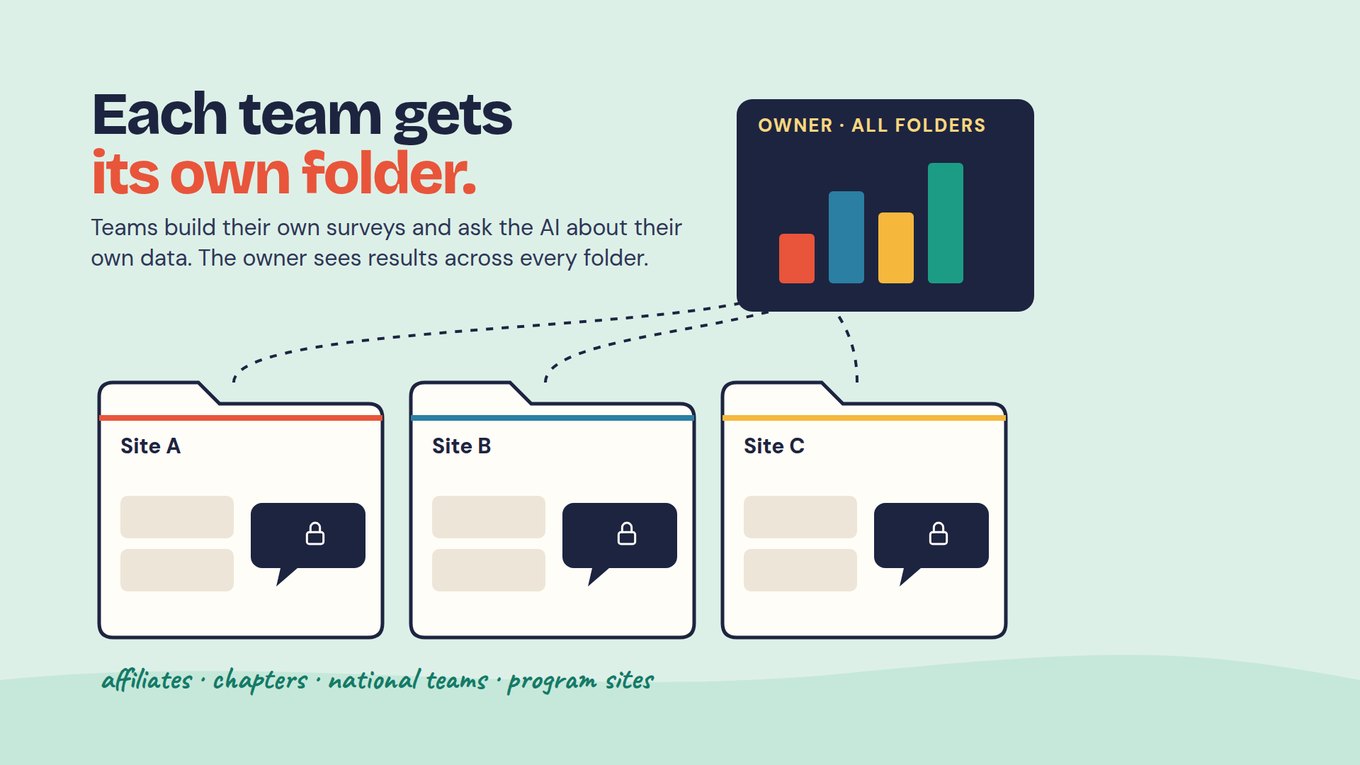
Each site's AI Assistant sees only that folder's data, so the Site B assistant cannot draw on Site A's notes. The director, as organization owner, sees aggregated results across every folder without anyone emailing a spreadsheet. Govern the work, lesson 4 of the course, shows how to assign that access and record it.
The combined view only means something for fields every site defines the same way. Agree a small shared core: client ID, site, case type, open and close dates, closure reason, "Are you working now?" and "What helped, or what got in the way?" Many programs, one picture covers which fields to share and when sites should stay side by side.
How do you keep client details out of AI?
Choose which fields are sent to the AI and which surveys it may use, and make every answer link back to a record. With field selection, name, email, phone, date of birth and address stay off, while case type, closure reason and the follow-up answers stay on because the director's question needs them.
The client ID stays on, so a reviewer can still open Luis's record; the model does not need his name to read what got in his way. Free-text notes can carry names and details about other people, so agree how notes are written before you switch a note field on.
Declared scope is the second lock: the Assistant stays locked until someone picks its surveys, such as intake, exit and the 90-day follow-up. Every line of its answer links to a record you can open. Note who approved the fields and scope, and when, in your team's change log.
Should you configure the CRM, buy a case system, or connect evidence around it?
Keep the CRM for what it does well, add a dedicated case system only when operational rules demand it, and in either case govern the evidence where it is collected. Configure the existing CRM when you own the product, have an administrator who is staying and can name an owner for the data model.
Choose a dedicated case system when clinical records, billing, statutory filing or a reporting mandate dominate the work. Test how it handles your exceptions and who can change it a year from now.
Connect evidence around the person when services run well but the analysis is fragmented. Sopact Sense does not replace a finance system or a case-management system of record; it sits beside the CRM. Record the CRM's client number on the first intake form, collect intake, notes, exit and follow-up on one persistent ID, and let the program team govern it.
Open Play Foundation runs four sports facilities in Stellenbosch, South Africa, covering coaching, water infrastructure and food security. On connected data, ten program reports became one funder submission, and a water leak surfaced in real time. CEO Marco Botha: "I'm digitizing our entire business through Sopact."
What can AI do with case records, and where should it stop?
AI can read notes and follow-up answers as they arrive and summarize a client's record, but people decide, and every summary needs checking against the record behind it. In Sopact Sense an Intelligence Cell reads each open-ended answer on arrival with a prompt your team configures, and an Intelligence Row summarizes one person's record, which helps at a caseworker handoff.
Know the limits. Do not rely on summaries for urgent or safeguarding decisions, and count people rather than notes: ten notes about Luis are one client with a transport barrier. The 90-day follow-up is self-reported, so clients who did not reply stay unknown, and a higher rate at one site does not prove its approach caused it.
Ask any vendor, including us, to correct one note, switch one field off and change a coding definition, then show how the next answer changes. A fluent summary of one clean record says little about a changing caseload.
Watch: why a CRM with AI still needs connected evidence
One client can sit in a CRM, case notes and surveys under different identifiers, and an AI answer is only as sound as those links. This video walks through the CRM, survey and AI path described above and why its answers fail without connected data. Watch for where each system stops seeing the person.
Start with one workflow: one site's employment cases
Pick one site and one case type, and run a single cycle from intake to 90-day follow-up on one ID before adding anything else.
- Choose the workflow. For example, employment cases opened at Site B this quarter, with the director's question written down.
- Build the intake form with the ID. Every client gets a unique ID at intake; add the CRM client number as a field so the two can be matched.
- Add the later forms to the same record. A case note, an exit form and a 90-day follow-up with the two shared questions.
- Set the controls. Put the forms in Site B's folder, switch off name, email, phone and address for AI, and pick the Assistant's surveys.
- Name the people. An owner who sends the forms, a reviewer who checks findings against records, and a steward who approves and logs field and scope changes.
- Review, then copy. When the follow-up closes, check who replied, read the answers behind each theme, agree one change, then set up the next site on the same shared core.
After the first cycle you should have Site B's clients on persistent IDs with intake, notes, exit and follow-up on one record, a short list of what got in the way traced to clients' own words, and a handover page naming the folder, the fields kept from AI and who approved them.
Frequently asked questions
Is a CRM the same as case management software?
Not necessarily. CRM covers relationship management, while case management is supporting a person through one or more cases with intake, plans, services, notes and follow-up; Salesforce and Dynamics 365 can do both once configured. Compare the records and decisions your team needs rather than the category label, and ask who will maintain the configuration after the consultant leaves.
Can one client have multiple cases?
Yes, and the record should expect it. Keep the person separate from each case, so a client with a housing case last year and an employment case this year stays one person with two histories, each with its own site, owner, dates and closure reason. In a demo, open a second case for an existing client and confirm no duplicate person appears.
Do we have to replace our CRM?
No: if the CRM runs contacts, referrals and tasks well, keep it for that. The gap is usually the evidence around the person: intake surveys, notes, exit forms and follow-up in other tools. Collect those on one persistent ID from the first form, record the CRM client number beside it, and let the program team govern that record.
Can each site see only its own clients?
In Sopact Sense, yes. Each site or role gets a folder and builds its own forms there, its AI Assistant sees only that folder's data, and the organization owner sees aggregated results across every folder. Decide who creates folders and approves access, and write it down; the combined view is only as good as the fields every site defines the same way.
Can AI replace caseworker review?
No. AI can read notes and follow-up answers, summarize a record and suggest themes, but responsible staff decide, and urgent or safeguarding matters need direct access to the record. Check each AI line against the record it links to, and keep personal fields out of the model with field selection so the review never depends on pasting names into a chat.