play icon for videos

Case Management Software That Tracks Outcomes, Beyond Notes

Case management software for nonprofits and human services that turns case notes into longitudinal outcome evidence funders read — mixed quant + qual.

Updated
May 29, 2026
360 feedback training evaluation
Use Case
Case Management Software · Built for the AI Era · Sopact
The thesis · case management → case intelligence

Beyond case management.
Case intelligence has begun.

The case management software in front of you was designed when the bottleneck was collection — get the intake form on the worker’s caseload screen, land the right fields, write the case note in a Word doc, export the table at year-end. That bottleneck moved.

Collection is solved. The new bottleneck is the workflow that reads every case note, every assessment, every follow-up survey on arrival — and surfaces the risk before it becomes a crisis. The year-end outcome report is no longer the answer. The client is the unit of work, and the client record has to be intelligent.

That is the difference between case management — the collection-era stack of intake form, case-note Word documents, services log, supervisor spreadsheet, and year-end outcome report — and case intelligence: one persistent client record, read on every arrival, with caseload, supervision, and funder reports generated as queries.

AI without a workflow is a clever intern with no desk. The teams winning with AI are the ones whose case data has a place to land — one record, one ID, one story.

01 · INTAKE
Smart intake
Referral, screening, eligibility · one client ID at first contact
02 · ASSESS
Read on arrival
Validated screens, service plan, risk factors — AI reads every field
03 · SERVE
Case notes & services
Each touchpoint writes back to the same client record
04 · OUTCOME
Follow-up surveys
90-day, 1-year, 3-year — same client ID, same row
05 · REPORT
Definitive reporting
Caseload · supervisor · funder · HMIS · court — one query each
Definition · for the AI-overview reader
Direct answer

What is case management software?

Case management software is a platform that holds one persistent record per client across every interaction — referral, intake assessment, service or treatment plan, case notes, services rendered, supervision, and outcome follow-up — and reads that record so case workers, supervisors, and program directors get answers without a spreadsheet merge. It replaces the typical stack of intake form, case-note Word documents, services log, and year-end outcome report with one connected record.

Used by:

  • Human services agencies (food, housing, community action, CDBG, United Way)
  • Social work, child welfare, adult protective services, family services
  • Workforce development, vocational, reentry, and job-training programs
  • Healthcare-adjacent programs — public health, community health, intensive case management
  • Housing & shelter (HUD-funded, transitional, supportive, group homes)
  • Victim services, after-school, adoption, and specialty programs
  • Multi-program agencies coordinating across teams on one client record
Adjacent terms

Case management tools, case notes software, case management platforms, case tracking software, case documentation software, outcomes management software, client database, case management system — different terms point to the same software category. What varies is which stage of the lifecycle the buyer is thinking about when they search.

Not the same as

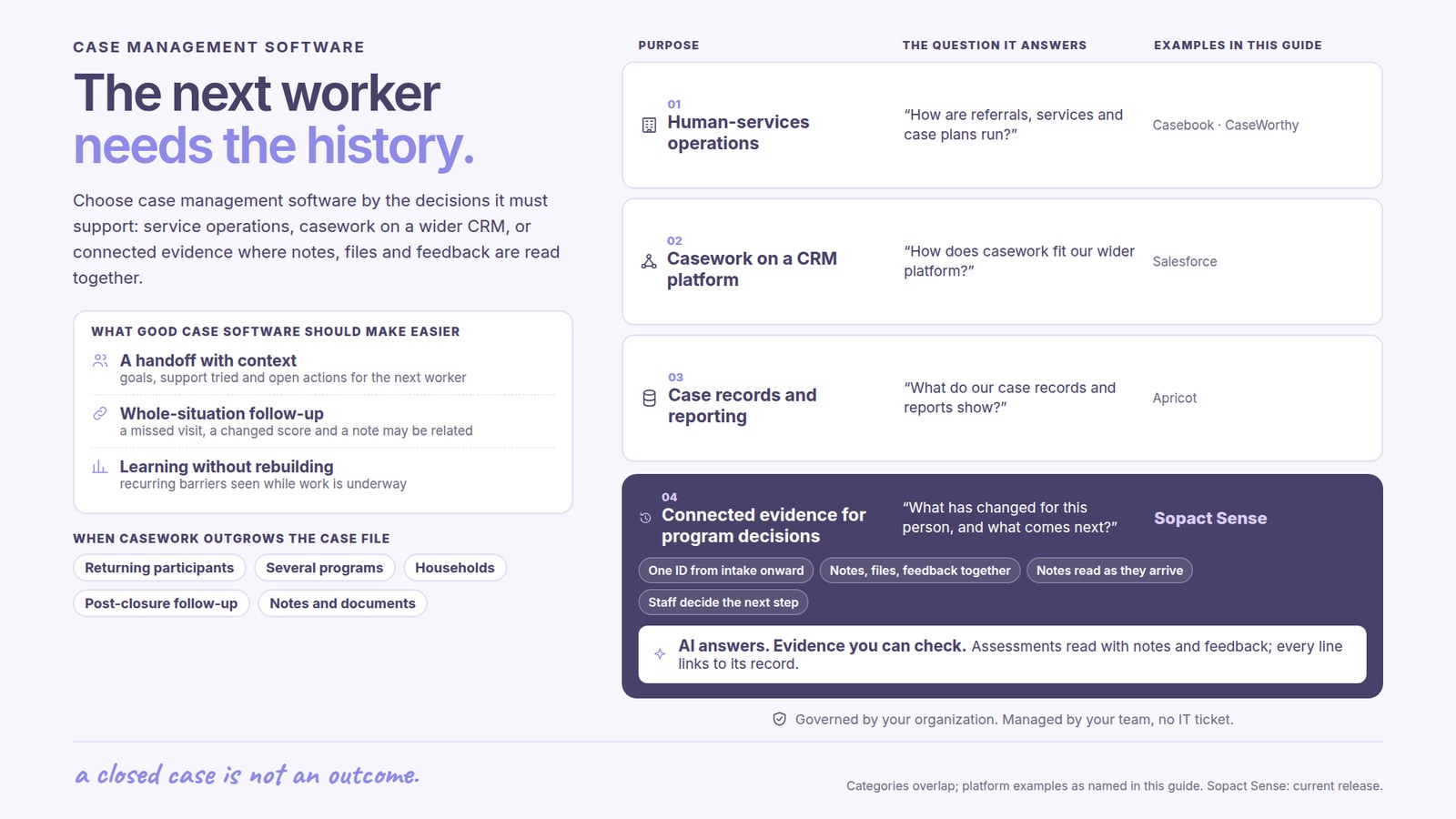
A CRM (Salesforce, HubSpot, Blackbaud) tracks relationships through a sales or fundraising lens. An EHR (Epic, Cerner) tracks clinical encounters. Case management software tracks clients through a service delivery lifecycle with case-note narrative and outcome evidence at its center.

The shift · why the legacy category is breaking

The era of case
management is over.

The case management software your team uses was designed when the bottleneck was collection — get the intake into the caseload screen, write the notes by hand, file the outcome report at year-end. The dashboard is no longer the answer.

Collection is solved. The new bottleneck is the workflow that reads every case note on arrival, surfaces the risk before the supervisor’s next meeting, and keeps one persistent client record across every program inside the agency. The client is the unit of work, and the client record has to be intelligent.

The era that ended

Case Management

What replaces it

Case Intelligence

Takes 3–12 months of integrator-led configuration. Bonterra Apricot, Salesforce, Penelope, Casebook — every form, field, supervisor view, and report built by hand.
Live in days. Intake form, case-note template, service plan, and outcome rubric described in plain language. Configuration is conversation.
Case notes and assessments do not read themselves. Supervisors sample at month-end; the rest stay in the file until something goes wrong.
Every case note read on arrival. Risks and signals surface as data lands — before the supervisor’s next meeting.
The client record resets between programs. The same family receiving social work services, workforce navigation, and housing support appears as three separate cases in three separate modules.
One persistent client ID across every program inside the agency. The family is one record with three service streams.
Caseload reports, supervisor dashboards, funder reports, court reports, HMIS exports — each a two-to-four-week reconstruction from intake, case-note, and outcome systems.
Every report is one query. The supporting case note is two clicks away. The outcome evidence is on the same row as the intake assessment.
Analytics features are a curse: they never produce what each funder asks for, so program staff export to Excel and rebuild the report by hand.
Reports answer the question each audience actually asks — caseload, supervisor, funder, court, board — no Excel detour.
Total cost of ownership is an order of magnitude higher than the license fee suggests. Integrator and trainer costs often exceed software costs.
Priced by use-case complexity, not seats or caseload. Configure one program, add the others as the agency learns.

AI without a workflow is a clever intern with no desk. The teams winning with AI are the ones whose case data has a place to land — one record, one ID, one story.

From the field · Open Play Foundation

An impossible reading, caught in minutes.

For years, Open Play’s program and facility data sat in paper logs and spreadsheets — including a water log Marco Botha had kept by hand for nearly three years. The foundation needed comparable, real-time evidence to put in front of investors and partners, not a quarter-end export — and nothing in the old setup could flag an operational problem while it was still fixable.

After a stretch of heavy rain, Open Play’s water purification system reported it had run out of rainwater — which Marco knew was impossible. Because the reserve, groundwater-extraction, and harvesting figures were now live on the record, he cross-checked them in minutes. The numbers immediately surfaced the real cause: a probable reservoir leak or a failed float switch — caught while still fixable. Same logic for case management: when intake assessments, services delivered, case notes, and follow-up surveys all live on one record, the impossible reading shows up on Tuesday, not at year-end.

“Those statistics that we’re now running on Sopact immediately showed me there’s something significantly wrong … things like that, we would never have been able to do in the past.”

Marco Botha, CEO, Open Play Foundation
The method spine · the five stages of case intelligence

The five-stage spine,
applied to one client.

Every effective case workflow moves through the same five stages — whether the program is social work, workforce development, housing navigation, public health, or a multi-program agency. Memorize them; the rest of this page is detail under each.

1

Intake Data

Referral, screening, eligibility, validated assessments.

2

Framework

Theory of Change, Logic Model, service plan, treatment plan.

3

Data Dictionary

Field definitions, validated-screen scoring, indicators, ownership.

4

Transformation

Case notes scored, risks flagged, services joined to outcomes.

5

Reports

Caseload, supervisor, funder, HMIS, court — one query each.

The rule

Pick the lifecycle the client record carries (next section), assign a persistent client ID at first contact, then let every later stage write back to the same row.

Buyer fit · the six shapes of casework

Six case shapes.
One client record underneath all of them.

The program changes, the documentation requirements change, the funder report at year-end changes. The record underneath — one client carried across every stage — does not.

01Human services & community actionenroll → serve → outcome
02Social work & family servicesreferral → assessment → closure
03Workforce & vocationalscreen → training → placement
04Healthcare-adjacentintake → care plan → discharge
05Housing & shelterCES → navigation → housed
06Multi-program agencyall of the above, one client
Pre-side · how the intake reads

What you collect

Post-side · how the outcome unfolds

What you report

Human services & community action. Household demographics, eligibility (CSBG ROMA, LIHEAP, food security), service plan, distribution receipts.
CSBG ROMA annual, Form 990 Schedule I, United Way community impact, funder outcome reports.
Social work & family services. Risk assessment, family functioning, validated screens, service plan, case notes, supervision threads.
Permanency outcomes, recurrence rates, court compliance, family stability metrics at 6/12/24 months.
Workforce & vocational. Skills inventory, credential history, training cohort enrollment, court-referral context (for reentry).
Placements at 90 days and 12 months, wage gain, retention, recidivism vs. baseline.
Healthcare-adjacent. Validated screens, care plan, encounter notes, social-determinants-of-health (SDOH) screening, care team coordination.
Pre/post symptom change, retention through care, county or payer outcome reports, community health metrics.
Housing & shelter. Coordinated Entry System (CES) assessment, VI-SPDAT score, housing barriers, length of stay.
HMIS exports, CoC submissions, HUD-required reporting, exit-to-housing rate, returns to homelessness.
Multi-program agency. Same client appears across social work, workforce, housing, healthcare — one intake, one consent, one record.
Agency roll-up at the community-impact scale — services delivered, outcomes achieved, demographic distribution, equity indicators.
The record continues · referral to year three

Same client ID. Five moments.
Outcome reporting as one query.

In legacy case management, the record resets at closure. In case intelligence, the record continues — referral through year-three follow-up — on the same persistent client ID.

01Referral
First contact
  • Referral source captured
  • Eligibility screen
  • Consent & privacy
  • Persistent ID assigned
02Assess
Baseline assessment
  • Validated screens
  • Risk & protective factors
  • Service or treatment plan
  • Read on arrival
03Serve
Service delivery
  • Case notes per touchpoint
  • Services rendered logged
  • Supervision threads
  • Risk signals flagged
04Close
Closure & 90-day follow-up
  • Closure summary
  • Outcome survey
  • Stability indicators
  • Re-engagement triggers
05Year 1–3
Longitudinal outcome
  • 1-year & 3-year survey
  • Recurrence tracking
  • Cohort-level evidence
  • Funder reports as queries
1 ID

One persistent client ID carries every case note, service delivered, supervision thread, and follow-up survey from referral through year three. Re-engagement arrives with the full case history attached.

Compared to legacy case management vendors

How Sopact compares to
Bonterra, Salesforce, Penelope, Casebook.

Most teams evaluating case management software are choosing between five recognizable names. Each was built for a different era; each made different trade-offs.

Capability
Sopact
Bonterra Apricot
Salesforce
Penelope
Casebook
Time to first cycle live
Days
3–6 months
6–12 months
3–6 months
2–4 months
AI reads case notes on arrival
Yes · native
No
Einstein add-on
No
Limited
Rubric scoring & citation trail
Yes
No
Custom build
No
No
One client ID across programs
Yes
Per program
Yes
Per program
Yes
Outcome report as one query
Yes
CSV merge
Custom report
Templated
Templated
Encryption, RBAC, audit logging
Yes
Yes
Yes
Yes
Yes
Configuration in natural language
Yes
No
No
No
No
Field / mobile / offline support
Yes
Limited
Limited
Limited
Yes
Built for small agencies (<15 staff)
Yes
Heavy lift
Enterprise
Heavy lift
Yes
Multi-site / multi-program agency
Yes
Yes
Yes
Yes
Yes
Longitudinal outcome tracking (1–3 yr)
Yes
Add-on
Custom build
Add-on
Limited
How to read this table

All five vendors will run a basic intake → service → outcome workflow. The differences show up at the third question your funder, board, or county auditor asks: how do you know the outcome happened, where is the supporting case note, and what does the agency-level report look like for the same client across three programs?

Pricing · by complexity of the use case, not seats or caseload

Sopact prices by the complexity
of what you actually run.

No per-seat tax. No per-caseload meter. The line items are the things that actually drive work — how many programs share the client record, how custom the data dictionary needs to be, which built-in skills get activated, and how branded the funder-facing reports have to look.

What every deployment includes
1

Custom data dictionary

Your case-note fields, your validated screens, your eligibility codes, your demographic categories — drafted from your existing intake form in one working session.

2

Built-in Sopact skills

Case-Note Reader skill, Treatment Plan skill, Service Plan skill, Outcome Rubric skill, Cohort Roll-up skill — turned on by default, ready to read on arrival. Add domain skills (Court Report, CES, CSBG ROMA) when needed.

3

Form, banner, and report design

Logo, color palette, intake banner styled to your agency. White-label form, banner, and report design rolling out — funder, court, and client-facing pages match your identity.

4

Mixed-model auto-indicators with attribution

Closed-ended validated screens and open-text case notes scored together. Indicators populate automatically, with citation trails and attribution rules — which service drove which outcome, across the caseload.

5

Definitive reporting

Caseload · supervisor · funder · HMIS / CoC · court · CSBG ROMA · United Way community impact — each generated from one place with citation trails. The data dictionary keeps every metric reproducible.

What scales the complexity — and therefore the price
Programs

Number of programs sharing one client

One program is the simplest case. Three programs (social work + workforce + housing) sharing one client ID adds dictionary reconciliation and cross-program reporting.

Sites

Multi-site deployment

One office is straightforward. Multiple sites under one agency add HMIS-aligned fields, federation-level roll-up, and BI integration to Tableau, Power BI, Looker, or Snowflake.

Longitudinal depth

Follow-up window

Closure summary is light. Year-1, year-3, and year-5 outcome cohorts attributed back to baseline assessment add depth to the dictionary.

Custom skills

Domain rubrics on top of the built-ins

Built-in skills cover common patterns. Your agency’s domain rubrics — encoded in plain English, versioned, composed with the built-ins — let the skill library grow with the practice.

White-label depth

Single brand to multi-brand

One brand on one form is simplest. Multi-brand white-label — separate funder portals, separate client-facing portals — useful for fiscal sponsors and coalitions.

API integration

HMIS, billing, court, and BI integration

Reading reports in Sopact is included. Piping data via API to HMIS, billing systems, court reports, or your BI stack adds integration setup.

Days
Time to first cycle live on Sopact, with the dictionary drafted in plain words
3–12 mo
Configuration time for a typical legacy case management deployment
4–6 wk
Staff time spent each year reconstructing the outcome report on legacy stacks
2–3×
Typical multiple of integrator cost to license cost on legacy platforms
Pricing in one line

A 12-person family services agency running one program pays less than a 50-person multi-site community-action agency running six. Both pay for the complexity they actually use — the data dictionary, the skills, the white-label depth, and the reporting reach. Talk to us with your program list; we will quote against it directly.

Security · the controls we provide, named honestly

Encryption, RBAC, audit logs.
Enterprise-grade AI under SLA.

Casework touches confidential information — services received, household context, eligibility status, treatment notes. Here is what Sopact actually provides, named without overclaim.

Encryption

At rest and in transit

AES-256 at rest, TLS 1.3 in transit, encrypted backups, scheduled key rotation. The reading model returns structured output and does not retain the underlying text.

Access & audit

Role-based, fully logged

Role-based access at the field level (worker, supervisor, director, auditor), single sign-on, multi-factor authentication, complete audit trail on every read and write.

AI under SLA

No training-data retention

All AI calls run under enterprise-grade service-level agreements with no training-data retention. The model reads, returns structured output, and forgets.

On HIPAA, FERPA, and regulated regimes

Sopact is not currently HIPAA-certified or covered by a Business Associate Agreement (BAA). The controls above support a security-conscious deployment, but if your agency is subject to HIPAA, FERPA, 42 CFR Part 2, state confidentiality rules, child-welfare regulations, or county behavioral-health contracts, you should evaluate the specific controls against your compliance program and consult your counsel before storing protected information. We are happy to walk through the technical detail with your security and compliance team.

Stage 05 · the four report shapes

Four report shapes,
tied to casework.

Reports are not formats — they are questions. Case intelligence produces four distinct shapes from the same accumulating client record. Naming the shape tells you which one a supervisor, funder, or auditor is actually asking for.

Missing

What didn’t arrive that should have

The case note overdue this week, the 90-day follow-up nobody returned, the supervision sign-off missed, the eligibility re-cert overdue. Run continuously — surface gaps before the supervisor’s Monday meeting.

Unusual

What looks off vs. the caseload or last quarter

A case where session frequency dropped sharply, a screening-score swing, a length-of-stay that doubled, a worker’s caseload drifting from agency norms. Anomaly against history or against the group.

Comprehensive

The longitudinal view of one client

Everything known about one client — first referral to today. Every assessment, every case note, every service rendered, every supervision thread, every outcome survey. Two-click answers for supervisors, funders, and auditors.

Aggregate

The longitudinal view of the agency

Caseload distribution, supervisor reports, HMIS / CoC, CSBG ROMA, court compliance, funder outcomes, United Way community impact — all as queries against the client records. The annual report drawn from one place.

What makes it unique · four properties

Four properties a CRM, EHR,
or spreadsheet cannot offer.

Strip away the marketing and four properties separate case intelligence from everything before it. If a system you’re evaluating lacks any of them, it belongs to the era that ended.

1

Definitive AI — the same case note gives the same answer

Generic generative-AI tools are easy to adopt and hard to trust: ask the same question twice and you can get two answers. For casework that supervisors, courts, auditors, or boards will scrutinize, that variance is disqualifying. Sopact runs the model to read, then locks the answer, so the result is reproducible and auditable every time.

2

Qualitative + quantitative on the same client

A validated screen (PHQ-9, GAD-7, VI-SPDAT, custom indicator) tells you what changed. The case-note narrative tells you why. Sopact joins both on the same persistent client ID — so the score and the case worker’s reasoning live on the same row in the supervisor or funder report.

3

Enterprise-grade security controls

Encryption at rest and in transit, role-based access at the field level (worker / supervisor / director / auditor), no training-data retention on AI calls, complete audit trail. Useful for any program; required for any agency whose contract or county auditor asks how the data is handled.

4

Configuration in language, on the fly

New intake question, new validated-screen scoring rule, new outcome cohort, new white-label brand — described in language, live immediately. The system bends to the agency’s practice instead of the agency’s practice bending to the system.

Buyer fit · by agency size and complexity

From small agencies to
multi-site county systems.

The architecture is the same; the configuration scales with the work. Here is what each size of agency typically runs through Sopact.

Small · under 15 staff

One or two programs

A single supervisor and 5–10 case workers. Intake form, case-note template, validated screen, and one outcome survey. Live in a week. No integrator, no IT staff required.

family serviceshousingworkforcefood assistance
Medium · 15–50 staff

Multi-program agency

Multiple program directors, mixed funder portfolio. One family appears across social work, workforce, and housing — joined on a persistent client ID. Supervisor dashboards and funder reports draw from one place.

community actionfamily servicesvocationalUnited Way
Large · 50+ staff, multi-site

Multi-site & county-system

Multiple physical sites, HMIS reporting, CoC compliance, CDBG and CSBG grants, court oversight. Sopact reads HMIS fields, runs the agency roll-up across sites, exposes data via API.

HMIS / CoCCDBGCSBG / ROMAmulti-site
Common questions · asked before the demo

Asked, answered, on the page.

Ten questions that come up in nearly every case management software evaluation — answered here so the comparison work happens before the sales call, not during it.

Q1What is case management software?
Case management software is a platform that holds one persistent record per client across every interaction — referral, intake assessment, service or treatment plan, case notes, services rendered, supervision, and outcome follow-up. It replaces the typical stack of intake form, case-note Word documents, services log, and year-end outcome report with one connected record. Used by human services, social work, workforce development, healthcare-adjacent, housing, public-sector, and multi-program agencies.
Q2What are examples of case management tools?
Examples of case management tools include the intake form, the case-note template, the validated assessment screen, the service or treatment plan, the supervisor caseload dashboard, the referral tracker, the outcome survey, and the funder report. Modern case management software brings all of these into one platform built around a persistent client record — instead of running them as separate forms, spreadsheets, and Word documents that have to be re-stitched at year-end.
Q3Which case management software is best for tracking client outcomes?
The best case management software for outcome tracking is one that (1) reads every case note on arrival rather than waiting for a year-end review, (2) keeps one persistent client record across every program a client touches, (3) generates outcome reports as queries instead of CSV merges, and (4) supports longitudinal follow-up at 90 days, 1 year, and 3 years on the same client ID. Legacy choices like Bonterra Apricot, Salesforce, Penelope, and Casebook were built for a configure-heavy era; AI-native platforms like Sopact treat configuration as conversation and generate outcome reports as queries.
Q4How is Sopact priced for case management?
Sopact pricing is based on the complexity of the use case, not seat counts or caseload size. The line items are how many programs share the client record, how custom the data dictionary needs to be, which built-in skills get activated, longitudinal depth, white-label depth, and API integration to existing billing, HMIS, or BI systems. Every deployment includes the custom data dictionary, built-in skills (case-note reader, treatment plan, outcome rubric, cohort roll-up), form and report design, mixed-model auto-indicators with attribution, and definitive reporting.
Q5Is there free case management software?
Free options and open-source case management tools exist, but the cost moves elsewhere. Spreadsheet-based casework or free CRM tiers carry hidden costs: lost case continuity when staff turn over, manual outcome reporting, the supervisor time spent reading case notes by hand, and the staff hours spent reconciling intake, services, and follow-up at year-end. A small agency that values its case workers’ time usually finds a low-cost paid platform pays back within the first reporting cycle.
Q6What security controls does Sopact provide for sensitive client data?
Sopact provides AES-256 encryption at rest, TLS 1.3 in transit, role-based access at the field level, SSO with multi-factor authentication, and a complete audit trail on every read and write. AI calls run under enterprise-grade service-level agreements with no training-data retention. Sopact is not currently HIPAA-certified or covered by a Business Associate Agreement (BAA); agencies subject to HIPAA, FERPA, 42 CFR Part 2, state confidentiality rules, or sector regulations should evaluate these controls against their own compliance program and consult their counsel before storing protected information.
Q7How does AI help with case notes and case documentation?
AI reads every case note on arrival and tags it against the treatment plan, the service plan, and the validated outcome screen the client completed at intake. Risk signals (escalation language, missed appointments, treatment-plan deviations, safeguarding flags) surface on Tuesday, not at the supervisor’s monthly review. The narrative stays with the case worker; the structure (themes, indicators, attribution to outcomes) is generated automatically and tied back to the source paragraph.
Q8Can one platform handle case management across multiple programs?
Yes — when the platform is built around one persistent client record. A family receiving social work services, workforce navigation, and housing support appears as one record with three service streams, not three separate cases. Multi-program agencies use this architecture to coordinate across teams, recognize re-engaging clients automatically, and report at the agency level instead of reconstructing the picture per program at year-end.
Q9What about Bonterra Apricot vs Salesforce for case management?
Both were built for the configure-heavy era. Bonterra Apricot is closer to community-services casework out of the box with prebuilt intake and outcome templates; integrator work is still required for outcome reporting. Salesforce (NPSP for nonprofits, Vlocity Public Sector for government) is more flexible but requires significant integrator work to become a real case management system, and Einstein AI is an add-on rather than native. Both produce numbers; neither reads case notes on arrival. AI-native case intelligence avoids both the configuration cost and the year-end reporting cost.
Q10What questions should I ask before buying case management software?
Six questions that separate platforms that work from platforms that look like they work in the demo: (1) How long until our first cycle is live? (2) Will every case note get read, or just the ones the supervisor samples? (3) Does the same client appear as one record across all our programs? (4) Is the caseload report a query, or a CSV merge? (5) When the funder or auditor asks why this outcome, can I show the supporting case note in two clicks? (6) Does the system work offline for field work?
Specialized use cases · case intelligence by domain

Same platform, six
domain-specific guides.

Case management is one shape of the stakeholder record. The same approach holds applicants, students, trainees, clients, and grantees across every program a foundation, agency, or university runs.

Use case
One persistent client record across multi-program nonprofits. CSBG ROMA, Form 990 Schedule I, United Way reporting.
Use case
Child welfare, behavioral health, APS, family services. Case notes read on arrival; supervisor caseload as one query.
Use case
LOI to full proposal to multi-year follow-up. Form 990 Schedule I as a query.
Use case
Apply → admit → alumni. Grants, scholarships, fellowships, accelerators.
Use case · across programs
Pre/post assessments, between-session check-ins, learning outcomes per participant.
Engine pillar
Applicants, students, trainees, alumni, employees, clients — every relationship on one record.

Bring one program. Sixty minutes is enough.

One intake form. One validated screen. One year’s worth of case notes you already have. We’ll walk through how it would live as one record per client, what the AI would pull out of the long-form notes, and what the supervisor caseload and funder outcome reports would look like coming out of one place.

Book a 60-minute working session Format · 60 min · with Unmesh Sheth, Founder & CEO