play icon for videos

Human Services Case Management Software

One client across coordinated entry, benefits and every program.

US
By Unmesh Sheth
·
11
min read

What is human services case management software?

Human services case management software is a platform that holds one persistent record per client across coordinated entry, eligibility, and every program a household touches — referral, benefits screen, intake assessment, service plan, case notes, services delivered, and outcome follow-up — so case workers, supervisors, and program directors get answers without stitching intake forms, a services log, and a year-end report together. It is also searched as human services software, social services case management software, or human services case management — all naming the same need: one intelligent client record that proves outcomes, not just logs services. The newest generation adds intelligence to the record itself: AI reads each case note on arrival, scores it against the service plan with citations, and turns follow-up surveys into outcome evidence — so the software answers whether the household actually stabilized, not just which benefits were issued.

Used by: community action agencies (CSBG / ROMA, LIHEAP, food security) · coordinated entry and housing programs (HMIS / CoC) · workforce and reentry programs (WIOA) · behavioral-health-adjacent and SDOH programs · family and protective services · multi-program agencies coordinating one household across benefits and services.

The era of human services case management is over

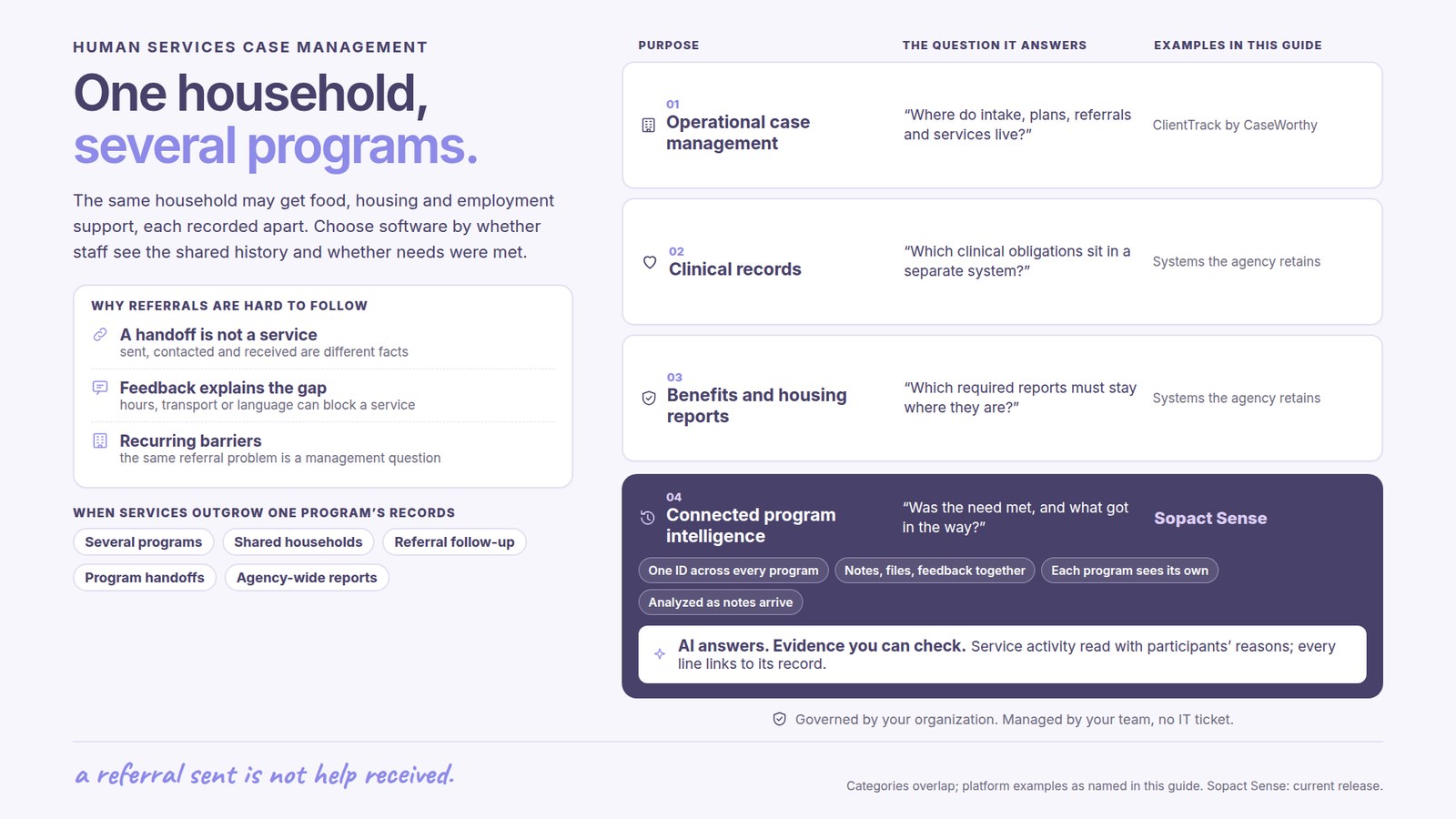
Not because the software stopped working — because storing the client and logging the benefit became table stakes. Bonterra (Apricot, ETO, Social Solutions), Salesforce Public Sector, CaseWorthy, ClientTrack, STARS, and Casebook earned their positions honestly: they got coordinated entry out of the filing cabinet, standardized the eligibility screen, and gave agencies a real system of record for HMIS, WIOA, and CSBG reporting. If your problem was collection — hundreds of households, a dozen case workers, one federal deadline — that generation solved it.

But the strengths hardened into weaknesses. Implementations run three months to a year; agencies describe legacy builds where every new program, benefit rule, or funder change is another integrator engagement. The logic is rigid by design, and the richest evidence those systems hold — the case notes — dies after collection: narrative piles up in a system nobody reads across, and the analytics describe what was delivered, not what changed for the household. A program lead running services across sites put the pattern plainly: they could track "outputs and dollars and volunteer hours," but "the biggest pain point is that we can't tell a cohesive story across all of it. Each thing works fine in a silo."

The cost of not reading is concrete. As one practitioner described it, case notes end up "just sitting around in the systems… by the time they find out, you already failed a child." In a multi-program agency the same household moves through SNAP, LIHEAP, housing, and workforce — and the work that decides whether the agency is well run has moved to the two ends the record-keeping tools never owned: reading every case note and eligibility assessment on arrival, and proving the outcome months and years later on the same household ID.

None of this requires ripping out your incumbent. The sentence we hear on almost every call now: "We're not gonna leave our system, but we're open to an AND." Keep the system of record — HMIS, the eligibility engine, the billing tool; add the layer that reads what it produces. (If you are comparing the category itself — the lifecycle, the shift, how to evaluate — start with the case management software hub.)

The stake, stated honestly: funders have already changed the question from "how many households did you serve" to "did their situation improve, and can you show it." CSBG ROMA asks for national performance indicators, not service counts. If you are signing a multi-year configuration build today, ask which question it will be able to answer when it finally goes live.

What is case intelligence?

Case intelligence is reliable answers from your case data — in minutes, not months. Everything a household touches is treated as data: the coordinated-entry referral, the eligibility screen, the VI-SPDAT or validated assessment, the service and benefit plan, every case note, the 6-month and year-three follow-up. All of it lands on one persistent client record, aligned to your framework and data dictionary, so the same household looks like the same household across food security, housing, and workforce — and across five years.

The part that changes daily work is the Assistant. Caseload analysis, assessment scoring, and open-text case-note analysis are unified into one chat-based function: ask a question, get a defensible answer with citations to the underlying records. No prompt engineering, no dashboard hunting, no waiting for the one analyst who knows where the HMIS export lives. A program is never one user — case workers, supervisors, finance, the board, funders, and clients themselves all need different views of the same record — and a chat interface empowers each of them directly.

When the analysis is done, it does not die in the chat: create shareable reports tailored to each audience — the supervisor's caseload view, the CSBG ROMA submission, the HMIS report, the board summary — from the same underlying answer, each number traceable to the source case note.

One proof point from the field. Open Play Foundation ran programs the way most funded organizations do — intake forms, follow-up reflections, stacks of narrative that never made it past the spreadsheet. When that work moved onto Sopact, the record could finally read itself: "Those statistics that we're now running on Sopact immediately showed me there's something significantly wrong … things like that, we would never have been able to do in the past." — Marco Botha, CEO, Open Play Foundation. A system of record tells you the benefit was issued. An intelligent record tells you a household is quietly sliding backward in time to act.

The human services case workflow, stage by stage

The honest way to evaluate human services case management software is against the lifecycle, not the feature list. Nearly every framework describes the same arc — and it is a loop, not a line: follow-up routinely sends a household back into reassessment until the goals are met. Below is the full cycle — six stages, each with what the software should do, the exact prompt to use, and what to expect back. Every prompt is copy-paste; the placeholders in brackets are yours to fill.

Stage 1 — Coordinated-entry intake and eligibility: assign the household ID that carries everything

Intake is where clean-at-source pays or fails. Instead of free-text answers you will pay a case worker to decode later, the form is designed so every narrative field maps to your framework, eligibility for SNAP, TANF, or LIHEAP is screened at the door, and every household gets a persistent unique ID that follows them across programs and years. Consent capture, save-and-return — and AI drafts the intake form from the program documents you already have.

Build a coordinated-entry intake form from this program description: [PROGRAM URL OR DOCUMENT]. Create structured fields for household demographics, benefit eligibility (SNAP / TANF / LIHEAP), and consent; narrative fields for presenting needs and goals mapped to our CSBG ROMA outcomes; and eligibility screening questions with clear pass/fail criteria. Assign a persistent household ID at referral. Flag any question that collects information we already hold on returning households.

Expected output. A ready-to-edit intake form: structured fields, mapped narrative prompts, benefit eligibility gates, and a persistent household ID assigned at first contact.

Tips for reliable output. Give the AI your ROMA rubric and data dictionary before form design. Assign the household ID at coordinated entry, not at enrollment — everything downstream, across every program, attaches to the ID created here.

Stage 2 — Assessment: capture a baseline, read on arrival

The baseline is the reference every later wave is compared against. Validated screens (VI-SPDAT, a self-sufficiency matrix, or your own indicator) and the intake narrative land on the same record, and the assessment is read the moment it arrives — needs, risk factors, and protective factors extracted and cited, not left in a folder until something goes wrong.

From this intake assessment, extract the household's baseline needs, risk factors, and protective factors, each with the exact source sentence. Score the validated screens included (VI-SPDAT or self-sufficiency matrix), flag any safeguarding or immediate-risk language for human review, and note where the assessment is incomplete. Do not infer eligibility or diagnosis — report only what the text supports.

Expected output. A structured baseline with per-item evidence, scored screens, and a flagged list of risk or safeguarding language routed to a human.

Tips for reliable output. Lock the baseline before services begin — a baseline captured on day one, even on a handful of households, proves the loop works before anything scales.

Stage 3 — Service and benefit planning: a plan with measurable goals

Every household gets a service and benefit plan built from the assessment and mapped to your framework — goals that are observable, timelines that are real, and the outcome each service or benefit is meant to move. The plan becomes the thing case notes are later read against.

Draft a service and benefit plan from this assessment: [ASSESSMENT]. Map each identified need to a measurable goal, a service, benefit, or referral, and the CSBG ROMA outcome indicator it should move. Write goals as observable statements a case worker can evidence, and flag any need with no service or benefit currently available in our program mix.

Expected output. A service plan with measurable goals, mapped services and benefits, ROMA outcome indicators, and a gap list where needs have no matching program.

Tips for reliable output. Name the outcome for every goal. A plan that can't say what stability looks like can't be evaluated later.

Stage 4 — Case notes read on arrival: the signal before the crisis

This is the stage record-keeping software cannot do. Every case note is read as it lands, coded against the service plan, with risk signals — missed recertification, disengagement, safeguarding language, a household sliding backward — surfaced the week they appear instead of at the supervisor's month-end sample. The narrative stays with the case worker; the structure is generated and tied back to the source sentence.

Read this batch of case notes: [NOTE BATCH]. For each household, summarize progress against the service plan with citations, code the note against our CSBG ROMA outcome indicators, and flag risk signals — missed recertification, disengagement, safeguarding or escalation language — with the exact source sentence. Use the same method as last month so results are comparable.

Expected output. Per-household progress summaries with citations, coded outcome evidence, and a risk-flag list with sources — the day notes are written, not six weeks later.

Tips for reliable output. Route every risk flag to a named owner with a deadline. A flag nobody owns is a finding that sat there while a family slid backward.

Stage 5 — Outcome follow-up: year-three answers on the same household

Closure is not the end of the record. The 6-month, one-year, and three-year follow-ups land on the same household ID as the intake assessment, so the question every funder asks — did the situation actually improve — has a reproducible answer instead of a year-end reconstruction. Re-engaging households, the ones who reappear every winter for LIHEAP, arrive with their full history attached.

Compare the baseline assessment to the [6-month / 1-year] follow-up across [COHORT / PROGRAM]: which outcomes moved, by how much, and with what confidence? Show change per CSBG ROMA indicator, note where the sample is too small to conclude, and pair every number with a representative case-note quote. Treat this as change over time, not attribution.

Expected output. A baseline-to-follow-up outcome analysis with honest confidence bounds and a narrative quote behind each number — the longitudinal view a persistent household ID makes possible.

Tips for reliable output. Capture contact channels and follow-up expectations at intake, not at exit. The longitudinal horizon is what separates an exit survey from a stability outcome.

Stage 6 — Reporting: one household record, many reports, no rebuild

Reports are questions, not formats. From the same accumulating household record, the caseload report, the supervisor dashboard, the CSBG ROMA submission, the HMIS / CoC report, the United Way community-impact report, and the Form 990 Schedule I program detail are each one query — with the supporting case note two clicks away — instead of a two-to-four-week reassembly across intake, benefits, services, and follow-up systems.

Aggregate this program's household records into a [CSBG ROMA / HMIS / United Way] outcome report: outcomes achieved against national performance indicators, coded case-note themes ranked by frequency with representative quotes, demographic distribution, and households flagged as missing a required follow-up. Cite the source household record for every number and quote. Format one version for the board and one for the funder.

Expected output. A funder-ready outcome report generated as a query, every figure citing its source record — plus the "missing" list surfaced before the deadline asks.

Tips for reliable output. Lock the data dictionary before the first reporting cycle and version every change — comparability across years is the entire value of a ROMA report. If your outcome framework needs an external anchor, align it to IRIS+ so metrics are comparable beyond your own walls.

How to evaluate human services case management software

Beyond table stakes — coordinated-entry intake, caseload views, benefits logging, HMIS compliance, security — four criteria actually separate tools: time to first live cycle (days vs. a quarter), whether AI reads case notes on arrival or a supervisor still samples them by hand, whether configuration is plain-English or a consultant engagement, and whether the platform can prove household outcomes rather than just count benefits issued. Ask every vendor to show the CSBG ROMA or HMIS outcome report on real data, not a slide.

The evaluation itself is work you can delegate to AI. These prompts mirror what agencies are already asking answer engines — use them as they are:

Build an evaluation matrix for human services case management software with technical and program criteria weighted 50/50. Technical: security and field-level access control, integration with our HMIS and eligibility system, configuration model, data export and exit rights. Program: AI case-note reading with citations, one household ID across programs, longitudinal outcome tracking, CSBG ROMA and HMIS report generation. Score vendors [VENDOR LIST] on each criterion with evidence required, not vendor claims.
Propose a 30-day pilot plan to evaluate human services case management software: one program, one cohort of roughly 50 current households, tested end to end (coordinated-entry intake → assessment → service plan → case-note reading → CSBG ROMA report), with numeric success thresholds and rollback criteria if the pilot fails.

A note on scope while you evaluate: the same spine adapts by vertical with a different intake and funder report — the case management software hub, nonprofit case management software, social work case management software, housing case management software, and workforce case management software each cover their fit directly. When outcome evidence has to travel beyond one agency, stakeholder intelligence and grant management software carry the same record upstream to the funder.

Learn the how-to: case intelligence in the Academy

The stages above are the argument; the Academy articles are the practice — each a hands-on companion for one workflow, written to run on your own data.

What human services case management software is not

Honest boundaries, because the fastest way to a failed implementation is buying the wrong category.

Not a CRM, and not an EHR. A CRM (Salesforce, Blackbaud) tracks donors and relationships; an EHR (Epic, Cerner) tracks clinical encounters and billing. Human services case management software tracks households through a service-and-benefit lifecycle, with case-note narrative and outcome evidence at the center. The unit of work is the household, and the record has to carry the whole journey from coordinated entry to multi-year outcome.

Not your HMIS, eligibility engine, or billing system. The general ledger, the benefit-issuance engine, and the HMIS submission stay in the systems built for them; case intelligence integrates on one shared household record rather than replacing them.

Not for every compliance regime. Sopact provides AES-256 encryption, TLS 1.3, field-level role-based access, SSO/MFA, and full audit logging, with AI under enterprise SLAs and no training-data retention — but Sopact is not currently HIPAA-certified or covered by a Business Associate Agreement. If your program is subject to HIPAA, 42 CFR Part 2 (substance-use confidentiality), FERPA, or county behavioral-health rules, evaluate these controls against your compliance program and confirm scope in writing before storing protected information. And if your use case is purely a data warehouse, Sopact is not the ideal system for that.

Frequently asked questions

What is human services case management software?

Human services case management software is a platform that holds one persistent record per client across coordinated entry, eligibility, and every program a household touches — referral, benefits screen, intake assessment, service plan, case notes, services delivered, and outcome follow-up — so case workers, supervisors, and program directors get answers without a spreadsheet merge. Also searched as human services software or social services case management software. The newest generation adds AI that reads each case note on arrival and turns follow-up into cited outcome evidence.

Which human services case management software is best for tracking client outcomes?

The best tool for outcome tracking reads every case note on arrival rather than waiting for a year-end review, keeps one persistent household ID across every program a family touches, generates CSBG ROMA and HMIS outcome reports as queries instead of CSV merges, and supports longitudinal follow-up at 6 months, one year, and three years on the same ID. Legacy choices like Bonterra Apricot, CaseWorthy, ClientTrack, and Casebook were built for a configure-heavy era; AI-native platforms like Sopact treat configuration as conversation and generate outcome reports as queries.

How does it handle coordinated entry, HMIS, and CoC reporting?

Coordinated entry assigns a persistent household ID at referral, so a family screened once appears as one record across housing, benefits, and workforce rather than a separate case per program. Under federal HMIS data standards, the intake, VI-SPDAT, service plan, and stable-housing outcome at 6 and 12 months live on the same record, so the HMIS / CoC submission is one query with each number citing its source case note — not a file-by-file manual rebuild. The HMIS system itself stays the system of record; case intelligence integrates on top of it. See the HUD HMIS program for the federal data standard.

Can it produce WIOA and CSBG ROMA reports?

Yes — as a single query off the same household records. For WIOA, applications, skills assessments, training, placement, and earnings follow-up live on one record and report against the required performance indicators. For CSBG, outcomes map to ROMA national performance indicators and pair each number with the supporting case note, so the report is defensible rather than a two-week reassembly. United Way community-impact and Form 990 Schedule I program detail come off the same records. For deeper WIOA workflows see workforce case management software.

How does STARS compare to Apricot by Bonterra for human services, especially WIOA?

Both are real, capable systems. STARS is purpose-built for workforce and WIOA reporting, with the required federal performance measures out of the box; Apricot by Bonterra is broader community-services casework with prebuilt intake and outcome templates but still needs integrator work for WIOA-specific outcome reporting. Both produce numbers; neither reads case notes on arrival or scores them against a rubric with a citation trail. AI-native case intelligence avoids both the configuration cost and the year-end reporting cost — and often runs alongside either as the reading layer rather than replacing it.

Bonterra Apricot vs Salesforce for human services outcome and funder reporting?

Both were built for the configure-heavy era. Apricot by Bonterra is closer to community-services casework out of the box with prebuilt intake and outcome templates; integrator work is still required for CSBG ROMA or HMIS outcome reporting. Salesforce (Public Sector for government agencies) is more flexible but requires significant integrator work to become a real case management system, and Einstein AI is an add-on rather than native. Both produce numbers; neither reads case notes on arrival. AI-native case intelligence avoids both the configuration cost and the year-end reporting cost — and often runs alongside an incumbent as the reading layer rather than replacing it.

How is human services case management software priced, and is there a free option?

Sopact is priced by use-case complexity, not by seats or caseload: how many programs share the household record, how custom the data dictionary is, which built-in skills are activated, longitudinal depth, white-label depth, and API integration to HMIS or your eligibility engine. A 12-person community action agency running one CSBG track pays less than a 50-person multi-site agency running six programs. Free and low-cost options exist — government-provided HMIS instances, Salesforce's free nonprofit licenses, spreadsheet-plus-form stacks — but they cover basic service logging; the cost moves elsewhere, into lost continuity when staff turn over, manual ROMA reporting, and the staff hours spent reconciling intake, benefits, and follow-up at year-end.

Is it secure, and is Sopact HIPAA or 42 CFR Part 2 compliant?

Look for AES-256 encryption at rest, TLS 1.3 in transit, role-based access to the field level, SSO with MFA, and full audit logging — all of which Sopact provides, with no training-data retention on AI calls. Sopact is not currently HIPAA-certified or covered by a Business Associate Agreement; if your casework touches protected health information under HIPAA, substance-use records under 42 CFR Part 2, or education records under FERPA, treat that as gating and confirm scope in writing. Sensitive fields can be excluded from AI processing entirely, and analysis can run on anonymized household IDs.

Can one platform handle one client across multiple programs?

Yes — when it is built around one persistent household record. A family receiving SNAP, LIHEAP, housing support, and workforce navigation appears as one record with several service streams, not four separate cases. Multi-program agencies use this to coordinate across teams, recognize re-engaging households automatically, and report at the agency level — so the CSBG ROMA and HMIS reports stop double-counting the same family across three programs.

Run one program on your own data. Then prove the outcome.

Two months, one contained use case — one program, one intake form, one cohort of households you already serve. You bring last year's case notes; the pilot shows you the coded, cited version of your own caseload, ending with a demonstrated CSBG ROMA or HMIS export. If the outcome answers aren't defensible in front of your board or funder, don't continue. Scope a 2-month pilot →