


Related solution
Case Management
Keep notes, assessments and check-ins connected to the person.
Explore the solution →

USE CASE / SOFTWARE GUIDE
Case notes software helps service and program teams record conversations, observations and agreed actions, keep them with the right person, and use that history during follow-up. Good software makes a note useful beyond the day it was written: a colleague can understand what changed, a supervisor can see recurring needs, and the team can connect support with later progress.
The difficulty grows when notes sit apart from intake forms, assessments and participant feedback. Staff repeat the same reading before each meeting, new colleagues depend on someone else’s memory, and a program report requires another round of manual coding. A searchable archive helps find a document; the team also needs to understand what the documents mean together.
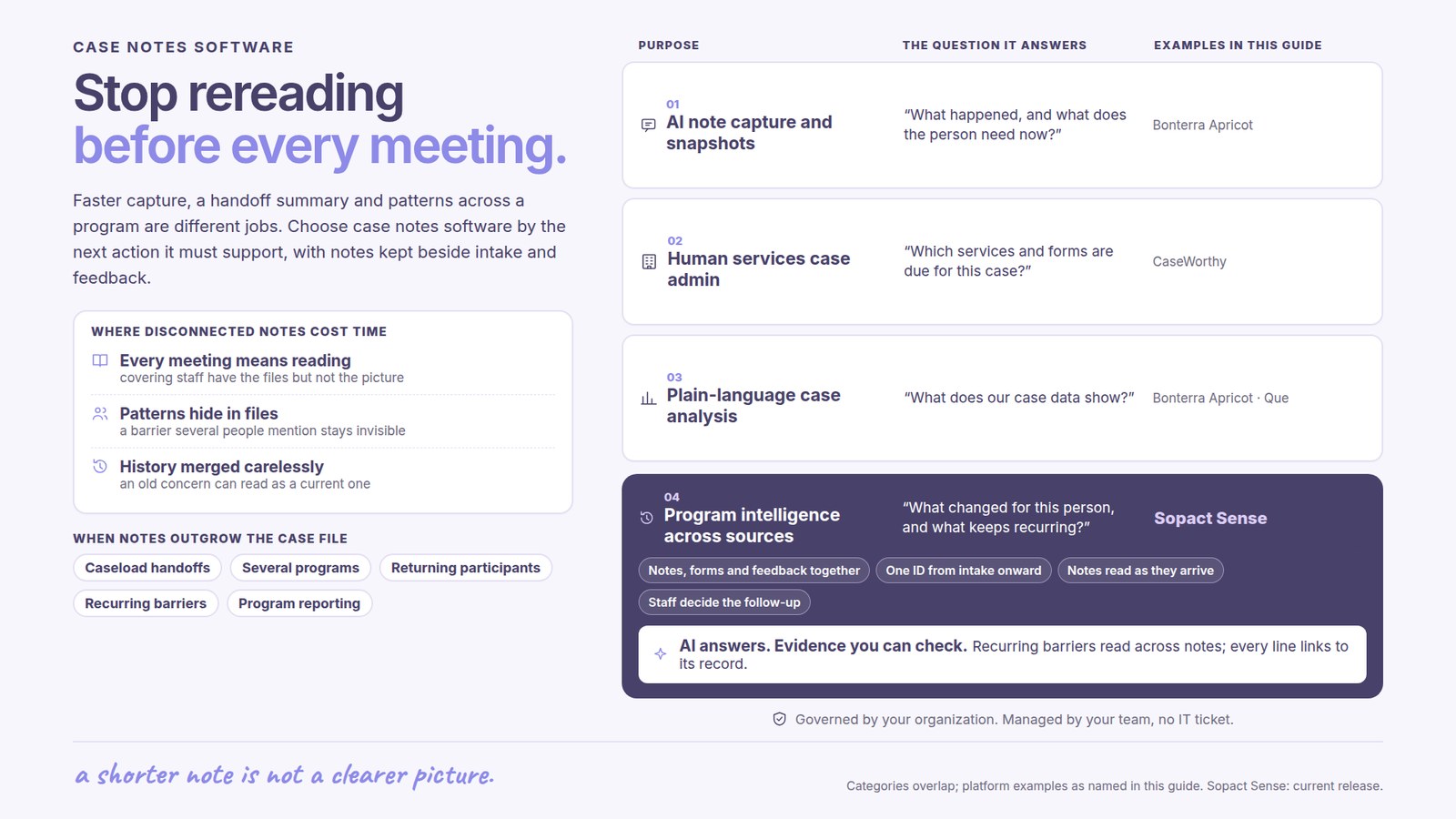
AI now assists note capture, summaries and analysis in several case-management platforms. The buying question is which work becomes easier: recording a visit, preparing for the next conversation, identifying recurring barriers, or understanding change across a program. Sopact focuses on connected program evidence, with analysis available as new information arrives and usable through AI Assistance for continuing review.
Notes remain with the person and the relevant program.
Incoming analysis connects new feedback with earlier evidence.
Staff inspect the sources and decide what support is needed.
A worker covering a colleague’s caseload may have the documents but still lack a clear picture of the participant’s goals, recent changes and outstanding actions. A useful summary reduces that preparation while keeping the original account available. The benefit is a better-informed conversation, rather than simply a shorter note.
A transport barrier mentioned by several participants can be important to program design even when each worker has addressed the immediate problem. If someone must open and code every note before the pattern becomes visible, learning arrives after the reporting cycle. Connecting narrative analysis with participant and program context helps leaders distinguish a recurring need from an isolated event.
The same person may join several programs or return after a year. Their earlier experience is useful, but an old concern should not be presented as a current one. Good software retains the date, source and relevant program around a note so staff can interpret change instead of reading an undifferentiated collection of text.
AI can help turn spoken or written observations into a draft note, condense a participant’s recent history, or identify themes across many records. These tasks serve different people. Faster capture helps the author; a participant summary helps the next worker; recurring analysis helps a program leader understand what support needs to change.
An on-demand summary can still leave the team doing the same preparation repeatedly if each new question requires another export or a separate analysis exercise. In an AI-native program workflow, new evidence is analyzed as it arrives and remains available for questions alongside earlier records. Staff can move from a new concern to the relevant history and follow-up without first assembling the file themselves.
The useful distinction is how much of the work the analysis covers and whether the evidence remains connected. A team should understand when analysis becomes available, what it includes, and how staff can inspect the underlying notes before acting.
Organizations buying a broader case-management system need to consider service coordination, required forms, staff access and reporting alongside notes. Bonterra Apricot now describes AI note capture, participant snapshots and plain-language data analysis through Que. Its documentation makes clear that staff review the outputs. These capabilities are relevant when staff need faster documentation and a clearer participant overview within their existing case system.
CaseWorthy is another established case-management platform relevant to organizations coordinating human services. Where a department needs operational case administration as well as narrative analysis, assess the full service workflow rather than making note summarization the entire purchase criterion.
Sopact is relevant when the central problem is understanding the participant’s continuing experience across sources and programs. Its case-management approach connects intake, notes, files and check-ins, allowing staff to ask about change and inspect the sources behind an answer. The benefit extends from preparing for one conversation to seeing patterns across a cohort or program.
These purposes overlap. An existing case system may already perform the required administration well. The decision is whether its analysis serves the program’s questions or whether an additional connected-evidence workflow would remove repeated preparation. Any exchange with another system depends on the available exports or integrations and the agreed scope.
A participant’s application or intake describes an initial need. Assessments show a starting point. Case notes and mentoring conversations explain what happens during delivery, while later feedback shows whether the support remained useful. Sopact keeps these sources connected so the team can interpret a new observation against the person’s earlier circumstances.
For a training program, this can mean considering a learner’s reported difficulty alongside the pre-course assessment and a mentor’s observations. The next action might be additional practice or a change in support. A note summary alone would shorten the reading; connected analysis helps the team understand which earlier information matters to the current decision.
At program level, staff can examine recurring barriers alongside participation and reported progress. Qualitative feedback explains why an outcome may differ across groups. It should remain distinguishable from measured results: a participant’s account, a staff observation and a completed assessment provide different kinds of evidence.
Sopact’s public product documentation describes related forms and analysis of written responses and PDFs while retaining the participant relationship. Its value is the continuing availability of that evidence for staff questions and follow-up, supported by personalization for each program.
Sopact’s typical setup estimate is two days to two weeks, with the scope agreed around the program’s collection and analysis needs. Historical imports and connections to other systems should be included explicitly in that discussion. Account creation is only one part of a usable workflow.
Once the configured workflow is operating, analysis runs as data arrives and is available through AI Assistance. Staff can review new information while it is relevant to the next conversation, instead of waiting for a periodic coding exercise. The original note remains important when a finding is ambiguous or a decision needs closer consideration.
The team still owns the judgment and the follow-up. Setup speed, immediate analysis and a completed support action are different measures. Compare the time staff spend preparing, the delay before they notice a new need, and the effort to prepare program reporting; do not judge the whole system by how quickly it produces a paragraph.
Useful case notes preserve knowledge that would otherwise leave with a staff member. Shared definitions help colleagues interpret the record consistently, while local teams retain the detail needed for their work. A change in template or program should not make the earlier evidence unintelligible.
Sopact’s emphasis on self-governance means the organization owns its routine collection and analysis with continuing team support. Personalization matters because youth services, workforce development and mentoring ask different questions. Support should help the workflow evolve as those questions change, rather than end when the first form is launched.
Access and review responsibilities should match the service. A program report may need a pattern across participants without exposing every personal detail. A source-linked AI answer is easier to check, but a citation alone does not establish that the interpretation is correct or replace the organization’s professional review procedures.
Choose for the next useful action: faster documentation, a better-informed handoff, more timely follow-up, or clearer learning across programs. Keep a system that already performs the required operational work if that remains the best fit. Where repeated reading and disconnected evidence are the main constraint, examine how Sopact carries analysis from new notes into staff questions and continuing participant support.
For the broader category, see case management software. For the difficulty of following the same person across repeated collection, see longitudinal data collection software.
Case notes software records and organizes observations, conversations and agreed actions around the relevant person and service. Good software helps staff use that history during review, handoffs and follow-up.
Note capture helps produce a written record. A summary helps a reader understand that record more quickly. Analysis across connected notes, assessments and feedback helps staff examine patterns and change over time.
The scope depends on the available source files, exports, identifiers and access. Agree the historical material to include and the required relationships during setup; do not assume every source has an automatic connector.
No. Analysis can be available as new data arrives, while staff still inspect the evidence, interpret circumstances and decide the follow-up. It is preparation for judgment, not a substitute for it.
Continue with a purpose
Related solution
Keep notes, assessments and check-ins connected to the person.
Explore the solution →Continue learning
Learn how to connect collection, analysis and follow-through.
Start learning →
Customer story
Explore its work to connect participant information across programs and years.
Read the story →See how Sopact can connect your notes, assessments and feedback so staff spend less time reconstructing history and more time using it.
See it with your workflow →