play icon for videos

Workforce Case Management Software (WIOA-Ready)

One participant record from intake to placement to 12-month retention.

US
By Unmesh Sheth
·
11
min read

What is workforce case management software?

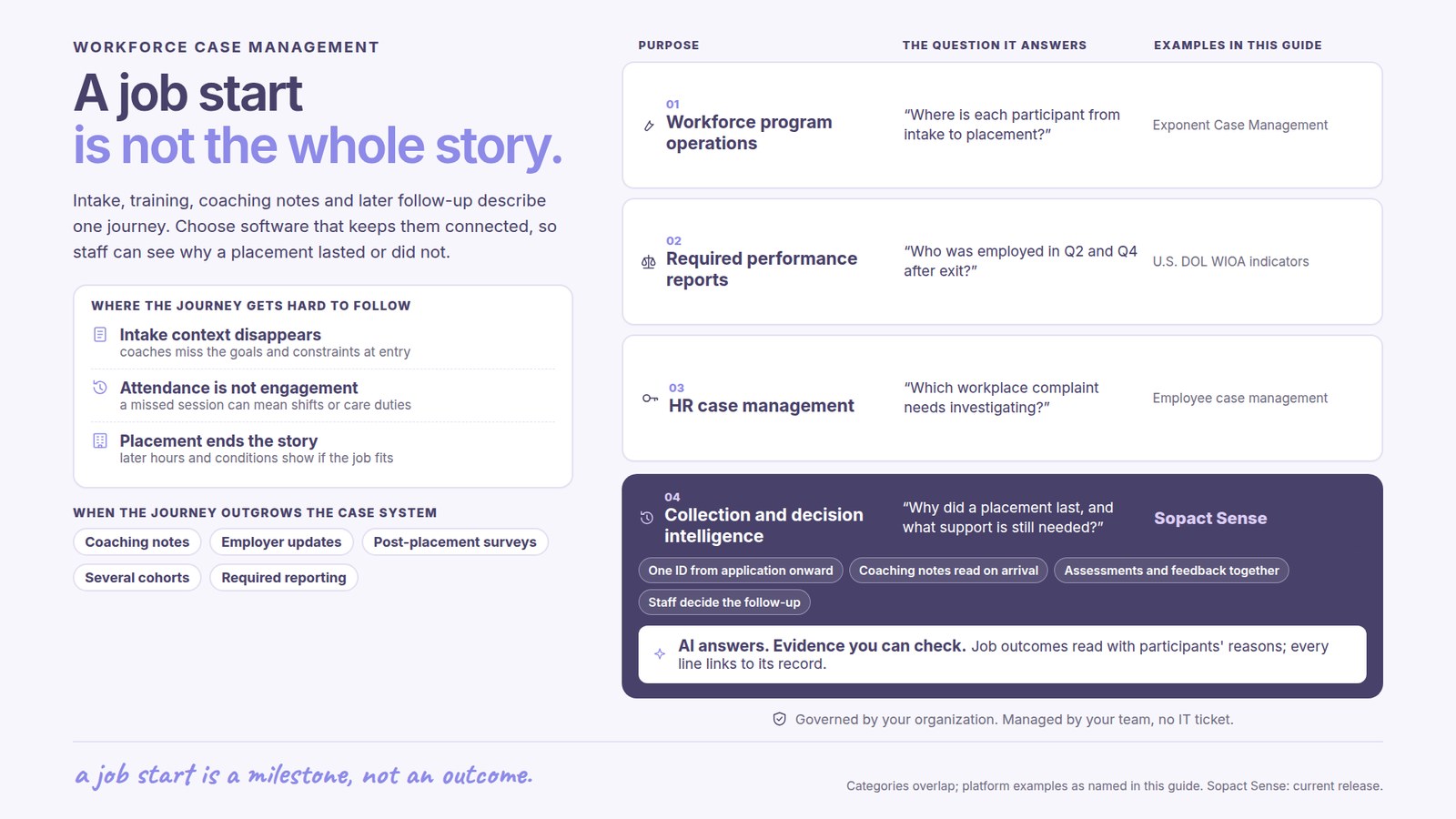
Workforce case management software runs the full workforce-services lifecycle on one persistent participant record — eligibility intake, skills assessment, training-cohort enrollment, coach case notes, job placement, and 90-day to 12-month retention follow-up — so coaches, program managers, and Workforce Development Boards get answers without stitching the state MIS to a spreadsheet. It is also called WIOA software, workforce development case management software, vocational rehabilitation case management software, or reentry case management software. The newest generation adds intelligence to the record itself: AI reads every coach case note on arrival, surfaces participant disengagement mid-cohort before the dropout, and turns WIOA performance metrics — Q2/Q4 employment, median earnings, credential attainment, retention — into a single query instead of a quarter-end reconstruction.

Used by: WIOA Title I/II/III providers (Adult, Dislocated Worker, Youth) · American Job Centers and One-Stops · Workforce Development Boards tracking sub-recipient performance · vocational and apprenticeship training providers · vocational rehabilitation programs · reentry and second-chance employment programs · adult basic education and HSE/GED programs · sector-based training partnerships (healthcare, construction, IT, manufacturing).

The era of WIOA paperwork is over

Not because the state MIS stopped working — because capturing the WIOA elements and filing the quarterly became table stakes. The state-mandated systems earned their place: Geographic Solutions and mWorkforce ship with WIOA performance elements baked in, and Bonterra ETO, Salesforce (Public Sector, Vlocity), and Bonterra Apricot gave providers a real system of record for participants and services. If your problem was compliance — thousands of participants, dozens of coaches, a federal reporting deadline — that generation solved it.

But the strengths hardened into weaknesses. The coach writes case notes in Word docs and re-enters WIOA elements into the state MIS overnight; the richest signal a program holds — the coach's narrative — dies after collection, sitting in a system nobody reads across. Participant disengagement surfaces in the quarterly performance report, by which point the participant has already dropped out. Placement and 12-month retention live in different systems, so year-1 outcomes are nearly impossible to join back to the original intake cohort. And when WIOA elements change between program years, cohort-over-cohort comparison quietly breaks.

The cost of not reading is concrete: the participant marked "active" whose case note describes no contact for three weeks should surface on Tuesday, not in the quarterly. The work that decides whether a program is well run has moved to the two ends the compliance MIS never owned — reading every coach note on arrival, and proving placement and retention months and years later on the same participant.

None of this requires ripping out the state MIS — and in most cases you can't. The honest framing: Sopact usually runs alongside Geographic Solutions or mWorkforce as the AI reading layer, not as a rip-and-replace. The state MIS owns WIOA compliance; Sopact owns the coach-note intelligence and the longitudinal outcome. Keep the system of record; add the layer that reads what it produces.

The stake, stated honestly: boards and funders have already changed the question from "how many did you enroll" to "did they get placed, did they stay employed, and can you show it on the same participant." If you are configuring a multi-year MIS build today, ask which question it will answer when it finally goes live.

What is workforce intelligence?

Workforce intelligence is reliable answers from your participant data — in minutes, not the quarter. Everything a participant touches is treated as data: the eligibility documents, the skills baseline, the individual employment plan, every coach case note, the placement event, the Q2/Q4 employment check, and the 12-month retention follow-up. All of it lands on one persistent participant ID, aligned to your WIOA elements and data dictionary, so the same person looks like the same person across Title I, reentry, and adult ed — and across program years.

The part that changes daily work is the Assistant. Caseload analysis, WIOA element tagging, and open-text coach-note reading are unified into one chat-based function: ask a question, get a defensible answer with citations to the underlying records. No prompt engineering, no dashboard hunting, no waiting for the one analyst who knows where the MIS export lives. A workforce program is never one user — coaches, program managers, the finance lead, the board, and the funder all need different views of the same participant — and a chat interface empowers each of them directly.

When the analysis is done, it does not die in the chat: create shareable reports tailored to each audience — the coach's caseload view, the WIOA quarterly performance report, the board summary — from the same underlying answer, each number traceable to the source case note.

One proof point from the field. Open Play Foundation ran programs the way most funded organizations do — intake forms, follow-up reflections, stacks of narrative that never made it past the spreadsheet. When that work moved onto Sopact, the record could finally read itself: "Those statistics that we're now running on Sopact immediately showed me there's something significantly wrong … things like that, we would never have been able to do in the past." — Marco Botha, CEO, Open Play Foundation. A compliance MIS tells you the WIOA element was filed. An intelligent record tells you a participant is drifting toward dropout in time to re-engage.

The workforce case management workflow, stage by stage

The honest way to evaluate workforce case management software is against the participant lifecycle, not the feature list — and it is a loop, not a line: coach notes routinely send a participant back into re-engagement before placement. Below is the full cycle — six stages, each with what the software should do, the exact prompt to use, and what to expect back. Every prompt is copy-paste; the placeholders in brackets are yours to fill.

Stage 1 — Eligibility intake: assign the participant ID that carries everything

Intake is where clean-at-source pays or fails. Instead of free-text answers a coach will decode later, the form is designed so every WIOA eligibility field and narrative maps to your data dictionary, and every participant gets a persistent unique ID that follows them from eligibility through year-1 retention. Eligibility screening, consent capture, court-referral context for reentry — and AI drafts the intake form from the program documents you already have.

Build a WIOA eligibility intake form from this program description: [PROGRAM URL OR DOCUMENT]. Create structured fields for demographics, WIOA eligibility documentation, and consent; narrative fields for barriers and employment goals; and eligibility screening with clear pass/fail criteria for Adult, Dislocated Worker, or Youth. For reentry, add court-referral and risk-needs context. Assign a persistent participant ID at first contact and flag any field we already hold on returning participants.

Expected output. A ready-to-edit intake form: WIOA eligibility fields, mapped narrative prompts, eligibility gates by title, reentry court-referral context, and a persistent participant ID assigned at eligibility.

Tips for reliable output. Give the AI your WIOA element list and data dictionary before form design. Assign the participant ID at eligibility, not at enrollment — everything downstream, including year-1 retention, attaches to the ID created here.

Stage 2 — Skills assessment: capture a baseline, read on arrival

The baseline is the reference every later placement and retention check is compared against. Validated assessments (TABE, CASAS, a skills inventory, or a reentry RNA) and the intake narrative land on the same record, and the assessment is read the moment it arrives — barriers, skill gaps, and supportive-service needs extracted and cited, not left in a folder until the participant stalls.

From this intake and skills assessment, extract the participant's baseline skill level, barriers to employment, and supportive-service needs, each with the exact source sentence. Score the included assessments (TABE / CASAS / skills inventory / RNA), flag any immediate-risk or safeguarding language for human review, and note where the assessment is incomplete. Do not infer eligibility — report only what the text supports.

Expected output. A structured baseline with per-item evidence, scored assessments, and a flagged list of risk language routed to a human.

Tips for reliable output. Lock the baseline before training begins — a baseline captured on day one, even on a single cohort, proves the loop works before anything scales to the WIOA quarterly.

Stage 3 — Training and cohort plan: an employment plan with measurable goals

Every participant gets an individual employment plan built from the assessment and mapped to your WIOA elements — a training cohort, a credential goal, supportive services, and the placement outcome each service is meant to move. The plan becomes the thing coach notes are later read against.

Draft an individual employment plan from this assessment: [ASSESSMENT]. Map each barrier to a measurable goal, a training cohort or supportive service, and the WIOA outcome indicator it should move — credential attainment, measurable skill gain, or placement. Write goals as observable statements a coach can evidence, set the cohort and credential target, and flag any need with no service currently available.

Expected output. An employment plan with measurable goals, a training cohort, mapped supportive services, WIOA outcome indicators, and a gap list where needs have no matching service.

Tips for reliable output. Name the WIOA outcome for every goal. A plan that can't say what placement or credential success looks like can't be evaluated at the quarterly.

Stage 4 — Coach notes read on arrival: the disengagement signal before the dropout

This is the stage the compliance MIS cannot do. Every coach case note is read as it lands, coded against the employment plan, with disengagement signals — missed sessions, attendance drops, escalation, safeguarding language — surfaced the week they appear instead of at the quarterly close. The narrative stays with the coach; the structure is generated and tied back to the source sentence, so the coach can re-engage a drifting participant mid-cohort.

Read this batch of coach case notes: [NOTE BATCH]. For each participant, summarize progress against the employment plan with citations, code the note against our WIOA outcome indicators, and flag disengagement signals — missed sessions, attendance drops, disengagement, safeguarding or escalation language — with the exact source sentence. Rank participants by dropout risk this cohort. Use the same method as last month so results are comparable.

Expected output. Per-participant progress summaries with citations, coded outcome evidence, and a mid-cohort disengagement-risk ranking with sources — the week notes are written, not at quarter-end.

Tips for reliable output. Route every disengagement flag to a named coach with a deadline. A flag nobody owns is a dropout the quarterly will report after the fact.

Stage 5 — Placement and retention follow-up: year-1 answers on the same participant

Exit is not the end of the record. The placement event, the Q2/Q4 post-exit employment check, median earnings, and the 12-month retention follow-up land on the same participant ID as the intake assessment — so the question every funder asks, did the participant get placed and stay employed, has a reproducible answer instead of a year-end reconstruction across systems. For reentry, recidivism at 6/12/24 months attaches to the same ID.

Compare the baseline to the [placement / Q4 post-exit / 12-month retention] outcome across [COHORT / PROGRAM]: which participants were placed, at what wage, and how many are retained — with what confidence? Show placement rate, median earnings gain, and retention per cohort, note where the sample is too small to conclude, and pair every number with a representative coach-note quote. For reentry, include recidivism at 12 months on the same participant ID. Treat this as change over time, not attribution.

Expected output. A baseline-to-outcome analysis — placement rate, wage gain, 12-month retention, reentry recidivism — with honest confidence bounds and a narrative quote behind each number, the longitudinal view a persistent ID makes possible.

Tips for reliable output. Capture contact channels and follow-up expectations at intake, not at exit. The year-1 horizon is what separates an exit survey from a WIOA retention outcome.

Stage 6 — WIOA performance reporting: one record, many reports, no rebuild

Reports are questions, not formats. From the same accumulating participant record, the coach caseload view, the WIOA quarterly performance report, the placement-rate calculation, and the funder retention cohort are each one query — with the supporting coach note two clicks away — instead of a two-to-four-week reassembly across the state MIS, the training tracker, and the placement spreadsheet.

Aggregate this program's participant records into a WIOA quarterly performance report: employment in Q2 and Q4 post-exit, median earnings, credential attainment, measurable skill gains, and 12-month retention against targets, plus coded coach-note themes ranked by frequency with representative quotes and participants flagged as missing a required follow-up. Cite the source participant record for every number and quote. Format one version for the Workforce Development Board and one for the funder.

Expected output. A WIOA-ready performance report generated as a query, every figure citing its source record — plus the "missing follow-up" list surfaced before the federal deadline asks.

Tips for reliable output. Lock the data dictionary before the first reporting cycle and version every WIOA element change — PY-over-PY comparability is the entire value. For the statutory definitions the report answers to, anchor to the U.S. Department of Labor's WIOA performance guidance.

Learn the how-to: workforce intelligence in the Academy

The stages above are the argument; the Academy articles are the practice — each a hands-on companion for one workflow, written to run on your own data.

What workforce case management software is not

Honest boundaries, because the fastest way to a failed implementation is buying the wrong category.

Not your state MIS, and not a replacement for it. Geographic Solutions and mWorkforce are the state-mandated systems of record with WIOA elements baked in; in most states you cannot rip them out. Sopact runs alongside as the AI reading layer — the state MIS owns compliance submission, Sopact owns coach-note intelligence and the longitudinal outcome on one participant ID.

Not an LMS, and not an ATS. An LMS (Canvas, Moodle) delivers curriculum; an ATS tracks job applicants for a single employer. Workforce case management software tracks the participant through the whole program — eligibility, training, placement, retention — with the coach narrative and the WIOA outcome at the center. Where workforce fits inside a broader agency, see nonprofit case management software and human services case management software; the umbrella is case management software.

Not for every compliance regime. Sopact provides AES-256 encryption, TLS 1.3, field-level role-based access, SSO/MFA, and full audit logging, with AI under enterprise SLAs and no training-data retention — but Sopact is not currently HIPAA-certified or covered by a Business Associate Agreement. Reentry programs subject to criminal-justice information (CJIS) rules, or programs touching educational records (FERPA), should evaluate these controls against their own compliance program and confirm scope in writing before storing protected information. Sensitive fields can be excluded from AI processing entirely, and analysis can run on anonymized IDs.

Frequently asked questions

What is workforce case management software?

Workforce case management software runs the full workforce-services lifecycle on one persistent participant record — eligibility intake, skills assessment, training cohort, coach notes, placement, and 90-day to 12-month retention follow-up. It is also called WIOA software or workforce development case management software. The newest generation adds AI that reads every coach note on arrival, surfaces disengagement mid-cohort, and produces WIOA performance metrics as a query.

What is the best case management software for workforce development?

The best workforce development case management software (1) supports WIOA performance metrics — Q2/Q4 employment, median earnings, credential attainment, measurable skill gains, retention — out of the box, (2) keeps one persistent participant ID from eligibility intake to 12-month retention, (3) generates placement and wage-gain reports as queries rather than CSV merges, and (4) reads coach notes on arrival so disengagement surfaces mid-cohort. Legacy choices like Bonterra ETO, Salesforce, and the state MIS were built for a compliance-first era; AI-native platforms like Sopact add the reading layer, often running alongside the mandated MIS.

What is WIOA software, and does Sopact produce WIOA performance reports?

WIOA software captures the Workforce Innovation and Opportunity Act performance elements — employment in Q2 and Q4 after exit, median earnings, credential attainment, and measurable skill gains — for Title I Adult, Dislocated Worker, and Youth programs. Sopact supports WIOA performance reporting as queries against the persistent participant record, generating the quarterly performance report, placement-rate calculation, wage-gain stats, and retention cohort without reconstruction across systems.

What is the best software for reentry case management?

For reentry, the best case management software (1) handles court-referral context and risk-needs assessment at intake, (2) supports field navigators with offline note capture, (3) tracks recidivism at 6/12/24 months on the same participant ID as the training and placement record, and (4) reads case notes on arrival so disengagement surfaces before the dropout. Reentry context lives on the same participant record as the workforce training, so workforce and reentry coaches coordinate on one ID.

Can workforce case management software track placement and retention longitudinally?

Yes — when the platform is built around one persistent participant ID. Placement, wage at placement, employment in Q2/Q4 post-exit, and 12-month retention all live on the same participant record as the eligibility intake, so year-1 retention joins back to year-0 intake without a system merge. For the outcome layer specifically, see outcome tracking software; for pre/post training gains, training evaluation.

How does Sopact compare to Geographic Solutions, mWorkforce, or Bonterra ETO?

Geographic Solutions and mWorkforce are the state-mandated MIS in many states, with WIOA elements baked in for compliance; Bonterra ETO is closer to community-services casework out of the box; Salesforce (Public Sector, Vlocity) is enterprise-flexible but integrator-heavy. All produce numbers; none read coach notes on arrival or surface disengagement mid-cohort. Sopact usually runs alongside the state MIS as the AI reading layer rather than replacing it — the MIS owns compliance, Sopact owns the coach-note intelligence and the year-1 outcome. For the coach-note layer itself, see case notes software.

Is workforce case management software secure, and is Sopact HIPAA compliant?

Look for AES-256 encryption at rest, TLS 1.3 in transit, field-level role-based access, SSO with MFA, and full audit logging — all of which Sopact provides, with no training-data retention on AI calls. Sopact is not currently HIPAA-certified or covered by a Business Associate Agreement. Reentry programs subject to criminal-justice information (CJIS) rules, or programs touching educational records (FERPA), should treat that as gating and confirm scope in writing; sensitive fields can be excluded from AI processing and analysis can run on anonymized IDs.

What questions should I ask before buying workforce case management software?

Six questions separate platforms that work from platforms that only demo well: Are WIOA elements supported out of the box, or a custom build? Does the same participant ID survive from eligibility intake to year-1 retention? Is the WIOA quarterly one query or a reconstruction across systems? Can field coaches write notes offline? Do disengagement signals surface mid-cohort or only at the quarterly? And when a federal monitor asks why this outcome, is the supporting coach note two clicks away? Then run a contained pilot on your own cohort before you commit. Where workforce sits in the bigger picture is stakeholder intelligence.

Run one cohort on your own data. Then prove the placement.

Two months, one contained use case — one program, one intake form, one cohort of participants you already serve. You bring last year's coach notes and your last WIOA quarterly; the pilot shows you the coded, cited version of your own caseload, ending with a demonstrated placement-and-retention query. If the outcome answers aren't defensible in front of your board or a federal monitor, don't continue. Scope a 2-month pilot →