


Related solution
Case Management
Keep notes, assessments and check-ins connected to the person.
Explore the solution →

USE CASE / SOFTWARE GUIDE
Victim services case management software helps advocacy and support programs organize appropriate intake information, service plans, contacts, referrals and reporting. Good software supports continuity for the survivor and the advocate while limiting collection and access to what the service genuinely needs.
Teams need to understand what support was requested, what was provided and what remains unresolved. When that information is scattered, survivors may have to repeat difficult accounts and staff spend time preparing updates. Collecting a larger, widely shared record can create a different problem: sensitive information reaching people who do not need it.
AI can help interpret permitted feedback and prepare program analysis, but confidentiality determines the appropriate scope. Sopact’s relevant value is connecting collection, context and analysis for authorized service-learning questions. That can begin with non-identifying program information; confidential survivor-record use requires a deployment that meets the program’s specific obligations.
Collect what supports the survivor’s chosen service.
Help authorized advocates understand agreed next steps.
Use suitable program evidence to improve access and delivery.
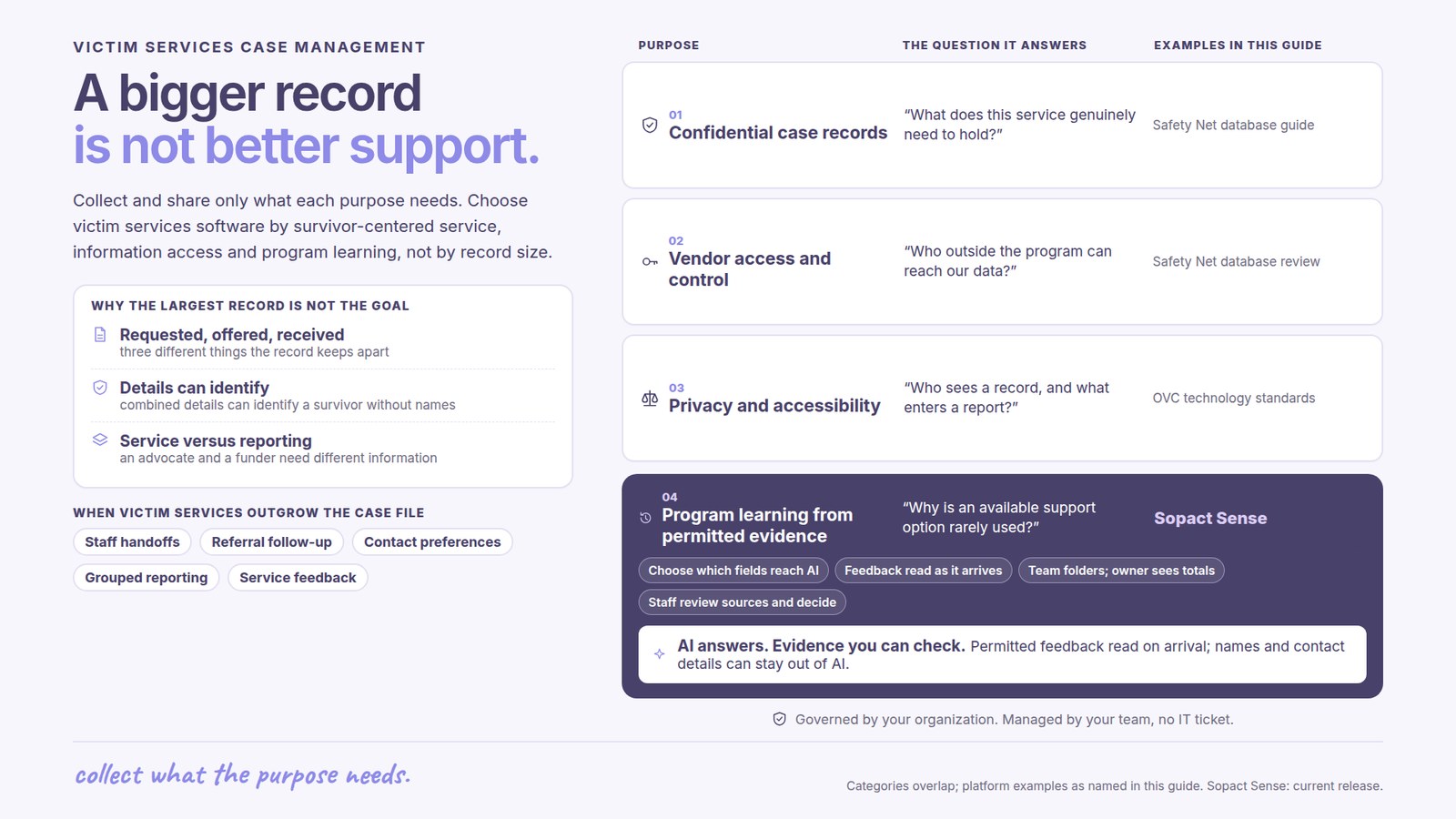
A useful record helps an advocate continue the conversation and honor the survivor’s priorities. It should distinguish a requested service, an offered referral and support actually received. More detailed narrative is not automatically more useful to that work.
The Safety Net Project’s database guide places purpose, confidentiality and program capacity at the center of selection. It explains that combinations of details can identify a survivor even when obvious identifiers are removed. The information needed for an individual service can differ substantially from what a manager or funder needs.
That distinction should shape the purchase. A confidential case record, a safe communication process and grouped program reporting are related responsibilities, not interchangeable views of one unrestricted database.
A staff handoff should make agreed actions and unresolved needs understandable to an authorized colleague. It does not require copying every account into every report. Focused information can support continuity while respecting the service relationship.
An ordinary reminder can be inappropriate if the survivor has not agreed to that contact method. Software selection should account for how staff know which channels and contact arrangements are suitable, rather than assuming more automated communication is always better.
A referral sent does not show that support was accessible. Appropriate follow-up can reveal that a service was unavailable or difficult to reach. That information helps the advocate respond and can also identify a delivery issue for the program.
The Office for Victims of Crime’s technology standards address privacy, security and accessibility in the use of information. For buyers, these are practical questions about how the service works: who can see a record, what enters a report and how a survivor’s communication needs are respected.
Safety Net’s database review resource helps programs assess vendor access and control of their information. An access policy and a technical restriction are different forms of protection. Product suitability depends on the actual deployment and agreements.
This applies to AI as well as ordinary search and exports. A useful AI function should operate only on information appropriate for that purpose. A general case-management feature list cannot establish suitability for confidential survivor data.
Programs often need to understand service demand, accessibility and recurring gaps without exposing individual case narratives. Sopact can connect appropriate forms, files and feedback with shared definitions, allowing incoming analysis to support continuing program questions through AI Assistance.
For example, a program might use suitably grouped service information and non-identifying feedback to examine why an available support option is rarely used. The finding could point staff toward a question about opening hours or how the service is explained. It need not require a shared personal history.
The AI-native value is ongoing interpretation of permitted evidence, rather than a one-off summary prepared at reporting time. Program staff can review sources and decide what the finding means. Analysis scope, access and the use of any sensitive information must be agreed before deployment.
Service contacts, distinct people served and referrals describe different kinds of activity. A data dictionary preserves the definition, period and counting rule so a report does not confuse repeated contact with additional people.
Program learning can also include appropriately collected feedback about whether support was understandable, accessible or responsive to the survivor’s priorities. These observations can inform improvement without assuming that a closed case establishes safety or recovery.
Small groups and unusually detailed examples can identify someone even in a report without names. The Safety Net guidance on shared databases is a useful resource when deciding how information may move beyond the program. Reporting choices should preserve the level of detail appropriate to the audience.
The strongest choice is the system that helps the team deliver its service with appropriate information, manageable staff effort and clear ownership. Specialized victim-service requirements come before generic promises about collecting everything or connecting every source.
Sopact can be considered for an agreed program-evidence workflow where its collection and analysis capabilities fit. Personalization and continuing team support help maintain the questions and definitions that matter. Confidential case-record suitability is a separate requirement to resolve for the intended deployment.
The case intelligence course provides a general learning resource. For survivor-service database selection, use specialist guidance and the program’s own requirements to determine the appropriate scope.
It supports appropriate intake, service coordination, referrals, contacts and reporting for victim assistance programs, with confidentiality and survivor-centered practice shaping the workflow.
No. Collection and access should fit the service purpose, the survivor’s choices and the program’s obligations. Broad sharing is not a universal goal.
AI may help interpret information appropriate for an authorized purpose, including non-identifying program feedback. Sensitive record use requires specific review of the actual deployment and data handling.
No. Closure is an administrative event. The survivor’s priorities and appropriate evidence guide how the program understands the support provided.
The Safety Net Project provides database confidentiality guidance and review resources. The Office for Victims of Crime also publishes information and technology standards.
Continue with a purpose
Related solution
Keep notes, assessments and check-ins connected to the person.
Explore the solution →Continue learning
Learn how to connect collection, analysis and follow-through.
Start learning →
Customer story
A youth-program implementation designed to connect participant evidence across years.
Read the story →Discuss an appropriate collection and analysis scope for your service-learning and reporting questions.
See it with your workflow →