


Can we keep our existing case-management system?
Yes, if a bounded evidence workflow addresses the gap. Establish approved transfers, identifiers, refresh responsibility and access controls. Do not assume a named native connector exists.


Case Management Tools · BUYER’S GUIDE
Case management tools help teams maintain client records and coordinate services. A useful comparison separates daily casework—such as referrals and care plans—from program evidence and reporting across those services.
Choose case-management software around the services staff must deliver. Specialist tools may be necessary for referrals, care plans or statutory records. Sopact is relevant for connected program collection and analysis, either within its supported scope or alongside a retained case system.
✳ DECISION INTELLIGENCE FOR PROGRAMS & PORTFOLIOS
Sopact is an AI-native data collection platform. It connects forms, supported files, interview transcripts, feedback and history so teams can investigate change and decide where to act.
For program leaders, this connects the person’s continuing record with the wider program question: what changed, which evidence explains it and where staff should follow up.
START HERE
Sopact is evaluated for program evidence, not assumed to replace specialist case operations. Clarity is especially relevant to homelessness services. Penelope is included for existing workflows; new-purchase availability needs confirmation.
| Option | Consider it for | Tradeoff to understand | Explore |
|---|---|---|---|
| SopactAI-native data collection | Recurring program and portfolio evidence | Needs an internal data owner and configured relationships; specialist operational functions must be checked separately. | Review ↗ |
| Bonterra Apricot | Participant and program case management | Compare the participant and service workflow first; test supporting-file analysis rather than assuming parity. | Review ↗ |
| Salesforce Nonprofit Cloud | Casework within a broader CRM | Configuration and connected products affect the result; name who will maintain the proposed deployment. | Review ↗ |
| Casebook | Casework and participant outcomes | Casework and outcomes belong together; check the document-analysis workflow needed for program review. | Review ↗ |
| Penelope | An existing Penelope service workflow | Existing help is not proof of a current new-customer offer. Confirm availability before including it in procurement. | Review ↗ |
| CharityTracker | Assistance and outcome tracking | Shared assistance records serve a specific job; verify the depth of analysis your program requires. | Review ↗ |
| ClientTrack by CaseWorthy | Coordinated human-services casework | Customer configuration is available; test end-to-end evidence analysis rather than treating no-code as exclusive. | Review ↗ |
| Bitfocus Clarity Human Services | Homelessness response and coordinated services | Evaluate the required client-service and reporting workflow; do not assume fit outside that service context. | Review ↗ |
| Exponent Case Management | Agency-wide case and program records | An agency casework choice; check how recurring program analysis uses supporting evidence. | Review ↗ |
NARROW THE CHOICE
The specialist systems below belong in a service-delivery evaluation. Sopact is a different candidate: consider it for contact-connected collection, participant feedback and program analysis, or as a bounded evidence workflow alongside an existing case system.
✳ DECISION INTELLIGENCE FOR PROGRAMS & PORTFOLIOS
AI-native data collection.
Better decisions.
An authorized internal owner can configure contact fields and collection relationships rather than rebuild a report from unrelated forms each cycle. Supported files and written feedback add context to participant history. Evaluate this around a specific program question, not a claim to replace every case-management function.
Documented foundations: contact setup , form relationships and supported evidence .
Explore this workflow ↗Decide which system owns client identity, service episodes and consent.
Connect permitted participant feedback and supported files to the relevant history.
Use the evidence to guide follow-up while retaining human responsibility for service decisions.
Self-service configuration is not exclusive to Sopact. Compare the full recurring workflow. After setup, can your authorized data owner change a question, connect the next collection stage and check the resulting analysis? Verify the workflow with your team’s permissions. Initial design, training and complex integrations still need an owner.
See how contact fields are configured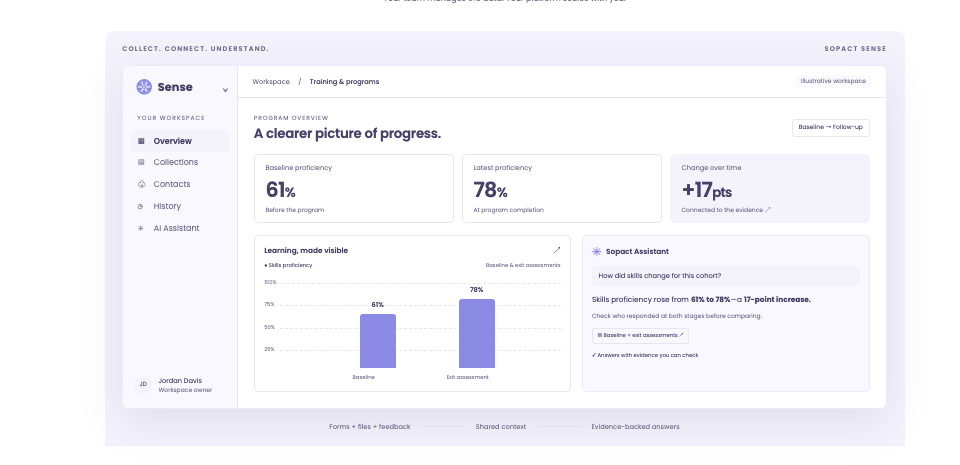
DIRECT COMPARISON
| Decision | What other options offer | Where to evaluate Sopact |
|---|---|---|
| Service delivery | Specialist case systems address casework; Salesforce documents care delivery and Casebook documents outcome tracking. | Sopact’s relevant scope is connected program collection and analysis, not assumed parity with specialist operations. |
| Routine changes | ClientTrack by CaseWorthy documents customer-configurable fields, forms and workflows. Self-service is not exclusive to Sopact. | Compare who can maintain the entire collection-to-analysis process, including supported qualitative evidence and historical meaning. |
| Service episodes | Client records may include several services with different status and ownership. | Preserve the relevant program relationships; do not flatten distinct service histories into a single status. |
| Assessment meaning | A configured questionnaire is not necessarily a validated assessment. | Keep the assessment method, version and qualified interpretation alongside the collected responses. |
| Evidence handoff | Operational systems and reporting tools may share only part of the record. | Specify the permitted transfer, update owner and source context before combining records. |
Claims are bounded to the documented features. Sources and practical limitations are linked in the reviews below. No hands-on parity test is claimed.
THE OTHER OPTIONS
A shorter shortlist is useful only if it keeps the functions you rely on.
Why consider it: A dedicated case-management option for human-services and nonprofit programs.
Check before choosing: Confirm the service workflows, reporting requirements and internal administration needed.
Read the vendor’s documentationWhy consider it: Case-management and care-delivery workflows in the Salesforce environment.
Check before choosing: Separate native functions, configuration and integrations; identify who administers each.
Read the vendor’s documentationWhy consider it: Outcome Tracking records participant goals and results alongside casework.
Check before choosing: Assess your service episodes, reporting definitions and permission needs in the configured workflow.
Read the vendor’s documentationWhy consider it: Published help documents ClientConnect, Engage and client messaging.
Check before choosing: Existing-user documentation does not confirm availability for a new purchase. Confirm that first, then check service episodes, documents and access.
Read the vendor’s documentationWhy consider it: An assistance-record and outcomes-tracking option for community organizations.
Check before choosing: Check referral sharing, local goals and the evidence needed for your reports.
Read the vendor’s documentationWhy consider it: Connects intake, assessments, services and reporting. The vendor documents self-service tools for changing fields, forms and workflows.
Check before choosing: CaseWorthy and ClientTrack are now presented as a unified offering, not two independent alternatives. Test the permissions and training required for your configuration.
Read the vendor’s documentationWhy consider it: An HMIS-centered platform with intake, assessments, referrals, reporting and longitudinal client tracking.
Check before choosing: Especially relevant to housing and homelessness services; not a default substitute for every nonprofit program workflow.
Read the vendor’s documentationWhy consider it: A dedicated case-management environment for human-services and nonprofit teams.
Check before choosing: Review the underlying platform responsibilities and required service workflows.
Read the vendor’s documentationA CLOSER LOOK
An assessment tool structures information about a participant’s needs or progress. A case-management system coordinates the wider service record. Choose the appropriate assessment method first, then check how its responses, dates and versions are stored and reviewed.
For program evidence, Sopact can support configured contact-connected collection and analysis. That does not establish a clinically validated assessment or an automated eligibility decision. Keep qualified staff responsible for interpretation and service decisions, and preserve any specialist assessment tool the team requires.
BEFORE YOU SWITCH
Use an approved sample. Let the person who will own the workflow run this test.
BUYING QUESTIONS
Yes, if a bounded evidence workflow addresses the gap. Establish approved transfers, identifiers, refresh responsibility and access controls. Do not assume a named native connector exists.
No. Review the applicable requirements, contracts, configured controls and deployment with qualified staff. A general product description is not a compliance assessment.
Your team knows who can change fields, definitions and collection stages, how records can be exported and how access is managed. Verify all required export contents; a spreadsheet download is not a complete migration plan.
BRING YOUR REAL WORKFLOW
Bring a form, a supporting file and the decision your team needs to make. See how the collection and analysis fit together.
Prepared by Sopact, a vendor included in this guide. Selection follows the workflow each article addresses. Product statements draw on the linked public documentation; recommendations are editorial judgments, not independent testing. Verify the proposed product, configuration, source handling and controls before purchasing.
Sources reviewed October 21, 2026. Documentation can change. Customer accounts are attributed; illustrations are labeled. The guide does not establish guaranteed accuracy, security certification or a universal implementation timeline.
Availability check: Penelope help confirms existing functions, not new-customer availability. Confirm a current offer before shortlisting it for a new purchase.