play icon for videos

Caseload Management Software

Track every client's progress on one ID; surface drift before month-end.

US
By Unmesh Sheth
·
11
min read

What is caseload management software?

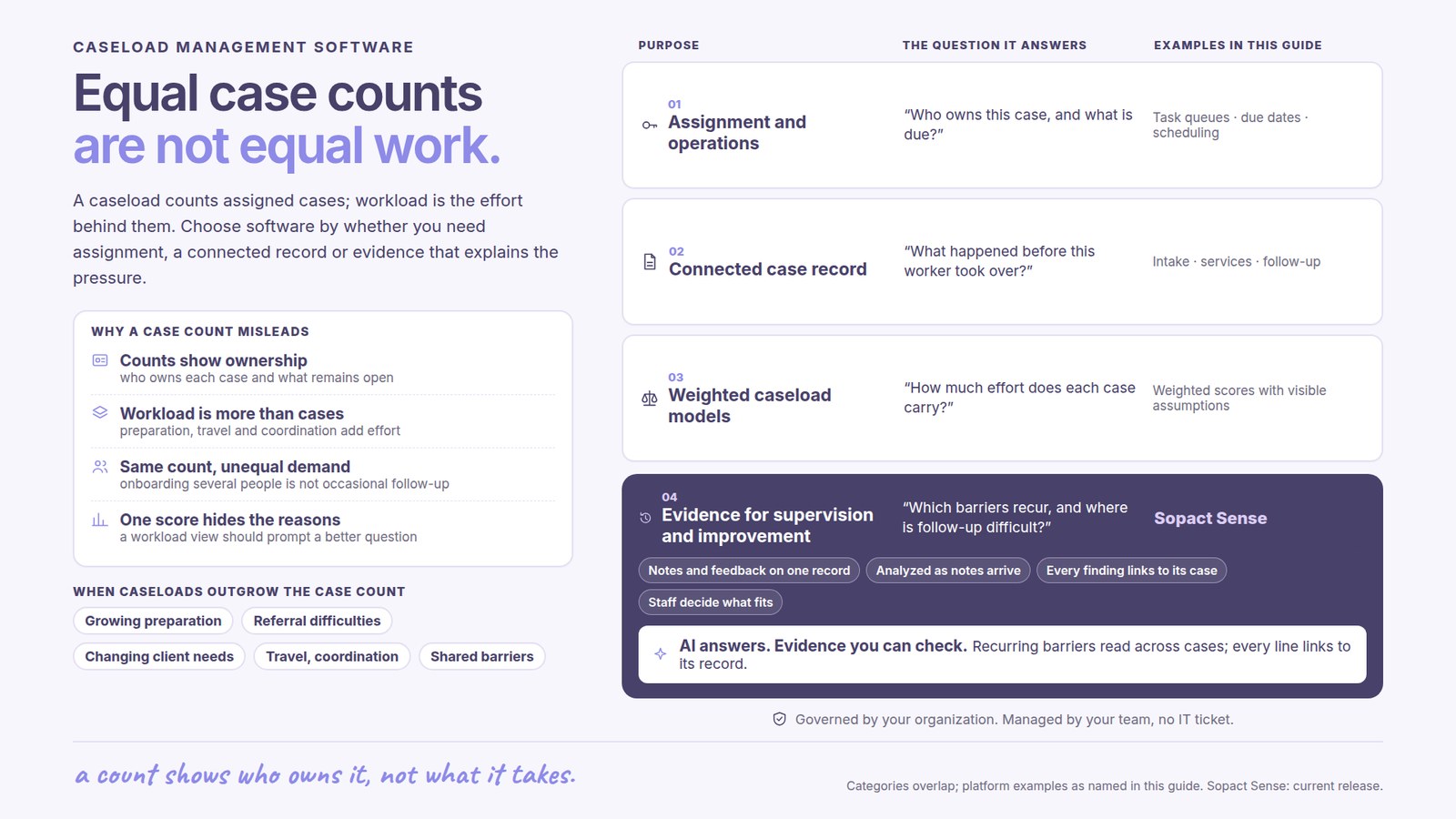
Caseload management software is the supervisor's view of case data — it sizes each worker's caseload to the service model, tracks every client's progress over time on one persistent ID, and surfaces drift, disengagement, and at-risk signals across the whole caseload before they become crises. It is also called a caseload management tool, supervisor caseload software, or intensive case management (ICM) software. Where a case management system holds one client at a time, caseload management is the whole panel at once: who is progressing, who has gone quiet, and who needs a check-in this week. The newest generation reads every case note on arrival and clusters the risk signals as data lands — so the answer arrives mid-cycle, not in a month-end sample.

Used by: social work supervisors managing 5–20 workers · housing field navigators and shelter case teams · behavioral-health and intensive case management (ICM) team leads · workforce program managers tracking placement and retention · community-action agencies balancing CSBG ROMA caseloads · multi-site agencies rolling caseload up across locations.

The era of caseload counts at month-end is over

Not because counts stopped mattering — because a count and a month-end sample became table stakes. The caseload view your supervisors use was built when the bottleneck was visibility: see how many cases each worker carries, which are overdue, how the cohort is moving. The supervisor read a sample at the end of the month and recalibrated for the next one. Bonterra (Apricot, ETO), Penelope, Casebook, and ClientTrack earned their place solving exactly that — they got caseloads out of the binder and gave supervisors a real list.

But the list is where they stop. In every one of those systems the caseload view is a static dashboard nobody reads across: 47 cases for Worker A, 32 for Worker B, and no view into what is actually happening inside either panel. The richest signal — the case notes — dies after collection, sitting in a system until someone samples it. As one practitioner put it, case notes end up "just sitting around in the systems… by the time they find out, you already failed a child." A caseload sized past what the model can actually monitor makes the problem structural: if a worker carries more clients than the service dose allows, the monitoring is nominal — a number on a dashboard, not a read of who is drifting.

The signal is usually there before the crisis. In youth work the pattern is the ABC triad — attendance, behavior, coursework — a client whose attendance slips two weeks running, whose notes turn terse, whose engagement fades. On a static list that shows up in the year-end cohort export. Read on arrival, it shows up on Tuesday, while the supervisor can still act. That is the difference between caseload management — a count and a sample — and caseload intelligence: every case note read as it lands, drift detected mid-cycle, at-risk clusters surfaced across the panel.

None of this requires ripping out the system your workers log into. The sentence we hear on nearly every call: "We're not gonna leave our system, but we're open to an AND." Keep the record of cases; add the layer that reads what it produces and shows the supervisor the distribution. (For the full lifecycle this sits inside — intake through outcome — start with case management software.)

What is caseload intelligence?

Caseload intelligence is a reliable answer to the supervisor's Tuesday question — who is progressing, who has drifted, who needs a check-in this week — in minutes, not at month-end. Every case a worker carries is treated as data: the referral, the complexity of the case mix, every case note, every follow-up. All of it lands on one persistent client record so the same person tracks as the same person across weeks and programs, and the supervisor sees the whole panel at once.

The part that changes the work is the Assistant. Caseload distribution, per-client progress, and open-text case-note analysis are unified into one chat-based function: ask "who on my unit has gone quiet in the last three weeks" and get a defensible answer with citations to the underlying notes. No dashboard hunting, no waiting for the one analyst who knows where the export lives. A supervisor is never the only reader — directors, auditors, and the workers themselves need different views of the same caseload — and a chat interface serves each of them directly.

When the read is done it does not die in the chat: create shareable views tailored to each audience — the supervisor's drift queue, the director's multi-site roll-up, the funder's cohort outcome — from the same underlying answer, each number traceable to the source case note.

One proof point from the field. Open Play Foundation ran programs on paper logs and spreadsheets, needing comparable evidence in time to act, not a quarter-end reconstruction. When the data moved onto Sopact and could read itself, "Those statistics that we're now running on Sopact immediately showed me there's something significantly wrong … things like that, we would never have been able to do in the past." — Marco Botha, CEO, Open Play Foundation. Same logic for caseloads: when every note is read on arrival, the impossible reading — the worker drifting 18%, the at-risk cluster, the case-mix imbalance — shows up on Tuesday.

The caseload cycle, stage by stage

The honest way to evaluate caseload management software is against the caseload cycle, not the feature list — and it is a loop, not a line: rebalancing routinely sends the panel back to reassignment as capacity and risk shift. Below is the full cycle — six stages, each with what the software should do, the exact prompt to use, and what to expect back. Every prompt is copy-paste; the placeholders in brackets are yours to fill.

Stage 1 — Assign: size the caseload to the model

Assignment is where monitoring is won or lost. Instead of balancing on raw counts — which treats an easy case and a high-acuity one as equal — the case mix is scored at intake and routed by complexity, specialty, and remaining capacity, so no worker carries more than the service dose can actually cover. Every client gets a persistent unique ID that carries their whole history from this moment on.

Score this batch of new referrals for case-mix complexity and propose assignments across [WORKER LIST], balancing on complexity and remaining capacity rather than raw case count. Respect each worker's specialty and current risk load, flag any worker who would be pushed past a monitorable caseload for our service model, and assign each client a persistent ID. Show the reasoning behind each assignment.

Expected output. A complexity-scored, capacity-balanced assignment plan with a persistent client ID per case and a flag on any worker pushed past a monitorable load.

Tips for reliable output. Define what a monitorable caseload is for your model before you assign — a number sized to the dose, not to the roster. Assign the client ID at referral; everything downstream attaches to the ID created here.

Stage 2 — Baseline: capture where each client starts

The baseline is the reference every later note is read against. For each client the intake, validated screens, and presenting needs land on the same record and are read the moment they arrive — so "progress" later has something concrete to measure from, per client, across the whole caseload.

For each client in this caseload, extract a baseline from their intake and screens: presenting needs, risk factors, protective factors, and the outcome indicators we will track over time, each with the source sentence. Flag any safeguarding or immediate-risk language for human review, and note where a baseline is missing so it can be captured before services begin.

Expected output. A per-client baseline with cited evidence, the indicators to track, and a list of clients missing a baseline — the reference the rest of the cycle compares against.

Tips for reliable output. Lock the baseline before services start. A caseload with no baselines can be counted but not tracked — drift is only visible against a starting point.

Stage 3 — Track: every client's progress on one ID over time

This is the stage a static list cannot do. Every case note is read as it lands, coded against each client's plan and baseline, so progress accumulates on the persistent ID over weeks and months rather than resetting at each contact. The supervisor sees the whole caseload's trajectory — who is moving, who is flat — not a folder per client.

Read this batch of case notes: [NOTE BATCH]. For each client, summarize progress against their baseline and plan with citations, code the note against our outcome indicators, and update the client's trajectory on their persistent ID. Show the caseload at a glance: who is progressing, who is flat, and who has no recent contact. Use the same method as last cycle so results are comparable.

Expected output. A caseload-level progress view built from per-client notes on one ID each — who is moving, who is flat, who has gone quiet — with citations back to the source note.

Tips for reliable output. Track on the same indicators every cycle. Comparability over time is the entire point of tracking on a persistent ID rather than a fresh read each month.

Stage 4 — Flag drift: surface disengagement before the crisis

Drift is the signal that precedes the crisis. Each worker's scoring patterns, risk-flag frequency, and each client's engagement are compared continuously against the panel mean and the client's own baseline, so disengagement — attendance slipping, notes going terse, an at-risk cluster forming — surfaces the week it appears instead of at the month-end sample.

Across this caseload, flag drift and disengagement: clients whose engagement has dropped against their own baseline (missed contacts, terse notes, attendance decline), and workers whose scoring or risk-flag patterns drift more than [10–15]% from the panel mean. Surface at-risk clusters by sub-track, pair every flag with the exact source sentence, and route each to a named owner. Do not infer — report only what the notes support.

Expected output. A ranked drift-and-disengagement list — client-level and worker-level — with at-risk clusters, cited to source, each routed to an owner: the mid-cycle signal, not the year-end finding.

Tips for reliable output. Route every flag to a named owner with a deadline. A drift signal nobody owns is a crisis waiting in the export. Set the drift threshold once and hold it, so cycles compare.

Stage 5 — Rebalance: recalibrate the caseload mid-cycle

Closure is not the end of the loop — it feeds the next assignment. When drift surfaces, the supervisor acts on it now: a supervision conversation, a targeted re-assignment, a threshold adjusted, capacity rebalanced across the panel. Re-engaging clients arrive with their full history attached to the same ID.

Given this cycle's drift and capacity signals across [CASELOAD], propose a rebalancing: which cases to redistribute and to whom, which workers need a supervision conversation, and where the caseload is over the monitorable threshold. Preserve continuity — keep each client with their worker where the relationship is working — and show the panel's complexity and risk load before and after.

Expected output. A mid-cycle rebalancing plan — redistributions, supervision flags, threshold adjustments — with the panel's load shown before and after, continuity preserved where it matters.

Tips for reliable output. Rebalance on the drift signal, not the year-end cohort. The whole value of surfacing drift on Tuesday is acting on it before the committee reads about it on Friday.

Stage 6 — Report: one caseload, many views, no rebuild

Reports are questions, not formats. From the same accumulating caseload, the supervisor drift queue, the director's multi-site roll-up, and the funder's cohort outcome are each one query — with the supporting case note two clicks away — instead of a month-end reassembly across worker spreadsheets.

Aggregate this caseload into a [supervisor / director / funder] report: caseload distribution and case-mix balance, drift and at-risk signals ranked with representative quotes, clients missing a required contact or follow-up, and cohort progress against targets. Cite the source case note for every number and quote. Format one version for the supervisor's Tuesday review and one for the funder.

Expected output. A caseload report generated as a query — distribution, drift, outcomes — every figure citing its source note, plus the "missing" list surfaced before the deadline asks.

Tips for reliable output. Lock the data dictionary before the first reporting cycle and version every change — comparability across cycles is the value. If your outcome framework needs an external anchor, align it to IRIS+ so metrics compare beyond your own walls.

Learn the how-to: caseload intelligence in the Academy

The stages above are the argument; the Academy articles are the practice — each a hands-on companion for one part of the caseload cycle, written to run on your own data.

What caseload management software is not

Honest boundaries, because the fastest way to a failed rollout is buying the wrong category.

Not the worker's per-client view. A case management worker view shows one client at a time — the file, the plan, the next appointment. Caseload management is the supervisor view: the whole panel at once, drift and distribution across it. Same data, two vantage points — see case notes software for the note the worker writes and client intake software for the front door that feeds it.

Not the full case lifecycle. Intake, assessment, service plan, and outcome follow-up belong to the broader system; caseload management is the capacity-and-continuity layer on top of it. For the whole lifecycle see case management software; for the discipline-specific fit, social work case management software, human services case management software, and nonprofit case management software each cover their vertical directly. To connect one client record across programs, see stakeholder intelligence.

Not for every compliance regime. Sopact provides AES-256 encryption, TLS 1.3, field-level role-based access, SSO/MFA, and full audit logging, with AI under enterprise SLAs and no training-data retention — but Sopact is not currently HIPAA-certified or covered by a Business Associate Agreement. If your caseload is subject to HIPAA, FERPA, 42 CFR Part 2, or state confidentiality rules, evaluate these controls against your compliance program and confirm scope in writing before storing protected information.

Frequently asked questions

What is caseload management software?

Caseload management software is the supervisor's view of case data: it sizes each worker's caseload to the service model, tracks every client's progress over time on one persistent ID, and surfaces drift, disengagement, and at-risk signals across the whole panel. Where case management software shows one client at a time, caseload management shows the whole caseload at once — who is progressing, who has gone quiet, who needs a check-in this week. The newest generation reads every case note on arrival rather than sampling at month-end.

How large should a caseload be, and how do you size it?

There is no universal number — the right caseload is the one sized to the service model, not the roster. A high-touch intensive case management (ICM) caseload of 15–20 is very different from a light-touch information-and-referral caseload of 60+. The test is monitorability: if a worker carries more clients than the service dose lets them actually read and respond to, the monitoring is nominal — a count on a dashboard, not a real read. Score case-mix complexity at intake and balance on that, not raw counts, so an easy case and a high-acuity one are not treated as equal.

How do you track caseload progress over time?

By putting every client on one persistent ID and reading every case note against their baseline as it lands, so progress accumulates over weeks and months instead of resetting at each contact. The supervisor then sees the caseload's trajectory at a glance — who is moving, who is flat, who has gone quiet — with each signal cited back to the source note. Tracking on the same indicators every cycle is what makes progress comparable rather than a fresh guess each month. The Academy walkthrough how to track caseload progress over time runs this on your own data.

What is intensive case management (ICM) software?

Intensive case management (ICM) software supports high-acuity, low-caseload work — smaller panels, frequent contact, and close tracking of engagement and risk. Because the caseload is small and the stakes are high, the value is less in counting cases and more in reading every contact on arrival: surfacing disengagement, missed contacts, and at-risk signals the week they appear. Caseload management software with note-reading on arrival is what makes ICM's small-panel promise real rather than nominal.

How does it flag at-risk clients and worker drift?

AI reads every case note on arrival and compares each client's engagement against their own baseline and each worker's scoring and risk-flag patterns against the panel mean. When a client's engagement drops — missed contacts, terse notes, attendance decline — or a worker's distribution drifts more than 10–15% from the panel, a flag surfaces to the supervisor mid-cycle, broken out by track and cited to the source sentence. At-risk clusters are surfaced across the caseload, not left in individual notes until someone samples them.

What is the difference between caseload management and full case management software?

Full case management software runs the whole client lifecycle — intake, assessment, service plan, case notes, outcome follow-up. Caseload management software is the supervisor's capacity-and-continuity layer over that same data: caseload size and case-mix balance per worker, progress on one ID over time, and drift across the panel. They share a record and a spine; caseload management is one view of it. The full story is at case management software.

Is caseload management software secure, and is Sopact HIPAA compliant?

Look for AES-256 encryption at rest, TLS 1.3 in transit, role-based access to the field level, SSO with MFA, and full audit logging — all of which Sopact provides, with no training-data retention on AI calls. Sopact is not currently HIPAA-certified or covered by a Business Associate Agreement; if your caseload touches protected health information under HIPAA, FERPA, or 42 CFR Part 2, treat that as gating and confirm scope in writing. Sensitive fields can be excluded from AI processing, and analysis can run on anonymized IDs.

Bring one supervisor's unit. Then watch the drift surface.

One supervisor, 5–10 workers, one quarter of case notes you already have. The pilot shows you the coded, cited version of your own caseload — who is progressing, who has drifted, who needs a check-in this week — surfaced mid-cycle instead of at month-end. If the drift signals aren't defensible in front of your director or funder, don't continue. Scope a caseload pilot →