What is AI case management?
AI case management is case management software with an artificial-intelligence layer that reads the free text on a client record — case notes, intake forms, assessments, and uploaded documents — to flag risk, theme recurring barriers, summarize a client’s history, surface which cases need attention now, and track outcomes across the client lifecycle, instead of only storing and searching that text.
Almost every case platform now says it has AI, so “has AI” has stopped telling a buyer anything. What practitioners describe is narrower and more urgent. Case notes, one data lead put it, are “just sitting around in the systems, and by the time they find out, you already failed a child.” A supervisor with four hundred open cases cannot read every note before Monday, so the risk a caseworker wrote down on Thursday waits, unread, until it becomes a crisis. AI case management is the attempt to close that gap by having software read the text a program already collects. The head category is case management software; the notes tooling underneath it is case notes software.
Key takeaways
- AI case management means software that reads the notes and documents on a client record, not just stores and searches them — the shift is from retrieval to reading.
- Because every vendor now ships an AI summary, the buyer’s real test is no longer “does it have AI” but “is the AI’s answer defensible”: reproducible, and traceable to the exact note behind it.
- The capabilities range from AI-assisted intake and document extraction to risk prediction, barrier theming, and supervisor copilots — but most legacy platforms bolt a summary on top rather than read the whole caseload.
- Sopact reads every note and document as it lands on the connected case history, one client record on a stable client identifier, and cites the sentence behind every flag, so an AI answer holds up in a safeguarding decision or a funder report.
- AI rarely means replacing your case system. Most teams keep it for the record and workflow and add an AI analysis system on top.
How AI changes traditional case management
Traditional case management is a system of record: it captures intake, stores notes, moves a case through statuses, and lets someone search the file later. The record is complete and almost none of it is read. A platform can hold a full history of every client and still not tell a supervisor which cases need attention now, because that answer lives in the free text, in the barrier a client raised and the progress that stalled, and storing text is not reading it.
The change AI introduces is not a faster workflow or a tidier dashboard; it is a different center of gravity for the data. A form-centric system organizes everything around the submission and reports on the fields, leaving the reasons in the notes unread. A record-centric system organizes everything around the client and reads the record as it grows. Sopact calls that record the connected case history: one client record, under a stable client identifier, where every note, form, and uploaded document is read as it lands, and every flag links back to the sentence it came from. That data-model difference — record read on arrival versus form stored for later — is what separates AI that reads from AI that only summarizes on request.
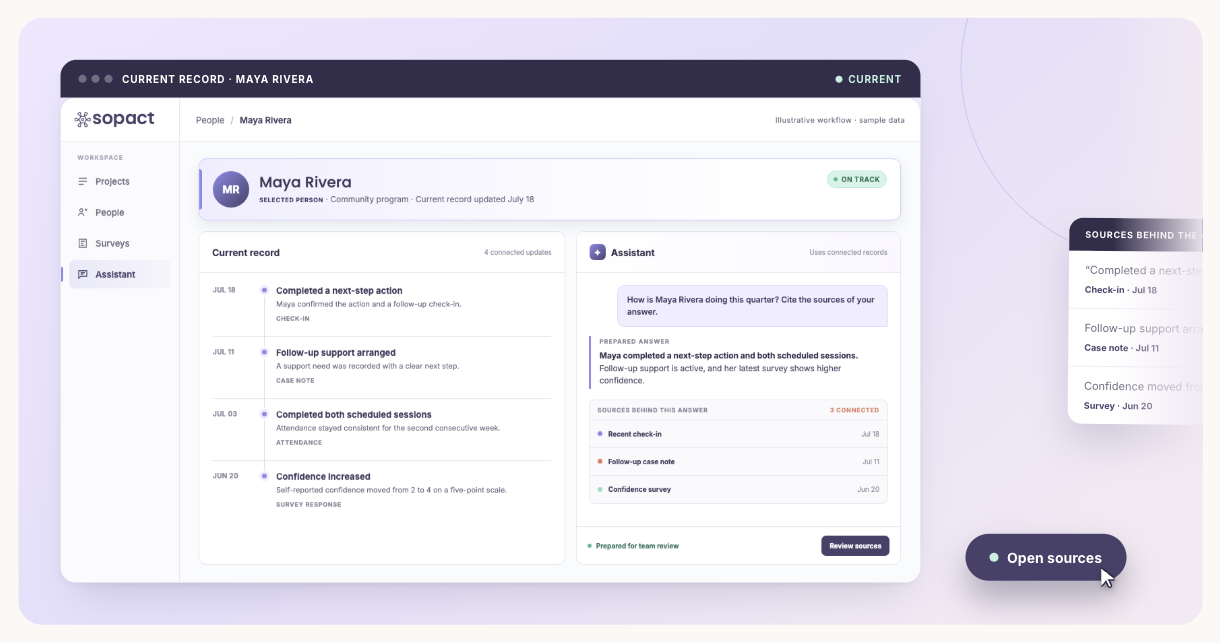
Sopact workflow
01Capture notes and files
02Read with governed rules
03Review cited signals
04Act with human judgment
AI prepares a case summary or signal, while authorized staff can open the source note and retain responsibility for the decision.
Traditional vs AI-enabled case management
| Task | Traditional | AI-enabled |
|---|
| Intake | Manual data entry into fields | Intelligent intake that reads and structures the answer |
| Prioritization | Manual review of a status list | Caseload ranked by what the notes say |
| Documents | Attachments, findable by filename | Assessments and files read for content |
| Reporting | Static counts pulled at quarter-end | Continuous insight as notes arrive |
| Search | Keyword match on the note that contains a word | Semantic retrieval across the whole caseload |
| Notes | Stored | Read, themed, and cited |
Example: catching client risk earlier
“Client missed two appointments because transportation is unreliable.”
Traditional system
Stores the note. It is findable only if someone opens the file.
AI case management
✓ Flags a transportation barrier
✓ Raises the client’s engagement risk
✓ Surfaces similar cases across the program
✓ Alerts a supervisor the day it is written
Key features of AI case management software
The features that define an AI case management system, and what turns ordinary case management into intelligent case management, cluster around reading the text your program already collects.
Key features
- AI analysis of case notes, with every note read as it lands and tied to its source.
- Document analysis, so assessments, court records, and uploads are read, not just stored.
- Automated risk identification, surfacing safeguarding and engagement signals from the text.
- Case summarization, condensing a client’s whole record with the evidence for each point.
- Barrier and pattern detection, theming recurring barriers across the caseload with counts.
- Outcome and progress tracking, following the same client longitudinally from intake to follow-up.
- A supervisor assistant that answers plain-language questions across the caseload, with sources.
- Portfolio-level insight across programs, reproducible and cited to the note.
These features are an umbrella over more than a dozen capabilities in four groups. Each group has a version that genuinely helps and a version that is hype, and the distinction is always whether the output is defensible.
Capture: intake, extraction, and transcription
AI-assisted intake reads a written or spoken answer and structures it, so a client is not re-keyed by hand. Document extraction, using document intelligence and OCR, pulls the content out of an uploaded assessment, court record, resume, or plan, the files that in most systems sit as unread attachments. Voice-to-text turns a spoken case note into readable text. These are the most mature capabilities in the category; the only real question is whether what gets captured lands on one client record or scatters across systems.
Reading: summaries, barrier themes, risk, and sentiment
This is the heart of AI case management and where tools diverge most. Natural language processing lets software summarize a client’s whole record, theme the barriers recurring across a caseload with a count for each, detect sentiment and its drivers, and predict risk from the signals a caseworker recorded. Done well, a single note, “client missed two appointments because childcare was unavailable,” is themed as a childcare barrier, raises the client’s risk level, and surfaces similar cases the day it is written. Explainable AI and a human-in-the-loop step are what make this group trustworthy: the finding shows the quote it came from, and a person confirms it before it drives a decision.
Operations: prioritization, recommendations, and follow-up
Case prioritization ranks the open caseload by what the notes say rather than by a status field, so the case that needs a supervisor today is surfaced today. Recommendation engines suggest a next step or referral; follow-up automation schedules the outreach a note implies. These are only as good as the reading underneath: ranking on stale status fields is just a sorted list, while ranking on what a caseworker actually wrote is a triage tool.
Retrieval and assistants: copilots, search, translation, and outcomes
Retrieval-augmented generation, or RAG, lets an assistant answer by retrieving the relevant records and then reading them, which is what a supervisor copilot should do: a program lead asks “which of my open cases need attention today?” and gets a ranked answer with the notes it used underneath. Semantic search finds cases by meaning, not keyword; multilingual translation reads a note in its original language; outcome prediction reads a record’s trajectory to estimate where a client is heading. Two things decide whether any of this is safe: permissions, so no one can ask their way into a record they should not see, and reproducibility, because an assistant that answers differently on different days cannot be trusted with a caseload.
Responsible AI and AI governance sit across all four groups: who owns the AI-derived data, how it is retained, whether a model change is disclosed, and how a wrong output is corrected. For programs handling children’s data or safeguarding information, those answers matter as much as the capability.
AI case management software compared: who reads, and who summarizes
The useful comparison is whether each answer can be reproduced and traced to its source. The established platforms manage cases well and increasingly add an AI summary; general chat tools read anything but forget everyone; this AI analysis system is a smaller, newer category, built for a different job.
AI case management: who does what
| Tool | Best at | Where it stops |
|---|
| Casebook | Modern case system of record; a clean client record | AI features are set up by an admin; reading the whole caseload and documents stays manual, and summaries are hard to trace |
| CaseWorthy | Deep, configurable system of record for compliance-heavy programs | Configuration is an implementation job; free-text theming and document reading are limited |
| Bonterra (Apricot / ETO) | Large human-services case management at scale | AI arrives feature by feature; reporting is on fields, not themed notes; documents stay unread |
| Eccovia | Statutory and HMIS-style compliance records | A system of record first; caseload-wide reading is not its purpose |
| Salesforce Nonprofit Cloud | Teams with admin capacity who want to build on Einstein | Everything is custom to build and maintain; nothing reads text or files by default |
| ChatGPT / Copilot | Reads anything you paste in, documents included | No client identity, no permissions, and not reproducible — a different answer on a different day |
| Sopact | Reads every note and document as it lands, on one stable client identifier, answered in plain language with sources, reproducible and traceable | Not a compliance system of record; it reads and proves on top of one rather than filing HMIS or WIOA data |
The fair conclusion: if your priority is operational casework or statutory compliance, one of these case systems is the right base, and AI does not change that. The best case management software comparison walks that choice in full, and the case management tools overview maps the category.
How do I add AI to the case management system I already have?
Usually you do not replace anything. Most teams keep their case system for the record, the workflow, and any compliance filing, and add an AI analysis system that ingests the notes and documents they already collect, passing results back to a warehouse or BI tool through an API. Sopact reads what you already collect rather than adding another form, so it sits alongside client intake software and caseload management software instead of competing with them. The honest limit: if you need HMIS, WIOA compliance, or eligibility management, that is a system of record, and an AI analysis system does not replace it.
A report tells you what happened. The Loop tells you in time to act.
The reason a quarterly AI summary disappoints is that it arrives after the moment it could have changed. AI case management is only worth the governance work if it shortens the distance between a note being written and someone acting on it. That is what Sopact’s Loop methodology is for: collect clean at the source so the notes are readable, analyze on arrival so a risk surfaces the day it is written, and improve in time so a supervisor acts while the case is still open. A one-time report is not the job; a continuous read is.
Two properties make that read trustworthy. Reliability, the same question returning the same number, is what lets an AI answer stand in a funder meeting; that is loop reliability. Traceability, every flag linking back to its source note, is what lets a reviewer check the work; that is loop traceability. Together they are the difference between an AI report a funder destroys in thirty seconds and one that holds up.
One method, three moves that never stop
1 · CollectIntake, notes, and documents land clean on one client record, so the text is readable.
2 · AnalyzeEvery note is read as it arrives, themed and risk-scored, with the quote attached.
3 · ImproveThe caseload is ranked by what the notes say, so a supervisor acts while it still matters.
This is the shift from a report to a loop — see the full method in the Loop.
How should you evaluate AI case management software?
Use one real case journey containing intake, long notes, services, documents, a permission boundary, an ambiguous signal, a later outcome, and a decision that must remain with an authorized person.
Self-driven
Case and program leads should update themes, signals, definitions, permissions, and review status without rebuilding an AI workflow.
How to test it
- Use: A real policy-defined signal and one changed rule.
- Pass: The change is versioned and the analysis can be rerun.
One record
Notes, services, documents, follow-up, and outcomes should remain tied to the correct client and case.
How to test it
- Use: A duplicate, re-enrollment, and restricted record.
- Pass: Identity joins correctly without exposing unauthorized data.
Volume
The workflow should handle full caseloads, long notes, files, languages, and new evidence at the required cadence.
How to test it
- Use: A representative program-year dataset.
- Pass: Coverage, failures, duplicates, and processing time are visible.
Longitudinal
Summaries and signals should preserve dated history, corrections, return to service, and follow-up.
How to test it
- Use: A corrected note and a later outcome.
- Pass: New analysis does not overwrite prior evidence.
Qualitative
Themes and flags should open to exact supportive, contradictory, and ambiguous passages.
How to test it
- Use: Real case notes requiring professional judgment.
- Pass: Reviewers can inspect and revise the classification.
Documents
Assessments, plans, consent, referrals, and uploaded files should keep source and permission context.
How to test it
- Use: Several document types with different access.
- Pass: Every extracted fact cites file and passage.
Assistant
An assistant should answer only from authorized evidence and should not make eligibility, safeguarding, service, or clinical decisions.
How to test it
- Use: A restricted case and an ambiguous note.
- Pass: The output shows sources, uncertainty, and required human review.
Reliable
A reviewer should reproduce one AI-prepared summary, flag, and reported outcome.
How to test it
- Use: A decision-critical case example.
- Pass: Definitions, model configuration, filters, evidence, review, and sources are retained.
Test one AI-assisted case decision
Use a de-identified client record containing structured fields, recent notes, documents, service history, and an unresolved next step. The test is whether AI supports a professional judgment with evidence rather than replacing it.
- Read the full context: include the relevant record, timeline, documents, and definitions rather than a pasted note.
- Show the source: every summary, risk signal, or suggested next action should open to the evidence used.
- Separate fact from inference: label missing information and uncertainty instead of filling gaps.
- Keep human authority: require an authorized worker to review and record consequential decisions.
- Repeat the question: confirm the governed answer is stable and the generated query is retained.
How multi-model AI reads interviews, PDFs, and surveys into one connected record — the capability underneath AI case management that reads documents, not just fields.
Frequently asked questions
What is AI case management?
AI case management is case management software with an AI layer that reads the notes and documents on a client record — flagging risk, theming barriers, summarizing history, and surfacing which cases need attention now — rather than only storing and searching them. Sopact does this on the connected case history, reading every note as it lands and citing the sentence behind each flag, so the answer is defensible.
How is AI used in case management?
Across four groups of capability: capture (AI-assisted intake, document extraction, voice-to-text), reading (summaries, barrier theming, risk and sentiment), operations (case prioritization, recommendations, follow-up), and assistants (a supervisor copilot, semantic search, translation, outcome prediction). Sopact uses AI only to read language, keeping the counts deterministic, so each capability produces an answer you can reproduce and trace.
Can AI analyze case notes?
Yes. AI can read case notes to summarize a client record, theme the barriers recurring across a caseload, detect risk and sentiment, and answer questions across the whole caseload. What matters is whether the analysis is reproducible and cited. Sopact reads every note as it lands and shows the sentence behind each finding, so the analysis is defensible.
Is AI case management secure?
It can be, if permissions cover the AI’s answers and not just the records, and governance is settled up front: data ownership, retention, model-change notice, and correction. Sopact keeps counts deterministic, uses AI only to read language, and enforces role-based access across the answers, so sensitive and safeguarding data is not exposed through the AI.
What are the risks of AI case management?
The real risks are non-reproducible answers, findings you cannot trace to a source, weak permissions that expose sensitive records, and unclear governance over AI-derived data. A summary that changes on different runs cannot support a safeguarding or funding decision. Sopact addresses this by making AI read-only over language, keeping counts deterministic, citing every flag, and enforcing permissions across the answers, not just the records.
Can AI replace case managers?
No. AI reads text faster than any person can, but it does not build a relationship, exercise judgment, or make a safeguarding call. The useful framing is that AI removes the reading backlog so case managers spend their time on the cases that need them. Sopact is built as a human-in-the-loop analysis system: it reads and cites, and a person decides.
Which tasks should stay human?
Judgment, relationship, and any decision with consequences for a client — safeguarding calls, eligibility determinations, and service planning — should stay human, with AI supplying the read underneath. Reading every note, theming barriers, and ranking a caseload are the tasks worth automating. Sopact draws the line there on purpose: it surfaces and cites the evidence, and a caseworker acts on it.
How do you implement AI case management safely?
Keep your system of record, add reading as a layer, insist the AI reads only language while counts stay deterministic, require that every finding cites its source note, set permissions on the answers, and settle governance up front: who owns AI-derived data, retention, model-change notice, and correction. Sopact is designed around exactly this pattern, which is why teams add it on top rather than ripping anything out.
Next: compare the field on best case management software, or start from the head category on case management software.
From stored to read
01Reads on arrivalEvery note and document, not a sample
02Which cases need me todayRanked from the notes, not the status field
03CitedThe sentence behind every flag
04DefensibleReproducible and traceable for a funder
Every platform says AI. The one that matters reads the notes and can prove where the answer came from.