


Related solution
Case Management
Keep notes, assessments and check-ins connected to the person.
Explore the solution →

USE CASE / SOFTWARE GUIDE
Client intake software helps organizations collect initial information, documents and requests, review what the client needs and move the request to the appropriate next step. Good software makes intake easier for the person seeking help and gives staff enough context to begin a useful conversation without asking them to start again.
The problem is rarely just a missing form. A submitted request can sit apart from supporting files, a returning client’s earlier history or the team responsible for follow-up. Staff retype information and reread documents, while the client sees no clear connection between completing intake and receiving a response.
AI can help interpret incoming text and files before the first review. Sopact connects this analysis with the person and program, making it available through AI Assistance for current questions and later support. The value is a better-informed handoff and continuity after intake, with staff retaining judgment about the appropriate service.
Read the client’s account with relevant supporting evidence.
Give the receiving team the context it needs to respond.
Use the intake alongside later notes, assessments and feedback.
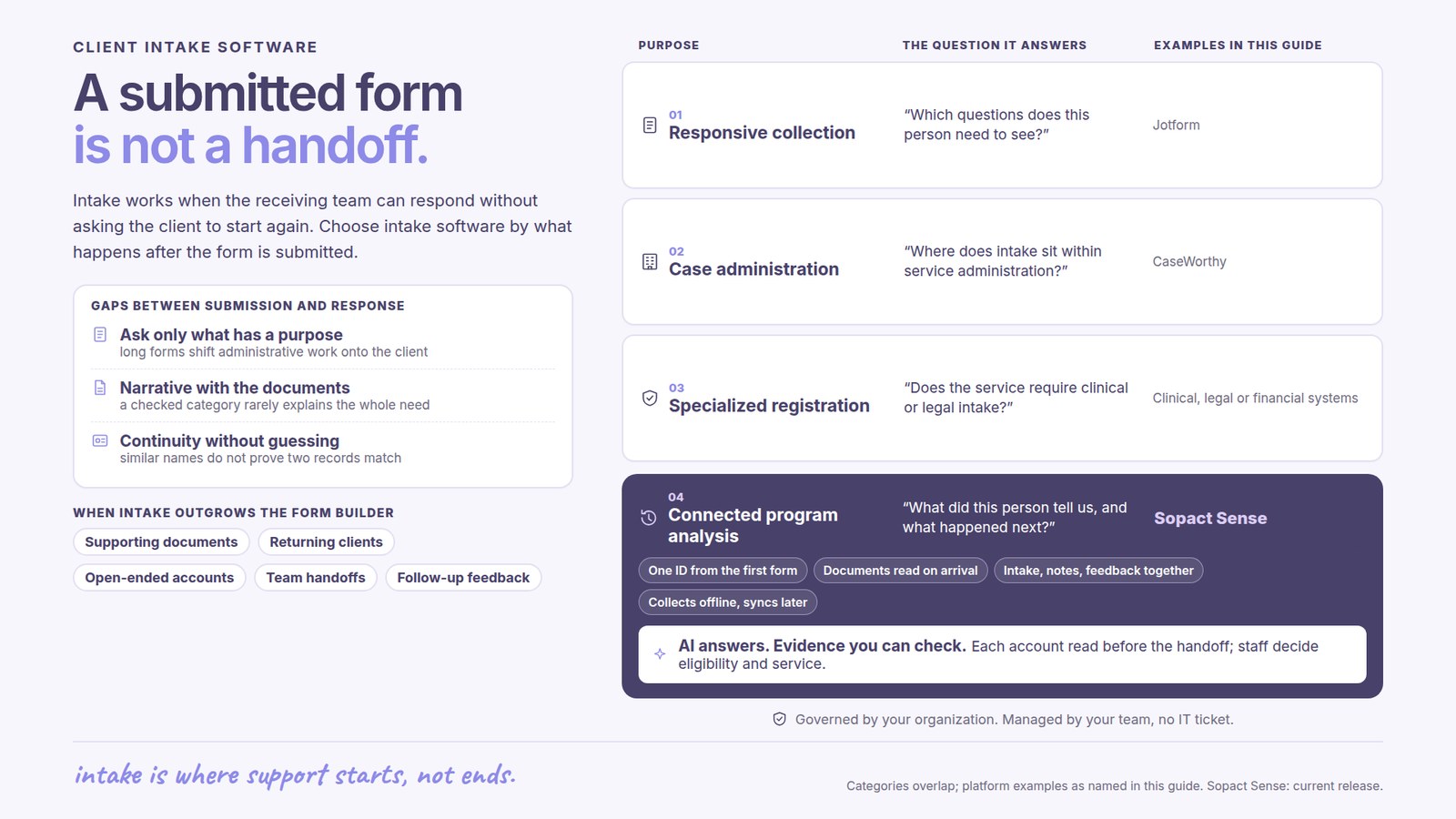
Client intake means different things in different organizations. A professional-service firm may be qualifying an inquiry. A clinical practice may need patient registration within a medical system. A nonprofit program may need to understand a person’s goals, documents and support needs before enrollment.
This guide focuses on service and program intake. The important question is how collected information becomes useful to staff and remains available during delivery. Specialized clinical, legal or financial requirements still determine which operational system is suitable.
A form builder, a full case-management platform and connected program analysis can all help with intake, but they do not own the same responsibilities.
Long intake forms can shift administrative work onto the client. Good collection distinguishes what staff need now from what can be discussed later. The person should not have to answer every possible program question before the team understands the request.
A checked category rarely explains the whole need. Open-ended answers and documents can add important context. Staff benefit when the explanation remains available alongside the structured information they use to prepare the next step.
A returning person may have relevant history, but similar names do not establish that two records describe the same client. Reliable continuity depends on agreed identification and review. The buyer benefit is less repetition with a trustworthy history, not automatic merging at any cost.
Jotform’s conditional forms adapt questions and actions to previous answers. This is relevant when the main need is responsive collection. A well-designed form can avoid asking irrelevant questions without requiring a larger system.
CaseWorthy’s platform supports coordinated case and program work around a shared client record. Broader case systems are relevant where intake must sit with service administration and required operational reporting.
Sopact focuses on collecting and connecting the evidence behind program decisions. Its fit is strongest when staff need to interpret intake material and keep using it alongside later assessments, interviews and feedback. Choose the combination around the work the team will actually perform.
A client’s initial account describes goals, circumstances and expectations. Later notes show the support provided, assessments describe change and feedback explains the experience. Sopact connects these sources so the team can ask a new question without assembling the history from scratch.
Analysis becomes available as new data arrives in the configured workflow. Staff can use AI Assistance to examine the material and prepare follow-up questions. This can reduce repetitive reading before a meeting while preserving access to the source when an interpretation needs closer attention.
For example, a training applicant may describe difficulty attending evening sessions. If that context remains available during onboarding, staff can discuss the practical constraint early. Later attendance and feedback can show whether the agreed arrangement helped. This is an illustrative use of continuity, not an automated eligibility decision.
Submission count alone does not show whether intake works. More useful questions include how long a complete request waits for an appropriate response, where clarification is repeatedly needed and whether the receiving team has the information required.
Read those measures with client feedback. An incomplete request may reflect confusing language, an inaccessible document requirement or uncertainty about the next step. The reason matters because each calls for a different improvement.
Sopact supports offline collection and multiple languages, as confirmed by its team. The channels and supported workflow should be agreed for the program. Collection flexibility is useful when it reduces barriers and preserves a coherent record for staff.
An intake process should remain useful when a program adds a service, changes a question or has a new staff member. Personalization and continuing support help the organization retain control of its collection and analysis rather than depend on one person’s spreadsheet knowledge.
Sopact’s typical setup estimate is two days to two weeks for an agreed scope. Historical records, source-system connections and the handoff responsibilities affect that scope. The value should be assessed through less repeated preparation and better continuity, not simply the speed of publishing a form.
For the continuing record, see case management software. For the conversations and observations after intake, see case notes software.
It collects initial client information and supporting material, helps staff review a request and supports the next service step.
A form builder may be enough when collection is the main problem and the receiving team already has a reliable review and follow-up process.
It keeps the original request useful alongside later notes, assessments and feedback, reducing repeated preparation during ongoing support.
This workflow uses AI to prepare and interpret evidence. Staff retain responsibility for eligibility and service decisions under their organization’s process.
Consider time to an appropriate response, repeated clarification, handoff quality and client experience, rather than submission volume alone.
Continue with a purpose
Related solution
Keep notes, assessments and check-ins connected to the person.
Explore the solution →Continue learning
Learn how to connect collection, analysis and follow-through.
Start learning →
Customer story
A youth-program implementation designed to connect participant evidence across years.
Read the story →See how Sopact can connect a client’s first account with the questions and evidence your program needs afterward.
See it with your workflow →