


Academy / Measurement & reporting
Course progress and additional readings
Measurement & reporting
You will learn: how to give AI the right sources, definitions and taste, draft a funder report that flags missing numbers instead of guessing, and check every figure before you send.
Who this is for: the funded partner at report time: the program lead, M&E lead or development team drafting a funder report with AI. You bring the requirements map from chapter 7, the funder's taste file from chapter 8, and records you trust.
What does AI need before it drafts a funder report?
In short: four things: the sources it may use, your data dictionary, the funder's agreement and the funder's taste file. Without them it fills the gaps with plausible guesses.
01 · DECLARED SOURCES
The surveys and records this report may draw on, and nothing else.
02 · THE DICTIONARY
What each metric means: population, period, unit, split.
03 · THE AGREEMENT
What you committed to report to this funder.
04 · FUNDER TASTE
How this funder reads, and how you speak.
The first three fix the numbers. The fourth shapes the words.
Add a short brief on top: who reads the report, what they will decide with it, and the period it covers. Frame the question fairly. "What changed for trainees this quarter, and what did not?" leaves room for an honest answer. "Show how our training succeeded" pushes the AI toward only the favorable evidence.
Do not start by uploading everything you have and asking for a strong story. That is how a draft ends up quoting last year's figures, mixing periods or presenting a single participant's experience as typical.
What happens when the AI cannot find a number?
In short: it should say the number is missing and why, never estimate it. A guessed number looks exactly like a found one, and the funder cannot tell the difference.
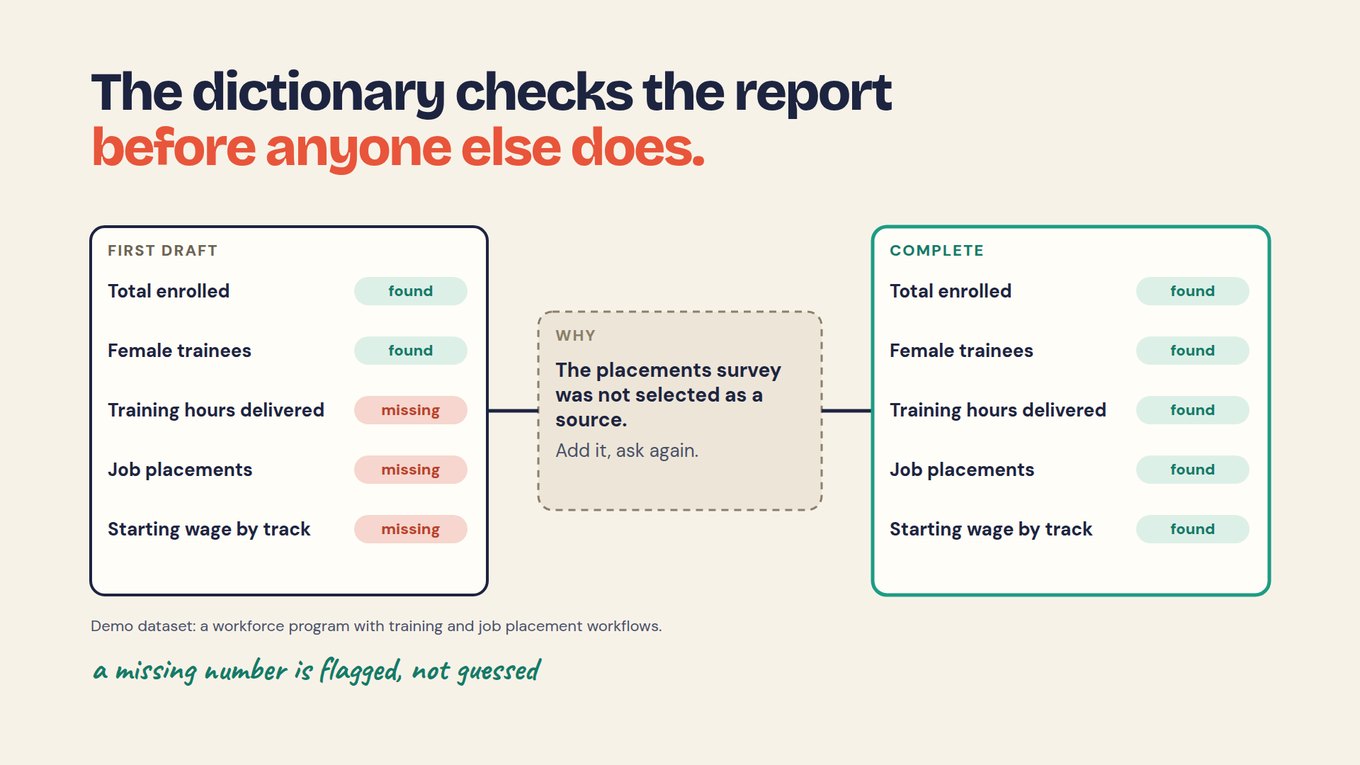
In a demo dataset, a workforce program with training and job placement workflows, the AI's first draft found total enrolled and female trainees. It flagged three items as missing: training hours delivered, job placements and starting wage by track. The reason was simple to fix: the placements survey had not been selected as a source. The team added it, asked again, and the draft was complete.
This works only because the dictionary told the AI what should be there. Without that list, a draft with two numbers looks finished. With it, the gaps are visible before a program officer finds them.
How do you choose which sources the AI may use?
In short: name the surveys and fields for this report before asking anything, send the fewest personal details the question needs, and make sure every answer points back to its records.
A report on placements needs the enrolment and placement records. It does not need names, emails or case notes. An approved summary table often answers the question with no identified records at all. The Foundations chapter on what the assistant may see covers this in detail.
In Sopact Sense today, the AI Assistant stays locked until you pick which surveys it may use. Field selection lets you choose which fields are sent to the AI, so names and emails stay out. Each team's Assistant sees only its own folder's data. Every line of an answer links to a record you can open. With other tools, keep the same habits by hand: a named export for each report, identifying columns removed, and a note of which files went in.
How do you draft the report with AI?
In short: ask for the funder's format, their words and your numbers, with a source for every figure and a clear flag for everything missing.
A structure most funders can follow: what the reader needs to know or decide; what was delivered against the plan; the outcomes, each with its source and limits; shortfalls and what is still unknown; spending where required; and the next action with an owner. Keep each caveat beside its number, not in a footnote.
Use a participant's words to explain a finding, not to replace it. One account shows what an experience was like; it does not show how common it was. Use quotes only with permission for this audience, and never let the AI write one.
Prompt · paste into Claude, ChatGPT or your AI tool
Draft our [PERIOD] report for [FUNDER NAME].

Use only:
- the data sources selected for this report: [LIST SURVEYS OR FILES]
- our data dictionary: [ATTACH]
- our agreement with this funder: [ATTACH]
- the funder taste file and our own taste file: [ATTACH]

Rules:
1. Follow the funder's template and the order in their taste file. Use their words.
2. Report every metric in the agreement, using the definition in our dictionary. Where the funder defines a metric differently, give their number, labelled, and add one sentence on how it differs.
3. Put the source next to every number.
4. If a number cannot be found in the selected sources, write "MISSING: [metric], not in the selected sources". Do not estimate, round up or borrow from another period.
5. Keep each limitation beside the number it limits. Include shortfalls.
6. Do not invent quotations, causes or explanations. Use only quotes marked as permitted.
7. End with a table: claim | number | source | status (found, missing, differs from agreement).
Drafting gets short. Checking does not.
Marco Botha, CEO of Open Play Foundation in South Africa, put it this way: "It just took 2 prompts and my report was ready." Drafting can get that short when the sources, definitions and taste are already in place. The check that follows should still take a person's full attention.
How do you check every number before you send?
In short: open the source of each number, confirm it matches the agreement's definition and period, and resolve or name every gap. Make every number match its source shows the method in full.
| Check | Ask yourself | Partner C example · fictional |
|---|---|---|
| Population | Does the count use the agreed unit? | 80 enrolled means 80 unique people, not visits |
| Definition | Does the metric match the agreement? | Placement within 90 days, not 6 months |
| Split | Is it broken down as agreed? | Starting wage by track, not one average |
| Missing | Is every gap named, with a date? | 12-month retention: not yet available, and when |
| Period | Do all numbers and files cover the same period? | A Q3 report with a Q2 financial file: ask, do not relabel |
| Source | Does each number open to its records? | Click through; the count matches |
| Quotes | Is each quote real and permitted for this reader? | Linked to its record, permission noted |
| Taste | Their words and format, same numbers? | Table first, IRIS+ codes, "participants" |
Pre-send checklist. Run it on every report, for every funder.
If the report includes spending, have the person responsible for finance explain any variance. An underspend may mean a delayed activity, not efficiency, and the AI cannot know which. A second AI pass that compares the draft with the sources can help find problems, but it can miss the same error twice. It is not an independent check.
ASK ANY TOOL, INCLUDING OURS
Before drafting, ask your data: "Which metrics in our agreement with Funder C can you not find in the selected sources?" A good answer is a short list of gaps, not a paragraph of prose. In Sopact Sense, the AI Assistant answers from the surveys you selected, and each line links to its record; Claude or ChatGPT can query the same data through MCP.
An honest limit: AI makes drafting faster, and it makes confident mistakes faster too. The report is still yours. Every number the funder reads is one your team has opened, and every gap is one your team decided how to name.
Try it on your own reporting
- Pick your next report due. Write the brief: reader, decision, period.
- List the sources it may use, and remove identifying fields.
- Run the drafting prompt with your dictionary, the agreement and both taste files.
- Count the MISSING flags. For each, add a source or decide how to name the gap.
- Run the checklist, row by row, before anyone else reads it.
Check your reasoning
Run the checklist on Partner C's report to the regional workforce fund. Population passes: 80 enrolled are unique people. Definition fails: placements were counted within 6 months, not 90 days. Missing fails: 12-month retention is absent with no date. Split fails: starting wage is one average, not by track. Those three failures are the three questions the fund sent back. Caught before sending, each is a fix or a named gap instead of a round of emails.
Questions teams ask
Can the AI write the whole report?
It can write the whole first draft. It should not decide what the numbers mean, which shortfalls matter, or whether a quote may be used. Those are judgments your team owns. Treat the draft as a strong starting point from a colleague who has read every record but never met the funder or the participants, then check it and make the calls it cannot.
Can we paste participant records into ChatGPT or Claude?
Only what the question needs, under your organization's data policy. Most report questions can be answered from counts and summaries without names, emails or case notes. If you work with identified records, use a tool where you choose which fields are sent and which surveys are in scope, and remove identifying columns from any export you paste.
Should we tell funders we drafted with AI?
Some funders ask, and being plain about it builds trust either way: say the draft was prepared with AI from your records and that your team checked every number against its source. What funders care about is whether the numbers are right and the claims are honest. A clear pre-send check is a better answer than any disclaimer.
What if the AI's number and our spreadsheet disagree?
Do not pick the one you prefer. Open both sources and find the difference: usually a different period, a duplicate person, visits counted as people, or a survey left out of the selection. Fix the cause, then record what it was, so the next report does not repeat it. If you cannot resolve it before the deadline, report the number you can trace and name the open question.