play icon for videos
← Academy
SOPACT ACADEMY · IMPACT MEASUREMENT & REPORTING · ALIGN

How Do You Build a Logic Model?

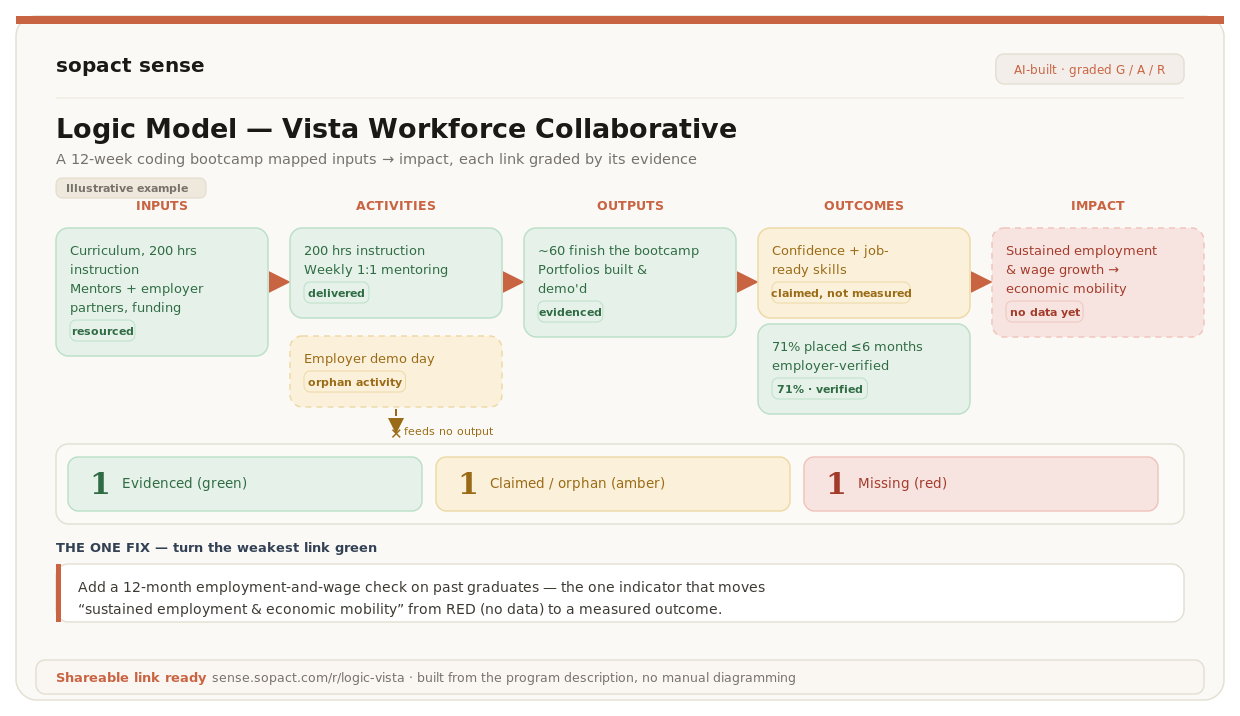
Describe your program and Sopact Sense lays out the logic model — inputs through impact — grading every box by evidence and flagging the orphan activities and gaps a funder spots first.

<!DOCTYPE html> <html lang="en"> <head> <meta charset="utf-8"> <meta name="viewport" content="width=device-width, initial-scale=1"> <style> @keyframes pulseDot{0%,100%{opacity:1}50%{opacity:.35}} *{box-sizing:border-box} body{margin:0;font-family:'Hanken Grotesk',-apple-system,BlinkMacSystemFont,sans-serif;background:#EEF2F9;padding:26px;display:flex;justify-content:center} .card{width:600px;max-width:100%;background:#FFFFFF;border:1px solid #E3E9F4;border-radius:20px;box-shadow:0 26px 64px -32px rgba(15,30,70,.34),0 2px 4px rgba(15,30,70,.05);overflow:hidden} .hdr{display:flex;align-items:center;gap:11px;padding:16px 20px;border-bottom:1px solid #EEF1F7;background:#F5F8FE} .hdr .ic{display:inline-flex;width:30px;height:30px;align-items:center;justify-content:center;border:2px solid #155DFC;border-radius:50%;color:#155DFC;font-size:15px;font-weight:800;flex-shrink:0} .hdr .t{min-width:0} .hdr .t .n{font-weight:800;font-size:14.5px;color:#0F172A;letter-spacing:-.2px} .hdr .t .s{font-size:12px;color:#64748B} .hdr .pill{margin-left:auto;display:inline-flex;align-items:center;gap:6px;font-size:11.5px;font-weight:700;color:#155DFC;background:#E6EEFF;padding:5px 10px;border-radius:20px;white-space:nowrap} .hdr .pill .d{width:6px;height:6px;border-radius:50%;background:#155DFC;animation:pulseDot 2s infinite} .tabs{display:flex;gap:0;padding:12px 16px 0;background:#F5F8FE} .tab{flex:1;display:flex;flex-direction:column;align-items:center;gap:5px;cursor:pointer;font-family:inherit;font-size:11.5px;font-weight:700;color:#64748B;background:transparent;border:none;border-bottom:2px solid transparent;padding:8px 4px 10px} .tab.on{font-weight:800;color:#155DFC;border-bottom-color:#155DFC} .tab .num{display:inline-flex;width:20px;height:20px;align-items:center;justify-content:center;border-radius:50%;font-size:11px;font-weight:800;color:#64748B;background:#EEF1F7} .tab.on .num{color:#fff;background:#155DFC} .divider{height:1px;background:#EEF1F7} .body{padding:20px} .eyebrow{font-size:10.5px;font-weight:800;letter-spacing:1.2px;text-transform:uppercase;color:#155DFC;margin-bottom:5px} .eyebrow.g{color:#15884F} .headline{font-family:'Inter',Georgia,serif;font-size:18.5px;font-weight:600;line-height:1.25;color:#0F172A;margin-bottom:12px} .lede{font-size:12.5px;line-height:1.55;color:#475569;margin:0 0 14px} .rows{display:flex;flex-direction:column;gap:8px;margin-bottom:14px} .row{display:flex;align-items:center;gap:11px;background:#F5F8FE;border:1px solid #EEF1F7;border-radius:11px;padding:11px 13px} .row .emoji{font-size:17px} .row .rt{flex:1;min-width:0} .row .rt .n{font-size:13px;font-weight:700;color:#0F172A} .row .rt .s{font-size:12px;color:#64748B} .pillsm{font-size:11px;font-weight:800;color:#155DFC;background:#E6EEFF;padding:4px 9px;border-radius:6px;flex-shrink:0} .pillsm.gray{font-weight:700;color:#64748B;background:#EEF1F7} .chainwrap{position:relative;padding-left:26px} .chainline{position:absolute;left:8px;top:8px;bottom:8px;width:2px;background:#E3E9F4} .cnode{position:relative;margin-bottom:14px} .cdot{position:absolute;left:-26px;top:4px;width:16px;height:16px;border-radius:50%;background:#fff;border:3px solid #94A3B8} .clabel{font-size:9.5px;font-weight:800;letter-spacing:.5px;text-transform:uppercase;color:#64748B;margin-bottom:4px} .cbox{background:#F5F8FE;border:1px solid #EEF1F7;border-radius:11px;padding:10px 12px;font-size:12px;line-height:1.5;color:#334155} .cbox.graded{display:flex;align-items:flex-start;gap:9px;border-left-width:3px;border-left-style:solid} .cnote{margin:0 0 14px 4px;font-size:11px;line-height:1.5} .cnote .plus{display:inline-flex;width:16px;height:16px;align-items:center;justify-content:center;background:#155DFC;color:#fff;border-radius:4px;font-size:10px;font-weight:800;flex-shrink:0;margin-right:6px} .csummary{display:flex;align-items:center;gap:12px;background:#0A1B3D;border-radius:13px;padding:11px 15px;margin-top:4px} .csummary .t{flex:1;font-size:11.5px;color:#CBD8F5} .csummary .t b{color:#F1F5FF} .mxwrap{border:1px solid #EEF1F7;border-radius:12px;overflow:hidden;margin-bottom:10px} .mxhead{display:grid;grid-template-columns:118px 1fr 1fr;background:#F5F8FE;border-bottom:1px solid #EEF1F7} .mxhead div{font-size:9px;font-weight:800;letter-spacing:.5px;text-transform:uppercase;color:#64748B;padding:7px 9px} .mxrow{display:grid;grid-template-columns:118px 1fr 1fr;border-bottom:1px solid #EEF1F7} .mxrow:last-child{border-bottom:none} .mxrow>div{padding:9px;font-size:11.5px;line-height:1.4;color:#334155;display:flex;align-items:center;flex-wrap:wrap;gap:5px} .mxrow .mxlabel{font-weight:700;color:#0F172A;background:#FAFBFE} .mxchip{font-size:9px;font-weight:800;letter-spacing:.3px;text-transform:uppercase;padding:3px 6px;border-radius:5px;white-space:nowrap} .promptwrap{padding:0 20px 18px} .promptlbl{font-size:10px;font-weight:800;letter-spacing:1px;text-transform:uppercase;color:#94A3B8;margin-bottom:7px} .prompt{display:flex;align-items:flex-start;gap:9px;font-family:ui-monospace,'SF Mono',Menlo,monospace;font-size:11px;line-height:1.5;color:#1E293B;background:#F5F8FE;border:1px solid #EEF1F7;border-left:3px solid #155DFC;border-radius:9px;padding:11px 12px} .prompt .car{color:#155DFC;font-weight:800;flex-shrink:0} .flagrow{display:flex;align-items:flex-start;gap:10px;background:#F5F8FE;border:1px solid #EEF1F7;border-radius:11px;padding:10px 12px;border-left-width:3px;border-left-style:solid;margin-bottom:8px} .flagtag{font-size:9.5px;font-weight:800;letter-spacing:.4px;text-transform:uppercase;padding:4px 8px;border-radius:5px;white-space:nowrap;flex-shrink:0} .flagtxt{font-size:12px;line-height:1.45;color:#334155} .lp{display:flex;align-items:center;gap:12px;background:#0A1B3D;border-radius:13px;padding:14px 16px;margin-top:6px} .lp .ic{display:inline-flex;width:34px;height:34px;align-items:center;justify-content:center;background:#14295C;border:1px solid #26407A;border-radius:9px;color:#7FA8FF;font-size:16px;flex-shrink:0} .lp .rt{flex:1;min-width:0} .lp .rt .n{font-size:13px;font-weight:800;color:#F1F5FF} .lp .rt .s{font-size:11.5px;color:#9DB2D9} .lp .open{font-size:11px;font-weight:800;color:#0A1B3D;background:#7FA8FF;padding:6px 11px;border-radius:7px;white-space:nowrap} </style> </head> <body> <div class="card"> <div class="hdr"> <span class="ic">&#128203;</span> <div class="t"> <div class="n">Vista Workforce Collaborative</div> <div class="s">DEMO-01 · Sopact Sense · Framework Builder</div> </div> <span class="pill"><span class="d"></span>Building</span> </div> <div class="tabs" id="tabs"></div> <div class="divider"></div> <div class="body" id="body"></div> <div class="promptwrap"> <div class="promptlbl">The prompt behind this step</div> <div class="prompt"><span class="car">&gt;</span><span id="promptTxt"></span></div> </div> </div> <script> (function(){ var TABS = ["Setup", "Build", "Fix", "Report"]; var CONTENT = [{"eyebrow": "Step 1 · Describe the program", "headline": "The input is your description, nothing else", "lede": "Use only what the program states — anything inferred gets marked, never invented.", "prompt": "You are the Sopact Sense Assistant. Here is my program description: [PASTE PROGRAM DESCRIPTION]. Use only what it states; mark anything you infer as [INFERRED]. Wait for my task."}, {"eyebrow": "Step 2 · Fill & grade the columns", "headline": "Six stages, one orphan activity flagged", "lede": "Every box is filled and graded, and gaps are flagged — <strong style=\"color:#15884F\">green</strong>, <strong style=\"color:#C9820A\">amber</strong>, <strong style=\"color:#C63E2B\">red</strong>.", "prompt": "Build a Logic Model for Vista Workforce Collaborative. Flag gaps and orphan activities, and grade every element green/amber/red."}, {"eyebrow": "Step 3 · Turn the weak link green", "headline": "The same model, one link fixed", "lede": "Take the lowest-graded link and fix it with the one indicator the program could realistically measure.", "prompt": "Take the lowest-graded element above and fix it using only what the program could realistically measure. Show the before → after grade and the single indicator that moves it to green."}, {"eyebrow": "Step 4 · Missing & incomplete report", "headline": "See what a funder circles first", "lede": "Every amber or red item becomes one named ask — the report leads with the decision it informs.", "prompt": "Create a 'missing & incomplete' report from this analysis in Sopact branding. List every element graded amber or red, what is missing, and the one input that would fix each. Lead with the decision this report informs."}]; var BODIES = { setup: "<div class=\"row\"><span class=\"emoji\">&#128221;</span><div class=\"rt\"><div class=\"n\">Program description</div><div class=\"s\">Vista Workforce Collaborative · 12-week bootcamp</div></div><span class=\"pillsm\">Pasted</span></div><div class=\"row\"><span class=\"emoji\">&#128203;</span><div class=\"rt\"><div class=\"n\">Five columns</div><div class=\"s\">Inputs · Activities · Outputs · Outcomes · Impact</div></div><span class=\"pillsm gray\">Structure</span></div><div class=\"row\"><span class=\"emoji\">&#128274;</span><div class=\"rt\"><div class=\"n\">No hallucination rule</div><div class=\"s\">Only what the program states; infer = flagged</div></div><span class=\"pillsm gray\">Required</span></div>", build: "<div class=\"chainwrap\"><div class=\"chainline\"></div><div class=\"cnode\"><div class=\"cdot\" style=\"border-color:#94A3B8\"></div><div class=\"clabel\" style=\"color:#64748B\">Inputs</div><div class=\"cbox\">Curriculum, instructors, mentors, employer partners, laptops, funding</div></div><div class=\"cnode\"><div class=\"cdot\" style=\"border-color:#94A3B8\"></div><div class=\"clabel\" style=\"color:#64748B\">Activities</div><div class=\"cbox\">200 hrs instruction · weekly 1:1 mentoring · employer demo day</div></div><div class=\"cnode\"><div class=\"cdot\" style=\"border-color:#94A3B8\"></div><div class=\"clabel\" style=\"color:#64748B\">Outputs</div><div class=\"cbox\">~60 complete the bootcamp; portfolios built</div></div><div class=\"cnote\" style=\"color:#C63E2B\"><strong>Gap:</strong> employer demo day feeds no output — orphan activity.</div><div class=\"cnode\"><div class=\"cdot\" style=\"border-color:#C9820A\"></div><div class=\"clabel\" style=\"color:#C9820A\">Short-term outcome</div><div class=\"cbox graded\" style=\"background:#FBF0DA;border-color:#F0DBA8;border-left-color:#C9820A\"><span style=\"flex:1;color:#5C3E08\">Job-ready skills + increased confidence</span><span class=\"mxchip\" style=\"background:#C9820A;color:#fff\">AMBER</span></div></div><div class=\"cnote\" style=\"color:#C9820A\"><strong>Assumption:</strong> mentoring builds confidence — claimed, not measured.</div><div class=\"cnode\"><div class=\"cdot\" style=\"border-color:#15884F\"></div><div class=\"clabel\" style=\"color:#15884F\">Medium-term outcome</div><div class=\"cbox graded\" style=\"background:#E4F3EA;border-color:#C6E7D1;border-left-color:#15884F\"><span style=\"flex:1;color:#0F3D24\">Employment within 6 months — 71%, verified</span><span class=\"mxchip\" style=\"background:#15884F;color:#fff\">GREEN</span></div></div><div class=\"cnode\"><div class=\"cdot\" style=\"border-color:#C63E2B\"></div><div class=\"clabel\" style=\"color:#C63E2B\">Long-term / Impact</div><div class=\"cbox graded\" style=\"background:#FCE9E7;border-color:#F6C9C2;border-left-color:#C63E2B\"><span style=\"flex:1;color:#7A2A1E\">Sustained employment &amp; wage growth → economic mobility</span><span class=\"mxchip\" style=\"background:#C63E2B;color:#fff\">RED</span></div></div></div>", fix: "<div class=\"chainwrap\"><div class=\"chainline\"></div><div class=\"cnode\"><div class=\"cdot\" style=\"border-color:#94A3B8\"></div><div class=\"clabel\" style=\"color:#64748B\">Inputs</div><div class=\"cbox\">Curriculum, instructors, mentors, employer partners, laptops, funding</div></div><div class=\"cnode\"><div class=\"cdot\" style=\"border-color:#94A3B8\"></div><div class=\"clabel\" style=\"color:#64748B\">Activities</div><div class=\"cbox\">200 hrs instruction · weekly 1:1 mentoring · employer demo day</div></div><div class=\"cnode\"><div class=\"cdot\" style=\"border-color:#94A3B8\"></div><div class=\"clabel\" style=\"color:#64748B\">Outputs</div><div class=\"cbox\">~60 complete the bootcamp; portfolios built</div></div><div class=\"cnote\" style=\"color:#C63E2B\"><strong>Gap:</strong> employer demo day feeds no output — orphan activity.</div><div class=\"cnode\"><div class=\"cdot\" style=\"border-color:#15884F\"></div><div class=\"clabel\" style=\"color:#15884F\">Short-term outcome</div><div class=\"cbox graded\" style=\"background:#E4F3EA;border-color:#C6E7D1;border-left-color:#15884F\"><span style=\"flex:1;color:#0F3D24\">Job-ready skills + increased confidence</span><span class=\"mxchip\" style=\"background:#15884F;color:#fff\">GREEN</span></div></div><div class=\"cnote\" style=\"color:#15884F\"><span class=\"plus\">+</span><strong>Indicator added:</strong> Confidence scale (1–5) captured at intake and at exit, on the same contact ID.</div><div class=\"cnode\"><div class=\"cdot\" style=\"border-color:#15884F\"></div><div class=\"clabel\" style=\"color:#15884F\">Medium-term outcome</div><div class=\"cbox graded\" style=\"background:#E4F3EA;border-color:#C6E7D1;border-left-color:#15884F\"><span style=\"flex:1;color:#0F3D24\">Employment within 6 months — 71%, verified</span><span class=\"mxchip\" style=\"background:#15884F;color:#fff\">GREEN</span></div></div><div class=\"cnode\"><div class=\"cdot\" style=\"border-color:#C63E2B\"></div><div class=\"clabel\" style=\"color:#C63E2B\">Long-term / Impact</div><div class=\"cbox graded\" style=\"background:#FCE9E7;border-color:#F6C9C2;border-left-color:#C63E2B\"><span style=\"flex:1;color:#7A2A1E\">Sustained employment &amp; wage growth → economic mobility</span><span class=\"mxchip\" style=\"background:#C63E2B;color:#fff\">RED</span></div></div></div>", reportFlags: "<div class=\"flagrow\" style=\"border-left-color:#C9820A\"><span class=\"flagtag\" style=\"color:#C9820A;background:#FBF0DA\">AMBER</span><div class=\"flagtxt\">Short-term outcome — mentoring → confidence is claimed, not measured. Needs an intake/exit confidence scale.</div></div><div class=\"flagrow\" style=\"border-left-color:#C63E2B\"><span class=\"flagtag\" style=\"color:#C63E2B;background:#FCE9E7\">RED</span><div class=\"flagtxt\">Long-term / Impact — sustained employment and wage growth aren’t tracked past first placement.</div></div>", lpTitle: "Missing & incomplete report · shareable link", lpSub: "Decision-first · Sopact branding · Vista Workforce Collaborative", summaryBefore: "Grade: 1 green &middot; 1 amber &middot; 1 red. Plus one orphan activity.", summaryAfter: "Grade: 2 green &middot; 0 amber &middot; 1 red. One indicator changed the picture." }; var phase = 1; var tabsEl = document.getElementById('tabs'); var bodyEl = document.getElementById('body'); var promptEl = document.getElementById('promptTxt'); function renderTabs(){ tabsEl.innerHTML = ''; TABS.forEach(function(label, i){ var b = document.createElement('button'); b.type = 'button'; b.className = 'tab' + (i === phase ? ' on' : ''); b.innerHTML = '<span class="num">' + (i+1) + '</span><span>' + label + '</span>'; b.addEventListener('click', function(){ phase = i; render(); }); tabsEl.appendChild(b); }); } function renderBody(){ var c = CONTENT[phase]; var eyebrowClass = (phase===2) ? 'eyebrow g' : 'eyebrow'; var out = '<div class="' + eyebrowClass + '">' + c.eyebrow + '</div><div class="headline">' + c.headline + '</div><p class="lede">' + c.lede + '</p>'; if (phase === 0) { out += '<div class="rows">' + BODIES.setup + '</div>'; } else if (phase === 1) { out += BODIES.build; out += '<div class="csummary"><div class="t"><b>' + BODIES.summaryBefore + '</b></div></div>'; } else if (phase === 2) { out += BODIES.fix; out += '<div class="csummary"><div class="t"><b>' + BODIES.summaryAfter + '</b></div></div>'; } else { out += BODIES.reportFlags; out += '<div class="lp"><span class="ic">&#128196;</span><div class="rt"><div class="n">' + BODIES.lpTitle + '</div><div class="s">' + BODIES.lpSub + '</div></div><span class="open">Open &rarr;</span></div>'; } bodyEl.innerHTML = out; promptEl.textContent = c.prompt; } function render(){ renderTabs(); renderBody(); } render(); })(); </script> </body> </html>

In short: One prompt now builds a funder-ready logic model from nothing but what a program publicly states. It names the decision the reader must make, lays the program out in columns — inputs → activities → outputs → outcomes → impact — grades every box by evidence, flags the orphan activities that feed no output, and ends with a prioritized plan for the boxes a reviewer circles first. Below, we run it on a real public page and walk through what each part of the prompt produces.

Do you need a logic model for a grant application?

Usually yes — it's the framework most funders ask for, because it makes a program's logic checkable in one page. A logic model lays your program out in columns — inputs → activities → outputs → outcomes → impact — so a reviewer can trace the line from what you spend to what changes. Most logic models fail in the middle: an activity that feeds no output, or an outcome with no data behind it. That's where the eye goes first.

The prompt below turns that principle into a complete audit. It reads only what your program states publicly, grades every box Green, Amber, or Red, names the orphan activities, and tells you the one box to fix this quarter. We ran it on The Lantern Network's public mentoring-program page — the sections that follow show the prompt for each part, then what came back.

1 · Name the decision, then run one prompt

Every grade depends on who is reading. A board sees "87% placed" as a headline; a renewing funder asks what evidence sits behind it, and whether every activity actually earns its place. So the prompt's first instruction is a decision frame: before building anything, state in one line who would use this logic model and for what decision. For Lantern, that came back as a corporate sponsor deciding whether to renew its grant. Every judgment below is made from that reader's chair.

Here is the full prompt. Paste it whole, swap in your program name and source, and Sense produces all four parts in one pass:

Build a Logic Model for [PROGRAM NAME] using only what the program publicly states at [SOURCE — URL or pasted program description]. Before building, state in one line who would use this logic model and for what decision — then make every judgment from that reader's perspective. PART 1 — Lay the program out in columns: Inputs → Activities → Outputs → Short-Term Outcomes → Medium/Long-Term Outcomes → Impact. Write every outcome as a change in people, never as an activity. Flag any orphan activity (one that feeds no output) and any empty column. Color every box: GREEN = specific AND evidenced; AMBER = stated but vague, or specific but unevidenced; RED = missing, or exists only as [INFERRED]. Tag anything not explicitly stated as [INFERRED]. Include a legend, program name, source URL, and date. PART 2 — One row per box: Element | Column | Grade | Evidence (quoted, paraphrased, or "none") | one measurable indicator that would test it, phrased so the program could actually collect it (who is measured, what changes, by when). PART 3 — List every orphan activity and every AMBER and RED box, ranked by how much the model depends on it. For each: why it is weak in one sentence, what breaks downstream, and whether the fix is a program-design problem or a measurement gap. PART 4 — The top 3–5 fixes, in priority order for the decision named above. For each: current language (or "missing") → proposed rewrite, plus the single data collection step that would move it toward green. CLOSING SUMMARY — 3–4 sentences: overall strength of the logic, the weakest box a skeptical funder would circle first, and the one action to take this quarter. RULES — Source fidelity is absolute: never invent program content; if the source does not say it, mark it RED or [INFERRED]. Every green grade must be traceable to specific source language.

Example source: https://www.lanternnetwork.org/mentoring-program. The rules do the heavy lifting — no invented content, every green traceable to a quote. The model is the claim; the table in Part 2 is its evidence trail.

2 · Part 1 — the visual logic model

Lay the program out in columns: Inputs → Activities → Outputs → Short-Term Outcomes → Medium/Long-Term Outcomes → Impact. Write every outcome as a change in people, never as an activity. Flag any orphan activity that feeds no output, and any empty column. Color every box green, amber, or red. Tag anything not explicitly stated as [INFERRED]. Include a legend, program name, source URL, and date.

Two disciplines make this different from the boxes-and-arrows version on most websites. First, every outcome is written as a change in people — "mentees gain career clarity," never "we run workshops." Second, the model hunts its own weak spots: an activity that produces no output is flagged as an orphan, and any column with nothing in it is called out. For Lantern, the pattern was immediate — the left of the model is concrete (288 mentees served, 251 internships delivered, named sponsors) while the outcome columns past placement rest on three testimonials.

The rubric is strict on purpose. Green means specific and evidenced — the program names it concretely and shows data ("87% secured internships, jobs, or promotions"). Amber means stated but vague, or specific but unevidenced. Red means missing entirely, or existing only as [INFERRED].

GRADE: green | 87% placed | 288 mentees, 251 internships — output evidenced; amber | confidence & clarity | short-term outcome claimed in three stories, never measured; red | mentoring dosage | activity with no recorded output — an orphan

3 · Part 2 — the gap & indicator table

For every box, produce one row: Element | Column | Grade | Evidence (quoted, paraphrased, or "none") | one measurable indicator that would test it, phrased so the program could actually collect it — who is measured, what changes, by when.

This table is the evidence trail behind the columns — one row per box, so nothing in the model floats free of a citation. The indicator column is the practical payoff: each is phrased so the program could actually collect it. For Lantern's orphan activity — the mentoring that feeds no output — the evidence column reads "none: no sessions, hours, or dosage recorded," and the indicator that would fix it is "mentoring hours and session count per mentee, captured against a persistent participant ID." That's not a critique; it's a work order.

4 · Part 3 — the weak-link diagnosis

List every orphan activity and every amber and red box, ranked by how much the model depends on it. For each: (a) why it is weak in one sentence, (b) what breaks downstream, (c) whether the fix is a program-design problem or a measurement gap — these require different responses.

The ranking is by dependence, not column order — the question is which weakness takes the most down with it. Lantern's number one was the orphan mentoring activity: no dosage is recorded, so there's no output linking the program's central activity to any outcome. If that link stays empty, confidence, clarity, and every downstream claim rest on the 87% placement number alone.

The design-versus-measurement tag matters just as much. A measurement gap means the program plausibly works but has never measured it — the fix is data collection. A design problem means an activity genuinely leads nowhere — the fix is program thinking. Lantern's diagnosis came back mostly measurement gaps: nothing needs removing, but the mentoring needs an output.

5 · Part 4 — the improvement plan

Give the top 3–5 fixes, in priority order for the decision named above. For each: show the current language (or "missing") → a proposed rewrite, plus the single data collection step that would move it toward green.

Each fix is a before-and-after pair. Lantern's first: the mentoring activity, currently "weekly 1:1 mentoring" with no output, gains an output box — "mentoring dosage recorded per mentee" — fed by a single data step: log session count and hours against a persistent participant ID. Fixes two through five follow the same shape: give the confidence claim a baseline/endline measure, connect the demo day to a placement output, and publish the denominator behind the 87%.

6 · The closing summary — one action this quarter

Close with 3–4 sentences: the overall strength of the logic, the weakest box a skeptical funder would circle first, and the one action to take this quarter.

The summary is the executive read. Lantern's verdict: the left of the model is concrete and evidenced, but the program's central activity — mentoring — produces no recorded output, so the outcome columns float. The one action this quarter: record mentoring dosage against a persistent participant ID, so next year's renewal case shows the activity actually connecting to the change it claims.

Take the prompt with you. The full prompt pack — the master prompt plus each part as a standalone prompt you can run separately — is available to download: Download the Logic Model prompt pack.

Tricks, tips, and troubleshooting

Hunt the orphan activities first. The fastest way to spot a weak logic model is to find an activity that feeds no output — a demo day connected to no placement, mentoring with no recorded dosage. Ask Sense to list orphan activities explicitly; funders circle them first.

Logic model vs theory of change. A logic model is the columns — what goes in, what comes out. A theory of change adds the assumption under each arrow. If you've built one, ask Sense: "Turn this logic model into a theory of change and name the assumption under each link."

Turn one box green per cycle. Add the one indicator Sense suggests for your reddest box, collect it next cohort, and re-run — watch the model fill in over time.

Tighten your program page while you're here. Once Sense has graded the model, ask it to bring your public claims in line with your evidence:

Based on the grades above, suggest edits to my program page so its claims match the evidence. Flag every sentence that overstates what we can show, and rewrite it to be accurate and specific.

The same prompt works for a Theory of Change, Logframe, or Results Framework — swap the framework name and keep the parts, rubric, and rules unchanged.

Frequently asked questions

What is a logic model?

A logic model is a one-page map of a program in five columns — inputs → activities → outputs → outcomes → impact — that shows the line from the resources you put in to the change you expect out. It's the framework most funders ask for because it makes a program's logic checkable at a glance.

What's the difference between a logic model and a theory of change?

A logic model shows the columns — what goes in and what comes out, in sequence. A theory of change goes a step further and names the assumption under each arrow: why you believe one box leads to the next. The logic model is the structure; the theory of change explains why it should work. Many teams build the logic model first, then add the assumptions to turn it into a theory of change.

How do you build a logic model with AI?

Describe your program in a few sentences (or paste its web page) and ask the AI to fill the five columns, flag gaps and orphan activities, suggest one indicator per element, and grade each box green, amber or red by how much evidence supports it. In Sopact Sense this takes minutes and stays grounded only in what your program states — it marks anything inferred so it never invents outputs you don't have.

Ready to try it for yourself?

ChatGPT, Claude, and Gemini are fine for a quick test — but not for an answer you'll put in front of a funder or board. When it has to hold up, run it in Sopact Sense.

Build a rigorous impact report →
The Loop
The Loop — the method in one read
the-loop
Loop
The method
0
One continuous method for reliable, traceable AI reporting across case, application, grant, and program workflows: collect clean, analyze on arrival, and improve in time.
Teams running cases, applications, grants, or programs that need AI-assisted reporting they can reproduce, trace to source evidence, and act on before the cycle ends.
What Is Case Intelligence?
what-is-case-intelligence
Case
Foundation
1
One current, traceable record for each person—connecting intake, services, notes, surveys, documents, outcomes, decisions, and follow-up.
Workforce and training · Youth and mentoring · Case management · Scholarships · Accelerators · Education · Nonprofit programs
What Is Grant Intelligence?
what-is-grant-intelligence
Grant
Foundation
1
One connected evidence record from application and committee review through the awarded grant, grantee reporting, renewal, and board accountability.
Foundations and grantmakers · Public grant programs · Scholarships and fellowships · Accelerators
What Is Portfolio Intelligence?
what-is-portfolio-intelligence
Portfolio
Strategy
1
A source-linked portfolio view that connects each investee or grantee's agreed plan, reporting cadence, evidence, risks, and results.
Impact funds and investors · Foundations with grant portfolios · Family offices · Blended-finance vehicles
What Is Connected Data Intelligence?
connected-data-intelligence
Feedback
Foundation
1
Keep evidence from surveys, files, notes, documents, systems, sites, and reporting periods connected to one continuing record.
Multi-program nonprofits · Member and chapter networks · Research associations · Training and coaching teams · Organizations with scattered evidence
What Is Impact Measurement and Reporting?
embedded-impact-measurement
Reporting
Align
1
Define intended change, align organization and funder context, govern measures, interpret evidence, and produce traceable reports for decisions.
Program and impact teams · MEL leads · Funders and donors · Foundations · Impact funds · Organizations building rigorous impact reports
The Loop Methodology
Methodology — continuous, not annual
loop-methodology
Loop
The method
1
The continuous collect–analyze–improve cycle, adopted as an experiment: start with the step that already pays and add one data-collection step at a time.
Teams tired of rebuilding spreadsheets and forms who want a measurement system that compounds instead of resetting.
How to Build a Theory of Change with AI: Prompts, Workflow & Examples
Build a Theory of Change You Can Test
how-to-build-a-theory-of-change
Reporting
Align
2
How Do You Onboard a Portfolio and Track Results?
Onboard a Portfolio & Lock the Impact Agreement
onboard-portfolio-lock-impact-agreement-track-results
Portfolio
Data Dictionary
2
The Loop: Reliability
Reliability — the same answer twice
loop-reliability
Loop
The method
2
Determinism as a feature: the same question over the same data returns the same answer every run — the opposite of a generic AI chat that drifts.
Anyone who has watched a general AI tool give two different numbers for the same question and needs results they can stand behind.
How to Design a Fair Application and Selection Process
Design an Application Process
how-to-design-an-application-process
Grant
Foundation
2
Which Shape Is Your Data?
Which shape is your data?
which-shape-is-your-data
Feedback
Foundation
2
How Do You Build a Logic Model?
Build a Logic Model You Can Use
how-to-build-a-logic-model
Reporting
Align
3
How Do You Onboard a Grant or RFP Program?
Onboard a Grant or RFP Program
how-to-onboard-a-grant-rfp-program
Grant
Foundation
3
Theory of Change to Data Collection: A Four-Step Workflow
Turn a Theory of Change into a Data-Collection Workflow
theory-of-change-to-data-collection-workflow
Case
Foundation
3
How Do You Map Portfolio Data to IRIS+, GRI, and ESRS?
One Data Dictionary & Standards Mapping (IRIS+ / GRI / ESRS / CSRD)
portfolio-data-dictionary-standards-mapping
Portfolio
Chapters
3
The Loop: Traceability & Transparency
Traceability & Transparency
loop-traceability
Loop
The method
3
Every figure links back to the exact response, note, or document it came from — a full audit trail from headline result to raw evidence.
Teams whose numbers get scrutinized — by funders, boards, auditors, or standards — and who need to answer where did this come from on the spot.
How Do You Change a Question Without Breaking the Record?
Change questions without breaking the record
change-questions-without-breaking-the-record
Feedback
Control
3
Versioning questions and rules so a programme team can improve the instrument mid-cycle without silently breaking the trend line.
Programme & MEL leads · Teams whose questionnaire has ossified · Anyone evaluating a platform where configuration is a purchased service
What Are the IMP Five Dimensions of Impact?
Use the Five Dimensions to Test the Evidence
five-dimensions-of-impact
Reporting
Align
4
How Do You Design a Grant Rubric and Eligibility Rules?
Design Your Rubric & Eligibility Rules
grant-rubric-eligibility-rules
Grant
Foundation
4
How Do You Frame Portfolio Outcomes Over Outputs?
Frame Outcomes Over Outputs at Portfolio Level
frame-outcomes-portfolio-level
Portfolio
Chapters
4
The Loop: Flexibility
Flexibility — one method, four workflows
loop-flexibility
Loop
The method
4
The same collect–analyze–improve cycle, shaped to four kinds of impact work — case, grant, portfolio, and feedback — each shown end to end.
Anyone deciding where the Loop fits their work, who wants to see the full path from messy input to a report they can defend.
How Do You Collect Feedback Offline and in the Field?
Collect Feedback Offline & in the Field
collect-feedback-offline
Feedback
Connect
4
Capturing stakeholder feedback where there's no connectivity and syncing each answer to one continuing record — so field and multi-site programs keep a single identity from intake to endline.
Field & multi-site programs · Low-connectivity contexts · Nonprofits collecting in person
How Do You Design an Intake Form for a Baseline?
Design an Intake Form That Captures a Usable Baseline
intake-form-usable-baseline
Case
Nonprofit Track
5
What's the Difference Between Outcomes and Outputs?
Outcomes vs Outputs
frame-outcomes-over-outputs
Grant
Foundation
5
How Do You Do Pre-Investment Due Diligence?
Pre-Investment Due Diligence & Screening
pre-investment-due-diligence-screening
Portfolio
Chapters
5
The Loop Guarantee
The Guarantee — first workflow in 2 months
loop-guarantee
Loop
The method
5
How Do You Build an Organization Evidence Model?
Build the Organization Evidence Model
build-organization-evidence-model
Reporting
Align
5
How Do You Use Documents as Evidence?
Read documents as evidence
read-documents-as-evidence
Feedback
Connect
5
How to Clean Open-Ended Survey Responses
Clean Open-Ended Responses at the Source
clean-open-ended-survey-responses
Feedback
Clean
6
How Do You Spot At-Risk Participants Mid-Program?
Spot At-Risk Participants Mid-Program
spot-at-risk-participants-mid-program
Case
Nonprofit Track
6
How to Write a Nonprofit Grant Application: Template and Example
Grant Application for Nonprofits
grant-application-for-nonprofit-organizations
Grant
Foundation
6
How Do You Collect Investee Reporting Without Burden?
Collect Standardized Reporting from Every Investee, Without Burden
collect-investee-reporting-without-burden
Portfolio
Chapters
6
How Do You Build a Funder Context Profile?
Build a Sourced Funder Context Profile
build-funder-context-profile
Reporting
Align
6
How Do You Measure Change at Exit?
Measure Change at Exit (Not Just Completion)
measure-change-at-exit
Case
Nonprofit Track
7
How Do You Collect Applications Clean at the Source?
Collect Applications Clean at the Source
collect-applications-clean-at-source
Grant
Collect
7
How Do You Chase Missing Investee Data?
Chase Missing Investee Data — Automatically
chase-missing-investee-data
Portfolio
Chapters
7
How Do You Analyze Multilingual Feedback?
Analyze Multilingual Feedback
analyze-multilingual-feedback
Feedback
Clean
7
Cleaning and theming multilingual open-ended feedback across languages on one continuing record — every theme cited to the person's own words, with no manual translate-then-code step.
Multi-country programs · Multilingual survey data · Global networks & chapters
How Do You Define Measures the Organization and Funder Can Both Use?
Define Measures the Organization and Funder Can Both Use
define-impact-metrics-funders-want
Reporting
Align
7
How Do You Find Who Is Missing Survey Waves?
Survey attrition — who is missing waves
survey-attrition-longitudinal-studies
Feedback
Read
8
How to Catch At-Risk Participants Early with Mentor Notes
Catch At-Risk Participants Early with Mentor Notes
mentor-notes-early-warning
Case
Nonprofit Track
8
How Do You Reduce Applicant Burden?
Reduce Applicant Burden
reduce-applicant-burden-auto-clarification
Grant
Collect
8
How Do You Analyze Investee Reports?
Read Investee Reports Across Qual + Quant + Financial + Social
read-investee-reports-multi-signal
Portfolio
Chapters
8
How Do You Define an Impact Metric So Everyone Counts It the Same Way?
Give Every Number One Definition
one-definition-for-every-number
Reporting
Define
8
How Do You Connect Quantitative and Qualitative Data?
Connect Quantitative & Qualitative Data
connect-quantitative-qualitative-survey-data
Feedback
Read
9
How Do You Calculate SROI Live?
Calculate SROI — Live, Sourced, and Honest
calculate-sroi-live
Case
Nonprofit Track
9
How Do You Collect Grantee Reports Without Burden?
Collect Grantee Reports Without Burden
collect-grantee-reporting-without-burden
Grant
Collect
9
How Do You Track Investees Against the Impact Agreement?
Track Investees Against the Impact Agreement (Variance)
track-investees-impact-agreement-variance
Portfolio
Chapters
9
How Do You Turn Reporting Requirements Into Evidence You Can Collect?
Turn Requirements Into Collectable Evidence
turn-reporting-requirements-into-evidence
Reporting
Define
9
How to Analyze Pre and Post Survey Data
Analyze Pre / Mid / Post Data
analyze-pre-mid-post-survey-data
Feedback
Read
10
How to Report a Job-Training Program to Grant Funders
Turn a Cohort into a Funder Impact Report
job-training-grant-impact-report
Case
Nonprofit Track
10
How Do You Chase Missing Grantee Data?
Chase Missing Grantee Data
chase-missing-grantee-data
Grant
Collect
10
How Do You Monitor Portfolio Risk in Real Time?
Portfolio Risk Monitoring & Early-Warning Alerts
portfolio-risk-monitoring-alerts
Portfolio
Chapters
10
How Do You Collect Clean Evidence Inside the Workflow?
Collect Clean Evidence Inside the Workflow
collect-clean-data-at-the-source
Reporting
Embed
10
How Do You Analyze Longitudinal Survey Data?
Track One Person’s Change Across Years
analyze-longitudinal-survey-data
Feedback
Read
11
How Do You Turn a Job Description Into a Checklist?
Turn a Job Description into a Requirements Checklist
job-description-requirements-checklist
Case
Social Enterprise Track
11
How Do You Review Applications Without Reviewer Bias?
Review Without Reviewer Bias
review-applications-without-reviewer-bias
Grant
Analyze
11
Ask Your Whole Portfolio Anything (Claude + MCP)
ask-your-portfolio-anything
Portfolio
Chapters
11
How Do You Get Stable Results From Governed Data?
Get Stable Results From Governed Data
same-numbers-every-time
Reporting
Read
11
How Do You Analyze a Batch of Grant Applications?
Analyze a Whole Round
how-to-analyze-a-batch-of-grant-applications
Grant
Analyze
12
How Long Do Program Outcomes Last?
Measure how long outcomes last
measure-outcome-duration-drop-off
Feedback
Read
12
How Do You Score Candidate-Role Matches Without Bias?
Score Candidate–Role Matches Without Bias
score-candidate-role-matches-without-bias
Case
Social Enterprise Track
12
How Do You Trace Every Result Back to Its Evidence?
Trace Every Result Back to Its Evidence
where-every-number-came-from
Reporting
Read
12
How Do You Roll Up a Grant Portfolio?
Aggregate Outcomes Across the Portfolio
how-to-roll-up-a-grant-portfolio
Portfolio
Communicate
13
How to Report Job Placements to Impact Investors
Turn a Cohort into a Social-Enterprise Investor Report
job-placement-investor-impact-report
Case
Social Enterprise Track
13
How Do You Track Reviewer Conflicts of Interest?
Track Reviewer Conflicts of Interest
track-conflicts-of-interest-audit
Grant
Analyze
13
How Do You Write a Donor Report?
Design a Report for a Real Funding Decision
donor-report-funders-trust
Reporting
Decide
13
A practical, step-by-step track for building a donor or grant report funders trust — from the funder's decision back through metrics, clean data, and traceable numbers.
Program & grant managers who report to funders
What Should AI Be Allowed to See in Your Stakeholder Data?
What the assistant may see
what-the-assistant-may-see
Feedback
Prove
13
How Do You Write an Impact Narrative for a Funder?
Write a Cited Impact Narrative
impact-narrative-funder-report-cited
Feedback
Prove
14
How Do You Read a Grantee Report?
Read a Grantee Report
read-grantee-report-multi-signal
Grant
Analyze
14
How Do You Monetize Impact with SROI?
Monetize Impact with SROI Across Levels
monetize-impact-sroi-across-levels
Portfolio
Chapters
14
How Do You Get AI to Write a Funder Report?
Generate the Audience-Specific Report From Evidence
assistant-writes-the-funder-report
Reporting
Decide
14
How Do You Compute Grantee Variance?
Compute Grantee Variance
how-to-compute-grantee-variance
Grant
Analyze
15
How Do You Put a Dollar Value on Impact?
Add a Credible Dollar Value With SROI
credible-dollar-value-on-impact
Reporting
Optional method
15
How Do You Set Up a Study That Follows People for Years?
One person, followed for years
one-person-followed-for-years
Feedback
Shapes
15
How Do You Build an SROI Value Map?
Build an SROI Value Map
how-to-build-an-sroi-value-map
Reporting
Optional method
16
How Do You Track Budget and Actual Spend?
Track Budget vs Actual Spend
how-to-track-budget-invoices-actual-spend
Grant
Analyze
16
How Do You Collect Feedback From Several People About One Person?
Several people describing one person
several-people-describing-one-person
Feedback
Shapes
16
How Do You Pick a Financial Proxy for SROI?
Pick a Defensible Financial Proxy
how-to-pick-a-financial-proxy-for-sroi
Reporting
Optional method
17
How Do You Analyze Grantee Reporting Longitudinally?
Analyze Grantee Reporting Over Time
analyze-grantee-reporting-longitudinal
Grant
Analyze
17
How Do You Compare Investees When Each One Defines Its Metrics Differently?
Compare & Benchmark Investees
compare-benchmark-investees
Portfolio
Chapters
17
How Do You Report Across Programs That Were Designed Separately?
Many programs, one picture
many-programs-one-picture
Feedback
Shapes
17
How Do You Calculate the SROI Ratio?
Calculate the SROI Ratio With a Range
how-to-calculate-the-sroi-ratio
Reporting
Optional method
18
How Do You Read a 990 for Compliance?
Read a 990 for Compliance
how-to-read-a-990-for-compliance
Grant
Analyze
18
How Do You Build Dashboards and Compliance Reports?
Portfolio Dashboards & Geographic Mapping
dashboards-sroi-compliance-reports
Portfolio
Communicate
18
How Do You Run a Survey Across a Member Network?
A network where each member sees their own part
member-network-survey
Feedback
Shapes
18
Ask Your Whole Grant Round Anything (Assistant + MCP)
Ask Your Whole Grant Round Anything
ask-your-grant-round-anything
Grant
Analyze
19
How Do You Produce an LP and Board Impact Report?
Produce the LP / Board Impact Report — Live, Not Annual
portfolio-lp-board-impact-report
Portfolio
Chapters
19
How Do You Build a Grant Audit Trail?
Build a Grant Audit Trail
grant-audit-compliance-trail
Grant
Communicate
20
How Do You Connect Your Stack Without Lock-In?
Connect Your Stack Without Lock-In (Microsoft Dynamics, Power BI, Affinity, MCP)
portfolio-connect-your-stack
Portfolio
Chapters
20
How Do You Produce Grant Compliance Reports?
Produce Compliance Reports
grant-compliance-regulatory-reports
Grant
Communicate
21
How Do You Roll Grantees Into a Board Report?
Roll Grantees Into a Board Report
roll-grantees-funder-board-report
Grant
Communicate
22
How Do You Build Grant Dashboards and Maps?
Grant Dashboards & Maps
grant-dashboards-geographic-mapping
Grant
Communicate
23