What is an impact report template?
An impact report template is a reusable outline for presenting purpose, activities, results, evidence and next steps. The seven sections below are one practical structure; adapt them to the audience and any required reporting format. Readers learn where to look, and gaps show up before the report is sent.
A template cannot supply evidence you do not have, but it can make a missing number visible instead of letting polished wording cover it. Below is the outline as copyable text, then the same outline filled in for one fictional funded partner.
THE SHORT VERSION
- Keep the same seven sections every period, and put the metrics you agreed with the funder in the results section, each with its definition.
- Give every number a source you can open, and write "missing" with a date wherever a number is not in your records.
- Fill the template with AI if you like, then check each figure against its record before anyone else reads it.
What are the seven sections of an impact report?
Summary, purpose and context, work delivered, results against the agreement, evidence and method, limits and learning, and next steps. Each section answers one reader question and draws on one kind of source, so you always know where its content should come from.
Here are the seven sections laid out as a page, with the source each one draws on, beside the same page filled in for a fictional partner.
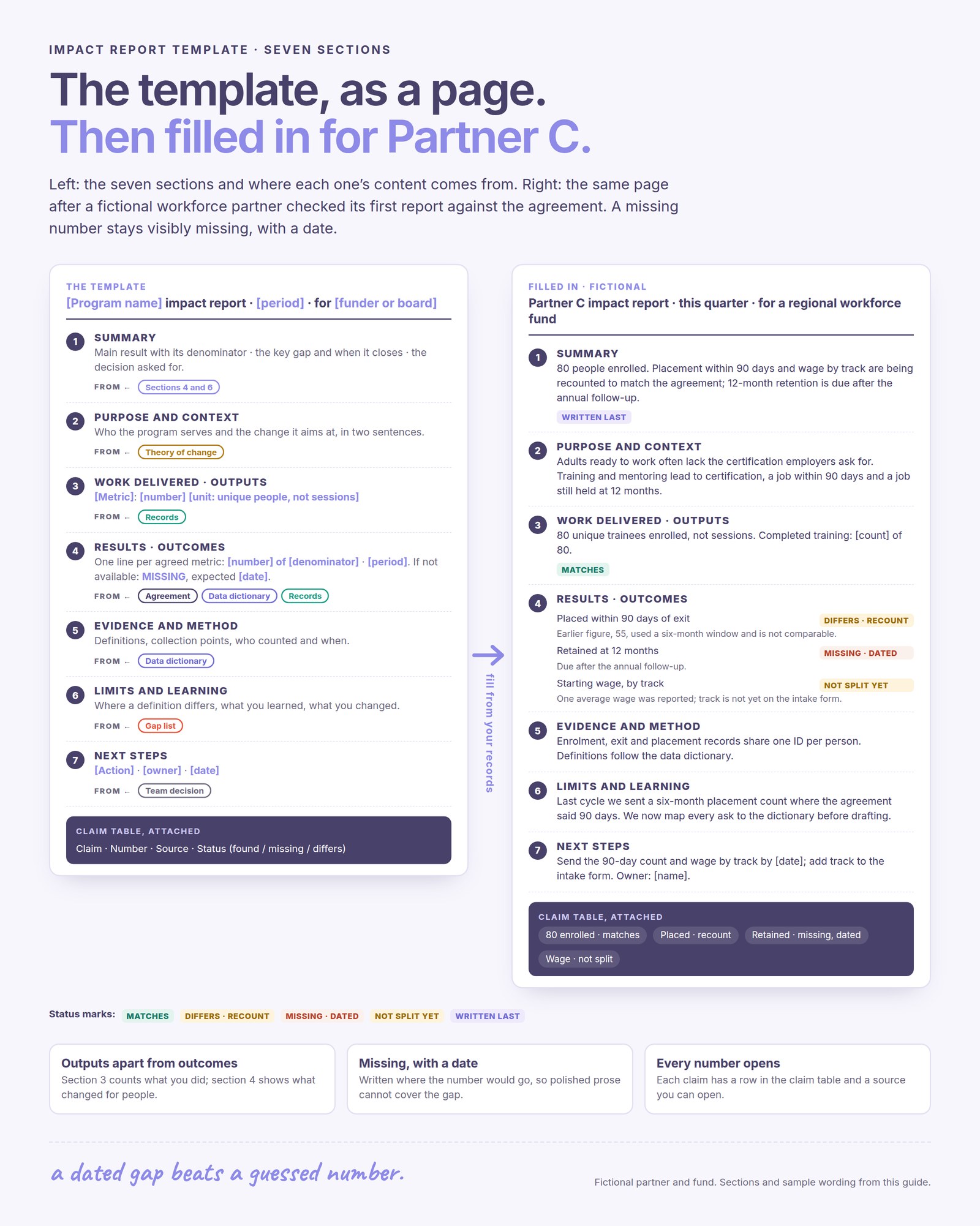
Section 3 counts what you did; section 4 shows what changed for people. Keeping them apart is the single most useful discipline a template enforces.
The video below follows a job-training and placement program that lines up its theory of change, IRIS+ metrics and the Five Dimensions of Impact. Watch how each reported metric maps to a step in the change model, which is what section 4 needs.
What does the impact report template look like as text?
Copy the outline below into your document and replace each bracket; anything you cannot fill from your records stays marked as missing. The closing table is the part funders trust most, because it lets them check any claim in seconds.
TEMPLATE · COPY INTO YOUR DOCUMENT
[PROGRAM NAME] impact report · [PERIOD] · for [FUNDER OR BOARD]

1. SUMMARY
The main result in one sentence, with its denominator.
The most important gap, and when it closes.
The decision or support you are asking for.

2. PURPOSE AND CONTEXT
Who the program serves and the change it aims at, in two sentences from your theory of change.

3. WORK DELIVERED (outputs)
[Metric]: [number] [unit, e.g. unique people, not sessions] · source: [records]

4. RESULTS (outcomes, one line per agreed metric)
[Metric as named in the agreement]: [number] of [denominator] · [period] · source: [records]
If not available: MISSING: [metric], not in our data · expected [date]

5. EVIDENCE AND METHOD
Definitions from our data dictionary · collection points · who counted and when.
Charts: title, unit, denominator, period and source beside each one.

6. LIMITS AND LEARNING
Where a definition differs from the agreement, and how.
One participant's words, with permission, after the result they explain.
What we learned, misses included, and what we changed.

7. NEXT STEPS
[Action] · [owner] · [date]

CLAIM TABLE
Claim | Number | Source | Status (found / missing / differs)
Keep the structure identical every period, so a funder finds retention in the same place each time.
Nonprofit impact report template: a filled-in sample
This sample fills in the template for Partner C, a fictional workforce training program funded by a fictional regional workforce fund, after the fund checked its first report against their agreement. Only the numbers from that example appear; brackets mark figures your own records would supply.
Their agreement covers enrolment counted as unique people, completion, placement within 90 days of exit, 12-month retention and starting wage split by track. Partner C's first report matched on enrolment but counted placements within six months, left out retention and gave one average wage.
The right-hand page of the template image above is that report, section by section: enrolment matches the agreement, placement within 90 days is being recounted, 12-month retention is marked missing with the date it becomes available, and starting wage is not yet split by track.
Notice what the sample does not do. It never adds the six-month 55 to anything, never estimates retention, and never turns one average wage into a claim about every track.
How do you give every number in the report a source?
Keep a claim table beside the draft, one row per number, with the source record, the definition and period it uses, and whether it matches the agreement. If a row has no source, the number does not go in the report.
| Claim | Source | Definition and period | Status |
|---|---|---|---|
| 80 enrolled | Enrolment records | Unique people, this quarter | Matches |
| Placed in a job | Placement records | Within 90 days of exit | Recount: 55 used six months |
| Retained | 12-month follow-up | Same job at 12 months | Missing, with date |
| Starting wage | Placement records | Hourly, by track | Not split yet |
A source you can name is good; a source you can open is better, because "where did this come from?" then takes seconds instead of an email thread.
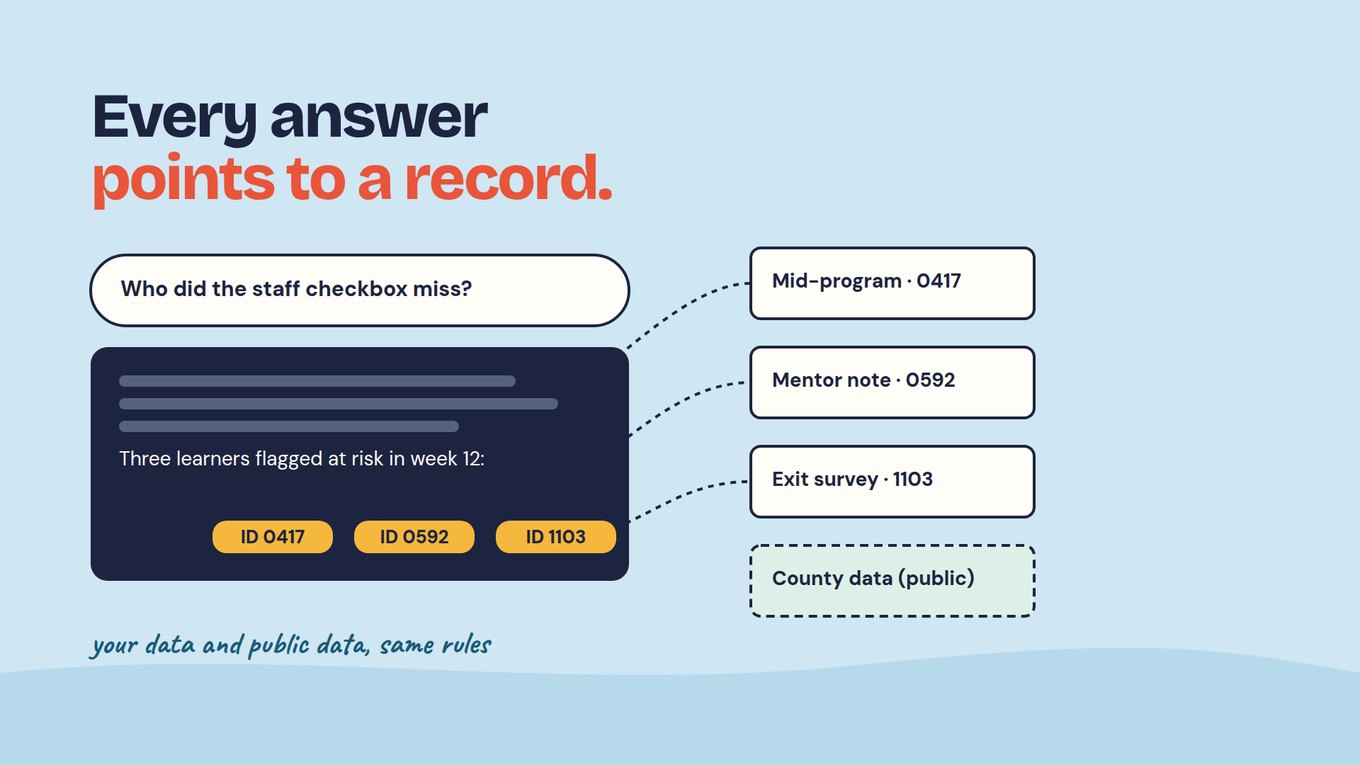
In Sopact Sense, every line of an AI Assistant answer links to a record you can open. With other tools, keep a named export per report and note which rows produced each number.
What should the template say when a number is missing?
Write "MISSING", the metric, why it is missing and when it will be available, in the same place the number would have gone. An estimate typed into a results table reads as a count, and the funder has no way to spot it unless you mark it.
In a demo dataset, a workforce program with training and job placement workflows, an AI first draft found total enrolled and female trainees. It flagged training hours delivered, job placements and starting wage by track as missing, because the placements survey had not been selected as a source. The team added it, asked again, and the draft was complete.
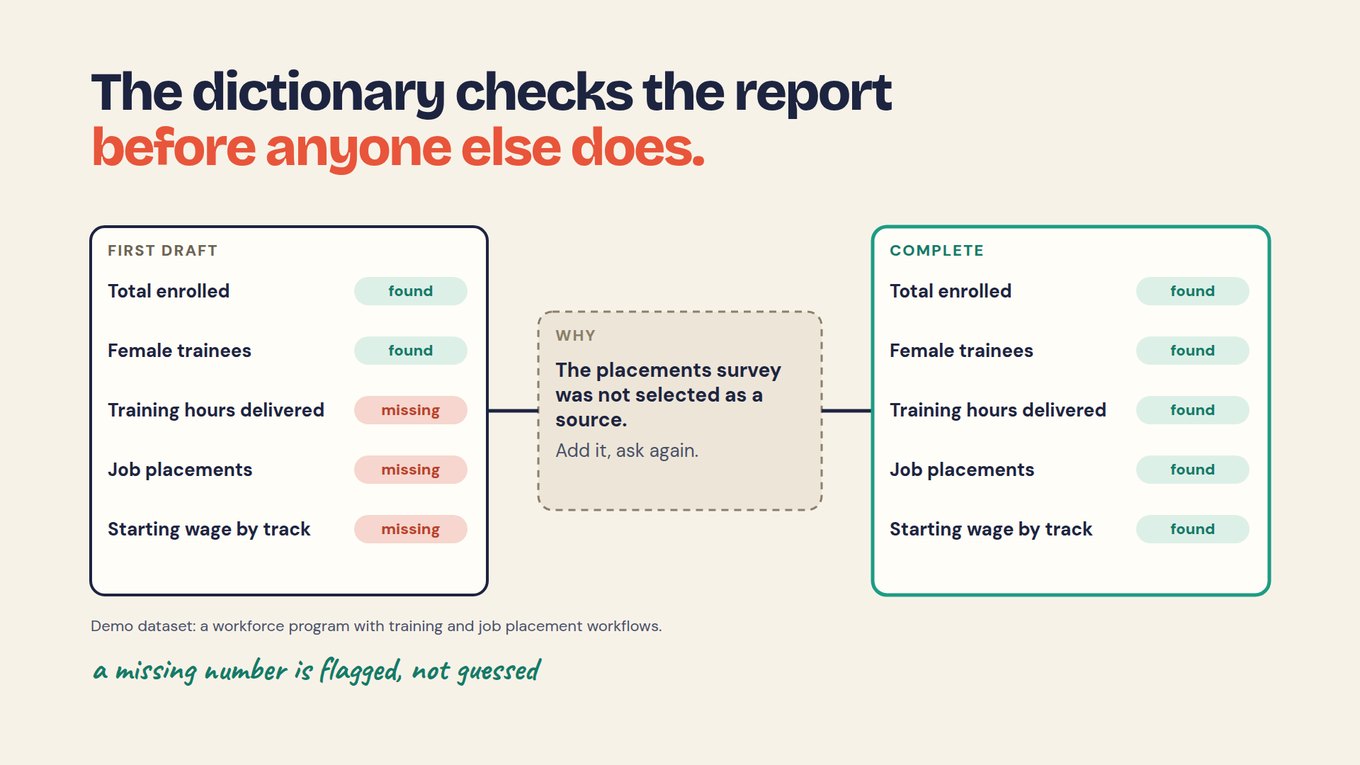
The gap was caught because a list of expected metrics existed. That is why section 4 starts from the agreement and the shared data dictionary, not from whatever the records happen to contain.
How do you fill the template with AI and check it?
Use the report outline, approved source material and the audience’s reporting requirements together. A useful draft states missing information explicitly and keeps the population, period and calculation behind each result visible.
Review the narrative against the evidence before sharing it. Confirm that percentages use the correct denominator, quotations are appropriate to publish and observed changes are not presented as proven causes. Where a result is not yet available, explain when it will be measured.
Sopact connects forms, files and feedback with program context, making analysis available as evidence arrives. That supports recurring questions and later reporting. The final report still needs the team’s judgment about what the findings mean and which decisions they support.
What can a filled template not fix?
A complete template shows what your records hold; it cannot make a weak measure strong or prove the program caused the change. However large the counts in section 3, they describe activity, not change for people.
To say the program caused a rise in placements, you need a comparison group, not a template. Self-reported wages carry their own error, and trainees who skip the follow-up may be the ones who struggled. A person decides what each result means and checks AI output against the record; one participant's story, used with permission, explains a number but never replaces it.
Start with one report on this template
Use the template for the next report that is due, from one funder, before rolling it out everywhere.
- Copy the outline and fill in the header: program, period, reader.
- Paste in every metric from that funder's agreement, with your dictionary's definition.
- Choose the sources the report may use, and strip names and emails from anything shared with AI.
- Fill sections 3 and 4 first, marking each gap MISSING with a date.
- Build the claim table and open the source of every number.
- Write the summary last, from what sections 4 and 6 actually say.
By the end of that cycle you hold a dated gap list, a claim table for every figure, and an outline your next report can reuse unchanged.
Frequently asked questions
How long should an impact report be?
Long enough to answer the reader's questions and let them check the evidence, and no longer. Many funders prefer two pages with a table first, plus an appendix for definitions. Ask each funder, or read their grantee guidance. The seven sections work at any length because each can be a single line.
Is an impact report the same as an annual report?
No. An annual report usually covers governance, finances and activity across the whole organization. An impact report focuses on results for the people a program serves and the evidence behind them, measured against what you agreed to report. The two can share evidence and even sections, but an annual report full of activity counts is not an impact report.
Is there a free impact report template?
Yes. The seven-section outline on this page is free to copy as text into any document or AI tool, and the filled-in sample shows how each section reads. The free ebook How to Write an Impact Report and the report examples library linked above show finished reports to compare with your draft.
Can I include AI-generated text in an impact report?
Yes, as a draft that your team checks. Give the AI only the sources, definitions and agreement for this report, require a source beside every number, and have it mark gaps instead of estimating them. Never let it generate results or quotations. Before sending, open each figure's source and confirm its definition and period match the agreement.
What if outcomes are not available yet?
Report what was delivered, label it as outputs, and put each missing outcome in section 4 with the date it will be available. A line such as "Retained at 12 months: available after the [month] follow-up" is honest and complete. Do not present activity counts as impact, and do not fill the outcome line with an estimate that looks like a count.