play icon for videos

Best Nonprofit Case Management Software: 10 Tools Compared (2026)

Ten nonprofit case management platforms compared by organizational fit, total cost, outcomes, reporting, implementation, and the workflows buyers should verify.

Updated
August 8, 2026
360 feedback training evaluation
Use Case

What is the best case management software for nonprofits?

The best case management software for a nonprofit fits its service model, reporting obligations, security needs, staff capacity, and budget. A useful system should manage intake, client records, case notes, service plans, referrals, outcomes, permissions, and funder reporting without forcing staff to maintain a second record in spreadsheets.

Watch: reading case notes on arrival and keeping every client on one record.

Nonprofit buyers rarely struggle to find features. They struggle to judge fit across tools that serve very different organizations. A small youth program, a multi-site human-services agency, and a Salesforce-centered national nonprofit may need the same feature names but very different configuration, administration, compliance, and reporting models.

Key takeaways

  • Start with fit, not rank. Apricot, ETO, Casebook, Penelope, Salesforce, and Sopact serve different combinations of case operations, administration, outcomes, and intelligence.
  • Use your own workflow in the demonstration. Test intake, one case note, a cross-program client, a safeguarding flag, a 90-day outcome, and a funder report.
  • Price the operating model. Include implementation, configuration, migration, support, staff training, internal administration, and reporting labor alongside the subscription.
  • Do not assume AI equals autonomous decisions. AI may summarize or flag evidence, while authorized staff retain responsibility for safeguarding and service decisions.
  • Sopact is an intelligence and outcome layer, not always a replacement system of record. Keep a specialized operational system when it owns clinical, statutory, billing, or mandated workflows.

How to choose nonprofit case management software in six tests

Test client identity, daily workflow, case-note usefulness, outcomes, reporting, and operating burden before comparing vendor presentations. Client identity asks whether one person can participate in several programs without duplicate records. Daily workflow covers intake, assessments, service plans, referrals, tasks, consent, and closure. Case-note usefulness asks whether staff can retrieve and interpret the narrative evidence they record.

The outcomes test should follow one participant from baseline through 90-day, one-year, and later follow-up where the program requires it. The reporting test should produce a real funder output from the same data without rebuilding definitions in a spreadsheet. The operating-burden test includes who configures fields, maintains permissions, resolves duplicates, trains staff, and changes the system when a grant requirement changes.

A nonprofit should also document exclusions before selecting a platform. Confirm required standards and contractual controls directly with the vendor, including HIPAA, HMIS, FERPA, WIOA, data residency, retention, breach response, and role-based access. A marketing page cannot establish whether a particular deployment is compliant.

How were these ten nonprofit case management platforms selected?

This shortlist reflects the vendors appearing most often in nonprofit and human-services buying questions, the workflows each publicly supports, and the fit a buyer can verify through a real demonstration. The comparison reviews product documentation, current feature and AI positioning, published security or compliance information, public pricing where available, implementation model, reporting scope, and nonprofit operating fit.

Sopact is included in its own comparison, so the method and limitation must be explicit. Vendor pages describe intended capabilities, not an independent guarantee of fit. Public reviews can reveal recurring adoption themes, but review counts and ratings change and should be checked directly. Every finalist should therefore run the same intake, case-note, cross-program identity, outcome, permission, and funder-reporting scenario on the nonprofit’s own data.

Which platform fits a small, midsize, or multi-program nonprofit?

Small nonprofits usually need a narrow implementation, predictable administration, usable forms, and reports that one program manager can maintain. Midsize organizations need cross-program identity, referral coordination, permissions, outcome definitions, and funder reporting that does not depend on one technical employee. Large or multi-site organizations often need integration, formal governance, complex security, enterprise reporting, and a dedicated administrator or implementation partner.

Free or low-cost software can be appropriate for a simple program with low-risk data and limited workflow requirements. The hidden risk is not the missing feature; it is the unsupported operating responsibility. Before choosing a free tool, price backups, access control, migrations, staff turnover, reporting labor, and the cost of leaving. A spreadsheet is inexpensive until the organization must prove who changed a record or reconnect one client across programs.

Route specialized needs to their owning comparisons: workforce case management software, housing case management software, human-services case management software, and social-work case management software.

How much does nonprofit case management software cost?

Nonprofit case management software cost is the subscription plus implementation, migration, configuration, integrations, training, support, internal administration, reporting labor, and eventual data-export cost. Vendors may price by users, modules, records, organization size, implementation scope, or custom contract, so a license quote alone is not a useful comparison.

Ask every vendor for a written three-year cost against one defined workflow and team size. A nonprofit trying to stay under $10,000 per year should confirm which modules, users, support, storage, forms, reports, APIs, security controls, and onboarding services are included. A lower subscription can still cost more when reports require a consultant or one employee becomes the permanent system administrator.

Is free or low-cost case management software right for a nonprofit?

Free or low-cost software can fit a small, low-risk program with a narrow workflow, limited integrations, simple permissions, and no statutory reporting requirement. It is a poor fit when the organization stores sensitive client records, coordinates several programs, needs a reliable audit history, requires complex access controls, or must prove outcomes to multiple funders.

Price the operating responsibility before treating a free tier, spreadsheet, general database, or open-source system as free. Backups, security review, duplicate resolution, upgrades, staff turnover, report maintenance, migration, and exit still need an owner. A governed paid platform is often cheaper than unsupported customization once the program depends on the record.

Which platform is best for outcome and funder reporting?

The strongest outcome-reporting platform preserves one client across programs and reporting periods, connects baseline and follow-up, separates outputs from outcomes, combines quantitative and qualitative evidence, exposes missing follow-up, and traces every material claim to source. Buyers should generate one real grant or funder report during the demonstration rather than accept a dashboard screenshot.

Apricot, ETO, Casebook, CaseWorthy, FAMCare, Salesforce, Exponent, and CharityTracker all position around combinations of outcomes, program reporting, grants, or human-services accountability. Sopact fits when the unresolved need is governed qualitative analysis, longitudinal evidence, and source-cited funder answers. The nonprofit’s reporting definition and workflow decide the fit, not a generic feature count.

How long does implementation take, and how should a nonprofit switch?

Implementation time depends on data quality, workflow scope, permissions, integrations, reporting requirements, staff availability, and whether the platform replaces the system of record or complements it. A narrow evidence-layer pilot is different from migrating every client, program, document, workflow, and statutory report into a primary case platform.

A safe switch starts with a field inventory, persistent identity design, duplicate-resolution rules, historical-record policy, permission map, migration sample, reconciliation report, staff acceptance test, parallel reporting cycle, cutover plan, rollback criteria, and verified export from the previous vendor. Do not retire the old system until record counts, key fields, permissions, open cases, documents, and required reports reconcile in writing.

Storage and search are table stakes; reading the notes is the differentiator

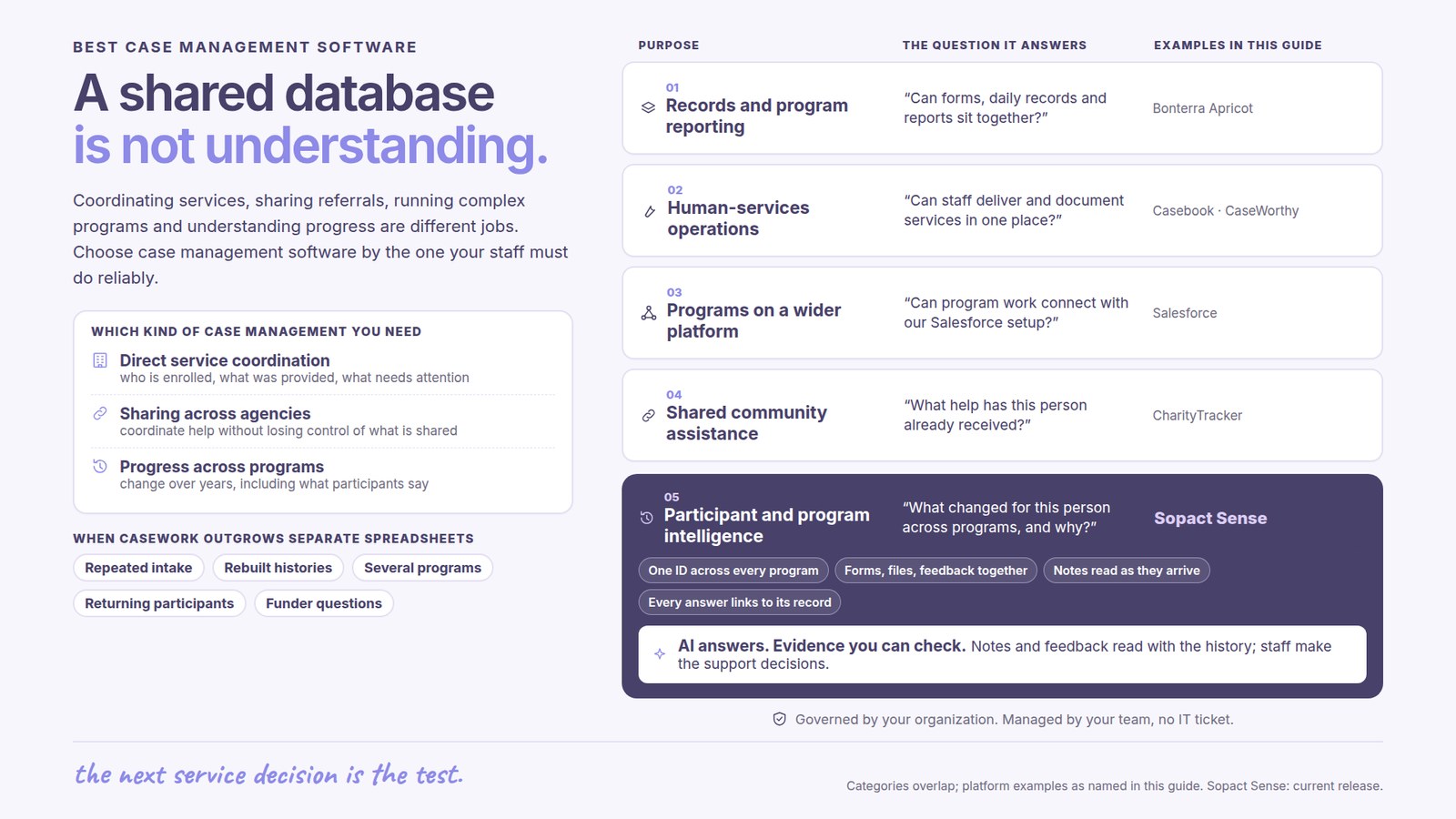
Persistence is not the only thing to shop for. Every serious case management product stores records and supports retrieval. The newer evaluation question is what the system can do with narrative evidence after a note is saved. Bonterra now describes AI assistance within Apricot, and Salesforce continues expanding AI across its platform, so a blanket claim that established systems merely store notes is no longer credible. Buyers should test the exact behavior instead.

Sopact reads each note on the Case Thread the moment it lands, so barriers, safeguarding concerns, and progress surface as they are recorded. That is the practice behind case management software and case management best practices, and it is the capability a feature list built around storage tends to leave out.

The evaluation criteria that actually separate systems

A useful shortlist compares systems on what they do with a note after it is saved. Ask each vendor to summarize a participant history, identify a safeguarding concern under your policy, theme barriers across a caseload, and show progress across reporting periods. Require the exact source sentence behind every material flag and require a human to approve the action.

Sopact answers each from the Case Thread: every note is read on arrival, every flag traces to the sentence that raised it, and progress can be read across the caseload on one record. Compare that intelligence layer against the broader category on case management tools and the workflow on case management process.

The tools teams reach for, and the one test

Buyers often shortlist Apricot, ETO, Casebook, Penelope, Salesforce Nonprofit Cloud, and Sopact. Apricot targets nonprofit and public-sector case management with forms, workflows, records, reporting, and newer AI assistance. ETO is positioned for large nonprofits, agencies, collaboratives, multi-program operations, and advanced reporting. Salesforce offers a broad configurable platform spanning intake, programs, cases, outcomes, fundraising, and other shared data.

Casebook emphasizes human-services casework and outcome reporting. Penelope remains relevant in organizations with established deployments, but buyers should verify current product direction, support, integrations, and migration options. Sopact fits when the primary gap is reading qualitative evidence, connecting it to outcomes, and producing source-cited program or portfolio answers. The decisive test is to run one real client journey and one real funder question through every finalist.

When should Sopact complement rather than replace a case system?

Sopact should complement the existing system when that system reliably owns required operational workflows and the unresolved problem is understanding case notes, outcomes, and patterns across programs. A nonprofit may keep Apricot, ETO, Salesforce, an HMIS, an EHR, or another mandated record system while sending governed, permitted evidence into Sopact for analysis.

Replacement becomes reasonable when the current system is lightly used, duplicative, difficult to change, and not required for billing, clinical documentation, statutory reporting, or partner exchange. The migration decision should follow a field inventory, identity design, duplicate-resolution plan, historical-note policy, permissions review, reconciliation test, and pilot. No comparison table can make that decision on the nonprofit's behalf.

Ten nonprofit case management platforms, compared

Compare platforms by organizational fit, case-note and outcome behavior, reporting and implementation burden, and the boundary where another system is more appropriate. This table was last verified in August 2026 against public product information; confirm packaging, pricing, compliance, and AI behavior directly with each vendor.

10 nonprofit case management tools · Last verified August 2026
PlatformBest fitCase notes, outcomes, safeguardingReporting & implementationNot ideal when
Bonterra ApricotNonprofits needing configurable intake, records, workflows, and outcome reportingCentral participant records, case notes, outcomes, permissions, and newer AI assistance; test source citations and policy-specific safeguardingTiered product; configuration and reporting capacity should be scopedThe team wants a very narrow intelligence layer rather than a primary case platform
ETOLarge nonprofits, government agencies, collaboratives, and complex multi-program reportingParticipant, enrollment, service, assessment, outcome, workflow, alert, and security capabilitiesEnterprise reporting and integrations; expect formal administration and implementationA small team needs a lightweight setup with little internal administration
CasebookHuman-services teams wanting purpose-built casework and outcome trackingIntake, notes, cases, services, and outcome-oriented workflows; test longitudinal and cross-program behaviorEvaluate required reports, migration, integrations, and support with the live workflowHighly specialized statutory or clinical workflows exceed the configured scope
PenelopeOrganizations with an established Penelope deployment and defined human-services workflowsExisting deployments may cover client and service records; verify current AI, safeguarding, and outcome-analysis behaviorConfirm roadmap, support, integrations, pricing, and migration options directlyA new buyer needs a clearly current roadmap or a low-administration launch
Salesforce Nonprofit CloudOrganizations needing a broad configurable platform across programs, cases, outcomes, fundraising, and integrationsIntake, assessments, care plans, referrals, notes, outcomes, permissions, and extensible automationPowerful ecosystem; implementation and ongoing administration are material parts of costThe nonprofit lacks Salesforce capacity and needs a focused, ready-to-run workflow
CaseWorthyHuman-services organizations needing connected multi-program operations, compliance, HMIS options, and outcome reportingUnified client journey, care plans, case notes, workflows, reporting, and Cara AI positioning; verify edition and policy-specific behaviorFormal implementation and administration should be scoped against programs, reports, integrations, and complianceA small low-risk program needs a narrow tool with minimal operational depth
FAMCareHuman-services nonprofits and agencies prioritizing configurable workflows, documentation, reporting, and grant accountabilityClient histories, case documentation, workflow, outcomes, and reporting are central; verify current AI, mobile, and integration scopeConfiguration and reporting design should be demonstrated with the nonprofit’s own requirementsThe team needs a lightweight shared-assistance network rather than configurable case operations
Exponent Case ManagementNonprofits already committed to Salesforce that want a human-services case model on that ecosystemSalesforce-based client, service, and outcome workflows; verify current package, roadmap, support, and AI behaviorSalesforce implementation, licenses, administration, and partner capacity remain part of total costThe nonprofit does not want Salesforce as its operating foundation
CharityTrackerSmaller community nonprofits and multi-agency assistance networks prioritizing ease, referrals, duplication prevention, and funder reportsRemote intake, case notes, outcomes, shared referrals, assistance history, and reportingPublicly emphasizes simple onboarding and reporting; verify permissions, integrations, longitudinal depth, and sensitive-data fitThe organization needs highly specialized statutory, clinical, or enterprise workflows
SopactNonprofits prioritizing qualitative intelligence, longitudinal outcomes, and source-cited funder answersReads permitted notes against a governed framework, links findings to the Case Thread, and keeps humans responsible for decisionsContained pilot and evidence-layer implementation; can complement an existing record systemThe requirement is a clinical EHR, billing system, HMIS, unrestricted CRM, or statutory system of record

The table narrows the shortlist; the nonprofit's own workflow decides it. See the head category on case management software and the nonprofit implementation context on nonprofit case management software.

A case file tells you what was recorded. The Loop tells you in time to act.

A case note written today and read at a quarterly review is a safeguarding signal that waited three months. The value of reading case notes is highest the moment they are written, while a client’s situation can still be responded to. That is the premise of the Loop, Sopact’s method for continuous intelligence: collect clean at the source, analyze the moment a note arrives, improve while there is still time to act.

The Loop is also what makes a case record defensible: every flag and every reported outcome traces back to the note it came from, the standard detailed in Loop traceability, so a safeguarding decision or a funder report rests on the caseworker’s own words.

One method, three moves that never stop

1 · CollectClean at the source; every note, form, and document lands on one client record.
2 · AnalyzeOn arrival; each note read for barriers, risk, and progress, with the line cited.
3 · ImproveIn time to act; a safeguarding signal or a stalling client surfaces the day it is written.

Then the cycle runs again, a little sharper each time. Read the method: the Loop methodology →

Test a shortlist against your own case notes this week

The fastest way to compare case management software is to make each system read your own notes. Export a batch of case notes, then paste the prompts below into Sopact Sense’s Assistant, or reason through them with your team. The arrow above each links the Academy walkthrough with the expected output and tips.

Academy walkthrough → Standardize case management notes

Here is a batch of free-text case notes from several caseworkers: [ATTACH]. Standardize them into consistent, readable records without losing the human detail, tie each to its client on one record, and show me what a system should be able to read from them, so I can judge a case management shortlist on reading rather than storage.

Academy walkthrough → Identify safeguarding concerns in notes

Here is a batch of case notes across my caseload: [ATTACH]. Read each against our safeguarding framework, flag any note that signals a risk with the exact sentence quoted, and rank the flags by severity, so I can test whether a case management system reads notes on arrival or only files them.

Academy walkthrough → Identify common client barriers

Here are case notes and intake forms for my caseload: [ATTACH]. Theme the barriers clients are facing — housing, transport, childcare, documentation — count how many clients each affects, and quote an example for each, so I can see which barriers a case system surfaces automatically and which it leaves buried.

Academy walkthrough → Track caseload progress over time

Here are progress notes for the same clients across several months on the same IDs: [ATTACH]. Show each client’s trajectory against their goals, flag anyone who has stalled or regressed, and surface the note that explains each flag, so I can judge whether a case management system reads progress across the caseload or only case by case.

Learn the how-to in the Academy

Each walkthrough is short and practical: what to do, the prompt to run, the output to expect, and the tips that keep it reliable.

Frequently asked questions

What is the best case management software for nonprofits?

The best case management software fits the nonprofit's service model, reporting obligations, security requirements, staff capacity, and budget. Apricot, ETO, Casebook, Penelope, Salesforce, and Sopact fit different operating models. Sopact is strongest when the unresolved need is qualitative intelligence, longitudinal outcomes, and source-cited funder reporting.

How should I evaluate case management software?

A nonprofit should test each system with its own intake, case note, cross-program participant, safeguarding policy, outcome schedule, and funder report. Sopact recommends six tests: identity, daily workflow, case-note usefulness, longitudinal outcomes, reporting, and total operating burden. Require source evidence and human approval for every material AI flag.

What is the best case management software for a small nonprofit?

A small nonprofit should favor narrow scope, predictable administration, usable forms, strong permissions, easy exports, and reports one program manager can maintain. Sopact can fit a contained outcome-intelligence need, while a purpose-built case platform may fit better when the organization needs full intake, scheduling, referrals, service planning, and statutory workflows.

Is there free case management software for nonprofits?

Free and low-cost tools exist, but nonprofits should price the operating responsibility as well as the license. Access control, backups, migrations, support, audit history, reporting labor, and exit costs still require an owner. Sopact does not position a free tier as a substitute for a governed system handling sensitive client data.

How much does nonprofit case management software cost?

Nonprofit case management software may be priced by users, modules, organizational scale, implementation, or a custom contract. Sopact recommends comparing subscription, migration, configuration, training, support, internal administration, reporting labor, and exit costs. Buyers should request a written three-year cost for one defined workflow because public list prices rarely capture implementation burden.

Which case management software is best for outcome and funder reporting?

The best platform preserves one participant across programs and reporting periods, keeps every indicator defined, combines quantitative and qualitative evidence, and traces a funder claim to its source. Sopact fits when source-cited outcome intelligence is the priority. ETO, Apricot, Casebook, and Salesforce also support outcome reporting in different operating models and should be tested with a real report.

What AI features should nonprofit case management software provide?

Useful AI should summarize participant history, identify policy-defined risks, theme barriers, detect stalled progress, cite the exact source, respect permissions, and leave decisions with authorized staff. Sopact applies those tests on the Case Thread. Buyers should reject demonstrations that cannot show the evidence behind an answer or explain which records the AI was allowed to read.

How does Sopact make a case record defensible?

Every flag and reported outcome in Sopact traces back to the note it came from on the Case Thread, so a safeguarding decision or a funder report rests on the caseworker’s own words rather than an impression.

Does Sopact replace an established case platform?

Not always. Sopact can complement Apricot, ETO, Salesforce, an HMIS, an EHR, or another operational record system when the gap is qualitative analysis and outcome intelligence. Replacement is appropriate only after reviewing required workflows, integrations, compliance, migration, permissions, reconciliation, and the cost of maintaining both systems.

Can Sopact surface safeguarding concerns automatically?

Sopact can flag text that matches a governed safeguarding framework and quote the sentence behind the flag, but authorized staff must inspect the evidence and decide the response. Sopact's Case Thread supports earlier review; it does not replace professional judgment, emergency protocols, mandatory reporting duties, or the nonprofit's safeguarding policy.

How long does nonprofit case management software implementation take?

Implementation depends on scope, migration quality, workflow complexity, integrations, permissions, reporting, and staff availability. A narrow Sopact pilot can test one defined intelligence or outcome workflow before broader adoption. A primary enterprise case system usually requires more discovery, configuration, reconciliation, training, and governance than an evidence layer.

How often does the software read the notes?

Continuously, on arrival. Sopact reads each note as it is written through the Loop methodology, so a barrier or a safeguarding signal surfaces the day it is recorded, not when the case file is next opened.

Next: see the head category on case management software, the category compared on case management tools, the workflow on case management process, the practice on case management best practices, or the nonprofit fit on nonprofit case management software.

Try it in Case Intelligence →