


Course progress and additional readings
Foundations · Lesson 4 of 6
You will make: An owner, reviewer and next-cycle checklist for one workflow, plus the folder, fields and surveys your AI may use.
What does governing the work mean for a small team?
In short: Every step of the data cycle has a named person and a date, every finding is checked before it travels, and what the AI may read is set once, in the workflow, by your program team rather than IT.
Picture the week the spring 30-day follow-up closes: 25 of 40 completers have replied. The delivery manager wants to know by Friday which completers used the skill at work and what stopped the others. Someone suggests pasting the export into ChatGPT. Nobody has said who checks the numbers before they go to partner employers, or whether learners’ names belong in that chat.
On the usual paths those questions get answered by whoever happens to hold the data. Governance here is the answer to a plain question: who decides, and what happens when they leave?
| Path | Who governs it | When that person leaves |
|---|---|---|
| Survey, Excel, ChatGPT | Whoever has the file | The formulas and cleaning steps leave with them; next quarter starts from a fresh export |
| CRM with AI bolted on | The admin or consultant who built it | Nobody dares change a field |
| Data warehouse | Data engineers | Pipelines go stale and questions end back in a spreadsheet |
| Governed at collection (Sopact Sense) | Your program team | Workflows stay self-managed; the next person opens the same records |
Lesson 1 walks through that comparison. This lesson is about running the last row week to week, in two halves: the people (roles, a calendar, a review, an action plan) and the controls (folders, field selection, a scoped assistant). Each fails without the other.
Who owns what on a small team?
In short: Three roles cover most workflows: owner, reviewer and data steward. On a team of two or three, one person may hold more than one, as long as they know which job they are doing at the time.
The steward is the role that usually goes unassigned. On the export-and-paste path it falls to whoever builds that quarter’s spreadsheet, so it changes hands without anyone noticing.
What does one cycle look like?
In short: Four steps, each with a date and an owner: collect, review, act, check. Put them on the calendar when you plan the program, not after the data arrives.
01 · COLLECT
Intake, exit and 30-day follow-up go out on schedule, on the same ID. Owner.
02 · REVIEW
Findings checked within a week of the wave closing. Reviewer.
03 · ACT
One change agreed, with an owner and a check date. Team.
04 · CHECK
Next cohort compared on the same definitions. Reviewer.
One cycle for the training team (illustrative).
Governed at collection, each 30-day answer lands on the learner’s existing record the day it is submitted. Maria’s record (ID 0417) already holds confidence 2/5 at intake and 4/5 at exit, 10 of 12 sessions and her mentor’s note about the mock interview she led; her 30-day answer joins the same thread. An Intelligence Cell reads each open-ended answer on arrival with the prompt you configured, so the review starts from linked, read answers rather than a fresh export.
How do folders give each team its own workspace?
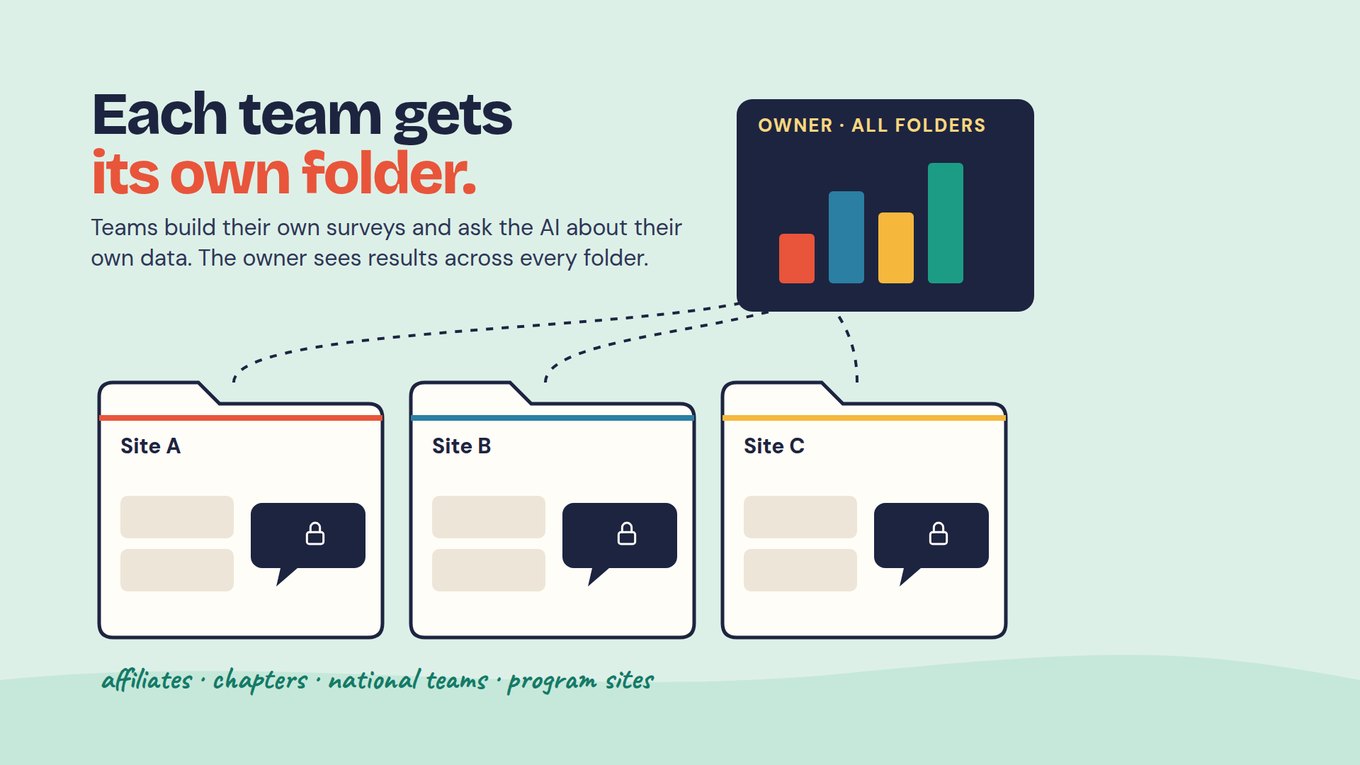
In short: In Sopact Sense each user or role gets a folder. That team builds its own surveys there, and the AI Assistant only sees that folder’s data. The organization owner sees aggregated results across every folder.
For the training team, one folder holds the skills course: intake, exit, the 30-day follow-up and mentor notes, all on the same IDs. If the organization also runs a leadership program with another team, that team gets its own folder and builds its own forms, and neither team’s Assistant can reach the other’s data. The owner still sees results across both without anyone merging files.
The same pattern fits affiliates, chapters, national teams and program sites: each keeps control of its own surveys, and nobody waits on a central administrator to add a question. The combined picture is only meaningful for the few fields every folder defines the same way. If your work spans several sites, Many programs, one picture shows which fields to share and how to combine them. Decide who creates folders and who approves access, and write it on your handover page.
How do you decide what the AI may see?
In short: Two controls. Field selection sets which fields are sent to AI APIs, so names, emails and phone numbers can stay out of the model. And the AI Assistant stays locked until you pick which surveys it may use.
On the export-and-paste path the rule is whatever the person at the keyboard decides that afternoon; a spreadsheet with a name column goes into the chat whole. Governed at collection, the steward decides once, in the workflow. For the training team, name, email and phone are off. The barrier answer, mentor note and confidence score are on, because the question needs them. The ID stays on every answer, so a reviewer can still open Maria’s record; the model does not need her name to read what stopped someone.
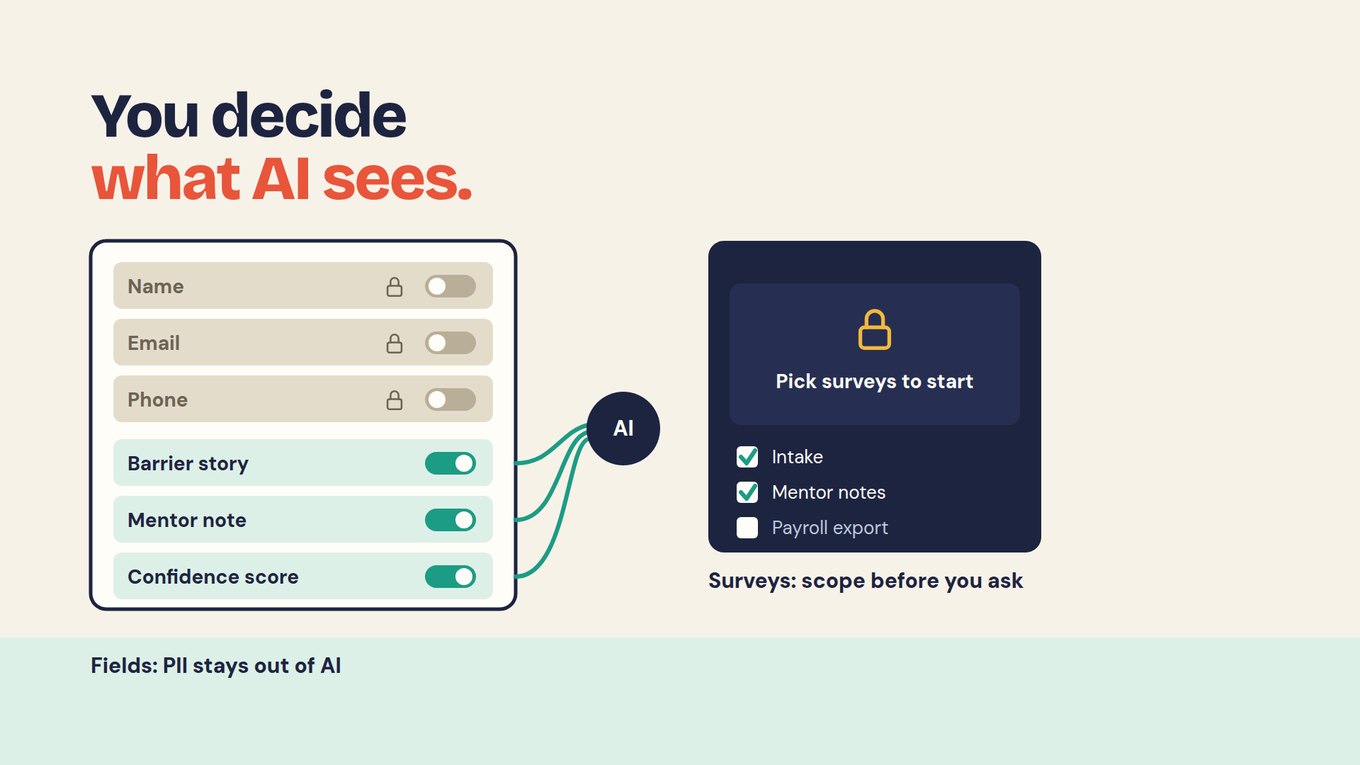
Scope works the same way. Before the delivery manager asks anything, the Assistant is locked. She ticks intake, mentor notes, exit and the 30-day follow-up, and leaves out anything the question does not need, such as a payroll export. The answer can only draw on what was picked, and every line of it links to a record she can open.
Keep a line in your team’s change log for who approved the field selection and scope, and when, and revisit it whenever a form or field is added. Lesson 2’s deep dive on what the AI may see goes further into sensitive fields and small groups.
How do you run the review meeting?
In short: Keep it short and fixed: what came in, what it shows, what is missing and what you will do. Thirty minutes is usually enough for one workflow.
REVIEW AGENDA · THIRTY MINUTES
Training example · fictional
Coverage: 25 of 40 completers replied to the 30-day follow-up (62.5%). The other 15 are unknown and stay that way in every table. Finding: 15 of 25 respondents used the skill at work (60% of respondents); 10 did not.
Explanations: the open answers from the 10 who said No (“What helped, or what got in the way?”) carry the second half of the question. Before they become a theme, the reviewer checks how they were coded and that each theme traces back to the words people wrote. Clean open-ended answers works through the counts. In that worked count, five of the eight non-users who described a barrier mention no time to practise.
Some of the 30-day answers arrived in Spanish. The reviewer asks to see the original beside the working translation for any answer that changed a code. Multilingual feedback shows why one of those answers moved from “no time to practise” to “no chance to use it at work yet”.
For anything the AI produced, the reviewer asks one question: does the record behind this line say what the summary says? If not, the finding waits.
How do you turn a finding into action?
In short: Pick one change your team can make, give it an owner and decide in advance how you will judge it.
Five learners saying they had no time to practise is a question to investigate, not a fact about all 40 completers. The team decides to test a short practice session after the next course, and writes the decision rule before any data comes in.
ONE-PAGE ACTION PLAN · EXAMPLE (ILLUSTRATIVE)
How do you keep the next cycle comparable?
In short: Change the program, not the measurement. Keep the question wording, definitions and timing the same unless there is a good reason, and record it when you change them.
Use the same follow-up question, the same definition of “used the skill” and the same window, day 25 to 35. Record who received the practice session. Keep the spring result as it is; correct errors openly with a note rather than replacing a number. Because the next cohort’s answers arrive in the same workflow, the comparison is ready when the wave closes.
Keep the change log as a team habit: what changed, why, who approved it and from which date, for questions and definitions as well as folder access, field selection and scope. Note the staff time the cycle took; if three people cannot sustain it, simplify before you expand. Change a question safely covers wording changes that would otherwise break the comparison.
Be honest about what the next cycle can show. A higher rate would be encouraging, but it would not prove the practice session caused it: groups and response rates differ, and “used the skill” is self-reported by those who chose to reply. An AI summary of the barrier answers is a reading, not a verdict; check it against the source. The decision belongs to your team. Lesson 5 shows how to define the measure so the comparison is fair.
What should a handover include?
In short: Someone else should be able to run the next cycle from your notes alone.
Keep one page with the roles, the calendar, where each form lives, the current definitions and the change log. Add the governance settings: the folder and who has access, the fields switched off for AI and the surveys the Assistant may use. List any IT dependency, such as organization-wide sign-in rules. Then ask a colleague to walk through the next cycle without asking you anything.
What does owning your own data look like?
In short: No IT ticket for every question, learning all year instead of a report at the end, and answers you can trace back to a record and trust.
Put the two halves together and the training team’s week looks different. The coordinator adds a question to the 30-day form herself. The operations lead sets what reaches the model. The delivery manager asks her question on Tuesday, not after a quarter-end export, and opens the records behind the answer before anything goes to partner employers.
In Sopact Sense today that rests on a persistent ID from the first form, folders, field selection, a scoped Assistant and answers that link to records. A shared place for definitions the Assistant can use is coming soon; until then, keep definitions in your working evidence plan and include them in the question.
ASK ANY TOOL, INCLUDING OURS
Ask to set up two team workspaces on your own data and show what each team’s assistant can and cannot see. Switch off name, email and phone, then ask about open-ended answers: a good answer quotes the words and cites record IDs with no personal details. Ask what the assistant does before any surveys are chosen; a good tool asks you to set the scope rather than guess.
Add this to your plan
Open your working evidence plan ↗
- Name the owner, reviewer and data steward for your workflow. If one person holds two roles, write which one they are using at the review meeting.
- Put the four cycle steps on a calendar, with a date for each.
- Write your governance settings: the folder or workspace that holds the workflow and who can access it, the fields that stay out of AI, and the surveys the assistant may use for your question.
- Write one action plan for your most recent finding, including its owner, check date and decision rule.
Check your reasoning
Coordinator owns the cycle, delivery manager reviews, operations lead stewards definitions and AI settings. One folder; name, email and phone off for AI; Assistant scoped to intake, mentor notes, exit and the 30-day follow-up. The practice session is tested on the next cohort with the same question and window, kept only if use rises and attendance is workable, with a note that groups differ and 15 spring outcomes are unknown.
Questions teams ask
How often should we review our data?
Match the review to the decision. If you decide monthly, review monthly; if each cohort is a cycle, review within a week of each follow-up wave closing. Answers are read on arrival, so you can look earlier, but hold the formal review on a fixed date. A review with no decision attached is usually a sign the cycle is too frequent.
Can one person hold every role?
Yes, on a very small team. What matters is knowing which job you are doing: running the work, checking a finding or changing a definition or AI setting. Where possible, have a second person review findings before they are shared, even on a short call.
Should names and emails ever be sent to the AI?
Rarely, for analysis. Most questions about what people said or how they changed need the answer text, scores and an ID, not contact details. In Sopact Sense, field selection keeps name, email and phone out of what is sent to AI APIs while the ID stays on each answer, so a reviewer can still open the record.
What should go in the change log?
Every change to a question, a definition, a survey wave, folder access, field selection or the surveys the assistant may use: what changed, why, who approved it and from which date. Keep it as a shared document the team owns. The log lets you explain any break in a trend later.
How do we know if an action worked?
Decide in advance what you will check and when, and keep the measurement the same. Compare the next cohort on the same question, window and definition, and report coverage beside the rate. Even then, a change in the numbers is not proof the action caused it; groups and circumstances differ. Lesson 5 covers how to define a measure you can defend.
When do we need IT help?
Less often than on the other paths: forms, folders, fields and assistant scope are managed by the program team. You may still need IT for organization-wide sign-in or security policies, or for connecting other systems. Record those dependencies on the handover page.
Deep dives for this lesson
Open one when the lesson raises that question, then come back. Each uses the same training-team example.
- How to Clean Open-Ended Survey Responses Without Losing MeaningCode open-ended answers so every theme stays checkable against the words people wrote.
- How to Analyze Multilingual Feedback and Evaluate SoftwareKeep the source language beside the translation so themes survive and groups stay comparable.
- Cross-Program Reporting: Combine Results Without Losing MeaningEach site keeps its own folder; the few shared fields let the owner see one picture.