play icon for videos

Survey Software: What It Is and How to Choose

What survey software is, the three eras from form builder to analysis-native, and how to choose — starting from the data-model question, not the feature list.

Updated
July 18, 2026
360 feedback training evaluation
Use Case

What is survey software?

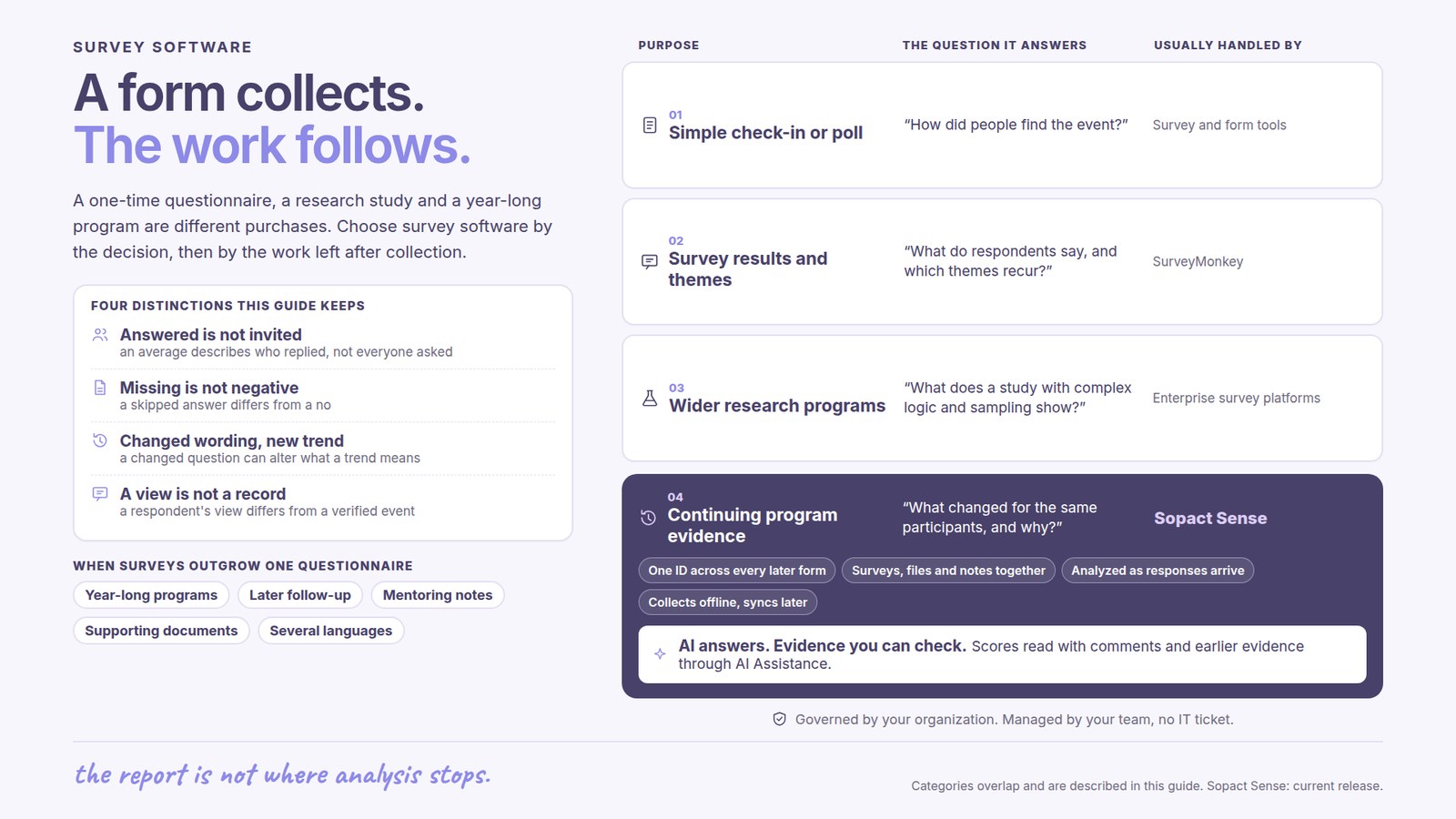
Survey software is a tool for designing questionnaires, distributing them, collecting responses, and reporting on the results. The category now spans three kinds of product: form builders that collect and stop, experience suites that add enterprise distribution and dashboards, and analysis-native platforms that read the open-ended answers and keep each response tied to the person who gave it. The differences that matter are in the data model, not the feature list.

Feature lists converge — every tool has skip logic, templates, and a chart view — so comparing them feature by feature tells you almost nothing. What separates the category is what happens to a response after it is submitted: whether it stays connected to the participant and their earlier answers, or becomes an anonymous row in a spreadsheet. That single question decides whether the software can support a program measured over time, and it is the question this page is built around.

Key takeaways

  • Survey software designs, distributes, collects, and reports — but the products split into three eras with very different data models underneath.
  • Features converge; the data model does not. Compare tools on what happens to a response after collection, not on their feature grids.
  • Sopact calls the buyer test The 500-Answer Test: ask a vendor to show 500 open-ended answers coded to your codebook and tied to the same participants at baseline and follow-up.
  • A form builder is enough for one-off anonymous polls — and cheaper. The category question only matters when you measure the same people over time.
  • Reporting is where most tools stop at counts. Outcome and longitudinal reporting need identity and coded open text that the collection step has to preserve.

How the category evolved — the three eras.

Survey software evolved through three eras, and each product's data model reflects the era it was designed for. The first era was the form builder — Google Forms, Microsoft Forms, Jotform, early SurveyMonkey — built to field a questionnaire quickly. A response is a row in a sheet, and there is no concept of the same person appearing in a later survey.

The second era was the experience suite — Typeform, Alchemer, Qualtrics, Medallia — which added polished distribution, branching, and dashboards for enterprise CX and engagement work. These are capable products, and the analysis and identity features exist, but they typically live in higher tiers configured by a specialist.

The third era is analysis-native. The unit is the participant, not the survey; open-ended answers are coded against a defined codebook as they arrive; and every response stays tied to the person who gave it across every wave. The data model this requires is described on survey analysis, and how the analysis runs on how to analyze survey data.

Three eras of survey software
EraBuilt forWhat the data model does
Form buildersFielding a questionnaire fast and freeA row per submission; no identity between forms
Experience suitesEnterprise CX and engagement programsRich collection; analysis and identity by add-on tier
Analysis-nativeProgram measurement over timeOne participant record; open text coded on arrival

The 500-Answer Test: the one question that separates the eras.

Ask any survey vendor to show you 500 open-ended answers coded against your codebook and tied to the same participants at baseline and follow-up. Sopact calls this the 500-Answer Test, and it separates the three eras in one demo because it exercises the two things a form builder cannot do: read free text systematically and hold identity across waves.

The test works because it targets the data model rather than a feature. A tool can have every question type and still fail it, because passing requires that a response stay attached to a participant record after collection and that open text be treated as codeable data rather than as a comment field. The reporting that sits on top of a passing answer — outcomes rather than counts — is on impact measurement, and the multi-wave version on longitudinal data collection software.

This is also the honest boundary of the argument: if you only ever send one-off, anonymous polls, a form builder is enough and cheaper, and no amount of analysis-native capability will pay for itself. The test matters when you are measuring the same people over time.

How to choose survey software.

Choose survey software by starting from the data-model question, not the feature list: after a response is collected, does it stay tied to the person who gave it, and can the tool read the open-ended answers. Everything else — templates, question types, send volume, integrations — is real but secondary, because those converge across vendors and the data model does not.

The table pairs the questions worth asking a vendor with the answers each kind of tool gives. Bring your own open-ended data to the demo; a tool that reads it live is in a different category from one that promises to. Participant-specific tooling is on impact survey questions, and offline and field collection on offline data collection.

How to choose: ask the data-model question first
Ask the vendorA form builder answersAn analysis-native tool answers
After collection, is a response still tied to the person?No; it becomes a row in an exportYes; it stays on a participant record
Can it code 500 open-ends against my codebook?No; that is a manual projectYes, on arrival and reproducibly
Can it show one person across baseline and follow-up?Only if you match it by handYes; one persistent ID across waves
Is the reporting outcomes, or response counts?Counts and charts of this surveyOutcomes tracked across waves

Software that reports at the end reports too late. The Loop.

The reason the data model matters is timing. A tool that collects now and analyzes later produces its findings after the decision has passed; a tool that reads responses on arrival keeps the analysis level with collection. That is the premise of the Loop, Sopact's method for continuous impact intelligence: collect clean at the source, analyze the moment data arrives, improve while you can still act.

The Loop is also what makes survey reporting defensible. Every figure traces to the responses behind it, and the same codebook returns the same themes twice running. That standard has its own chapter in reliability and reproducibility. The head-to-head ranking of named products is on best survey software.

One method, three moves that never stop

1 · CollectClean at the source; every response tied to a participant.
2 · AnalyzeOn arrival; open text coded, not left in a comment field.
3 · ImproveIn time to act; reporting is outcomes, not counts.

Then the cycle runs again, a little sharper each wave. Read the method: the Loop methodology →

Run the 500-Answer Test on your shortlist

The fastest way to choose is to bring your own open-ended data to each demo and see which tool reads it. Each prompt below pastes into Sopact Sense's Assistant, or reasons through with your team; the arrow above each links the Academy walkthrough that shows the expected output and the tips.

Academy walkthrough → Run the 500-Answer Test

Here are open-ended survey responses and my codebook: [PASTE CODEBOOK + RESPONSES]. Code every response against the codebook, return the theme distribution with counts, three verbatims per theme, and a list of anything unclassifiable marked UNCODED. Do not invent themes. This is the test I will run against every survey tool on my shortlist — show me what a passing answer looks like.

Academy walkthrough → Check whether identity survives collection

Review this survey setup for whether a response stays tied to the participant after collection: [PASTE FIELDS + HOW IT IS DISTRIBUTED]. Tell me whether the same person's baseline and follow-up responses can be joined without a manual match, what key would do the joining, and where it breaks. Return: Can it join? / Key used / Failure points / Fix.

Academy walkthrough → Define outcome reporting, not counts

For this program, define the reporting the survey software actually needs to produce: [PASTE PROGRAM + OUTCOMES]. Separate outcome reporting (change per participant over time) from output reporting (response counts and averages). List which requires identity across waves and which a form builder could produce. Return a table: Report / Outcome or output / Needs identity across waves?

Academy walkthrough → Test the subgroup reporting

Given these survey results and subgroup fields, produce the subgroup reporting a buyer should expect from good survey software: [PASTE RESULTS + SUBGROUPS]. Report the distribution per subgroup, flag gaps beyond chance, and mark cells too small to interpret. Then note which of these a form builder could produce unaided and which needs the responses kept on a participant record.

Learn the how-to in the Academy

Each walkthrough is short and practical: what to do, the prompt to run, the output to expect, and the tips that keep it reliable.

Watch: the shift from software that collects responses to software that reads them — the line between the three eras.

Frequently asked questions

What is survey software?

Survey software is a tool for designing questionnaires, distributing them, collecting responses, and reporting results. The category spans three kinds of product: form builders that collect and stop, experience suites that add enterprise distribution and dashboards, and analysis-native platforms that read the open-ended answers and keep each response tied to the participant. Sopact belongs to the third kind, and its buyer test for telling them apart is the 500-Answer Test.

What is participant survey and assessment software?

Participant survey and assessment software is survey software built to follow the same people over time rather than to field standalone questionnaires — it binds every response to a participant record so baseline, mid-point, and follow-up assessments join automatically. This is the analysis-native end of the category. Sopact is designed for exactly this case, where the question is whether a specific participant changed, not what a one-time sample reported.

What reporting features should survey software have?

Beyond charts and cross-tabs, look for three things most tools lack: coding of open-ended responses against a fixed codebook, one participant identity carried across waves, and outcome reporting that shows change per person rather than counts per survey. Sopact treats these as the reporting that actually answers a funder's questions, and the first two have to be handled at collection — no reporting layer can add them afterwards.

Can survey software analyze open-ended responses?

Form builders and most experience suites store open-ended answers as text for a human to read; analysis-native tools code them against a codebook as they arrive and return a reproducible theme distribution. The difference is whether 500 free-text answers are a dataset or a reading assignment. Sopact anchors the coding to your locked codebook so the same responses coded twice return the same distribution, which is the 500-Answer Test.

What is participant survey and assessment software used for?

It is used wherever a program needs to show that participants changed — workforce training, education, health, and social programs that report to funders. The distinguishing requirement is following the same individuals across baseline, exit, and follow-up, which standalone survey tools cannot do without manual matching. Sopact holds one persistent participant record so the assessment history is a property of the data rather than a reconstruction.

Does survey software work for field surveys and offline data collection?

Good survey software supports offline collection that syncs when a connection returns, which matters for field programs in low-connectivity settings. The harder requirement is that offline-collected responses still bind to the right participant on sync. Sopact's approach to this is on the offline data collection page; the point is that offline capability without identity still leaves you matching records by hand.

If we already have a survey tool, do we need an analysis-native platform too?

If your survey tool fields one-off anonymous polls and you are happy with counts and charts, no — a form builder is enough and cheaper. You need the analysis-native layer when you have to read open-ended answers systematically and follow the same people over time, because those are the two things the earlier eras were not built to do. The 500-Answer Test tells you in one demo which situation you are in.

How is Sopact different from SurveyMonkey, Typeform, or Qualtrics?

SurveyMonkey and Typeform are form builders and experience suites optimized for fielding surveys; Qualtrics is a capable experience suite whose analysis and identity features live in enterprise tiers. Sopact is analysis-native: open text is coded on arrival and every response stays tied to a participant across waves by default. The difference is a data model, not a feature — Sopact stores a participant record where a form builder stores a row per submission.

How do you choose survey software?

Start with the data-model question rather than the feature grid: after collection, does a response stay tied to the person who gave it, and can the tool read the open-ended answers. Bring your own open-ended data to each demo and run the 500-Answer Test. Features converge across vendors, so the model is what actually separates a tool that supports a program measured over time from one that does not.

Next: see the ranked head-to-head on best survey software, or the data model behind the test on survey analysis.