


Does an AI summary prove that the analysis is accurate?
No. Check the included records, definitions, calculation and source passages. Fluent wording is not evidence that the answer is complete or correct.


AI Survey Platforms · BUYER’S GUIDE
AI survey platforms use AI to help design questions, interpret responses or prepare findings. To compare them, ask what the AI reads, how that evidence stays connected and how a person checks the answer.
Compare AI survey platforms by the task: questionnaire design, survey-result analysis, feedback interpretation or connected program intelligence. Sopact’s relevant distinction is how collection, history and supported evidence feed the analysis—not AI availability alone.
✳ DECISION INTELLIGENCE FOR PROGRAMS & PORTFOLIOS
Sopact is an AI-native data collection platform. It connects forms, supported files, interview transcripts, feedback and history so teams can investigate change and decide where to act.
The value to evaluate is AI working with the program’s collected evidence and history—not just helping write questions or summarize one survey.
START HERE
Compare the named product, not a bundle of every feature its vendor sells. Alchemer Survey and Alchemer Pulse serve different functions; verify the products included in a proposed setup.
| Option | Consider it for | Tradeoff to understand | Explore |
|---|---|---|---|
| SopactAI-native data collection | Recurring program and portfolio evidence | Needs an internal data owner and configured relationships; specialist operational functions must be checked separately. | Review ↗ |
| Qualtrics | Research and experience management | Strong research and experience scope; select the products and administration model your program actually needs. | Review ↗ |
| SurveyMonkey | Surveys, feedback and survey-result analysis | Useful for survey-led decisions. Its multi-survey analysis excludes file uploads and contact custom data—not the entire platform. | Review ↗ |
| Alchemer | Surveys and feedback workflows | Survey, Workflow and Pulse address different jobs; compare the proposed combination, not the survey editor alone. | Review ↗ |
| QuestionPro | Survey research with AI assistance | Evaluate the study methods and research workflow first; continuing program records are a separate requirement. | Review ↗ |
NARROW THE CHOICE
For research-led assistance, compare Qualtrics and QuestionPro. For survey reporting or feedback analysis, examine SurveyMonkey and Alchemer’s relevant features. Sopact fits a recurring program workflow where contact-linked responses and supported documents provide context for analysis.
✳ DECISION INTELLIGENCE FOR PROGRAMS & PORTFOLIOS
AI-native data collection.
Better decisions.
Sopact combines configured collection relationships with AI-assisted analysis of written responses and supported files. Intelligent Cell places an analysis result beside its input. The team supplies definitions and reviews interpretation rather than treating a generated answer as a verified finding.
Documented foundations: contact setup , form relationships and supported evidence .
Explore this workflow ↗Identify the people, periods, documents and fields the question requires.
Reconcile totals, then inspect the text supporting a suggested explanation.
Check exceptions, contradictory responses and access boundaries before sharing.
Self-service configuration is not exclusive to Sopact. Compare the full recurring workflow. After setup, can your authorized data owner change a question, connect the next collection stage and check the resulting analysis? Verify the workflow with your team’s permissions. Initial design, training and complex integrations still need an owner.
See how contact fields are configured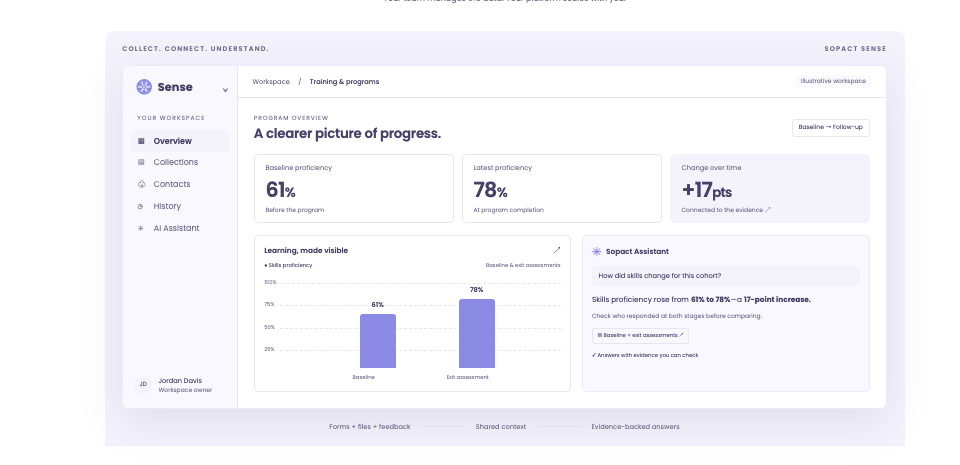
DIRECT COMPARISON
| Decision | What other options offer | Where to evaluate Sopact |
|---|---|---|
| AI-assisted research | QuestionPro offers AI assistance for survey and research tasks. | Sopact’s emphasis is continuing program records and collection context. |
| Multi-source analysis | Qualtrics supports external-data projects; Alchemer Pulse analyzes feedback text. | Sopact’s distinction to evaluate is the complete collection-to-analysis workflow, not exclusive access to text analysis. |
| Calculations versus explanations | AI products can assist with different analytical tasks. | Reconcile numeric results independently from the explanation of why a pattern occurred. |
| Evidence coverage | A summary can omit records or conflicting material. | Test missing outcomes and contradictory responses; inspect what was included and excluded. |
| Access boundaries | Feature availability does not establish your configured access controls. | Check permitted records, assistant retrieval and shared reports separately. |
Claims are bounded to the documented features. Sources and practical limitations are linked in the reviews below. No hands-on parity test is claimed.
THE OTHER OPTIONS
A shorter shortlist is useful only if it keeps the functions you rely on.
Why consider it: Research and experience tools; imported-data projects support analysis of external data.
Check before choosing: Match the proposed products and administration responsibilities to the work you actually need.
Read the vendor’s documentationWhy consider it: Supports cross-survey trends, contact custom data, conversational analysis and themes in written responses.
Check before choosing: AI availability depends on the account and survey. Multi-survey analysis has its own exclusions; these do not establish platform-wide gaps.
Read the vendor’s documentationWhy consider it: Alchemer combines survey and feedback products with workflow capabilities. Its Iris launch also positions it around AI-native customer experience; AI alone is not a Sopact differentiator.
Check before choosing: Confirm Iris availability: its current product page invites waitlist signups. Compare the products actually proposed for your team. Feedback follow-up and a continuing program evidence record are different buying jobs.
Read the vendor’s documentationWhy consider it: Survey and research workflows with AI-assisted tasks.
Check before choosing: Confirm the study methods, audience access and analysis features needed for your research.
Read the vendor’s documentationA CLOSER LOOK
Its value depends on the task it improves: writing questions, interpreting comments or examining evidence across collection stages. Test the actual input and output rather than treating an AI label as proof of a complete workflow.
For a program question, give the assistant permitted earlier responses and supporting material, then inspect the basis of its answer. Separate a verified calculation from a suggested explanation. A useful answer should help the team decide what to check next.
BEFORE YOU SWITCH
Use an approved sample. Let the person who will own the workflow run this test.
BUYING QUESTIONS
No. Check the included records, definitions, calculation and source passages. Fluent wording is not evidence that the answer is complete or correct.
Yes, for a bounded task with an approved tool and suitable data handling. Your team still owns preparation, identifiers, definitions, version control and result checking.
No. AI can help examine evidence and suggest explanations. The team decides what to do and what to collect next.
BRING YOUR REAL WORKFLOW
Bring a form, a supporting file and the decision your team needs to make. See how the collection and analysis fit together.
Prepared by Sopact, a vendor included in this guide. Selection follows the workflow each article addresses. Product statements draw on the linked public documentation; recommendations are editorial judgments, not independent testing. Verify the proposed product, configuration, source handling and controls before purchasing.
Sources reviewed October 21, 2026. Documentation can change. Customer accounts are attributed; illustrations are labeled. The guide does not establish guaranteed accuracy, security certification or a universal implementation timeline.