SurveyMonkey Alternatives for Nonprofits · BUYER’S GUIDE
SurveyMonkey Alternatives for Nonprofits: From Surveys to Program Decisions
SurveyMonkey alternatives for nonprofits include KoboToolbox and SurveyCTO for field collection, CommCare for ongoing frontline programs, and Sopact for connected program data. Alchemer and Qualtrics are options for more demanding survey and research work.
Keep SurveyMonkey for nonprofit feedback when it answers the question well. Compare KoboToolbox or SurveyCTO for fieldwork and CommCare for continuing frontline cases. Evaluate Sopact when staff need participant-linked surveys, supporting files and history in the same program analysis.
By the Sopact team · Revised October 21, 2026 Vendor-authored comparison. Recommendations by use case, not independent product testing.
✳ DECISION INTELLIGENCE FOR PROGRAMS & PORTFOLIOS
AI-native data collection. Better decisions.
Sopact is an AI-native data collection platform. It connects forms, supported files, interview transcripts, feedback and history so teams can investigate change and decide where to act.
For nonprofits, that means connecting participant feedback with intake, follow-up and supporting records, so staff can understand progress without reconstructing the story for every report.
What are you still piecing together after the survey?
A program team may need to know whether the same participants improved, what their interviews reveal and who missed follow-up. Those questions need matching records and relevant history. If the harder problem is collecting reliable data during field visits, evaluate the field workflow first.
✳ DECISION INTELLIGENCE FOR PROGRAMS & PORTFOLIOS
Connect the participant’s story from intake to follow-up.
AI-native data collection. Better decisions.
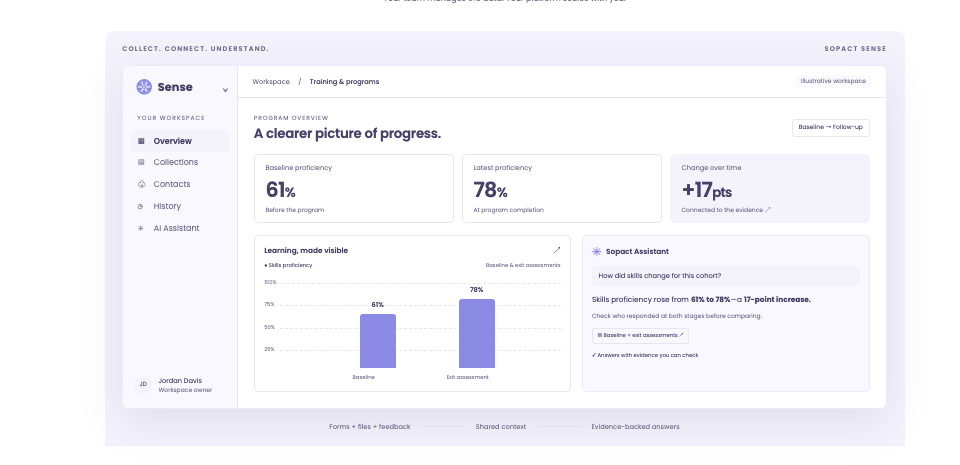
Sopact is an AI-native data collection platform. Connect forms, supported files, interview transcripts and feedback to the relevant contacts and collection stages. Your team can examine scores alongside written explanations, then decide what to ask or do next. After setup, authorized owners can maintain contact fields and form relationships as the program changes. That is the practical value: a continuing evidence workflow your team can run, not another report to assemble.
ILLUSTRATIVE WORKFLOW · NOT A PRODUCT SCREEN OR CUSTOMER RESULT
01
Collect the starting point
A training program records a participant’s goals and baseline assessment.
02
Connect the later evidence
Link follow-up answers and a supported interview file to the same contact, with dates and shared definitions.
03
Choose the next action
Compare matched participants, check missing responses and read explanations before deciding who needs follow-up.
The practical test of self-governance
Self-service configuration is not exclusive to Sopact. Compare the full recurring workflow. After setup, can your authorized data owner change a question, connect the next collection stage and check the resulting analysis? Verify the workflow with your team’s permissions. Initial design, training and complex integrations still need an owner.
See the connected-context illustration from Sopact’s homepageIllustrative interface and example figures, not measured customer results. Explore the platform ↗
DIRECT COMPARISON
Compare the complete workflow
Decision
What other options offer
Where to evaluate Sopact
Survey analysis
SurveyMonkey offers AI-assisted analysis and contact data.
Compare the additional work of bringing supported files and collection history into the same program question.
Fieldwork and repeat visits
KoboToolbox supports linked projects; SurveyCTO has case management and built-in analysis; CommCare maintains continuing cases.
Do not replace a working field system without testing devices, connectivity, synchronization and staff workflows.
Files in cross-survey analysis
SurveyMonkey’s multi-survey analysis excludes File Upload and Custom Data (Contacts), not the whole platform.
Test a form, PDF and follow-up together. Sopact documents open-text and PDF analysis with configured contact relationships.
Different nonprofit audiences
Donor, volunteer and participant surveys serve different purposes.
Connect records only where the program purpose and consent justify continuity.
Program-team ownership
SurveyMonkey customer administration is a real capability.
Compare the whole recurring evidence workflow, including supported files and the next collection stage.
Claims are bounded to the documented features. Sources and practical limitations are linked in the reviews below. No hands-on parity test is claimed.
THE OTHER OPTIONS
Read the fit and the tradeoff
A shorter shortlist is useful only if it keeps the functions you rely on.
SurveyMonkeyDonor, volunteer and participant feedback+
Why consider it: Supports cross-survey trends, contact custom data, conversational analysis and themes in written responses.
Check before choosing: AI availability depends on the account and survey. Multi-survey analysis has its own exclusions; these do not establish platform-wide gaps.
SurveyCTOStructured field research and repeat visits+
Why consider it: Case management organizes repeated field collection. Built-in Data Explorer summarizes fields, explores relationships and opens individual submissions.
Check before choosing: Test whether Data Explorer covers the analysis required; external analysis is an option, not a universal requirement.
AlchemerConfigured surveys and feedback workflows+
Why consider it: Alchemer combines survey and feedback products with workflow capabilities. Its Iris launch also positions it around AI-native customer experience; AI alone is not a Sopact differentiator.
Check before choosing: Confirm Iris availability: its current product page invites waitlist signups. Compare the products actually proposed for your team. Feedback follow-up and a continuing program evidence record are different buying jobs.
Do you need nonprofit surveys or application management?
Feedback collection and application review are different jobs. A satisfaction survey needs a clear questionnaire and usable analysis. A grant application may also need reviewer assignments, scoring and a documented selection decision.
SurveyMonkey Apply is an application-workflow product. If that is the requirement, use an application-focused comparison. Evaluate Sopact separately for connected application evidence and recipient follow-up; do not assume it replaces every review or award-administration control.
ILLUSTRATIVE BUYING SCENARIO · NOT A CUSTOMER RESULT
Donor feedback and participant progress need different records
A nonprofit may run a donor satisfaction survey, volunteer feedback and a participant outcomes program. Donor sentiment can be understood from a survey without connecting it to every program file. Participant progress may require intake, follow-up and interview evidence belonging to the same person.
Putting both workflows in the same category hides the buying decision. Sopact is relevant when staff must investigate the participant’s journey and maintain the next collection themselves. It does not need to replace the donor CRM or every working survey to deliver that value.
BEFORE YOU SWITCH
Test the work. Not just the demo.
Use an approved sample. Let the person who will own the workflow run this test.
Use one program: an intake form, a follow-up survey and a permitted interview transcript or PDF.
Include one missing follow-up and one changed question. Check the matched participants, totals and supporting text.
Have your program owner add the next collection stage. Record what they can do themselves and where they need help.
BUYING QUESTIONS
SurveyMonkey Alternatives for Nonprofits: questions to settle
Which survey tools should a nonprofit compare?
Start with the work: SurveyMonkey for feedback surveys; KoboToolbox or SurveyCTO for field collection; CommCare for continuing frontline cases; Sopact for connected program evidence. Alchemer and Qualtrics fit additional survey or research needs. Google Forms and Microsoft Forms remain options for a simple questionnaire.
Do we need to move every survey?
No. Keep working surveys where they are if a bounded collection workflow meets the need. Agree how approved data moves and who maintains it.
Can we use our earlier SurveyMonkey responses?
Plan a sample import first. Preserve IDs, dates and definitions, resolve mismatches and reconcile totals. Do not assume imports automatically recreate file relationships or earlier analysis.
Watch the four-part data collection seriesStart with part 1. Then follow collection → analysis → change over time → reporting.+
Prepared by Sopact, a vendor included in this guide. Selection follows the workflow each article addresses. Product statements draw on the linked public documentation; recommendations are editorial judgments, not independent testing. Verify the proposed product, configuration, source handling and controls before purchasing.
Sources reviewed October 21, 2026. Documentation can change. Customer accounts are attributed; illustrations are labeled. The guide does not establish guaranteed accuracy, security certification or a universal implementation timeline.