


Is a unique ID enough for longitudinal analysis?
It is a foundation, not the whole method. You also need eligibility, collection dates, comparable measures and rules for duplicates, late responses and missing follow-up.


Longitudinal Data Collection · BUYER’S GUIDE
Longitudinal data collection follows the same people, organizations or other units across time. Software must preserve identity, dates and the meaning of each measure so a change in the data can be interpreted correctly.
Longitudinal software must connect the same units over time and preserve comparable measures. Compare REDCap for research databases, CommCare for frontline cases, SurveyCTO or KoboToolbox for field follow-up, and Sopact for program-linked quantitative and qualitative evidence.
✳ DECISION INTELLIGENCE FOR PROGRAMS & PORTFOLIOS
Sopact is an AI-native data collection platform. It connects forms, supported files, interview transcripts, feedback and history so teams can investigate change and decide where to act.
Connecting successive responses is only the start. Program teams also need the supporting explanations, consistent definitions and missing-follow-up context to interpret change responsibly.
START HERE
5 options. Different jobs. Start with the work your team needs to do.
| Option | Consider it for | Tradeoff to understand | Explore |
|---|---|---|---|
| SopactAI-native data collection | Recurring program and portfolio evidence | Needs an internal data owner and configured relationships; specialist operational functions must be checked separately. | Review ↗ |
| REDCap | Research surveys and study databases | A research-database choice; confirm your institution’s deployment, permissions and longitudinal setup. | Review ↗ |
| CommCare | Continuing frontline cases | Case continuity supports frontline work; mixed-source program analysis is a separate buying requirement. | Review ↗ |
| SurveyCTO | Assigned cases and repeated fieldwork | Field quality and review controls matter. Any downstream analysis must preserve approval status and corrections. | Review ↗ |
| KoboToolbox | Field collection with linked projects | Preserve a working field workflow; linked projects do not by themselves establish analysis of every supporting document. | Review ↗ |
NARROW THE CHOICE
Shortlist REDCap for research databases; CommCare for continuing frontline cases; SurveyCTO or KoboToolbox for repeated field collection. Evaluate Sopact when program teams need linked collection stages and qualitative evidence alongside change over time.
✳ DECISION INTELLIGENCE FOR PROGRAMS & PORTFOLIOS
AI-native data collection.
Better decisions.
Contact-connected collection provides a foundation for linking baseline and later responses. Sopact can bring written responses and supported files into the analysis, helping a team investigate the context behind a result. The team must still define eligibility, time windows and comparable measures.
Documented foundations: contact setup , form relationships and supported evidence .
Explore this workflow ↗Record who started, who qualifies for follow-up and which identifier persists.
Preserve response dates, question versions and missing or late follow-ups.
Separate matched-participant change from averages across different respondent groups.
Self-service configuration is not exclusive to Sopact. Compare the full recurring workflow. After setup, can your authorized data owner change a question, connect the next collection stage and check the resulting analysis? Verify the workflow with your team’s permissions. Initial design, training and complex integrations still need an owner.
See how contact fields are configured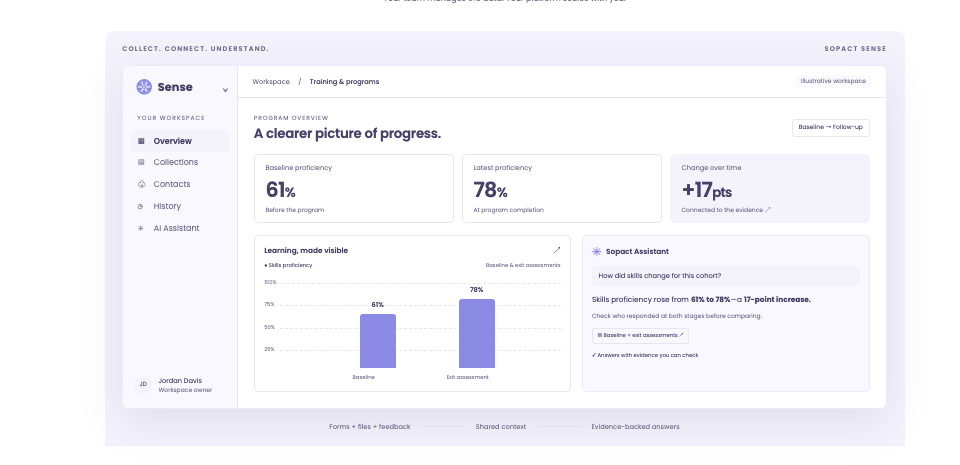
DIRECT COMPARISON
| Decision | What other options offer | Where to evaluate Sopact |
|---|---|---|
| Study operations | REDCap provides configurable research databases, scheduling, audit trails and file uploads. | Sopact’s focus here is recurring program collection with contact context and supported qualitative evidence—not exclusive control over survey design. |
| Repeated field collection | CommCare, SurveyCTO and KoboToolbox offer case or linked-project approaches. | Evaluate how Sopact’s configured contact relationships support the team’s follow-up and analysis cycle. |
| Analysis population | A repeated survey can reach a different respondent group. | Separate matched-participant change from averages across changing samples. |
| Measure changes | A shared field name does not guarantee the same question or scale. | Keep definitions and versions so apparent progress is not a measurement change. |
| Qualitative context | Repeat records establish continuity, not an explanation by themselves. | Review supported written evidence alongside the person’s collection history. |
Claims are bounded to the documented features. Sources and practical limitations are linked in the reviews below. No hands-on parity test is claimed.
THE OTHER OPTIONS
A shorter shortlist is useful only if it keeps the functions you rely on.
Why consider it: Research teams can configure surveys and databases; documented tools include scheduling, audit trails, file uploads and exports.
Check before choosing: Check institutional availability, research governance and the implementation your study needs. Customer control is not exclusive to Sopact.
Read the vendor’s documentationWhy consider it: Case-centered collection supports repeat interactions with people and households.
Check before choosing: Evaluate the field application, synchronization and analysis workflow together.
Read the vendor’s documentationWhy consider it: Case management organizes repeated field collection. Built-in Data Explorer summarizes fields, explores relationships and opens individual submissions.
Check before choosing: Test whether Data Explorer covers the analysis required; external analysis is an option, not a universal requirement.
Read the vendor’s documentationWhy consider it: Dynamic data attachments let child projects use non-media responses from a parent project.
Check before choosing: Linked forms are a building block; define the follow-up and analysis process around them.
Read the vendor’s documentationA CLOSER LOOK
Yes, when repeated measurements and qualitative evidence can be linked to the same permitted participant record and collection period. A score describes a result; an interview or written response may help the team investigate its context.
Check persistent identifiers, consent, follow-up eligibility and missing responses. Test recontact and reminder requirements separately: storing a continuing profile does not establish automated outreach. For sensitive research, verify the study’s governance and deployment requirements before selection.
BEFORE YOU SWITCH
Use an approved sample. Let the person who will own the workflow run this test.
BUYING QUESTIONS
It is a foundation, not the whole method. You also need eligibility, collection dates, comparable measures and rules for duplicates, late responses and missing follow-up.
No, unless the measure explicitly defines that treatment. Report missing responses separately and explain how they affect the analysis population.
Not without a permitted, consistent linking method. Independent anonymous surveys can describe group-level patterns, but they do not establish the history of the same individuals.
BRING YOUR REAL WORKFLOW
Bring a form, a supporting file and the decision your team needs to make. See how the collection and analysis fit together.
Prepared by Sopact, a vendor included in this guide. Selection follows the workflow each article addresses. Product statements draw on the linked public documentation; recommendations are editorial judgments, not independent testing. Verify the proposed product, configuration, source handling and controls before purchasing.
Sources reviewed October 21, 2026. Documentation can change. Customer accounts are attributed; illustrations are labeled. The guide does not establish guaranteed accuracy, security certification or a universal implementation timeline.