


How do you analyze survey data?
To analyze survey data, start from the question the survey must answer, check who responded, clean the data, count closed answers against their base, theme open answers, join scores to reasons, compare groups and waves, and report findings with their limits. A spreadsheet can do all eight. Most errors start upstream: answers not matched to a person, percentages on the wrong base, and comments read apart from their scores.
THE SHORT VERSION
- Write the question and the decision first; they set the base and the groups.
- Report every count against the people who answered it, such as 15 of 25 respondents, and keep non-replies as unknown.
- Theme each open answer once, keep it on the same ID as the score, and make every number open to its answers.
Each step uses one fictional example: a three-person team that trains people for employers asks its 40 spring completers, 30 days on, whether they have used the skill at work and what got in the way.
Step 1: Start with the question and the decision it serves
Write the question the analysis must answer and the decision it will inform before you open the data, because the question sets the population, the base and which answers you read together.
The training team’s question is “Which completers used the skill at work after 30 days, and what stopped the others?” The decision is whether to add a practice session for the next cohort, and the unit of analysis is one person at one point in time.
Note the design too: a one-time voluntary survey describes its respondents, while a matched follow-up can show change within each person.
Step 2: Check who answered and match each answer to a person
Before any percentage, count who was invited and who answered, and confirm that each answer can be matched to the right person across surveys. The training team invited 40 completers and 25 replied at 30 days, a response rate of 62.5%. The other 15 are unknown: not a No, and not a Yes.
Matching is where analysis most often breaks unnoticed: when intake, exit and follow-up sit in separate tools, teams match by name or email and lose people to typos. If each learner gets a unique ID at the first form and later surveys land on that ID, there is nothing to match: Maria (ID 0417) has all three answers on one record.
Write down four counts before moving on: invited, answered, matched and not matched. For anonymous surveys, keep each rating with the comment from the same submission.
Step 3: Clean the data without erasing the blanks
Keep an untouched copy of the raw export, then clean a working copy under written rules: remove test entries, separate true duplicates from repeat waves, and keep every kind of missing answer visible. Record each exclusion and its reason so someone else can repeat the result.
A missing answer is not zero and not No. Keep skipped, don’t know and prefer not to answer as separate codes, check that scales run in the questionnaire’s direction, and confirm that joining two tables has not duplicated rows or dropped people.
Be slow to delete: two people can both write “no time,” so check the ID and timestamp first. If wording changed between waves, log the change and its date before combining results.
Step 4: Count closed answers against the right base
Summarize each closed question with counts and percentages of the people who answered it, and name that base every time. For the training team, 15 of 25 respondents used the skill at work, which is 60% of respondents. It is not 60% of the 40 completers, because 15 of them never answered.
For a rating scale, show how many people chose each point before any average; a median is often the safer summary, and the Likert scale guide goes further. When people can pick several options, percentages can add up to more than 100%, so label them as the share of respondents choosing each option.
Step 5: Theme open-ended answers once, with written definitions
Read a varied sample of open answers, write two to four theme definitions with what each includes and excludes, then apply them once to every answer and store each theme beside its words. Themes rebuilt each time someone asks will not give the same count twice.
The training team’s follow-up asked, “What helped, or what got in the way?” Among the 10 who had not used the skill, the answers fell into three themes: schedule changed (“Moved to the evening shift.”), no chance to practise (“Nobody to try it with yet.”) and manager support (“My manager hasn’t asked me to use it.”).
Count themes in people, not mentions, so one talkative respondent does not count three times, and keep unclear answers in a review pile rather than forcing a fit. The open-ended analysis guide has a longer worked example.
Step 6: Join each score to its reason on the same ID
Put each person’s closed answer and open answer side by side on the same ID, then count each theme against the group it describes. Open answers say why, but only when you know whose reason it is.
The training team’s joint view is one row per respondent: ID, used the skill or not, and their own words. The reasons of the 10 who said No are counted out of 10, never as a share of all 40, and the 15 who did not reply stay in their own unknown column.
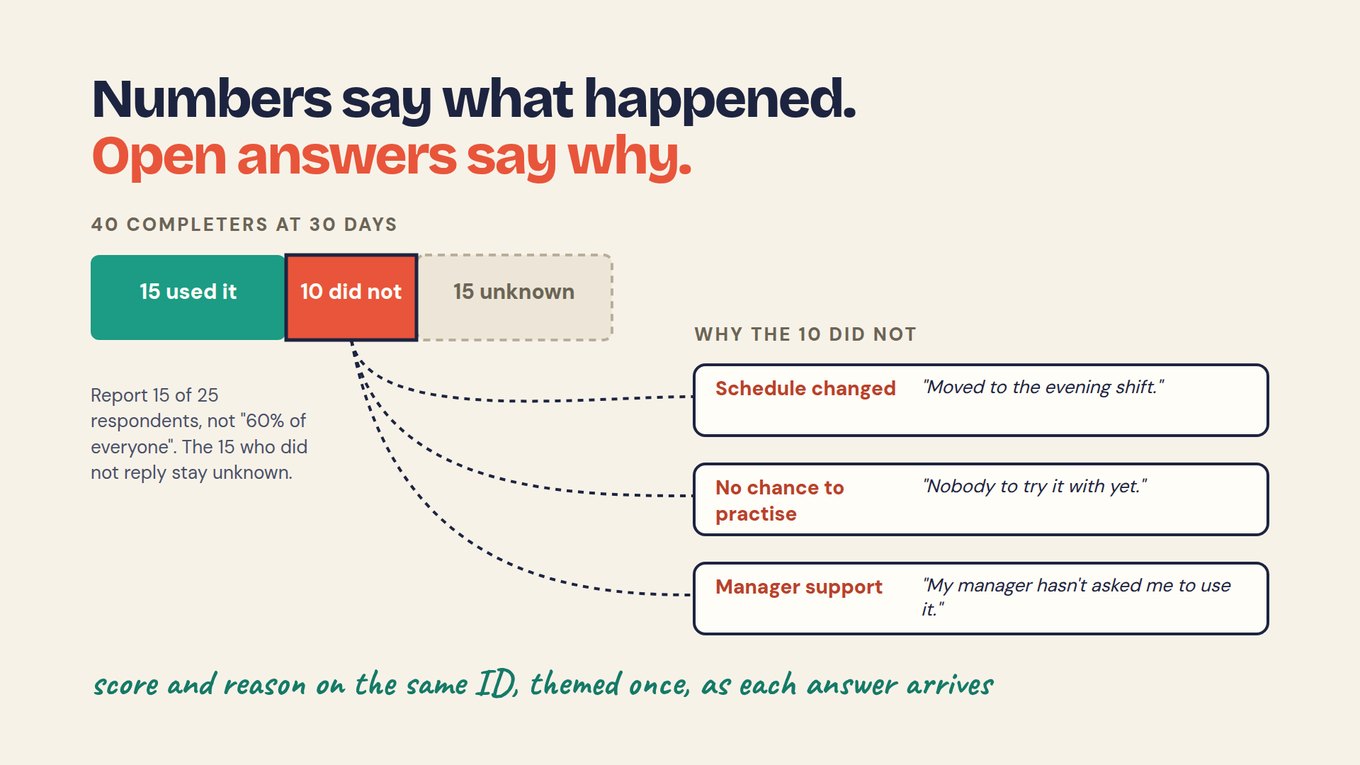
Label each account by who gave it: Maria’s 30-day answer is her own, while her mentor’s note that she led a mock interview is someone else’s view, and both sit on ID 0417 unmerged. The deep dive on connecting quantitative and qualitative survey data builds this joint display.
Step 7: Compare groups and waves carefully
Compare only the groups your question needs, check each group’s base before reading a difference, and measure change within the same people, not between two averages. A gap between two percentages means little when one group has four people in it.
The training team could split its 25 respondents by attendance, such as 10 or more of 12 sessions against the rest. Read groups of a handful as signals, and label exploratory splits as exploratory.
For change over time, pair each person’s answers on the ID: Maria’s confidence went from 2 of 5 at intake to 4 of 5 at exit, +2 for her. Report the spread of individual changes and how many people answered both times; the pre and post survey guide covers the design.
Step 8: Report each finding so a reader can check it
Write each finding as a sentence a reader can check: the result with its base, the reasons in respondents’ own words, what stays unknown, and the decision it supports. Then name who owns the decision.
TRAINING EXAMPLE · FICTIONAL
“15 of 25 respondents used the skill at work within 30 days; 10 did not, and 15 of 40 completers did not reply. Those who did not named a changed schedule, no chance to practise and no push from their manager. We will test a practice session with the next cohort.”
Say the limits once. These answers are self-reported by 25 of 40 completers, and the 15 who did not reply may differ from those who did. A rise from intake to exit does not show the course caused it without a comparison group, and an AI-proposed theme stays a proposal until a person checks it against the words.
See the survey report examples, the impact report guide and report examples for layouts.
Which analysis method fits each survey question?
Match the method to the shape of the question: counts for one closed item, a cross-tab for groups, paired change for the same people over time, and written theme definitions for open answers. Use advanced methods only when they answer a defined question.
Scroll horizontally to see all columns →
| Your data or question | Start with | Check before reporting | Training team example |
|---|---|---|---|
| One closed question | Counts and valid percentages | Base is people who answered? | 15 of 25 respondents used the skill |
| A rating scale | Category counts, median and spread | Categories shown, not only a mean? | Exit confidence on a 1–5 scale |
| Two or more groups | Cross-tab with each group’s base | Each group large enough? | Used the skill, by attendance |
| Same people, two points in time | Change per person on matched IDs | Unmatched people reported? | Maria, 0417: confidence 2 to 4 |
| Different people over time | Comparable population estimates | Wording or recruitment changed? | Spring cohort vs next cohort |
| Open-ended answers | Written theme definitions, applied once | Counted in people, not mentions? | Reasons of the 10 who did not |
| Scores with reasons | A joint display on the same ID | Read as a lead, not a cause? | Three themes among the 10 |
Can you analyze survey data with ChatGPT?
You can use ChatGPT to explore a survey export, but not for a count someone will rely on: the same file pasted twice can return different themes and numbers, and the paste drops the ID that ties each answer to a person.
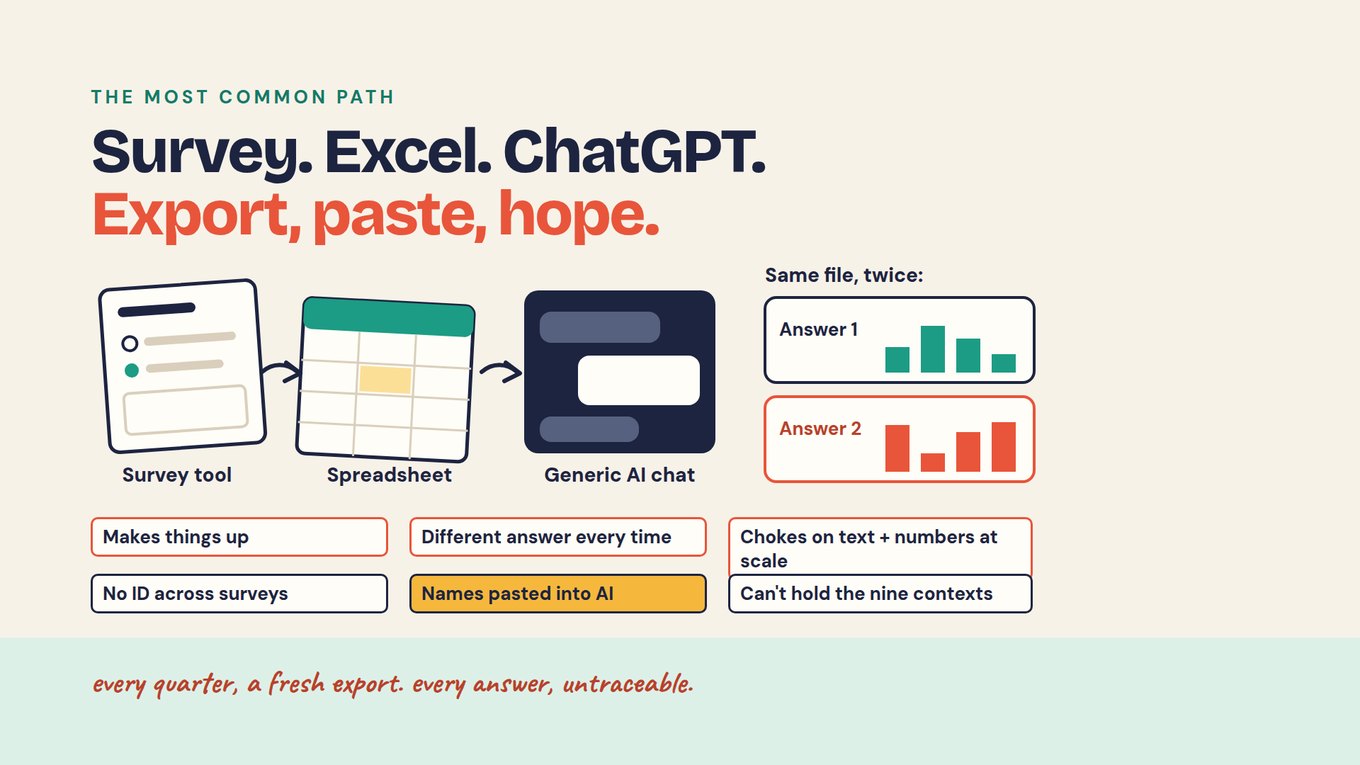
With hundreds of open answers, a chat window summarizes what stands out and skips the rest without saying so. The fix is steps 5 and 6, whichever tool reads the answers: theme each one once, store it on the person’s ID, and count stored themes, as lesson 2 of the free course, AI-native vs bolted-on, explains.
Export, paste, hope
- Export and pasteNames travel along; the ID linking earlier surveys does not.
- Ask againThemes are rebuilt, so the counts can change.
- Report the numberNothing links it to its answers.
Theme once, count stored results
- Theme each answer on arrivalStored beside the words, on the person’s ID.
- Count the stored themesThe same question gives the same count.
- Open any countEach line leads to the records behind it.
In Sopact Sense, each person gets an ID at the first form and an Intelligence Cell reads each open answer on arrival with a prompt your team configures. The AI Assistant stays locked until you choose which surveys it may use, field selection keeps name, email and phone out of the model, and every line of an answer links to a record you can open.
Watch: why open-answer coding stays small
This three-minute Sopact video shows why teams end up coding a sample of open answers instead of all of them: applying and revising a codebook by hand is repeated work. Watch for the moment a definition changes and every earlier answer needs another pass.
Start with one survey this week
Take one survey your team already runs, with a closed question and the open question that explains it, and put it through all eight steps once. One pass shows where your process breaks.
- Write the question, the decision and who will act on it.
- Record four counts: invited, answered, matched to an ID and not matched.
- Write two to four theme definitions before reading answers by group.
- Theme each open answer once, store it beside the answer, and check a sample against the words.
- Build the joint display: themes counted in people against each group’s base, non-replies apart.
- Write one finding with its base, limit, owner and review date.
After the first cycle you should have one linked view per person, written theme definitions, a count with its base and unknowns, and an owned decision.
Frequently asked questions
Can I analyze survey data in Excel or Google Sheets?
Yes: spreadsheets handle counts, percentages, cross-tabs and a documented coding process well. The strain shows when surveys repeat: matching the same people across files by name or email, recoding open answers every quarter, and keeping comments beside their scores. Complex designs may need a statistical package or a platform that keeps each person on one ID.
How do you analyze open-ended survey responses?
Read a varied sample, write two to four theme definitions with what each includes and excludes, then apply them once to every answer and store the theme beside the words. Count themes in people, not mentions. If AI assigns the themes, check a sample against the original answers, especially rare themes and short replies.
How do you analyze Likert scale survey data?
Start with how many people chose each point on the scale, then add a median and, if you explain it, a mean. Report the number who answered each item. For change over time, pair each person’s answers on an ID and look at the spread of individual changes rather than comparing two group averages.
Can ChatGPT analyze survey data?
It can help you explore an export, but a pasted file is a weak base for reporting. The same file can return different themes and counts on two runs, the export drops the ID that links surveys, and names may go into the chat. For a number you will report, theme each answer once and keep every count traceable.
Do comments explain why a score changed?
They suggest explanations and point to what to test next, but they do not prove cause. Only some respondents leave comments, and role, schedule or starting confidence can relate to both the comment and the score. Report a reason that is more common in one group as a lead, with its count and base.
