play icon for videos

360 Feedback Software: Collection vs Synthesis

360 feedback software does two things: collect ratings and synthesize them into development direction.

US
Pioneering the best AI-native application & portfolio intelligence platform
Updated
May 6, 2026
360 feedback training evaluation
Use Case
Use case / Software
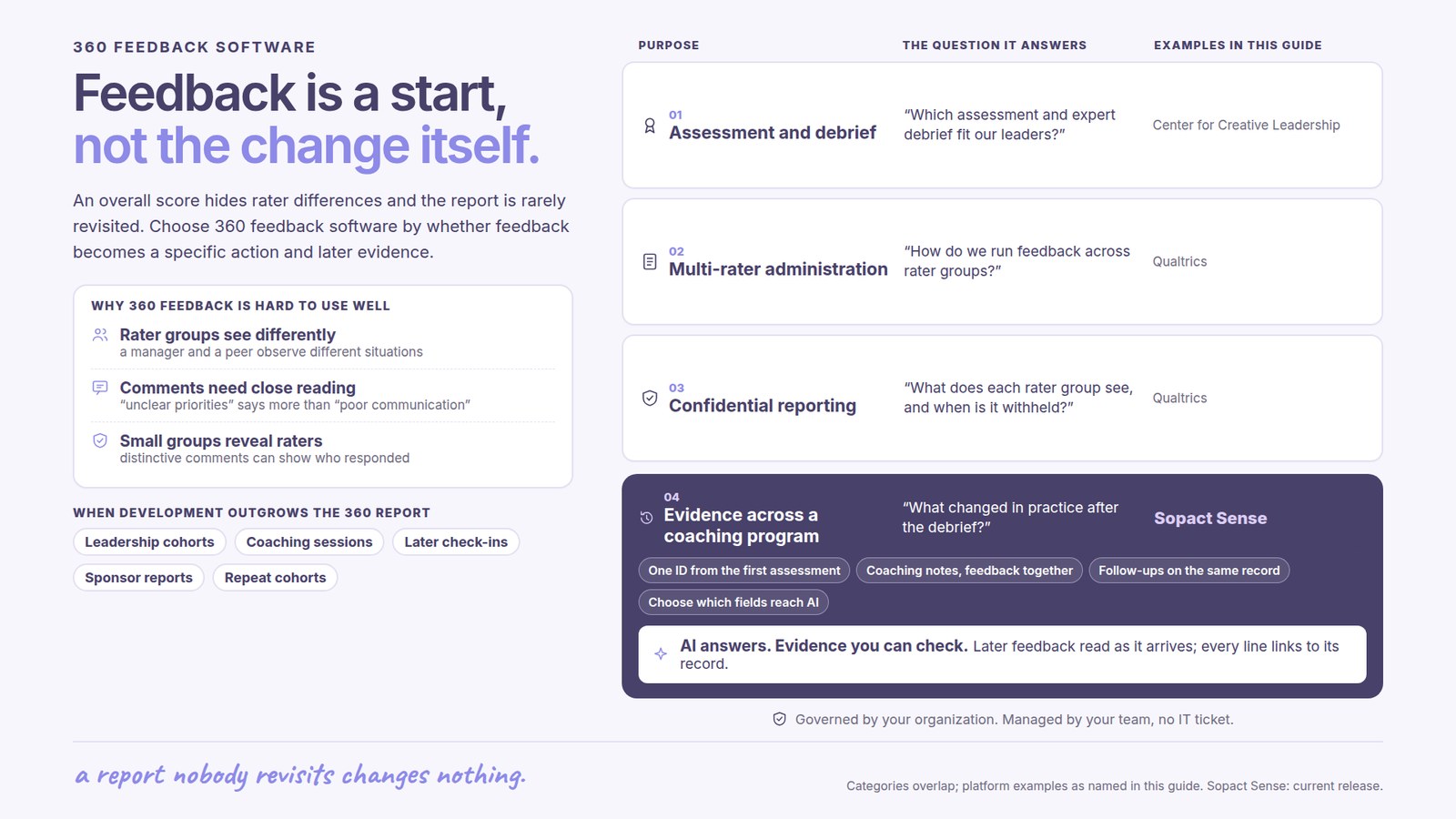
360 feedback software does two things. Most do the first. Few do the second.

The first job is collection: rater nomination, anonymity, reminders, response tracking. The second job is synthesis: reading open-text comments, mapping divergence between groups, deriving priorities, tracking the same subject across cycles. The buying decision should hinge on the second.

This guide explains the two-layer architecture every 360 feedback platform exposes (whether the vendor labels it that way or not), the six buying criteria that predict whether the cycle produces direction or only data, and a side-by-side vendor evaluation from a workforce program lead choosing software for fifty coaches. No prior background needed.

What this guide covers
01The two-layer architecture
02Definitions of software, platform, tool
03Six buying criteria that matter
04A worked vendor comparison
05Decision matrix for fit
06Frequently asked questions
The architecture
The two layers every 360 feedback software exposes

Every 360 platform on the market does collection well enough. The differentiator sits one layer down. Synthesis is what turns ratings and open-text into a development direction the subject can act on without an external analyst doing the reading.

Buying criteria, mapped to layers
Layer 1 / Table stakes
Collection
What every 360 feedback platform must do to run a cycle. Vendors compete here on workflow polish, not on whether the capability exists.
+
Rater nomination workflow
Subject or admin nominates peers, direct reports, manager.
+
Role-based survey distribution
Different question sets per rater group.
+
Anonymity controls
Floor of three raters per group enforced or configurable.
+
Automated reminders, response tracking
Cycle completion management without manual chasing.
+
Aggregated reporting
Average scores per item, raw comment lists.
Layer 2 / Differentiator
Synthesis
What turns 360 collection into 360 development. Few platforms deliver here, and the gap shows up after the first cycle when the report does not produce direction.
+
Qualitative theme extraction by rater group
Open-text grouped into themes, separately for peers, direct reports, manager.
+
Divergence mapping
Self vs external consensus surfaced automatically per dimension.
+
Priority derivation
Three to five development areas ranked from the data, not chosen by the subject.
+
Longitudinal tracking
Cycle 2 connects to cycle 1 for the same subject; movement visible.
+
Cohort-level pattern recognition
What is true across the cohort, not only per subject.

Most 360 feedback software handles Layer 1 and stops there. The synthesis cost gets transferred to internal staff, an external coach, or never happens at all. The buying decision should be made on Layer 2.

Architecture is universal across vendors; capability coverage is not. A platform missing one Layer 2 capability is missing a fifth of what makes a 360 cycle produce direction. Source: Sopact analysis of 360 cycles run on workforce, leadership, and foundation programs, 2024 to 2026.

Definitions
Software, platform, tool: same category, different labels

The 360 software market uses platform, software, and tool as near-synonyms. The functional category is the same. What matters for buying is the two-layer architecture, not the label the vendor chose.

What is 360 feedback software?

360 feedback software is a platform that collects ratings and qualitative feedback about a subject from multiple rater groups, then produces an output report. The software handles rater nomination, survey distribution, anonymity controls, response tracking, and reporting.

Platforms vary widely in whether the report contains real synthesis (themes pulled from open-text, divergence between groups, prioritized development areas) or only raw aggregation (averaged scores per item, comment dumps). The buying decision should be made on synthesis depth, not on collection polish.

What is a 360 feedback platform?

A 360 feedback platform is software that runs the full cycle from rater nomination through report delivery. Platform implies a hosted multi-tenant system rather than installed software, which most modern 360 tools are. The functional category is identical to 360 feedback software.

The buying decision rests on the same two-layer architecture: how well the platform handles collection, and how well it handles synthesis. Vendor labels do not predict capability coverage.

What is a 360 multi rater assessment tool?

A 360 multi-rater assessment tool is the software that runs the assessment process: collecting evaluations from peers, direct reports, manager, and self, then producing a composite report. Multi-rater is the methodological term, assessment is the output, tool is the software.

The category overlaps fully with 360 feedback software and 360 feedback platform. Tool tends to be the marketing label used by smaller, lower-cost vendors targeting individual coaches or small organizations rather than enterprise HR functions.

What is the best 360 feedback software?

There is no single best 360 feedback software because the right choice depends on what the program needs out of the cycle. For HR teams running annual leadership 360s on small executive cohorts, established platforms like Culture Amp, Lattice, or Qualtrics 360 cover the collection layer well and integrate with broader engagement suites. The shortlist for "best 360 degree feedback software" tends to surface those names.

For impact programs running 360s on coaches, mentors, or program staff, where synthesis matters as much as collection and a dedicated talent-operations function does not exist, the buying criterion shifts. The best 360 feedback software in that case is whichever platform turns ratings and open-text into prioritized development direction without analyst time. Sopact Sense is built for this second case.

Adjacent categories
Related software a 360 platform is sometimes confused with
Not 360 software
Performance management software
Performance management platforms (Lattice, 15Five, BambooHR) often include 360 modules but are built around manager-led review cycles. Useful when the 360 sits inside a performance program; thinner on synthesis when it sits inside a development program.
Not 360 software
Generic survey software
SurveyMonkey, Google Forms, Typeform, Qualtrics CoreXM. Adequate for collection if configured carefully. No 360 report generation; the output is a raw response export. Synthesis cost transfers to whoever opens the file.
Not 360 software
Engagement survey software
Culture Amp engagement, Glint, Peakon. Built for organization-wide pulse measurement. Some include 360 modules as an extension; the core capability is anonymous engagement aggregated to team level, which is a different problem.
Adjacent
Coaching platforms
BetterUp, CoachHub, Bravely. The coach reads the 360 report and produces development direction in coaching sessions. The software stack includes 360 collection through partner platforms; the synthesis layer often lives with the human coach rather than the software.
Buying criteria
Six criteria that predict the buying decision

Three are collection-layer table stakes. Three are synthesis-layer differentiators. Most procurement evaluations weight all six equally and end up choosing on the wrong axis. The first three should be pass or fail. The next three should be the choice.

01 / Collection
Anonymity controls
Floor enforced or configurable per group.
Is the minimum-three-raters-per-group floor enforced by the platform, or does it require manual configuration each cycle? Good 360 software treats anonymity as a default, not a setting. Platforms that ship reports with a single rater in a group are not safe for sensitive cycles.
Why it matters: One identifiable rater changes how every other rater answers next cycle.
02 / Collection
Rater group definition
Real roles, not only labels.
Does the platform treat peer, direct report, manager, and self as functional categories that drive different question sets and reporting cuts, or are they string labels on otherwise identical surveys? Rater group is the unit of synthesis; if groups collapse to one bucket, divergence cannot be reported.
Why it matters: No group separation means no consensus comparison.
03 / Collection
Open-text capacity
Comments collected, not throttled.
Does the platform support open-text comments per rater group with no character limits, optional follow-up prompts, and per-dimension comments? Or are comments a single optional field at the end? Open-text density predicts whether the synthesis layer has anything to work with.
Why it matters: Synthesis depends on raw qualitative volume.
04 / Synthesis
Theme extraction by group
Comments grouped, themes named.
Does the platform read open-text comments and produce themes per rater group, or only list comments verbatim? Theme extraction by group is the difference between a coach reading two hundred comments to find patterns and the platform surfacing the patterns directly.
Why it matters: First true synthesis capability. Rare in HR platforms.
05 / Synthesis
Divergence mapping
Self vs external, automatic.
Does the report compare self ratings to external consensus per dimension and surface gaps automatically, or does the subject have to do the comparison manually? Divergence is the most consistently actionable signal in 360 data; not surfacing it leaves the highest-value insight on the floor.
Why it matters: Where to focus comes from gap, not from average.
06 / Synthesis
Longitudinal tracking
Cycle 2 connects to cycle 1.
Does the platform persist subject identity across cycles so that a year-two 360 reads as movement from year one rather than as a fresh snapshot? Most 360 software treats each cycle as independent. Programs running cohorts over multiple years lose the entire developmental signal without longitudinal tracking.
Why it matters: Development is a curve. Snapshots cannot show it.
The matrix
Six buying decisions, each with a working and a broken way

Every 360 feedback platform comparison surfaces six structural choices. The first three are collection-layer trade-offs vendors all handle competently. The last three are where the synthesis gap opens up. Choose deliberately.

The choice
Broken way
Working way
What this decides
Anonymity floor
Minimum raters per group before report releases.
Broken

Floor configurable per cycle, often dropped to 1 or 2 raters when nominations are thin. Reports release with identifiable raters because the deadline pressure beats the safety rule.

Working

Floor enforced at platform level (typically 3 raters per group). Below floor, the group is excluded from the report or merged into "external." No per-cycle override.

Whether next cycle's raters are honest. One identifiable rater this cycle changes every answer next cycle.

Open-text capture
How comments are collected from raters.
Broken

One end-of-survey "anything else?" field, character-limited. Raters skip it. Comments arrive sparse, generic, undifferentiated by which dimension they refer to.

Working

Per-dimension comment prompts with optional follow-up. Raters comment on the dimensions they care about. Open-text volume scales with rater investment, not survey design.

What synthesis has to work with. Sparse comments produce thin themes regardless of platform synthesis quality.

Rater group reporting
How peer, direct report, manager, self appear in output.
Broken

Single aggregated score per item with rater group as a filter view. Subject sees one bar chart. Differences between groups invisible without exporting and pivoting.

Working

Rater group is a primary report axis. Every dimension shows scores by group side by side. Open-text themes pulled per group, not aggregated.

Whether divergence shows up. Aggregation hides the most actionable pattern in the data.

Theme extraction
What the platform does with open-text.
Broken

Comments listed verbatim, optionally with sentiment tags. Subject reads two hundred comments looking for patterns. Coach charges for analysis time. Patterns surface only if someone has bandwidth.

Working

Comments coded into themes per rater group with frequency counts. Subject reads three to five themes from peers, three to five from direct reports, names them, and moves on.

Whether qualitative data is read or stored. Storing is not synthesis.

Priority derivation
Where the development direction comes from.
Broken

Subject reads the report and decides what to focus on. Half the time the focus lands on the strength they already had. The data did not tell them where to go.

Working

Three to five priorities derived from the data: largest divergence gaps, most-cited weakness themes, dimensions below threshold. Subject sees the priorities first, ratings second.

Whether the cycle changes behavior. Self-chosen priorities reflect existing self-image, not the data.

Longitudinal architecture
Whether subject identity persists across cycles.
Broken

Cycle 2 is a fresh data set. Subject ID rotated, comparison only possible by manual export and join. Movement on dimensions invisible without analyst time.

Working

Persistent subject ID across cycles. Cycle 2 report opens with movement on each dimension since cycle 1. Theme drift across cycles surfaced automatically.

Whether 360 measures development or only state. Snapshot programs cannot show growth.

Compounding effect

The first three decisions cost roughly the same to get right or wrong. The last three compound. A platform that derives priorities (5) from divergence mapping (6 from sister page) using themes (4) extracted from rater-group-separated open-text (3) produces a different report than a platform that does any one of these and not the others. Buy on the synthesis stack, not on individual capabilities.

Worked example
A workforce program lead chooses 360 software for fifty coaches

Real procurement scenario, abstracted to remove vendor names where the comparison is not the point. The lead has narrowed to two finalists. The choice between them shows how the two-layer architecture maps to a real buying decision.

We have fifty coaches across three regions, each running cohorts of about thirty participants per quarter. Board wants quarterly 360 reports on every coach. We have one program manager and no analyst. The two platforms we shortlisted both demo well on collection. Vendor A is the established HR 360 tool the board recognizes. Vendor B is newer, half the price, and the synthesis layer is built in. We need the report to land on the coach's desk with three priorities already named, not a hundred-page PDF the program manager has to read first.

Workforce program operations director, mid-procurement evaluation, summer cycle.

The two evaluation axes, bound at the moment of buying
Axis 1 / Collection

Both platforms cover rater nomination, anonymity, role-based distribution, and reminders. Collection is functionally tied.

Bind
at decision
Axis 2 / Synthesis

Vendor A produces aggregated scores plus comment lists. Vendor B groups themes by rater type, maps divergence, derives priorities.

What each platform produces from the same fifty 360 cycles
Synthesis-built-in platform produces
Per-coach development priorities

Three priorities derived from the data: largest divergence gap, most-cited weakness theme, dimension below cohort threshold. Coach reads the priorities first, scores second.

Themes pulled per rater group

Participants say one thing, peer coaches say another, supervisor says a third. Three theme blocks, frequency counted, ready to read.

Cohort patterns surfaced automatically

Across all fifty coaches, which themes recur. Program-level intervention candidates surface from coach-level data without separate analysis.

Cycle 2 connects to cycle 1

Quarterly cadence becomes a development trajectory. Coach who scored 2.9 on listening in Q1 and 3.4 in Q2 sees the movement, not two snapshots.

Established HR platform produces
Per-coach raw report

Aggregated scores per dimension, comments listed verbatim. Twenty-page PDF per coach. Program manager prints fifty PDFs and starts reading.

Comments stored, not synthesized

Two hundred comments per coach, undifferentiated by rater group in the report view. Pattern recognition transferred to whoever opens the file.

No cohort view

Each report self-contained. Cohort patterns require export to a separate tool, manual coding, eighty hours of analyst time the program does not have.

Cycle 2 starts fresh

Subject IDs rotate. Comparing Q1 to Q2 requires manual join in a spreadsheet. Movement signal lost in the data plumbing.

Why one is buyable for this program and one is not

Both platforms cover collection. The difference is fifty PDFs the program manager has to read versus fifty reports that arrive with priorities named. The buying decision is not about features. It is about whether the synthesis cost stays inside the platform or transfers to staff that does not exist.

Applications
Three program shapes, three different software answers

The right 360 feedback platform depends on what the program needs from the cycle. Three contexts surface three different fits, and each context predicts which buying criteria carry the most weight.

01
Enterprise leadership development
Annual 360 on 200 to 2,000 leaders. Dedicated talent operations function. HR-suite integration matters.

Typical shape. Annual or biannual cycle running on 200 to 2,000 leaders. Talent operations function owns the cycle, with budget for analyst time. Cycle ties into broader engagement, performance, and succession workflows. HR information system integration is a procurement requirement; security review is mandatory.

What breaks. Established HR 360 modules cover collection at scale and integrate cleanly with the HRIS. The synthesis layer is typically thin: aggregated scores by competency, comment lists. The talent ops function fills the gap with internal analysts, external coaches, or both. Cost per leader balloons.

What works. When budget supports the analyst layer, established platforms (Culture Amp, Lattice, Qualtrics 360) are the right fit because procurement, security, and integration are the binding constraints. The synthesis cost shows up on a different ledger and is treated as program overhead.

A specific shape

A 1,200-leader annual 360 at a global financial services firm. Talent ops runs the cycle through Culture Amp, exports raw data to internal data team, who code themes for the top 200 leaders quarterly. Coaches use the synthesized output. Cost runs roughly $400 per leader, mostly in synthesis labor.

02
Workforce training cohorts
Quarterly 360s on coaches and program staff. No analyst function. Synthesis must arrive built-in.

Typical shape. Workforce training, sector training, or apprenticeship programs running cohorts of 30 to 100 participants per quarter. 360s run on the coaches who lead the cohorts, sometimes also on program staff. Cycles repeat every quarter. Program manager owns the cycle and is also responsible for everything else.

What breaks. Established HR 360 platforms assume a talent ops function that does not exist. Reports arrive as raw aggregated PDFs the program manager cannot read for fifty coaches in time to act before the next cycle. Synthesis cost transfers to the coach reading their own report, which produces no developmental movement.

What works. Synthesis-built-in platforms close the gap. The report arrives on the coach's desk with three priorities already named. Cohort patterns surface across coaches without separate analysis. Quarterly cadence becomes a development trajectory rather than a stack of disconnected snapshots.

A specific shape

A workforce training organization running 50 coaches across 3 regions, quarterly cycles, one program manager. Vendor selection moves from a $30,000-per-year established HR platform plus 80 hours of quarterly analyst time toward an impact-platform with synthesis built in. Total cost per coach drops; report quality rises.

03
Foundation portfolio assessment
Annual or biannual 360 on grantee organizations from program officer, peer grantees, technical advisors.

Typical shape. Foundation runs annual or biannual 360 on grantee organizations, with the grantee leadership team rated by the program officer, peer grantees in the same portfolio, and the technical advisor. Output feeds renewal decisions and capacity-building plans. Five to fifty grantees in scope per cycle.

What breaks. Most 360 platforms are built for individuals as subjects, not organizations. Generic survey software collects the data but produces no usable report. Grants management platforms (Submittable, Foundant) run application workflows but lack 360 architecture. Foundation staff stitches together the synthesis manually each year.

What works. Multi-rater platforms that treat any subject (person, program, partnership, organization) as the unit of analysis fit the foundation case. Synthesis surfaces what program officer says vs what peer grantees say vs what the technical advisor flagged, separately. Renewal conversations move from "tell me how you're doing" to "here is the multi-perspective picture."

A specific shape

A 25-grantee foundation portfolio. Annual 360 cycle. Each grantee leadership team rated by program officer, two peer grantees, and one technical advisor. Synthesis-built-in platform produces a 4-page report per grantee with priorities, themes by rater type, and divergence from self-assessment. Renewal conversations get sharper. One staff member runs the cycle in 6 weeks.

A note on vendors
Culture Amp Qualtrics 360 Lattice 15Five SurveyMonkey Workday Sopact Sense

Established 360 feedback software handles collection well. Rater nomination, anonymity controls, role-based distribution, response tracking. The architectural gap is the synthesis layer: reading open-text by rater group, mapping divergence between self and external consensus, deriving priorities from the data, persisting subject identity across cycles.

Sopact Sense closes the gap. The platform treats theme extraction by rater group, divergence mapping, priority derivation, and longitudinal tracking as default report content rather than analyst work. Programs without dedicated talent-operations functions get a 360 report that reads as development direction, not as a data dump.

FAQ
360 feedback software questions, answered
Q.01
What is 360 feedback software?

360 feedback software is a platform that collects ratings and qualitative feedback about a subject from multiple rater groups, then produces an output report. The software handles rater nomination, survey distribution, anonymity controls, response tracking, and reporting. Platforms vary widely in whether the report contains real synthesis (themes pulled from open-text, divergence between groups, prioritized development areas) or only raw aggregation (averaged scores per item, comment dumps).

Q.02
What is the difference between 360 feedback software and a 360 feedback platform?

The terms are used interchangeably in the market. Software vendors call themselves platforms; platform vendors describe themselves as software. The functional definition is the same: a system that runs a 360 cycle from rater nomination through report delivery. Buyers should ignore the label and evaluate the two-layer architecture: collection capabilities (rater management, anonymity, reminders, reporting basics) and synthesis capabilities (qualitative coding, divergence mapping, narrative generation, longitudinal tracking).

Q.03
What features should 360 feedback software have?

Collection layer: rater nomination workflow, role-based survey distribution (peer, direct report, manager, self), anonymity floor (typically minimum three raters per group), automated reminders, response tracking, and basic aggregated reporting. Synthesis layer: qualitative theme extraction from open-text comments grouped by rater type, divergence mapping between self and external consensus, prioritized development areas derived from the data, and longitudinal tracking across cycles. Most platforms deliver the collection layer well. The synthesis layer is where the buying decision should be made.

Q.04
What is the best 360 feedback software?

There is no single best 360 feedback software because the right choice depends on what the program needs out of the cycle. For HR teams running annual leadership 360s on small executive cohorts, established platforms like Culture Amp, Lattice, or Qualtrics 360 cover collection well. For impact programs running 360s on coaches, mentors, or program staff where synthesis matters as much as collection, the buying criterion shifts to whether the platform can group themes by rater type, surface divergence, and produce prioritized development direction without manual analyst time. Sopact Sense is built for this second case.

Q.05
How much does 360 feedback software cost?

Pricing varies widely. Self-serve survey platforms with 360 templates run from a few hundred to a few thousand dollars per year. Established HR-suite 360 modules (Culture Amp, Lattice) typically price per employee per month, often bundled into broader engagement or performance suites, with annual contracts in the thousands to tens of thousands depending on headcount. Impact-focused platforms with synthesis built in price closer to the impact-measurement market, typically per-program or per-cohort. The honest cost calculation includes analyst hours: a platform that produces only raw aggregation transfers the synthesis cost to internal staff or external consultants.

Q.06
What is the best 360 feedback software for small teams?

AI 360 feedback tools for small teams typically reduce the cost barrier two ways: smaller minimum cohort sizes and automated synthesis that removes the need for an internal analyst. For teams running their first 360 cycle on a cohort of 10 to 50 subjects, the buying criterion is whether the platform produces a usable development report without external help. Established HR 360 platforms tend to assume a dedicated talent operations function. Impact and AI-native platforms tend to assume the program lead is also the analyst.

Q.07
What is 360 multi rater assessment tool?

A 360 multi-rater assessment tool is the software that runs the assessment process: collecting evaluations from peers, direct reports, manager, and self, then producing a composite report. Multi-rater is the methodological term; assessment is the output; tool is the software. The tool category overlaps fully with 360 feedback software and 360 feedback platform. Buying criteria are identical: collection capabilities for the cycle and synthesis capabilities for the report.

Q.08
What is a 360 feedback platform?

A 360 feedback platform is software that runs the full cycle from rater nomination through report delivery. Platform implies a hosted multi-tenant system rather than installed software, which most modern 360 tools are. The functional category is the same as 360 feedback software. The buying decision rests on the two-layer architecture: how well the platform handles collection and how well it handles synthesis.

Q.09
How does Sopact Sense compare to other 360 feedback software?

Sopact Sense differs in the synthesis layer. Most 360 feedback software delivers collection plus aggregated reporting (scores per item, raw comment lists). Sopact Sense delivers collection plus four synthesis capabilities: qualitative theme extraction from open-text grouped by rater type, divergence mapping between self and external consensus, automatic priority derivation from the largest gaps and most-cited themes, and longitudinal tracking across cycles for the same subject. The collection layer is comparable to other platforms; the differentiator sits in what the report contains by default rather than after analyst work.

Q.10
Can I use SurveyMonkey or Google Forms for 360 feedback?

Yes for collection, no for synthesis. SurveyMonkey, Google Forms, Typeform, and similar generic survey tools handle the collection layer adequately: rater-specific links, anonymity controls if configured, response tracking. They do not produce 360 reports. The output is a raw response export. Some teams build pivot tables to aggregate scores by rater type; almost no team builds a synthesis layer. The result is a 360 cycle that produces data but not direction. The synthesis gap is why specialized 360 software exists.

Q.11
What 360 feedback software comparison criteria matter most?

Six criteria predict whether the buying decision will hold up after the first cycle. Anonymity controls (whether the floor is enforced or configurable). Rater group definition (whether peer, direct report, manager, self are real roles or only labels). Open-text handling (whether the platform reads comments or only stores them). Divergence reporting (whether the platform compares self to external consensus automatically). Priority derivation (whether the report tells the subject where to focus or only shows scores). Longitudinal tracking (whether cycle 2 connects to cycle 1 for the same subject). The first three are collection-layer table stakes. The last three are where most platforms fall short.

Q.12
Do I need separate 360 feedback software or can my HRIS handle it?

HRIS systems with built-in 360 modules (Workday, BambooHR, others) handle collection adequately and integrate with existing employee records, which simplifies rater nomination. The synthesis layer is typically thin or absent. The choice depends on whether the 360 cycle is a compliance step (annual review feeds, manager development trees) or a developmental investment (leadership cohorts, coach evaluation, program improvement). Compliance-flavored cycles can stay inside the HRIS. Developmental cycles benefit from specialized software where the report does work the HRIS report does not.

Q.13
What 360 degree feedback platform should a leadership development program use?

For a leadership development program, the platform decision turns on three questions. Will the same subject be 360'd more than once (longitudinal tracking matters)? Will the program lead need to act on the report directly or pass it to an executive coach (synthesis depth matters)? Will the cohort be small enough that internal analysis is unrealistic (automation matters)? When all three answers are yes, the platform decision moves toward synthesis-heavy software. When the cohort is large and a dedicated talent operations function exists, established HR 360 platforms tend to be sufficient.

Related guides
Sibling pages on 360 measurement and survey methodology

Each guide takes a different angle on the same measurement question. Three are part of the 360 cluster directly. Three are upstream methodology pages a 360 program lead works with regularly.

Test the synthesis layer on your data
Bring a 360 export. See what synthesis-built-in produces.

A working session, not a sales call. Bring an anonymized export from your current 360 platform (or a sample cycle if you have not run one). We run it through the synthesis layer and walk through what the report looks like with priorities derived, themes grouped by rater type, and divergence mapped. No procurement decision required afterward.

Format

60 minutes, screen-share, working session. No deck.

What to bring

An anonymized 360 cycle export, or a sample data structure from a planned cycle.

What you leave with

A view of what the report would look like with synthesis built in, against your data.