


Own routine changes
Authorized staff can maintain collection design after setup, with support when needed.


SurveyCTO Alternatives · BUYER’S GUIDE
Field research platforms help teams collect, supervise and review study data. SurveyCTO alternatives should be compared on offline work, quality controls, repeat visits and the analysis your team needs after a submission is accepted.
Compare ODK or KoboToolbox when replacing field collection, and CommCare when repeated visits are part of continuing casework. Sopact belongs on the shortlist when approved research records need to connect with documents, transcripts and program history for recurring decisions.
✳ DECISION INTELLIGENCE FOR PROGRAMS & PORTFOLIOS
Sopact is an AI-native data collection platform. It connects forms, supported files, interview transcripts, feedback and history so teams can investigate change and decide where to act.
For teams using SurveyCTO, the opportunity is to connect approved research records with interviews, reports and earlier results—while preserving the field controls the study still needs.
START HERE
Four alternatives, plus SurveyCTO. Separate field requirements from the recurring program-analysis requirement.
| Option | Consider it for | Tradeoff to understand | Explore |
|---|---|---|---|
| SopactAI-native data collection | Approved records plus qualitative and historical context | Needs an internal data owner and configured relationships; specialist operational functions must be checked separately. | Review ↗ |
| SurveyCTO | Supervised field research and quality review | Field quality and review controls matter. Any downstream analysis must preserve approval status and corrections. | Review ↗ |
| ODK | Flexible field collection with persistent Entities | Entities support repeat collection; specialist referrals and case operations need separate evaluation. | Review ↗ |
| KoboToolbox | Humanitarian collection and linked projects | Preserve a working field workflow; linked projects do not by themselves establish analysis of every supporting document. | Review ↗ |
| CommCare | Repeated frontline case and service workflows | Case continuity supports frontline work; mixed-source program analysis is a separate buying requirement. | Review ↗ |
NARROW THE CHOICE
KoboToolbox and ODK are relevant field alternatives; CommCare serves continuing frontline cases. Sopact’s case is different: program teams need approved quantitative records and written evidence in one maintained analytical context, with less repeated assembly for each review.
✳ DECISION INTELLIGENCE FOR PROGRAMS & PORTFOLIOS
AI-native data collection.
Better decisions.
Sopact connects collected responses, contacts and supported evidence for recurring analysis. A program owner can revisit a question as follow-up arrives, examine the documents or transcripts that help explain a pattern, and update routine collection design. Initial migration and specialized research still need the right expertise.
Documented foundations: contact setup , form relationships and supported evidence .
Explore this workflow ↗Authorized staff can maintain collection design after setup, with support when needed.
Analyze approved responses alongside supported documents and collected transcripts.
Retain study round and participant context when comparing results.
Review quantitative findings with qualitative explanations and their sources.
Shared definitions make results comparable; verify access across collection, analysis and reports.
Use accepted submissions, collection dates and the definitions that applied to that study round.
Bring in relevant interview transcripts and supported reports without losing their source or period.
Check who is represented, what changed and what the evidence actually supports.
Self-service configuration is not exclusive to Sopact. Compare the full recurring workflow. After setup, can your authorized data owner change a question, connect the next collection stage and check the resulting analysis? Verify the workflow with your team’s permissions. Initial design, training and complex integrations still need an owner.
See how contact fields are configured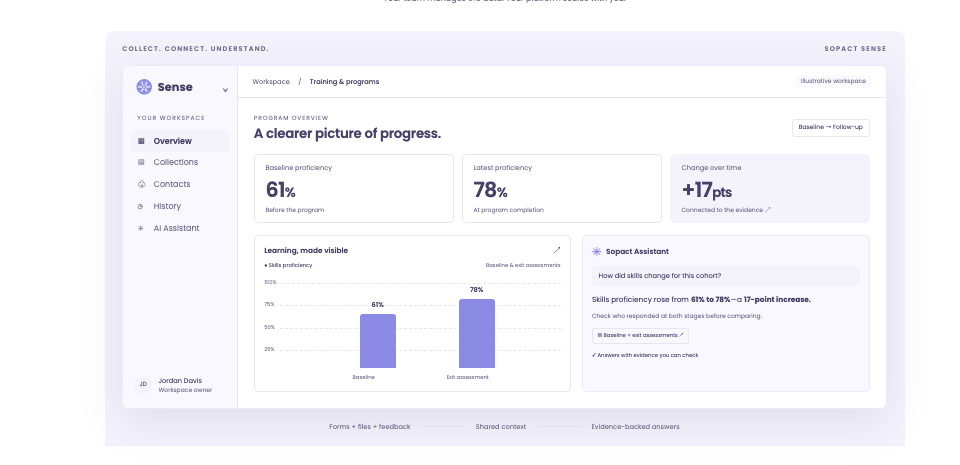
DIRECT COMPARISON
| Decision | What other options offer | Where to evaluate Sopact |
|---|---|---|
| Routine ownership | SurveyCTO teams maintain forms, cases and collection operations. | Evaluate whether the same internal owner can also maintain connected stages and recurring mixed-source analysis. |
| Quality and corrections | SurveyCTO documents submission review, corrections and quality checks. | If transferring data, preserve review status and reconcile corrections. Do not silently analyze unapproved records. |
| Analysis scope | Data Explorer provides built-in data exploration. | Evaluate supported documents and transcripts alongside the numeric results, not just a different visualization. |
| Longitudinal context | SurveyCTO case workflows support repeated collection. | Connect relevant history while distinguishing true change from altered questions, missing follow-up or changed samples. |
| Across programs | Different projects may require different study designs and reporting rules. | Maintain shared definitions where appropriate while preserving local context; verify access to source data, assistant answers and reports. |
Claims are bounded to the documented features. Sources and practical limitations are linked in the reviews below. No hands-on parity test is claimed.
THE OTHER OPTIONS
A shorter shortlist is useful only if it keeps the functions you rely on.
Why consider it: Combines field collection, case workflows and quality monitoring. Data Explorer provides built-in exploration—not merely an export destination.
Check before choosing: Check the exact offline, review and analytical workflow your study needs before changing platforms.
Read the vendor’s documentationWhy consider it: Entities connect forms around a continuing subject such as a person or place.
Check before choosing: Map specialized casework before switching; flexible forms do not automatically reproduce a complete service-delivery application.
Read the vendor’s documentationWhy consider it: Dynamic data attachments connect projects for repeat collection. Its audio-analysis workspace supports manual and AI-assisted qualitative coding.
Check before choosing: The documented qualitative-analysis feature covers audio responses, not ordinary text answers. Test the wider evidence workflow separately.
Read the vendor’s documentationWhy consider it: Case histories, assignments and referrals support repeated frontline work. A no-code builder lets teams configure mobile workflows.
Check before choosing: Evaluate the required case operations as well as reporting. A connected-analysis product is not automatically an equivalent frontline app.
Read the vendor’s documentationA CLOSER LOOK
ODK Entities support continuing subjects across forms. SurveyCTO documents case workflows and quality-monitoring tools. Compare your actual assignment, review, correction and offline requirements—not the assumption that one is a simple form and the other has all the analysis. Sopact belongs in the evaluation when mixed-source program interpretation is the unmet need.
BEFORE YOU SWITCH
Use an approved sample. Let the person who will own the workflow run this test.
BUYING QUESTIONS
Yes. Data Explorer supports built-in exploration. Sopact should be evaluated for the additional job of connecting program records with supported documents, transcripts and relevant history—not on a claim that SurveyCTO only exports data.
Yes, that may be the better architecture. Any proposed transfer must preserve identifiers, approvals, corrections and dates. Verify the integration or import process rather than assuming it exists.
Consider ODK or KoboToolbox for field collection, CommCare for case-led frontline work, and Sopact for recurring program collection and analysis. Required field and research functions must be tested individually.
BRING YOUR REAL WORKFLOW
Bring a form, a supporting file and the decision your team needs to make. See how the collection and analysis fit together.
Prepared by Sopact, a vendor included in this guide. Selection follows the workflow each article addresses. Product statements draw on the linked public documentation; recommendations are editorial judgments, not independent testing. Verify the proposed product, configuration, source handling and controls before purchasing.
Sources reviewed October 21, 2026. Documentation can change. Customer accounts are attributed; illustrations are labeled. The guide does not establish guaranteed accuracy, security certification or a universal implementation timeline.