


Related solution
Training & Programs
Connect learning evidence, participant support and later outcomes.
Explore the solution →

USE CASE / SOFTWARE GUIDE
Workforce development software helps training providers and workforce programs organize enrollment, services, learning progress, employment and follow-up. Good software helps staff understand the participant’s journey and use that evidence to improve support. Learning delivery, case administration, job matching and program analysis are related needs, but they are not the same purchase.
A course completion record rarely explains the whole result. Learners may face barriers during training, need different support when entering work or change jobs after placement. When assessments, mentor notes and employment updates live in separate systems, staff lose the context that would help them respond sooner.
AI can make narrative evidence useful alongside structured measures as information arrives. Sopact focuses on connecting that evidence across the program so staff can understand progress, examine barriers and prepare reporting from the information they already use.
Read assessments with participant feedback and support needs.
Distinguish readiness, a job offer and a confirmed start.
Follow continued employment and the participant’s experience.
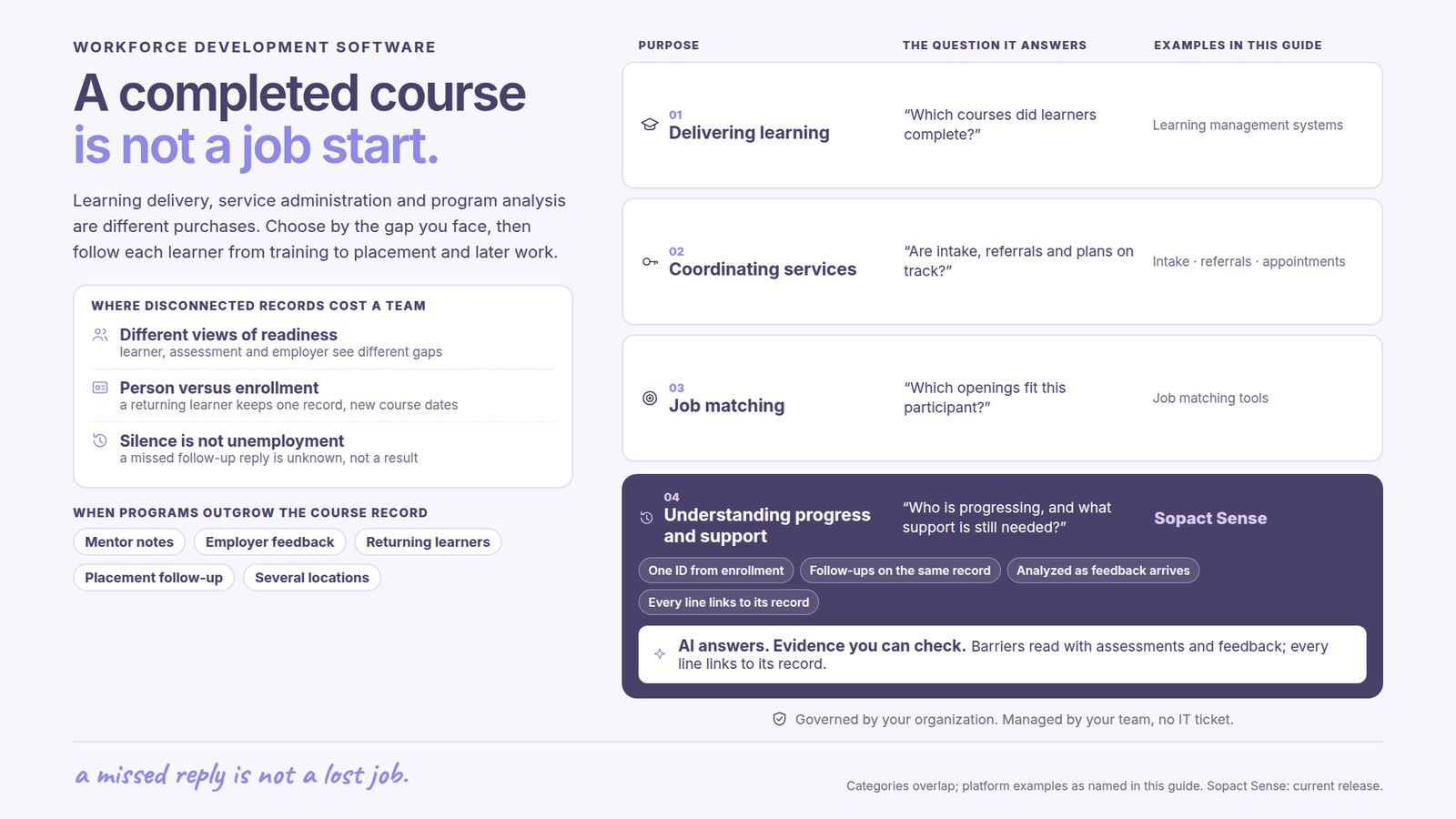
A learning management system organizes courses, content and learning activity. If the main problem is delivering instruction, those capabilities matter first. A program-analysis platform can use learning evidence without replacing the system that teaches the course.
Intake, referrals, appointments, support plans and required records belong to the operational workflow. Programs with mandated administrative requirements need those requirements covered. A strong outcomes dashboard cannot compensate for a missing service process.
When staff already collect data but struggle to connect it, the gap may be evidence and analysis. Sopact’s Training & Programs approach brings participant information, assessments, notes and feedback together. The value is understanding what is happening during delivery as well as after it.
A learner may attend regularly and pass the course while still feeling unprepared for an interview. An employer may report a different concern from the one visible in the course assessment. These perspectives are useful together, because each describes a different part of readiness.
Staff also need to distinguish a person from a program enrollment. Someone returning for another credential brings earlier experience, but the new course has its own dates and expectations. Overwriting the earlier record or creating an unrelated new contact makes later interpretation harder.
Follow-up creates another gap. A missed response after placement is not evidence of unemployment, and a confirmed job start does not establish sustained work. Keeping those distinctions visible helps the team focus outreach and explain the results without overstating them.
AI can prepare themes from learner comments, mentor observations and employer feedback. Its practical value is making this evidence available while the next support decision is still open. A recurring concern about interview confidence can inform coaching during the program rather than appear only in the final evaluation.
Sopact analyzes data as it arrives in the configured workflow. AI Assistance can help staff explore the connected evidence alongside earlier goals and measures, with sources available for review. The team spends less effort assembling context before a conversation and more time deciding what support is useful.
A summary of each form is only one part of this work. The continuing record allows a new observation to be interpreted in relation to the earlier journey. Program staff can also examine whether a concern appears across a cohort or is specific to one participant’s circumstances.
Assessments, practice and participant feedback show different aspects of learning. Attendance records participation; demonstrated skill shows something about capability; comments can explain where a learner still needs help. These measures should complement one another.
An accepted offer and a started job are different events. A useful record makes the chosen definition clear and preserves the date and source of the update. Staff can then distinguish people preparing to enter work from those already employed.
Later follow-up may concern remaining with the same employer, staying in any employment, gaining more hours or progressing toward the participant’s goals. Select the measures that fit the program and explain what they mean. The participant’s account adds context that a placement total cannot provide.
A workforce data dictionary should make the meaning of completion, placement and follow-up clear. Include the relevant population, time period and source. This allows a program leader to understand whether a result refers to everyone enrolled, those completing training or only people who answered the follow-up.
For programs subject to WIOA reporting, the U.S. Department of Labor’s performance indicators include employment measures tied to the second and fourth quarters after exit, with distinct youth provisions. A locally chosen 90-day check-in should not be relabeled as an equivalent formal indicator.
The software should support the program’s learning needs while preserving the applicable reporting definitions. Agree required submissions and any specialist system connections explicitly. A connected record makes evidence easier to use; it does not, by itself, establish compliance or prove that the program caused an employment outcome.
The Lantern Network partnership focuses on mentoring, professional development and career exposure. Its work with Sopact is developing a connected learner record from baseline through follow-up, bringing structured responses together with staff context and appropriate conversations.
The example illustrates why workforce learning needs more than isolated pre- and post-surveys. The team’s aim is to understand progress during the learner journey and use that evidence for support and communication.
Sopact’s typical setup estimate is two days to two weeks for an agreed scope. Define the first program, available sources and decisions the analysis should support. Historical records and links with learning or case systems should be part of that scope.
Across locations, common definitions can support comparison while local questions retain the context staff need. The benefit is a shared understanding of results without forcing every team to collect an identical survey.
Sopact combines team ownership, personalization and continuing support as cohorts and requirements change. For a closer look at learning evidence, see training evaluation software. For change after participation, see outcome tracking software.
It supports the work around enrollment, services, training, employment and follow-up. Different products emphasize learning delivery, operational administration, job matching or program evidence.
That is not the central purpose of this workflow. Sopact focuses on connecting evidence and analysis across a program. Learning delivery or specialist administration can remain in existing systems, with any data exchange included in the agreed scope.
Placement records a defined employment event. Retention examines employment later under an explicit definition, such as the same employer or any employment. The relevant population and period should be clear.
It can make incoming comments, observations and documents useful alongside structured measures. Staff can examine barriers and progress during delivery, then decide what support or further evidence is needed.
Continue with a purpose
Related solution
Connect learning evidence, participant support and later outcomes.
Explore the solution →Continue learning
Plan how starting points, feedback and follow-up inform program learning.
Start learning →
Customer story
A partnership developing connected evidence across the learner journey.
Read the story →See how Sopact can bring participant context, learning feedback and employment follow-up into a useful program view.
See it with your workflow →