


Additional course links
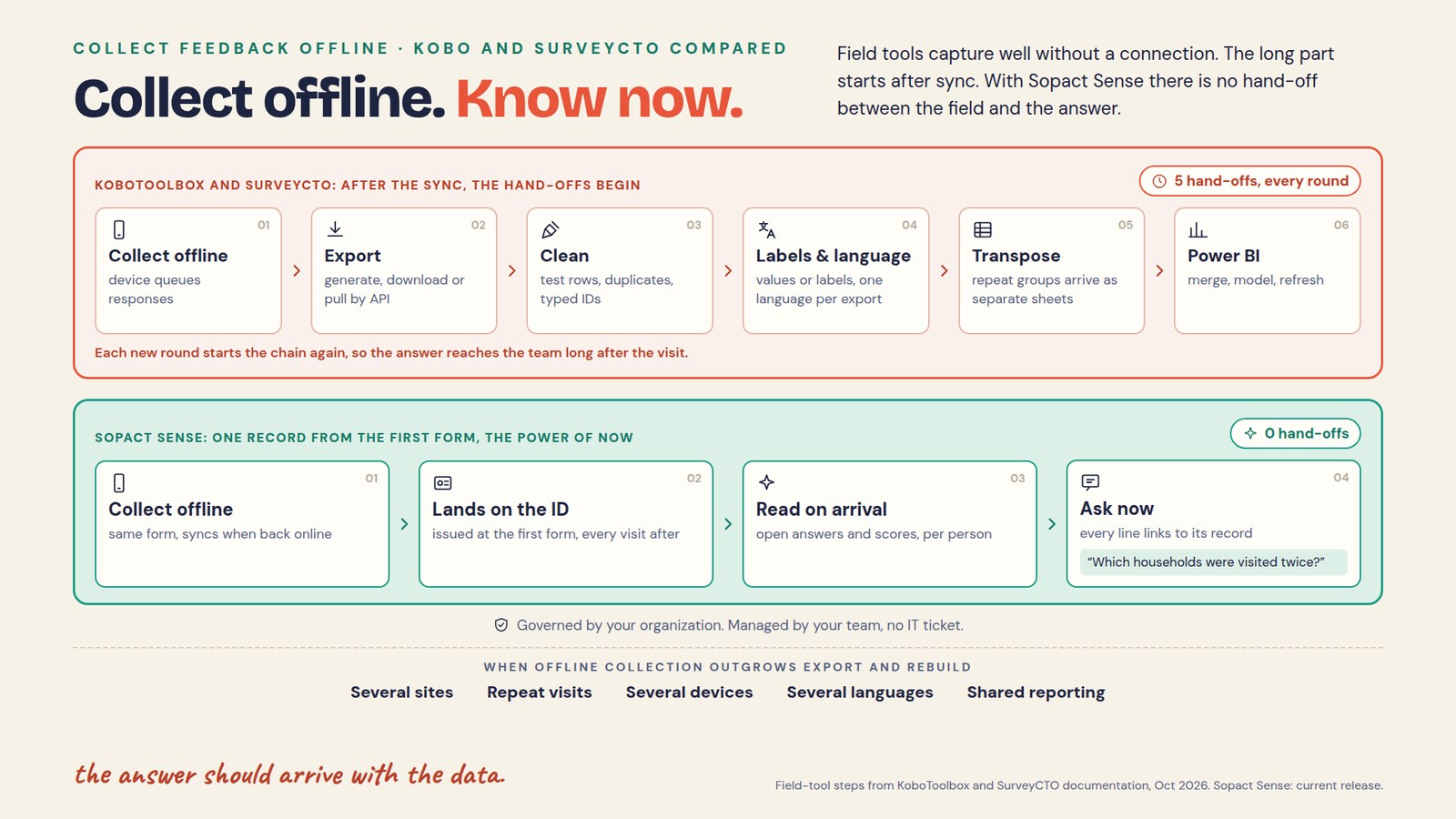
How do you collect feedback offline and keep it connected?
In short: Capture offline on a prepared device, give each person or household one ID at the first form, and sync every visit to that same record. How fast you learn is decided after the sync: either the response lands on a continuing record you can question today, or it lands in an export that has to be cleaned, relabeled, reshaped and loaded into a dashboard first.
This lesson is for program and evaluation teams who visit the same people more than once where connectivity is weak: household visits, clinic follow-ups, training sites and partner field teams. You leave with a field protocol, a reconciled test batch and a hand-off count for the workflow you use today.
- Define the unit you follow (person, household, site or partner) and issue its ID at the first form.
- Load the form version and the permitted roster on every device while it is still connected.
- Record each visit with its own visit date, the subject ID and the form version.
- Sync, then confirm receipt of every expected visit before anything is cleared from the device.
- Reconcile late uploads, retries and conflicting updates, and keep uncertain matches visible.
- Count the hand-offs between the sync and an answer your team can act on.
- Read the round while it is still open, and carry what you learn into the next visit.
Where does the time go after an offline round?
In short: Mostly after the sync. Field tools capture reliably without a connection. The delay comes from the steps between a synced response and an answer, and those steps repeat every round.
KoboToolbox and SurveyCTO are capable field-capture tools, and many teams run them well. Their own documentation shows what happens next when the analysis lives in another tool:
| Hand-off | KoboToolbox | SurveyCTO |
|---|---|---|
| 1. Export | Generate an export, then download it as XLS, CSV or SPSS, or copy a synchronous export URL from the API (export guide). | Export from the server console or SurveyCTO Desktop, or connect through the REST API (API guide). |
| 2. Clean | Someone removes training tests, upload retries, duplicate registrations and mistyped IDs. The export cannot know which rows are the same person. | |
| 3. Labels and language | Choose question labels or data column names, choice labels or XML values, and the label language for each export. | Choose choice values, or values and labels, and the label language; Desktop falls back to the default form language (export options). |
| 4. Transpose | Repeat groups export as separate sheets linked by _index and _parent_index. KoboToolbox notes that merging individual and roster data inside the system is not available and points to Excel Power Query (merging guide). | Repeat groups export in wide format, or in long format with each repeat group in its own file or sheet (data format). |
| 5. Power BI | Paste the export URL into Power BI, transform the data in Power Query, set table relationships for repeat groups, then click Refresh for new data (Power BI guide). | Connect the API URL, convert it to a table, expand the columns, which all arrive as text, set their types, then click Refresh (Power BI guide). |
Each step is reasonable on its own. Together they mean the answer waits for whoever owns the export, and the chain starts again with the next round. A dashboard refresh brings in new rows; it does not decide which rows belong to the same person, and it does not read what people wrote in the open questions.
The hand-off count: a test for any field workflow
In short: Count the steps between a synced response and an answer your team can act on. Each hand-off adds delay, a chance of error and one more person the workflow depends on.
Run the count on one recent round. List every step from the sync to the report: what was done, in which tool, by whom, and how long the result waited. Then ask three questions:
- Does every visit land on the same person or household without a merge?
- Can someone ask a question of this round today and trace every answer to a record?
- If the person who builds the export leaves, does the workflow still run next round?
Zero is the target, not a rule. Some evaluations still need a statistical package for the final analysis. The test is whether routine questions wait for the chain: who was visited twice, who is missing a follow-up, and what people said about the service.
Start with the person, the visit and the submission
Consider a fictional fieldworker visiting one household in March, July and November. The household ID identifies the unit being followed. A visit ID distinguishes each encounter. The form version identifies the questions asked. The submission ID identifies the uploaded response. These identifiers serve different purposes and should not be substituted for one another.
A tablet’s upload order does not establish event order. Record when the visit occurred separately from when the response reached the server. If a different household member answers, keep the respondent’s role rather than assuming the same person supplied every answer.
Missing identifiers make reconstruction harder, but they do not prove that earlier evidence is lost. Authorized reconciliation may be possible from adequate source information. Keep uncertain matches visible and explain how unmatched records affect the analysis; do not force a match to complete a chart.
Choose what must work without a connection
Write down the actual offline tasks: open a form, select an existing household, add a new participant, save an attachment, validate a response and resume an interrupted visit. A tool supporting one task offline does not mean every lookup, file type or analysis feature works offline.
KoboToolbox’s web-form documentation requires opening and caching a form while connected before offline use. Responses queue locally and upload after reconnection, and clearing browser site data can delete queued work. KoboCollect’s Android documentation describes downloading deployed forms before collecting without a connection, with draft, finalized and sent as separate stages. Train fieldworkers to tell those states apart rather than treating “saved” as “received.”
Sopact Sense forms also collect offline and sync when the connection returns. Whichever tool you use, test the exact device, browser and form features your team will carry before the first real visit.
What an identifier has to survive
| Change | What to test |
|---|---|
| A different device | The next fieldworker can select the correct authorized subject; an upload arriving late keeps its visit date. |
| A different fieldworker | The protocol explains how to confirm the subject without relying on a colleague’s memory. |
| A long gap | Changed contact details do not create a new person; household changes follow an explicit rule. |
| A lost card or forgotten code | A permitted recovery process exists; uncertain identity is flagged rather than guessed. |
Design the ID for the unit you follow. A household splitting into two is not the same situation as a person changing phone number. Record a documented relationship or change event when the real-world unit changes; keeping the old label alone may misrepresent the history.
Self-generated codes can work in some study designs, but test their stability, uniqueness and disclosure risk: people interpret the instructions differently on later visits, and two people may produce the same code. System-issued codes need a retrieval process too. Do not rely on a phone number or a name alone; numbers are shared and reassigned, and names are transliterated differently.
How do KoboToolbox and SurveyCTO follow the same person?
In short: Both can link visits, but the link is something you design and maintain alongside the forms. In Sopact Sense, the ID issued at the first form is the record, and every later form is added to it.
KoboToolbox offers dynamic data attachments: a follow-up form looks up values from a parent project through a matching identifying question. Its documentation lists the limits: parent data must be submitted and downloaded to the device first, values cannot be pulled from repeat groups, and choice names appear instead of labels. SurveyCTO offers case management: cases sit in a cases dataset with an id and a label column, forms are linked through a formids column, and published form data can update existing cases or create new ones.
Teams that set these up carefully get reliable follow-up visits. The analysis still happens after export. In Sopact Sense, the first form issues the ID, and the next visit, the follow-up survey, an interview note or public data loaded as a survey are added to that same record, so the history is already together when someone asks a question.
Prepare a field protocol before the first visit
- Define the unit and ID. State whether you follow a person, household, facility or partner. Decide how repeat visits connect and how a genuinely new unit is registered.
- Prepare permitted reference data. Give fieldworkers only the roster information they need. Test whether it stays available offline and how updates reach the device.
- Prevent ID collisions. If codes are issued offline, use an agreed unique-ID method or allocated ranges across devices and sites. Test the same new-registration scenario on two devices.
- Load and test the right form version. Check language, branching, required fields, ranges and attachments without a connection. Keep the version with each response.
- Explain local storage. Fieldworkers should know how to save, resume, finalize and confirm an upload, and which actions could remove unsent records.
- Plan exceptions. Define what happens after a lost device, an interrupted visit, a duplicate registration, a changed permission or a failed upload.
- Reconcile the batch. Compare expected visits, the local queue and accepted server records. Resolve discrepancies before removing local data under the agreed retention procedure.
If a mapping links codes to identifiable people, control access to it and keep the analytical view separate. Avoid printing sensitive program information on a card that could expose a participant if someone else found it.
What changes when two devices are offline?
Device A may record a new address while device B holds an older roster. When both reconnect, the server needs a policy for updates and conflicts. “Last uploaded” is not necessarily “most recent event,” and a silent overwrite can hide a valid observation.
ODK documents Entities for longitudinal and case workflows, including information shared between forms and conflict handling. Use your own tool’s documentation to design the test, and verify the exact relationships, permissions and conflict handling rather than relying on a feature name.
Test a late submission, a repeated upload and two different updates to one subject. Keep distinct visit records. If a current attribute changes, keep enough history to show which source supplied it and how a conflict was resolved. Do not count an upload retry as another visit.
Practice: reconcile a partner’s field batch
Use fictional Partner P-024 for this exercise. A partner’s field team makes three authorized visits. Two devices synchronize in a different order from the visits, and one upload is retried.
| Record | Subject and event | Expected result |
|---|---|---|
| V-101 | H-014 · September 2 · device A | One visit, even if uploaded after V-102 |
| V-102 | H-014 · September 9 · device B | A second visit linked to the same household |
| V-103 | H-015 · September 9 · device A | A separate household and visit |
| Retry of V-102 | Same submission attempted again | Recognized as a retry; not a fourth visit |
The expected result is three visits across two households, once the IDs and the retry have been checked. There are four transmission attempts. A transmission count is not a participant, household or visit count.
Add one conflicting address update and one record with an unrecognized subject ID. Do not invent the answer that makes the total reconcile. Record the conflict, keep the source and ask the authorized reviewer to resolve it. Your batch note should state what was accepted, what remains unresolved and whether any record is left out of a report.
Now count the hand-offs for this batch. In an export workflow, the visits reach the team as rows: someone removes the retry, checks the IDs, merges any roster sheet and refreshes the dashboard before anyone can say that household H-014 was visited twice. In Sopact Sense, both H-014 visits sit on one household record once they sync, and the team can ask which households had a second visit and open each record behind the answer. The conflict and the unrecognized ID still go to a person; no tool should guess them.
Where Sopact Sense fits: the power of now
In short: Sopact Sense keeps offline collection, the continuing record and the analysis in one place, so a round can be read while it is still in the field.
You can run this method with any field tool and a spreadsheet: issue IDs carefully, reconcile each batch and rebuild the report every round. That holds up for one site and one round. It slows down as sites, devices, languages and rounds multiply, because every round repeats the export chain and depends on the person who knows it.
In Sopact Sense, the ID is issued at the first form and every later form is another workflow on the same record. Forms collect offline and sync when the connection returns. As responses arrive, the Intelligence Cell reads each open-ended answer and the Intelligence Row summarizes each person across visits. The AI Assistant answers questions about the round, such as which households are missing a follow-up, with every line linked to the record behind it, and it works only on the surveys you pick. You choose which fields reach the AI, so names and phone numbers can stay out of the model, and each team’s folder limits what its assistant can see. Your team sets this up and runs it, with no IT ticket.
People still decide. A conflicting update, an unrecognized ID or a household split needs a named reviewer. The AI reads and summarizes; it does not settle identity or replace the field protocol.
Privacy: a linked record is not necessarily anonymous
Replacing a name with a code may protect some uses of the data, but a retained mapping can still identify the person. The UK Information Commissioner’s guidance distinguishes pseudonymisation from anonymisation and stresses protecting the additional identifying information. Do not describe a follow-up system as anonymous because the report hides names.
Agree what participants are told about collection, follow-up, access and retention. A request not to be contacted again is different from a request about data already collected; follow the applicable protocol for each. Offline devices may not hold the latest permission status, so define how fieldworkers get current instructions. Before giving data to an assistant, continue with the lesson on AI access to stakeholder data.
What should you verify when choosing a tool?
- Which forms, reference lists and attachments work offline on your supported devices?
- Can staff tell a draft, a queued response and a confirmed server receipt apart?
- Does the ID issued at the first form carry every later visit without a merge?
- How are new IDs issued across sites, and how are duplicates or uncertain matches reviewed?
- How are late updates, retries and conflicting edits handled?
- How many hand-offs sit between a synced response and an answer, and who owns each one?
- Are open-ended answers read as they arrive, or coded after export?
- What happens to unsent work after a restart, low storage, logout or a lost device?
Do not assume an XLSForm import preserves every feature in another product. Test a representative form with its real calculations, repeat groups, translations, media and validation before promising a migration route.
Run the test before field deployment
Use a safe test environment with representative history. Put two devices offline, complete the fictional batch, restart one device, reconnect in reverse order and inspect the received records. Test the real form features and the permissions each role needs.
Pass when every expected visit can be accounted for, duplicates are handled by the documented rule, uncertainty is visible, the source context survives and your team can answer a routine question about the batch the same day. Human review of an ambiguous case is not failure. An unnoticed merge or a missing submission is.
After the test passes, release the field protocol and check the first real batch closely. Keep a named owner for synchronization problems and unresolved identity questions. Connectivity, battery, storage and training remain operational concerns whichever software you choose.
Watch: why collected evidence needs its record context
Watch the video · 2 minutes 34 seconds. This is a companion explanation of connected evidence, not a demonstration of offline device support. Use the field test above to verify offline behavior in your chosen configuration. Explore more explainers in the video library.
Frequently asked questions
Can a survey work with no internet connection?
Yes, if the form and the reference data it needs are on the device first. KoboToolbox, SurveyCTO and Sopact Sense all collect offline and sync later. An ordinary online survey link does not work offline. Test the supported device, browser and form features before deployment.
Is Sopact Sense an alternative to KoboToolbox or SurveyCTO?
Yes, for teams that follow the same people over time and need answers during the round. All three collect offline. The difference is after the sync: Sopact Sense issues the ID at the first form, adds every later visit to that record and reads responses as they arrive, instead of handing data to an export, cleanup, reshaping and a dashboard.
Do we still need Power BI?
For routine questions about a round, often not, because the AI Assistant in Sopact Sense answers them on the record with each line linked to its source. Teams with an established dashboard or a statistical analysis plan can keep those tools for the final analysis. The change is that they stop being the only route to an answer.
Is saving a response the same as uploading it?
No. A draft or locally queued response may not have reached the server. Confirm receipt and reconcile the expected batch before removing local copies under the retention procedure.
Can a system-generated ID make the survey anonymous?
Not by itself. If a mapping or other information can identify the person, hiding the name does not make the data anonymous. Describe the actual confidentiality and follow-up arrangements accurately.
What if a household is not on the roster?
Use the approved new-registration process and unique-ID method. Flag any doubt about whether the household already exists; do not create or merge records only to finish the form.
How do we handle a household that moves or splits?
A move may keep the same household record under your definition. A split may need new linked units. Define the rule, keep the event dates and do not assume an unchanged ID always means an unchanged household.
Can we bring forms or past rounds from KoboToolbox or SurveyCTO?
Test the exact form in the receiving tool; calculations, repeat groups and offline behavior may not transfer unchanged. Past rounds usually arrive as exports, so plan how earlier IDs map to the new records and check a sample before the first new visit.
Is a manual matching review a failure?
No. A controlled review of uncertainty protects data quality. The problem is an unsupported match presented as certain, or an unresolved record silently left out of the report.
If your field collection includes attachments
Bring the reconciled batch and its source files to the document-evidence lesson. You will examine how attachments and transcripts retain their source, period and permissions when their contents are analyzed.
Lesson reviewed October 1, 2026. Partner P-024, H-014, H-015 and the visit records are fictional training examples. KoboToolbox and SurveyCTO steps are taken from their public documentation as of October 2026; check the linked pages for changes.