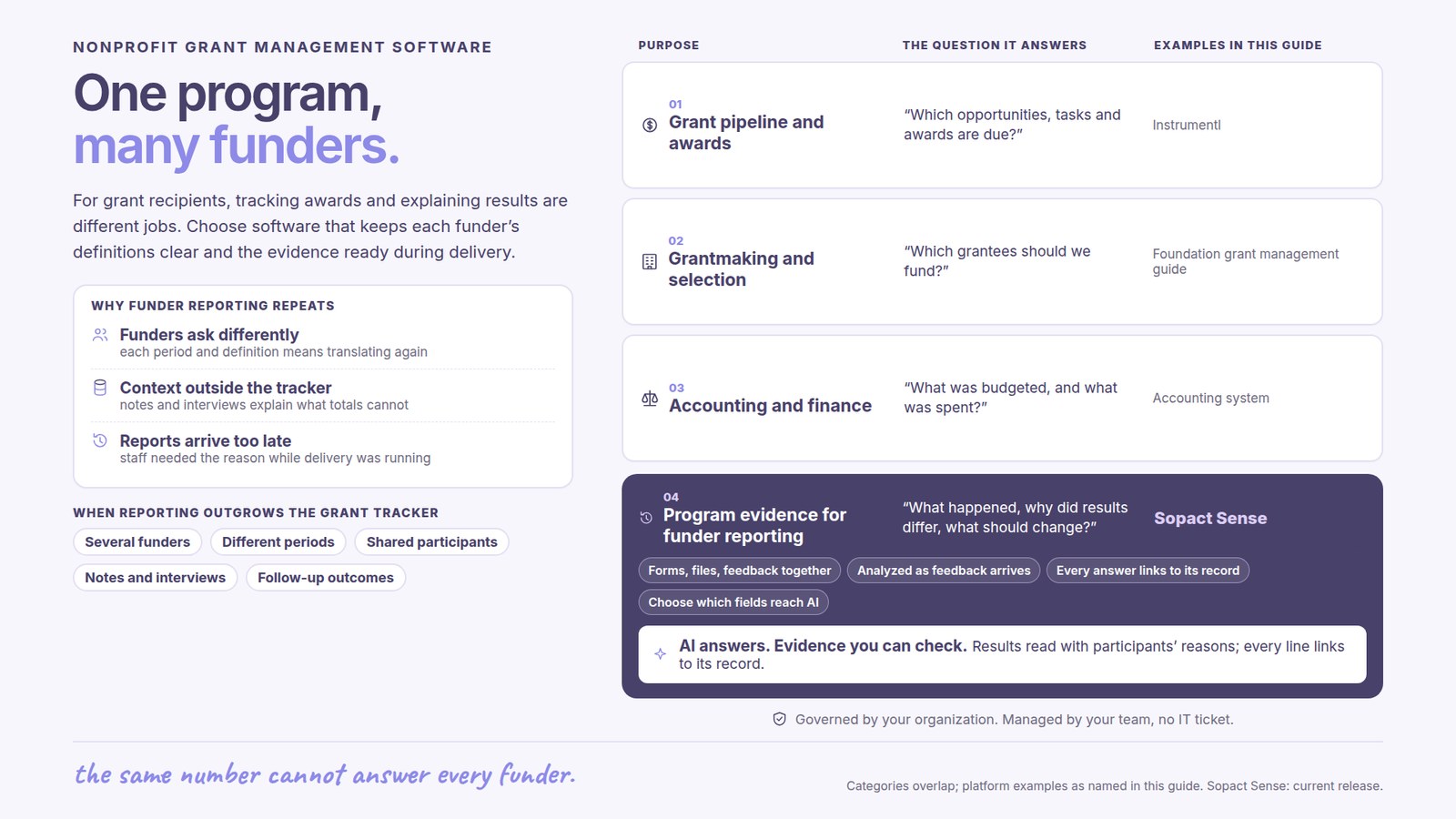
What is nonprofit grant management software?
Nonprofit grant management software helps an organization that receives grants keep each award’s terms, deadlines, program evidence and funder reports on one connected record, from the proposal through the final report. The deadline calendar is the smaller part of the job; the larger part is showing what each award paid for, in each funder’s terms, without rebuilding the evidence for every report.
This guide is for grant recipients: the development, program and finance staff of a nonprofit that reports to several funders at once. Foundations and agencies selecting grantees need a different workflow; see grant management software for foundations for that buying decision.
The other side of Maya’s story
In the video this guide accompanies, Unmesh Sheth, Sopact’s founder, describes Maya, a composite of the grant leads we talk to. Her foundation gives about $25M a year, manages 380 live grants and has run the same heavily configured platform for more than a decade. Nothing is broken, but everything is slow. On a Monday morning her board wants the impact of the top ten grants, the CEO needs numbers for an 11 o’clock donor call and the M&E lead wants to know what changed since last year.
A nonprofit sits at the other end of those requests. If your organization is one of Maya’s 380 grants, her Monday becomes your Wednesday: an email asking for a figure the last report did not include, in a format none of your other funders use. Each funder has its own template, reporting period and idea of what “served” means, and each writes as if its report were the only one on your desk.
Most nonprofits answer the way funders do: export, rebuild the numbers in a spreadsheet, write the narrative, send, and start again for the next funder. The question for software is whether your records can carry that work instead: one record per award, evidence collected once and reused without bending its meaning, and documents you already maintain doing the reporting.
Why every funder report starts from scratch
Unmesh gives the reasons from the funder’s side, and each has a mirror image for the grantee. Funders ask questions the data was never collected for, so program staff reconstruct an answer after the fact. Much of what matters is narrative, which a chart cannot read, so the story is trimmed to fit a number field. Every grantee reports different metrics in a different format, so the next funder sends another template. And when a report does not match the story donors heard, the frustration lands back on the staff who told it.
A better deadline tracker fixes none of this. The fix sits upstream: agree what evidence each award needs when the grant begins, collect it while the program runs, and keep one award apart from another.
The video is told from the funder’s chair, which is the reason to watch it as a grantee. The dashboards passage explains why your funders cannot answer their own boards, the source of many one-off requests; the onboarding passage describes a reporting arrangement, built on documents you already keep, that a nonprofit can propose rather than wait to be offered.
Jump to: 4:49 — Why dashboards can’t answer the questions · 11:08 — Onboarding, and reports built from documents you already keep
Decide whether you need a tracker or a wider workflow
A grant tracker is enough when the main need is a shared list of opportunities, deadlines and owners. A wider workflow earns its cost when development, program, finance and leadership must connect the proposal, award terms, delivery and reports over the life of a grant. The handoffs where information is re-entered by hand or argued over, more than the calendar, decide which you need. Do not replace a working spreadsheet because it is a spreadsheet; check whether it gives you reliable access, version control, ownership and backup at the workload you carry.
Qualification belongs in the same record. Note why an opportunity fits, with the source and date of each requirement, and estimate the reporting burden before committing, since a small grant with heavy custom reporting can cost more staff time than a larger one. Keep the go/no-go reasoning so next year’s review starts from what changed, and ask vendors to demonstrate a declined opportunity and a moved deadline, not only a win.
Give every award one record
Keep the submitted proposal and the approved award apart, since the final amount, target, timetable or reporting requirement often differs from the request. For each award, record the funder, owner, status, start and end dates, approved commitments, reporting schedule and source documents, under an award ID of its own that links to the program and to the funder relationship.
The deck behind the video draws the funder’s version of this as a single line: one grantee, one ID, running from the application through onboarding, reporting, compliance and audit, and accounting, with the proposal PDF, the theory of change, the Q2 report and the IRS 990 hanging from it. A nonprofit needs the same line for every award it holds. When the proposal, agreed terms, reports and finance figures sit under one persistent ID, a funder’s follow-up becomes a lookup instead of a search through shared drives.

Record the reporting period as well as the deadline: a report due in April may cover January through March. Add internal preparation and approval dates so the external deadline is not the first reminder. When a funder approves a change, record its date, reason and source, keep the earlier schedule, and never let a requested change look like a confirmed amendment.
- AgreeApproved terms, measures and reporting periods.
- CollectProgram and financial evidence during delivery.
- ReviewDefinitions, gaps, explanations and corrections.
- ReportA dated submission with its sources retained.
Build an evidence plan for each reporting question
Translate each funder question into evidence the team can collect while the program runs: the measure or narrative, its source, owner, collection moment and review date, with anything unsupported marked. The collection moment has to match the claim. Participation can use attendance; experience needs open-ended feedback or interviews; sustained employment needs a later follow-up, not an exit survey.
Define each important indicator’s unit, population, period, calculation and treatment of missing information. “Placed in employment” could mean an offer, a first day at work or retention after 90 days, and those are three different measures even when every funder uses the same label. Keep your own learning needs in the plan too, and map each funder template to measures you already hold rather than redesigning collection around every new form.
The data dictionary lesson shows how to document the definitions, and the grant reporting guide covers the structure of the report. When you map to a funder’s framework, keep the original meaning and record a partial match as partial.
Reuse evidence across funders without changing its meaning
Store the evidence apart from each report’s presentation, so funders can receive different views while the sources, definitions and calculations stay the same. Reuse is honest only when the evidence answers the question asked.
Illustrative example. A training program enrolls 120 people and records 90 completions under its agreed completion rule. Funder A asks for completions among everyone enrolled: 90 ÷ 120 = 75%.
Funder B asks for 90-day employment retention among the 60 participants who entered employment. Only 40 have reached the follow-up date, and 30 of them have confirmed retention. The report should show the 40 due, the 30 confirmed and what is unknown; dividing 30 by all 120 enrolled answers a different question. If all 40 due participants have an established status, confirmed retention among those due is 30 ÷ 40 = 75%. If some statuses are unknown, say so and keep a confirmed-result share distinct from a rate among respondents. The 20 not yet due are not failures.
The two 75% figures are different findings, and a report placing them side by side should say so. Keep reach apart from attribution too: two awards supporting one program can both cite its results, but cannot add them to claim twice as many unique participants. The nonprofit impact report guide helps organize a cross-program view, and impact report templates help present it; neither replaces these definition checks.
Update documents you already keep instead of re-keying metrics
For a nonprofit, the most useful passage in the video comes after the award. Unmesh describes funders who open each grant with a conversation of an hour to an hour and a half, in which both sides settle goals, who is responsible for what, which metrics will be reported and the theory of change behind them. What follows is lighter for the grantee. There is no portal of custom fields to fill; the organization updates a document it maintains anyway, its social audit or its financial report, and the funder’s rubric checks that document for what is complete and what is missing. Because every submission is tied to the grantee’s unique ID, the follow-up is a request for one specific piece rather than a new form.
A nonprofit does not have to wait for a funder to offer this. Bring your evidence plan to the first conversation after an award, show the documents you already produce and ask whether an updated version can stand in for a custom template. Some funders will still require their own form, but every document they accept is one less template to maintain.
The same check can run on your side before anything is sent. In Sopact, an Intelligence Cell applies a prompt you configure to each document or open-ended answer as it arrives, compares it with that award’s reporting plan and records what is present and what is missing. An Intelligence Row keeps a running summary for each award or participant, so gaps show up weeks before the deadline rather than the night before.
Program evidence from surveys, attendance, case notes and interviews connects to the right award through stable participant IDs and dates. A service contact is not a verified outcome, and a person in two programs needs a counting rule before totals are combined. For person-level continuity, see Case Management and the Case Intelligence course.
Reconcile financial and program reporting before submission
Keep approved budgets, actual expenditure and program results distinguishable. Finance names the authoritative financial source and reporting basis; program staff name the evidence behind delivery and outcome claims. A fluent narrative does not resolve a mismatch, and an underspend may reflect timing or a changed activity rather than efficiency.
Give the report a shared status, such as draft, awaiting program review, awaiting finance review, approved and submitted, and decide who owns the final submission; several files named “final” is the failure this prevents. Retain the submitted version with its calculations and confirmation, and if figures change afterward, keep what was sent and follow the funder’s correction process. Accounting and the award terms stay authoritative for financial treatment; the grant workflow connects evidence and review, and should draw finance figures from accounting rather than retype them.
Answer a funder’s question with sources
The deck ends with Maya no longer exporting anything. She asks how many families her nutrition grantees reached this quarter, and the answer comes back by grantee, with the source documents behind it. Each grantee’s part of that answer has to be right first, and that part is yours.

When a funder emails a follow-up question, the useful reply is a figure with its definition, coverage and source, sent the same day. In Sopact, the AI Assistant answers questions about your own records in plain language and cites the records it used; Claude or ChatGPT can query the same data through MCP. A development lead can ask how many participants completed under Funder A’s rule this quarter, open the records behind the count and check them before replying.
Be exact about the limits. AI can extract requirements, find passages and draft a narrative, but it can also fill a gap with a plausible achievement, so test it on an incomplete record: a missing follow-up, a revised target, a narrative that contradicts a table. A good result flags each problem. A participant’s comment explains one experience without proving it holds for everyone, and a pre/post change does not show the program caused it; that needs an evaluation design. Staff who know the award check every source, calculation and claim before submission. See the Applications & Grants workflow for product context.
Use a nonprofit grant software evaluation checklist
Ask each supplier to take one active award from approved terms through a completed report and one follow-up question. Involve development, program and finance staff, and have each perform a routine task and inspect the information they need.
| Requirement | Demonstration | What to verify |
|---|---|---|
| Opportunity and award tracking | A proposal awarded with revised terms. | Original request and approved commitments remain distinct. |
| Deadline ownership | A report deadline and a staff handoff. | Period, owner, reminders and current status are clear. |
| Evidence collection | A metric, an interview note and an uploaded document. | Sources connect to the correct program, award and period. |
| Document-based reporting | An updated financial report or social audit checked against the reporting plan. | Complete and missing items are identified before submission. |
| Defined measures | Two funders asking similar but different questions. | Mappings preserve definitions and disclose differences. |
| Missing information | A follow-up that is not yet due and one that is overdue. | Neither is silently converted into a negative outcome. |
| Answer with sources | A funder’s follow-up question asked in plain language. | The answer states its definition and coverage and opens the records behind it. |
| Review and submission | Program and finance approval followed by a correction. | Submitted versions and reasons for changes are retained. |
| Team control | A new field, reporting schedule or staff owner. | Routine maintenance effort and permissions are demonstrated. |
| Exit and portability | Export one complete award and its evidence. | The record remains usable outside the product. |
Count migration, cleanup, training, integrations and administration alongside the subscription. In the video, Unmesh puts a traditional grant-system implementation at six to nine months. Few nonprofits can give a project that much staff time, so find out how soon the first real funder report can come out of the new setup, and which of your staff will keep it running. Use Sopact pricing as one input, then scope the workflow. A small organization should not buy a complex system to solve a deadline problem.
Start with one award and a report the team can explain
Choose an upcoming report with representative requirements and, if you can, a funder willing to accept an updated document in place of its template. Connect the approved terms, definitions, program evidence and financial source, and include a known gap or correction. Measure preparation time, missing evidence, correction effort and whether a second staff member could rebuild a reported figure from the record, and check the burden on frontline staff; a faster report is not a success if collection becomes harder.
Open Play Foundation’s published story describes bringing ten programs into one funder report while keeping facility and program information available for operational decisions. It shows program evidence being reused, not a benchmark for implementation speed. Continue with the Impact Measurement & Reporting course, the impact report writing guide and report examples and dashboards. Expand to the next award when the team can repeat the process without inventing a new spreadsheet trail.
Frequently asked questions
What is nonprofit grant management software?
Software that helps a nonprofit manage the grants it receives: opportunities, proposals, award terms, deadlines, program evidence and funder reports across the life of each grant. It differs from grantmaker software, which foundations and agencies use to run applications, review and awards. For a recipient, the test is whether each award’s commitments, evidence and submitted reports stay connected on one record.
When is a spreadsheet or grant tracker enough?
When the main need is a shared list of opportunities, deadlines, owners and status, and one or two people do most of the reporting. Look at a wider workflow when award terms, program evidence and finance figures cross several teams, when the same numbers are re-keyed for each funder, or when a staff change leaves nobody able to explain last year’s report.
Can the same evidence be reused for several funders?
Yes, when it answers each funder’s actual question. Keep definitions, populations, periods and calculations explicit, and store the evidence apart from each report’s layout. A completion rate among everyone enrolled and a retention rate among those due for follow-up can both be 75% and still describe different things. Results shared by two awards cannot be added to claim more unique participants.
How can we spend less time on each funder report?
Settle the reporting plan with the funder in the weeks after the award, and ask whether an updated document you already keep, such as a financial report or social audit, can replace a custom template. Check each document against the plan as it is prepared so gaps surface well before the deadline, and keep the evidence on one award record so the next report starts from it.
How should missing follow-up be reported?
Separate outcomes that are not yet due, overdue, unknown and confirmed. State the denominator and coverage, for example 30 confirmed among the 40 participants who have reached the follow-up date, rather than dividing by everyone enrolled. Do not treat missing information as either failure or success; say what is outstanding and when it will be collected.
Can AI draft our funder reports, and does Sopact replace accounting?
AI can draft from your evidence, pull requirements from an agreement, flag missing items and answer a follow-up question with its sources, but it cannot confirm that a milestone happened. Staff who know the award check every draft before submission. Sopact does not replace accounting, which stays the authoritative source for financial figures; it connects program evidence and reporting to each award.