What is a Salesforce grant management alternative?
A Salesforce grant management alternative is a separate workflow for the evidence side of grantmaking, such as application review and grantee reporting for one program, while Salesforce stays the system of record for relationships, awards and the operations built around them. For most teams it is not a CRM replacement. It is a way to stop paying for each new question with another custom report.
Salesforce offers dedicated Grantmaking capabilities for applications, reviews, awards and post-award work, so not every Salesforce grant program is a custom CRM build. What varies is the installation. Some foundations run Grantmaking close to its documented setup; others carry years of fields, automations and reports layered on by administrators and partners. This guide, published by Sopact, is mostly for the second group, so test each point against your own org.
Customization debt: what a CRM accumulates over a decade
In the video below, Sopact founder Unmesh Sheth returns to a story grant managers tell him over and over after years of building out their systems: everything is configured, the approval cycle still runs long, and now they are asking where AI belongs. His example is Maya, whom he presents as a composite of the grant leads Sopact works with. She runs 380 live grants for a foundation that gives about $25 million a year, reviews roughly 800 applications each cycle and keeps 12,000 profiles, and her team has used the same heavily configured platform for over ten years.
On a CRM, that decade has a recognizable shape. A new program gets its own fields. A reviewer wants a different scoring layout, so the rubric is rebuilt beside the old one. A board member asks for a count nobody tracks, so someone adds a field, a validation rule and a report. Each request is small and reasonable. Together they become the list Unmesh walks through at 2:29: custom fields, reviewer preferences that stretch the cycle, rubric configuration, setup questions that go back to a consultant or vendor, approval steps and, at the end, exports. The deck puts the cost plainly: every cycle now takes two to three months of configuration.
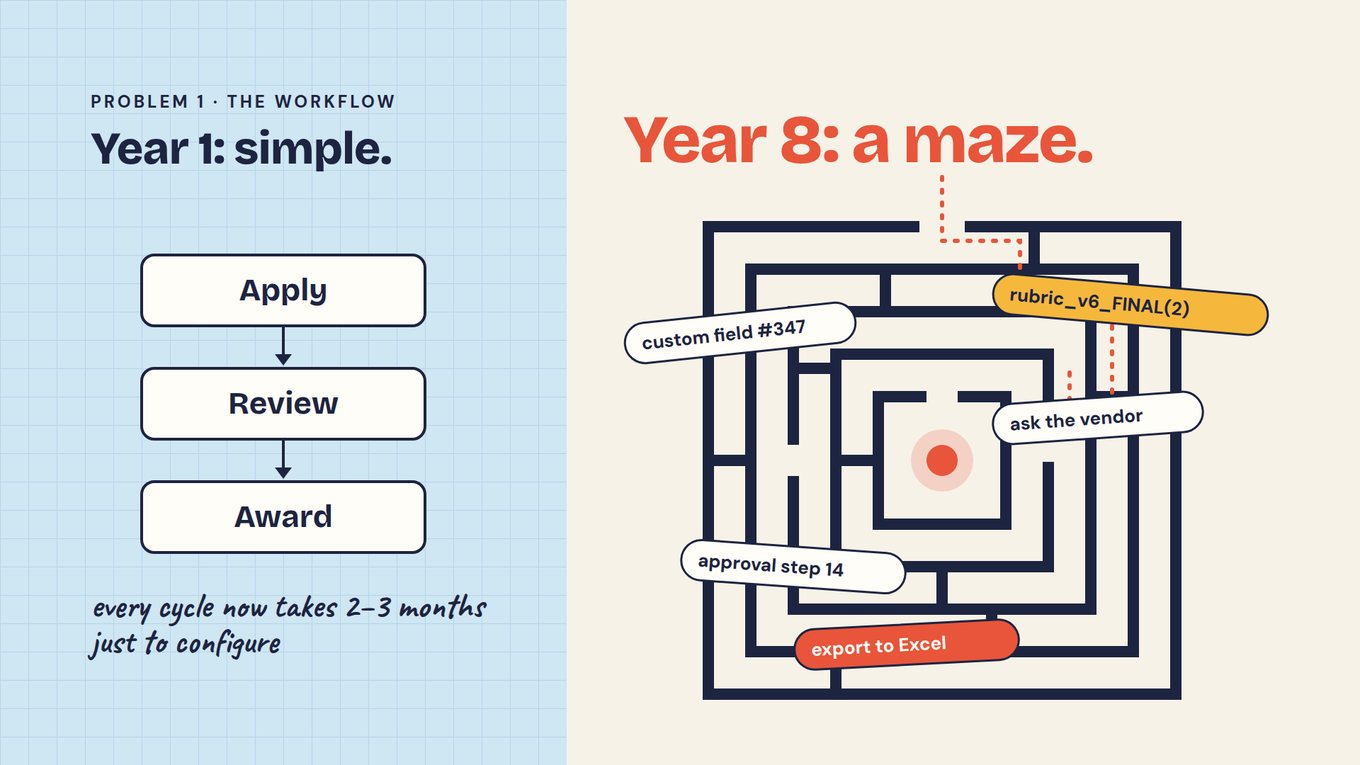
Call it customization debt. It was taken on for good reasons, it keeps charging interest after the people who took it on have left, and it limits what the team can change. Paying it down does not require leaving Salesforce, but it does require knowing which parts of the configuration still carry a decision and which only carry history.
When every answer is a report someone has to build
The debt shows most clearly in the questions. A program officer wants to know which applicants described the same barrier; a board member wants the outcomes behind the largest grants. In a heavily customized org each of those becomes a request to build a report, adjust a report type or export and reconcile by hand. Whether it can be answered at all depends on whether the data sits in a reportable field, and narrative answers, attached proposals and grantee reports rarely do.
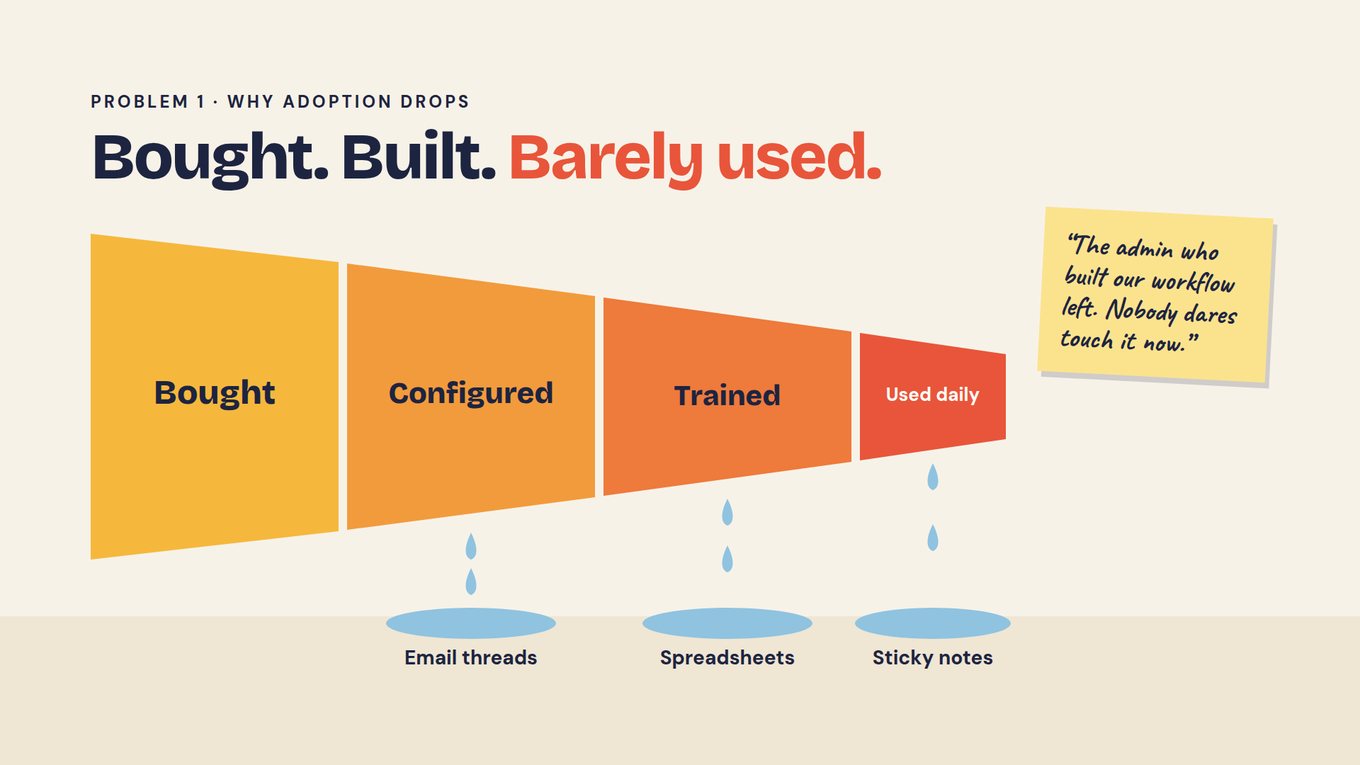
Unmesh's next point, at 3:29, explains why the queue keeps growing. Of the hundreds of features an organization pays for, it sets up some, teaches staff a smaller number and relies daily on a thin slice. Whatever the system does not handle drifts into inboxes, spreadsheets and sticky notes. And the story he hears most often: the person who built the workflow has gone, and no one is willing to change it. On Salesforce that often means the reports still run, but nobody left can say what their filters assume.
Before you compare vendors, keep a question log for two or three weeks. Each time someone needs an answer the org cannot give without a new report, an export or a message to the admin, write it down.
| Record | Why it matters |
|---|---|
| The question, in the asker's words | Shows what leadership and program staff need, as opposed to what the existing reports were built to show. |
| Where the answer lives | Separates reportable fields from narratives, attachments and grantee documents that someone has to read. |
| Who produced it, and how long it took | Shows how much of the week depends on one administrator, a partner or a spreadsheet. |
| Whether it could be reproduced | Tells you whether the next person to ask would get the same number from the same records. |
The log usually sorts into two piles. Questions about relationships, award status and payments tend to be answerable in Salesforce once the right report exists. Questions that require reading, such as what applicants wrote, what a grantee reported against what it proposed and where evidence is missing, are the ones that keep turning into exports. The second pile is where a separate evidence workflow earns its place.
WATCH · WHERE THE MONTHS GO
Why a heavily configured grant system still feels slow
The question log shows the symptom; this conversation explains the cause. Unmesh traces how custom fields, rubric versions and approval steps stretch a cycle, and why most of a paid-for feature list sits idle. Watch 9:30 with Salesforce in mind: he argues for keeping the current system running and moving one low-risk workflow at a time, the approach the pilot below tests.
Jump to: 2:29 — What stretches the cycle · 3:29 — Bought, configured, barely used · 9:30 — Migrate low-risk workflows first
Use this in your evaluation: At 3:29, mark which of your Salesforce reports are rebuilt or exported every cycle, and who does it. Those reports point to the program to test first. For the data preparation behind that step, see the Academy guide to preparing data governance before AI.
What Salesforce already supports
Salesforce's Grantmaking documentation describes funding opportunities, application intake and review, awards, recurring requirements, progress reports and secure sharing. What is available depends on the products and configuration involved. Salesforce also documents a connection between Grantmaking and Outcome Management for consistent indicators, targets and grantee results, and Outcome Management for grants can support reporting through an Experience Cloud site. A claim that Salesforce cannot track outcomes after an award would be misleading.
Its Trailhead module covers award decisions, disbursement records and progress reports as well. For a foundation that runs constituent relationships in Salesforce, those connected records are a good reason to keep it. The useful question is whether your configured workflow serves program staff, and whether the people you have can maintain it.
Separate the CRM decision from the evidence workflow
Teams tend to frame this as one decision when it is two. The first is where relationships, awards and grant operations live, and for many foundations that stays Salesforce. The second is how staff prepare and review evidence: reading applications against a rubric, turning an approved proposal into reporting expectations, reading grantee reports and answering questions with sources. Rebuilding the same forms and manual steps in another product only relocates that work.
Sopact is built around that second decision. One persistent ID follows each applicant from application to award to every report. As each answer, essay or attachment comes in, an Intelligence Cell analyzes it with a prompt configured by the program team. An Intelligence Row holds the summary for each grantee. Staff put questions to the AI Assistant in ordinary language and get answers that cite their records, and teams that prefer Claude or ChatGPT can reach the same data over MCP. The part to test is whether program staff, rather than an administrator, can revise those prompts and questions.
| Stage | Evidence work to test | Ownership to settle |
|---|---|---|
| Application review | Read each application against agreed criteria on arrival, cite the passages behind each score and flag missing evidence for reviewers. | Which system keeps the submitted application, the rubric version and the final decision? |
| Onboarding | Carry the approved proposal forward and confirm commitments and reporting questions with the grantee. | Who approves changes from the original proposal? |
| Grantee reports | Connect each report to the grant and reporting period, using common definitions only where comparison is valid. | Which team maintains the definitions and resolves corrections? |
| Portfolio questions | Answer the questions in your log with sources that staff can open and check before anything reaches the board. | Who can see the underlying records and approve the shared answer? |
Where both systems stay, write down which one owns applicant identity, award status and each reporting record, and test how a correction travels between them. An untested integration becomes one more reconciliation task.
Keep Salesforce as the record while one program moves
In the video, Unmesh recommends planning for the whole lifecycle while starting where the stakes are lowest: application review, ideally for fellowships or scholarships, since large grants carry heavier due diligence. On Salesforce, pick the small program whose questions fill the most lines in your log, and leave its awards and payments where they are.
Pace is part of what you are testing, and it helps to have a reference point. Typical timelines from Sopact's work with application programs: with traditional application software, meaning non-AI-native tools such as Submittable or SurveyMonkey Apply, teams spend two to three months setting up the form, rubric and workflow, then two to three months reading, re-reading, scoring and selecting, four to six months before a decision. With AI-native review, setting up intake, rubric and prompts takes about two weeks; the AI reads and scores every application in a day; human judgment and follow-up with applicants take one to two weeks. That is roughly three to four weeks. Unmesh puts a traditional grant-system implementation at six to nine months. None of these figures describes your org; the pilot should produce your own.
- Rehearse on a completed cycle. Take an authorized sample with its rubric and original decisions, including borderline cases and missing information, and compare the prepared assessments with an independent human review. A different shortlist is a reason to investigate, not proof either list is right. The Academy lessons on batch application analysis and proposal scoring give reviewers a shared method.
- Map identifiers before importing anything. Keep organization, contact, application, award and reporting-period identities distinct, linked by stable Salesforce IDs; a repeat applicant with several awards should not collapse into one row. Inventory attachments, review comments and permissions too, because a field export does not carry them.
- Hand the rubric to program staff. Configure the review prompt from your written criteria, then ask the program lead to revise it once without the admin's help. If that is hard, you have learned something about the new system too.
- Run one live cycle. Name owners for applicant support, corrections and final decisions, and keep a backup and a rollback point until the results are checked.
- Write decisions back to Salesforce. Agree which fields return to the CRM, such as decision, amount and date, and who checks them.
- Re-ask the log. Answer five questions from your log from the pilot program. Note whether each answer came with sources, how long it took and whether anyone had to build a report.
Measure the whole job in both processes, including the staff time it takes to keep the two systems connected; if the connection costs more than the new workflow saves, change the design before expanding it. And keep one limit in view: an AI-prepared assessment is a draft. Reviewers open the passage it cites, check it against the criterion and record a reason when they override it, and people make the funding decisions. A pilot shows whether the work got lighter and whether reviewers trust it. Whether funded work caused an outcome is a question for an evaluation design.
Design the outcome record before the first award
One organization can report on several grants across several periods, so decide which observations belong to each grant, what each indicator means and when it is measured, and keep commitments apart from reported results. Fictional example: a grantee commits to training 100 participants, later reports 80 completions and provides employment information for 50 people. Those are different measures with different coverage, and the report should show that rather than present one completion rate as proof of employment impact. Use common definitions only where the fund needs comparison, and allow local questions where programs differ. The Academy lesson on extracting outcomes from grantee reports shows the review method in practice.
When staying with Salesforce makes sense
Stay and tidy the configuration when the question log is short, most entries concern relationships and award status, and your team can maintain the reports it needs. Retiring stale fields and documenting what each trusted report assumes may be enough.
Connect an evidence workflow when Salesforce runs operations reliably yet one program keeps generating exports for review or reporting. Salesforce stays the record and results are written back.
Look at a larger move only once a full pilot cycle has paid off and you know where every job the CRM does today would go. For a broader view, compare grant software alternatives and best grant management software.
Frequently asked questions
Does Salesforce have a grant management product?
Yes. Salesforce documents Grantmaking capabilities across the grant lifecycle, from funding opportunities and application review to awards, disbursements and progress reports. Your organization may run that product, another package or a custom configuration built over years, and the three behave differently. Identify which one you actually have, and which parts your team can change without help, before comparing it with any alternative.
Can Salesforce track outcomes after an award?
Yes. Its documentation describes progress reports and a connection between Grantmaking and Outcome Management for indicators, targets and grantee results. The question for your team is how those capabilities are configured and maintained in your org, and whether questions about narrative reports and attachments can be answered without an export. Test that with real questions from your log rather than assuming the capability is missing.
Does Sopact replace our Salesforce CRM?
That should not be the default assumption. The approach on this page keeps Salesforce as the system of record for relationships, awards and payments, and moves one program's review and reporting into a workflow built on one persistent ID per applicant. Decisions and key fields are written back. Agree which system owns each record, and test how corrections travel, before running both.
Our Salesforce admin left. Where do we start?
Begin with the question log, not the configuration. Two or three weeks of recording which questions needed a new report, an export or outside help shows which parts of the org still serve the team. Some reports can be documented and kept. If the log keeps returning to one program's applications or grantee reports, test the alternative there first.
What should we measure in a pilot?
Measure setup and reading time, whether cited evidence supports each assessment, how missing information is handled, reviewer corrections and overrides, permission behavior and the effort of producing a report. Include a mid-cycle change to a criterion or question and record who made it. Maintenance is what customization debt makes expensive, so the comparison should cover the next cycle as well as the first.
Bring one program to a Sopact workflow discussion, along with your question log, and compare its current process with a concrete plan for collection, review, decisions and later reporting.