


Related solution
Applications & Grants
Connect application evidence, human review and the next program stage.
Explore the solution →

USE CASE / SOFTWARE GUIDE
Grant management software helps organizations administer grant applications, review, awards, follow-up and reporting. Good software keeps commitments and evidence understandable throughout the grant, so staff can support grantees, explain funding decisions and learn across a portfolio. Grantmakers distributing funds and organizations managing grants they receive have different operational needs.
The difficulty is often the work between stages. A proposal explains the intended result, a progress report describes a change, and a spreadsheet holds the current figures. Staff must reconnect those pieces for every board question or renewal discussion. Collecting all the files is not the same as understanding the grant.
AI can make narrative reports, application documents and participant feedback useful alongside quantitative measures as they arrive. Sopact focuses on that connected intelligence: incoming analysis supports current grant work and remains available for follow-up, portfolio questions and later decisions.
Understand the proposal and evidence behind the decision.
Read progress and emerging needs against the agreed purpose.
Explain patterns with shared definitions and source context.
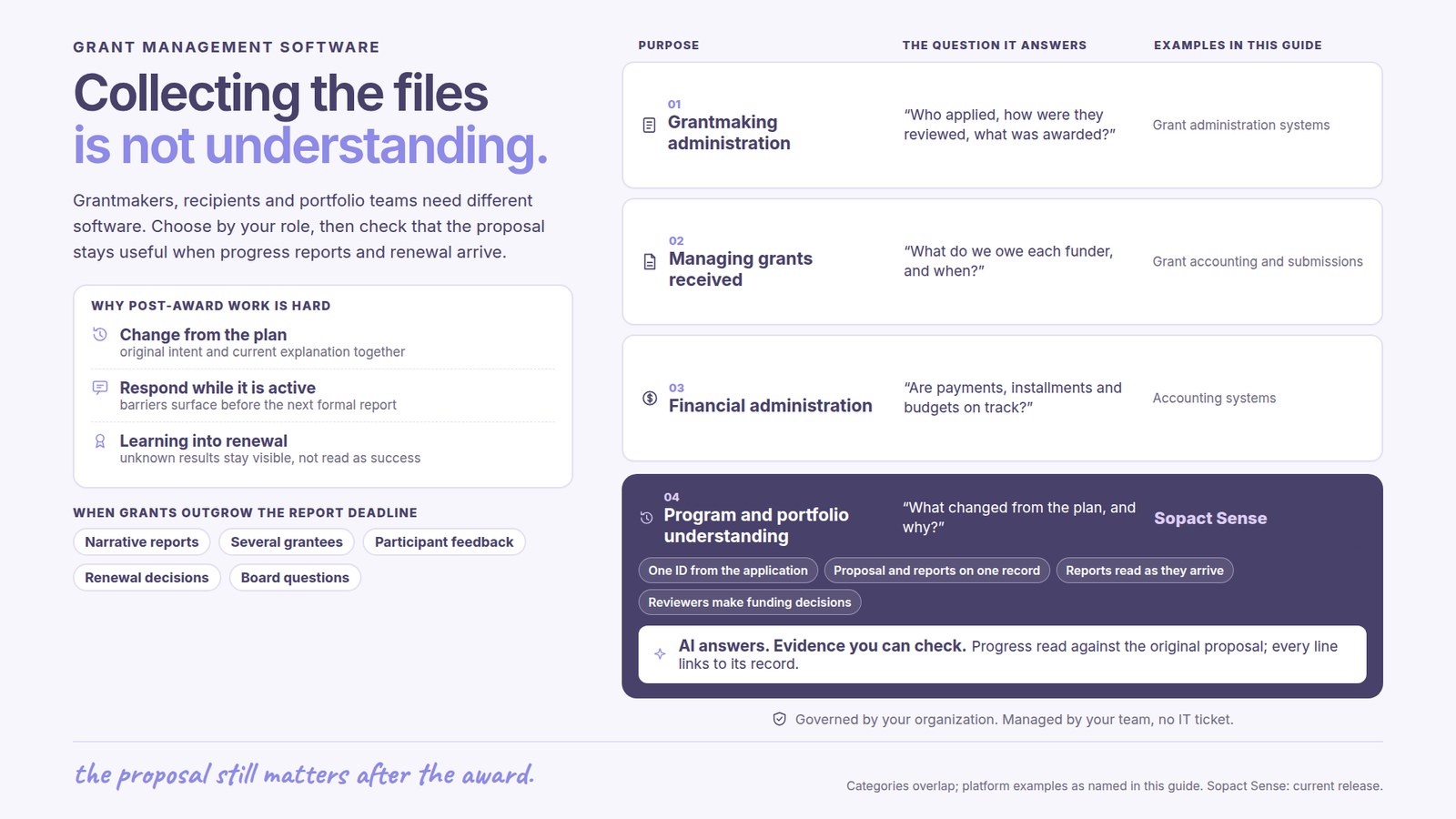
Funders need application intake, eligibility and review, award records, grantee communication and follow-up. Financial administration and complex approvals may also matter. The important question is how well the proposed system supports the actual program, including work after selection.
Recipients need to manage commitments to funders, reporting dates, evidence and often budgets or expenditure. These responsibilities differ from running a competitive grant round. Grant accounting and prescribed submissions deserve explicit attention where they are required.
Some teams already have administration covered but still struggle to interpret reports, connect results and answer new questions. Sopact’s Applications & Grants approach is relevant to this evidence work. A separate grant software shortlist compares named platforms by purpose.
A good application contains more than a score. It explains the proposed work, starting conditions, intended participants and evidence of need. If that context disappears into an archive after the award, the program officer must reconstruct it when a progress report arrives.
Sopact analyzes incoming application material in the configured criteria and context. Reviewers can inspect supporting evidence, identify questions for an interview or clarification, and apply their own judgment. Once a grant is awarded, the relevant proposal context can inform onboarding and later review.
This continuity matters in grants that support continuing programs. The purpose is to reduce repeated reading and preserve what the organization has already learned, rather than make a new isolated summary at every stage. Decisions, commitments and later observations still need to remain distinct.
A progress report may show that delivery changed because recruitment was slower or participants needed different support. Staff need the original intention and current explanation together to distinguish a useful adaptation from an unresolved problem.
Incoming evidence can inform a conversation with the grantee before the next formal report. For example, recurring participation barriers may justify changes in outreach or delivery. A useful system helps the program officer understand the issue while there is still time to act.
Renewal discussions need more than the last report. Prior commitments, progress, participant feedback and explanations of change provide a fuller account. Unknown results should remain visible so missing evidence is not mistaken for success or failure.
AI used for one document can reduce a reading task. An AI-native evidence workflow can make new analysis available as data arrives and retain its connection to the grant’s purpose, earlier evidence and reporting period. This lets the same information support several questions over the life of a grant.
In Sopact, AI Assistance can help staff explore that connected evidence. A program officer may need to understand a changed delivery plan; a portfolio lead may need to identify recurring barriers across partners; a reporting team may need the evidence behind a finding. They should not have to rebuild separate collections of files for each conversation.
The useful distinction is how analysis fits the work. Several established grant platforms now offer AI review or summaries. Buyers should examine the continuity, scope and team ownership of the proposed workflow rather than assume that a newer AI label proves a better fit.
Grantees may use the same word for different measures. People reached, service visits and completed programs describe different things. A concise data dictionary makes those definitions explicit, along with the reporting period, population and source. This gives the team a basis for meaningful comparison without forcing every partner into identical reporting.
Consider a portfolio supporting both mentoring and employment training. A common participation measure may be useful across both, while job placement belongs to the employment program. Narrative evidence can explain barriers or adaptations across the portfolio even when the outcome measures remain different.
Sopact connects forms, files and feedback with this program context. Staff can examine quantitative results alongside the explanations, notes and documents behind them. The impact reporting software guide develops reporting for different audiences. Reporting coverage matters too: a finding based on submitted reports should identify the grants or periods still missing.
An organization may need a grant system to execute payments, track installments, manage budgets or exchange information with accounting. Those functions are related to, but different from, analyzing the evidence of program delivery. Include each required responsibility explicitly when selecting or extending software.
Sopact can be considered alongside an existing grant-administration system when the unmet need is connected analysis and portfolio understanding. The sources and data exchange must fit the actual environment. Keeping a functioning financial process while improving evidence use can be more practical than replacing every system at once.
For a renewal or replacement decision, the grant software alternatives guide considers the broader choice. The purchase should resolve a concrete operating problem, not simply add another place to upload reports.
Sopact’s typical setup estimate is two days to two weeks for an agreed scope. Define the first grant workflow, available evidence and decisions it should support. Historical migration, complex integrations and specialized administration need to be included in the plan.
Once configured, analysis is available as new data arrives. Reviewers and program staff still interpret the findings, ask follow-up questions and make decisions. Setup speed, analysis availability and final approval time are different measures.
Sopact combines self-governance, personalization and continuing team support. The lasting value is that the program team can adapt its questions and retain organizational knowledge as grants and staff change. Impact measurement becomes part of managing the program rather than a separate reporting project months later.
It supports grant applications, review, award administration, follow-up and reporting. Product fit depends on whether the buyer is a grantmaker, a recipient or a team needing program and portfolio analysis.
It helps manage commitments, progress, reporting and other requirements after a grant is awarded. A useful evidence workflow connects current reports with the proposal, program context and earlier findings.
No. AI can prepare evidence and analysis; reviewers interpret it, seek clarification and make funding decisions.
Yes, where the agreed workflow and available data exchange support it. Sopact can address evidence analysis and portfolio understanding while an existing system retains specialist administration.
It explains what each measure means, who and what period it covers, and which sources support it. This helps staff compare compatible results and avoid combining unlike measures.
Continue with a purpose
Related solution
Connect application evidence, human review and the next program stage.
Explore the solution →Continue learning
Explore how program criteria guide evidence review.
Start learning →
Customer story
A five-day launch and custom-rubric assessments prepared for a human committee.
Read the story →Explore how Sopact can connect applications, progress and portfolio questions around your grant programs.
See it with your workflow →