play icon for videos

Equity Dashboard: See What Averages Hide | Sopact

Most equity dashboards aggregate disparities away. Build one with disaggregation structured at collection — so gaps surface, not hide.

US
Pioneering the best AI-native application & portfolio intelligence platform
Updated
April 20, 2026
360 feedback training evaluation
Use Case

Equity Dashboard: See What Averages Hide

A workforce nonprofit pulls its year-end equity report. Aggregate program completion is 74%. The board nods. Six months later a funder asks for outcomes by race and the team discovers completion is 82% for one subgroup and 51% for another — a 31-point gap that was visible in the raw data the whole time but never surfaced in the dashboard. The question is not why the dashboard failed to show the gap. The question is why the gap was invisible the moment the data was collected.

This is the Equity Resolution Problem: the resolution needed to see inequity — by subgroup, by intersection, over time — is lost at the collection stage, not the display stage. By the time data reaches a dashboard, the answer to "are outcomes equitable?" has already been baked in by how the data was shaped at intake.

Last updated: April 2026

This page explains what an equity dashboard actually is, why most of them aggregate disparities away, and how to build one where gaps surface rather than hide. It is written for nonprofit program leaders, foundation staff, and impact fund managers who need equity evidence that holds up to a board question, a funder audit, and an investigative journalist — in that order.

Equity Dashboard · For Nonprofits, Foundations & Impact Funds
See what averages hide.

Most equity dashboards aggregate disparities away. The resolution needed to see inequity is lost at collection — not at display. Build one where subgroup outcomes surface as patterns form, not after a quarterly cleanup.

Completion rate — year over year
the aggregate climbs while one subgroup falls behind
31-pt gap hidden
90% 75% 60% 45% 30% Y1 Y2 Y3 Y4 Y5 Group A Aggregate Group B Group C Aggregate view alone Subgroup resolution
Aggregate (what a standard dashboard shows) Disaggregated subgroups
The Ownable Concept
The Equity Resolution Problem

The resolution needed to see inequity — by subgroup, by intersection, over time — is lost at the collection stage, not the display stage. By the time data reaches a dashboard, the answer to “are outcomes equitable?” has already been baked in by how the data was shaped at intake.

31 pt
Typical subgroup gap hidden beneath a favorable aggregate
Faster decision cycle when disaggregation is structured at collection
22%
Of nonprofit dashboards track outcomes longitudinally by cohort
0
Manual reconciliation required when participant IDs persist
Six Principles
Build a dashboard where disparities surface, not hide.

Every principle below addresses a specific failure mode in standard BI stacks. They apply equally to program equity, pay equity, grantmaking equity, and portfolio equity.

01
Collection
Structure disaggregation at intake

Demographic, geographic, and contextual fields must be standardized and attached to a persistent ID at first contact. Retrofitting from exports is what creates the Equity Resolution Problem.

Free-text demographic fields by year three are beyond repair.

02
Context
Pair every metric with its “why”

A gap without context produces defensiveness or denial. Pair each metric with a short qualitative note explaining the likely driver — drawn from staff feedback and participant narrative, not speculation.

Numbers alone never move a board meeting toward action.

03
Longitudinal
Track cohorts over time, not snapshots

A single point-in-time read hides divergence. Use the persistent participant ID to follow the same cohort across intake, mid-program, completion, and follow-up — the gap appears in the trajectory.

Cross-sectional snapshots can mask a widening gap as progress.

04
Protection
Protect small subgroups — don’t erase them

If a subgroup under n=10 is suppressed for privacy, say so explicitly. Quiet suppression is how dashboards accidentally erase the populations facing the steepest disparities. Mask the count, not the existence.

Silent n<10 suppression is the most common hidden failure.

05
Decisions
Attach decisions to data — every time

Maintain a visible “what we changed” log alongside each metric. Each entry records the intervention tried, the date, and the observed shift. After two quarters this becomes the single most useful artifact for any audit, evaluation, or board review.

A dashboard without an action log is a museum exhibit.

06
Resolution
Drill from aggregate to individual

Equity work eventually requires looking at a specific person or program. The dashboard should let you click from a subgroup line into the underlying cases — with appropriate permissions — so the pattern connects back to real experience.

Aggregate-only views produce recommendations that cannot be acted on.

Sopact Sense applies all six principles by default — disaggregation is structured at collection, participant IDs persist across touchpoints, and the intervention log is a built-in surface.

See the full approach →

What is an equity dashboard?

An equity dashboard is a continuously updated view of outcomes disaggregated by demographic and contextual subgroups, paired with the decisions and actions that moved them. It is not a chart of averages. A real equity dashboard shows whether outcomes are equitable across race, gender, income, geography, and program cohort — not just whether outcomes are improving overall. Sopact Sense builds this view by assigning a persistent participant ID at first contact, so every subsequent data point for that person attaches to the same record without manual reconciliation.

The distinction matters because most BI tools — Tableau, Power BI, Looker — are excellent at rendering whatever data you load into them. They cannot fix the fact that the data was collected without the segmentation structure needed to show inequity. An equity dashboard built on cleaned-after-the-fact spreadsheets is a rendering of absence.

What is equity analytics?

Equity analytics is the practice of analyzing program or workforce data with subgroup-level resolution as a default, not as a retrofit. Where standard analytics asks "did outcomes improve?", equity analytics asks "for whom did outcomes improve, by how much, and at what pace?" The difference is structural: equity analytics requires that every record carry the demographic and contextual fields needed for disaggregation, collected consistently at the point of intake.

Without that structure, teams run a familiar pattern: export from Salesforce or an LMS, spend two weeks cleaning and joining files, generate a subgroup breakdown, publish a slide. Six months later the next person repeats the work from scratch. Sopact Sense replaces that cycle with longitudinal data that connects automatically — one participant, many touchpoints, one view.

What is a pay equity dashboard?

A pay equity dashboard tracks compensation, raises, and promotion rates across demographic groups to identify and monitor pay gaps. It typically includes base salary by role, total compensation with bonus and equity, pay-band distribution by race and gender, and year-over-year change. Specialized tools like Syndio and Trusaic focus on statistical pay-gap analysis with regression controls; most nonprofits and mission-driven funders don't need that depth but do need visible, defensible pay-band distribution.

What is an employee equity dashboard?

The phrase "employee equity dashboard" means two very different things depending on context, and search results mix them. In a compensation context, it refers to stock option and vesting tracking — handled by tools like Carta and Pulley. In a workforce equity context, it refers to a DEI dashboard tracking representation, pay, and advancement across demographic groups. This page covers the second meaning. For stock equity administration, use a cap-table platform; for workforce equity, continue reading.

What is a DEI dashboard?

A DEI dashboard visualizes diversity, equity, and inclusion metrics across an organization or program: representation by race and gender at each level, hiring and attrition by demographic, promotion parity, belonging and inclusion survey results, and pay equity. Platforms like Diversio focus on corporate DEI with survey-based inclusion scoring; Visier offers workforce analytics with DEI modules for enterprise HR teams. Nonprofits and impact funds typically need a DEI dashboard that covers both internal workforce equity and program participant equity — a scope most corporate DEI tools don't cover.

What are DEI metrics?

DEI metrics are quantitative indicators organized across four categories: representation (demographic composition at each organizational level), equity (pay, promotion, and opportunity parity across groups), inclusion (belonging, psychological safety, and participation, typically measured through short pulse surveys), and progression (hiring, advancement, and retention rates by demographic). Well-designed DEI dashboards show these metrics alongside the actions taken to move them, not in isolation. A representation number with no adjacent intervention log is a score; a representation number paired with "what we changed and when" is a learning system.

Step 1: The Equity Resolution Problem — why aggregate views hide inequity

Traditional analytics stacks collapse heterogeneous groups into averages by default. An 82% completion rate for participants is a Tuesday-morning headline. It is also statistically true, easy to cite, and catastrophic for equity work — because it answers a question nobody concerned with equity was asking. The question is whose 82%.

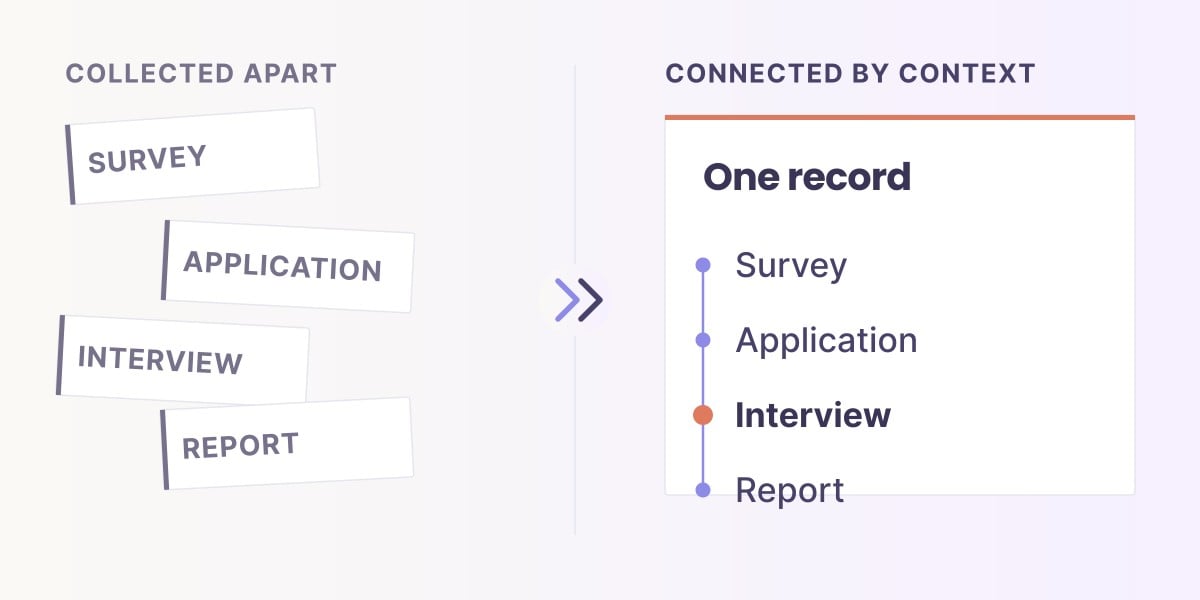
The Equity Resolution Problem has three compounding layers. First, collection resolution: if demographic fields are optional, inconsistent across forms, or entered as free text, no downstream tool can rebuild them cleanly. Second, identity resolution: if the same person appears across intake, mid-program, and follow-up with different record IDs, you cannot compute subgroup outcomes longitudinally without a deduplication project. Third, contextual resolution: raw demographic fields without program-stage, region, and cohort metadata produce subgroup counts too small to act on.

Three ICP Archetypes
Whichever way your organization is shaped — the break happens in the same place.

Program, workforce, grantmaking. The surface metrics differ; the Equity Resolution Problem is identical.

A nonprofit delivers five programs across three regions. Each program collects demographic data differently. By the time an equity lens is applied at year-end, the fields don’t align — race is free text in one form, a dropdown in another, missing entirely in a third. The gap isn’t in the analysis. It’s in the collection.

01
Intake

Demographics captured inconsistently across programs.

02
Mid-program

No persistent ID means pulse surveys can’t join to intake.

03
Outcome

Annual report shows aggregate rate only — subgroup trajectories invisible.

Traditional Stack
  • Each program builds its own intake form — five variants of a race field
  • Annual export to Excel; analyst spends three weeks cleaning and joining
  • Subgroup breakdown appears once a year, in a slide nobody updates
  • “Why it moved” reconstructed from memory, not recorded
With Sopact Sense
  • Standardized demographic schema applied at intake across all five programs
  • Persistent participant ID chains every touchpoint to the same record
  • Subgroup outcome trajectories visible in real time, per cohort
  • Intervention log attached to each metric — decisions traceable to outcomes

A workforce training nonprofit reports 74% completion. Placement is 61%. The funder asks for outcomes by race, gender, and prior employment status. The team spends four weeks reconciling LMS exports, applicant intake, and post-placement surveys — only to discover the fields needed for disaggregation were never captured consistently.

01
Enrollment

Applicant data in one system, program intake in another.

02
Completion

LMS tracks completion but not demographic segmentation.

03
Placement & Wage

Post-placement survey has its own record IDs; no link back to intake.

Traditional Stack
  • Three systems, three record-ID schemes, manual deduplication
  • Wage equity analysis requires a quarterly cleanup sprint
  • Placement outcomes shown in aggregate — subgroup wage gap invisible
  • Board reviews happen quarterly; interventions lag behind data
With Sopact Sense
  • One participant ID from application through one-year follow-up
  • Wage outcomes connect automatically to intake demographics
  • Placement-rate parity visible as each cohort completes — not annually
  • Bi-weekly decision cadence — the intervention window stays open

A community foundation funds 60 grantees a year. It commits publicly to equity in grantmaking. The data to prove that commitment lives in a grants management platform that tracks applications and awards — but not the demographics of who ultimately gets served. The equity claim ends at the grantee boundary.

01
Application

Organization demographics captured at application.

02
Award

Award decision logged; geographic distribution visible.

03
Downstream outcomes

Grantee reports on participants served — demographics absent or inconsistent.

Traditional Stack
  • Grants management platform covers application-to-award; outcomes sit elsewhere
  • Grantee reports arrive as PDF narratives — demographic disaggregation manual
  • Equity in grantmaking shown as award distribution only — not downstream reach
  • No longitudinal view of how grantee outcomes evolve year over year
With Sopact Sense
  • Grantee outcome reporting uses the same structured schema across the portfolio
  • Downstream participant demographics connect to the funding decision that enabled them
  • Equity visible at three layers: who applies, who gets funded, who gets served
  • Year-over-year trajectory surfaces widening or narrowing gaps across the portfolio

Different surfaces, same failure mode. The fix isn’t a better dashboard — it’s structured disaggregation at collection, chained through persistent IDs, with interventions logged as they happen.

See the architecture →

Step 2: How equity dashboards go wrong — seven failure patterns

The patterns are consistent across nonprofits, foundations, and impact funds. Demographic fields collected inconsistently across intake forms, follow-ups, and partner-submitted records — by year three of a program the data dictionary has drifted beyond repair. Small subgroup suppression applied as a privacy measure — common in education equity dashboards — makes the groups facing the steepest inequity statistically invisible. Cross-sectional snapshots masquerading as trends, because cohort-based longitudinal tracking requires participant IDs that were never assigned. Quantitative-only dashboards that surface a gap but not the reason behind it. No decision log attached to metrics, so movement in a number cannot be traced to an intervention. Single-tool dashboards built in Tableau on an export that's three months old. Binary equity framing — equitable or inequitable — instead of directional framing that tracks how fast gaps are narrowing or widening.

Each failure has the same root: the dashboard was designed as a reporting artifact, not as part of the data collection system. By the time the visualization layer is reached, the equity question is already unanswerable at the resolution it needs.

Step 3: The Sopact Sense approach — disaggregation structured at collection

Sopact Sense inverts the stack. A unique participant ID is assigned at first contact. Demographic fields are structured, standardized, and attached to that ID at intake — not retrofitted. Every follow-up survey, outcome measure, and partner-submitted record joins to the same participant record automatically through the persistent ID chain. By the time a dashboard is drawn, the resolution is already present.

The four-category framework — Access, Achievement, Inclusion, Engagement — carries forward from equity measurement practice but is operationalized differently. Each category's metrics are collected with the subgroup fields attached, not added during analysis. A belonging pulse is not a separate survey to be joined later; it's a two-item check attached to the same participant record that carries their enrollment demographics.

Traditional BI Stack vs. Sopact Sense
Where equity dashboards break — and where they hold up.

Standard BI tools render whatever you load into them. They cannot fix a collection layer that lost the resolution before analysis began.

Risk 01
The Aggregation Default

Averages are the default rendering in every BI tool. Subgroup breakdowns require deliberate configuration and tend to live on secondary tabs nobody clicks.

The board sees a headline; the equity question goes unasked.

Risk 02
The Export Latency Tax

Dashboards built on quarterly exports are always 2–4 weeks behind. By the time a widening gap appears, the cohort that experienced it has moved on.

The decision window closes before the signal arrives.

Risk 03
The Cleanup Cascade

Every new analysis restarts the reconciliation. Demographic fields captured inconsistently require manual cleaning each reporting cycle — an implicit tax on every equity question.

Year three, the data dictionary has drifted beyond repair.

Risk 04
The Subgroup Suppression Silence

Privacy thresholds drop small groups from reports automatically — often without annotation. The populations facing the steepest inequity become statistically invisible.

Silent suppression is how dashboards erase the people who need visibility most.

Capability Comparison
What it takes to build an equity dashboard that holds up.
Capability Traditional BI Stack Sopact Sense
Structured demographic fields at intake
Standardized schema applied consistently across all programs.
Depends on upstream form tools

Each program builds its own intake — consistency requires manual governance.

Built-in schema governance

Demographic and contextual fields standardized across every form and program.

Persistent participant ID
Same ID carries across intake, mid-program, outcome, and follow-up.
Requires deduplication project

IDs typically differ across systems; joining records is a quarterly sprint.

Assigned at first contact

Every touchpoint joins to the same participant record automatically.

Cohort outcome trajectories
Track the same cohort from enrollment through follow-up.
Supported via custom modeling

Requires data engineering to build cohort joins; most teams default to snapshots.

Native cohort view

Longitudinal trajectory per subgroup visible as each cohort progresses.

Small subgroup handling
Protect privacy without erasing the subgroup’s existence.
Silent suppression common

Thresholds often applied without annotation — groups disappear from the view.

Visible, annotated suppression

Small-n cells masked with explicit notation — existence never erased.

Disaggregation by default
Subgroup breakdown is the default view, not a buried tab.
Aggregate is the default

Subgroup breakdowns require deliberate dashboard configuration.

Disaggregation is the default lens

Every metric surface is segmented by the fields captured at intake.

Qualitative context attached
Every metric carries a “why it moved” note drawn from narrative feedback.
Requires separate qualitative tool

Narrative data lives in interview transcripts or open-ended fields — rarely joined to metrics.

Intelligent Column analysis

Themes surface across open-ended responses as they arrive — attached to the same participant record.

Update frequency
How quickly new data reaches the dashboard view.
2–4 weeks behind typical

Quarterly exports define the cadence in most nonprofit/foundation setups.

Continuous

Dashboard updates as data enters the persistent participant record — no export cycle.

Intervention log attached to metrics
“What we changed” record visible alongside each number.
External to dashboard

Decisions captured in meeting notes or program memos — not joined to the metrics they moved.

Built-in action log

Every intervention recorded with date and targeted metric — traceability preserved.

Traditional BI tools are excellent at rendering. They are not built to fix a collection layer that lost resolution before analysis began.

Compare to a full nonprofit dashboard →

The fix is not a better dashboard. It is a collection layer where disaggregation is structured at intake and participant IDs chain every subsequent touchpoint automatically.

Build equity dashboards that hold up →

Step 4: Building equity dashboards that drive action

The "why it moved / what we changed" pattern is the difference between a dashboard that reports and a dashboard that teaches. Every metric gets two attached annotations: a why it moved note explaining the likely driver of the change (derived from qualitative feedback and staff observation), and a what we changed log of the specific interventions deployed and when. After two quarters, this log becomes a decision archive — the single most useful artifact for board meetings, funder reports, and program evaluation.

For a nonprofit tracking workforce outcomes: add evening advising, watch no-show rates, document the intervention in the log. For a foundation tracking grantmaking equity: flag when funding concentration by geography widens, document outreach to underrepresented regions, measure the shift six months later. For an impact fund tracking portfolio equity: track board diversity and employee demographics across investees, document the investor ask, observe the trajectory.

The pattern applies identically across nonprofit program dashboards, DEI dashboards, housing equity dashboards, and impact dashboards. What changes is the underlying metric set; what stays identical is the insight → action → evidence loop.

Step 5: Common mistakes and how to avoid them

Building the dashboard before defining the decision. A dashboard with no owning decision rhythm becomes a museum exhibit. Pick one high-stakes decision — aid packaging, grant allocation, program expansion, portfolio investment — and build backwards from it.

Choosing too many metrics at the start. Six to eight well-defined indicators tied to Access, Achievement, Inclusion, and Engagement beat thirty metrics that nobody reads. Expand only when the first loop is stable.

Publishing without methodology notes. Every chart should carry its data source, cohort definition, and date of last refresh visibly. Stakeholders lose trust faster from hidden methodology than from uncomfortable numbers.

Suppressing small subgroups without saying so. If a subgroup under n=10 is masked, say that — don't silently drop it. Invisible suppression is how equity dashboards accidentally erase the groups that matter most.

Running equity analytics quarterly. Disparities shift faster than reporting cycles. A monthly or even bi-weekly cadence keeps the decision window open; a quarterly cadence closes it.

Treating AI dashboards as magic. AI-powered summary and "why it moved" annotations are useful only when built on clean, longitudinally connected data. An AI summary of messy data is a well-formatted hallucination.

Masterclass
Longitudinal Data vs. Disconnected Metrics
See the workflow →
Longitudinal Data vs Disconnected Metrics — masterclass thumbnail
▶ Masterclass Watch now
#longitudinal #equity #cohorts #dashboards

Unmesh Sheth, Founder & CEO, Sopact

Book a walkthrough →

Frequently Asked Questions

What is an equity dashboard?

An equity dashboard is a continuously updated view of program, workforce, or portfolio outcomes disaggregated by race, gender, income, geography, and cohort, paired with the decisions and actions that moved those outcomes. Unlike a standard BI dashboard that renders averages, an equity dashboard exposes disparities at the subgroup level and tracks whether gaps are narrowing or widening over time. Sopact Sense builds this view on persistent participant IDs assigned at intake.

What is equity analytics?

Equity analytics is the practice of analyzing outcomes with subgroup-level resolution as a default, not as a retrofit. It asks "for whom did outcomes improve, by how much, and at what pace?" rather than just "did outcomes improve?" Proper equity analytics requires that every record carry the demographic fields needed for disaggregation, collected consistently at intake rather than reconstructed from exports.

What is the Equity Resolution Problem?

The Equity Resolution Problem is Sopact's term for a structural failure pattern: the resolution needed to see inequity is lost at the collection stage, not the display stage. By the time data reaches a dashboard, whether you can answer "are outcomes equitable?" has already been determined by how demographic fields, participant IDs, and context metadata were captured — or weren't — at intake.

What is a pay equity dashboard?

A pay equity dashboard tracks compensation, raises, and promotion rates across demographic groups to identify pay gaps. Core components include base salary by role and demographic, total compensation, pay-band distribution by race and gender, and year-over-year change. Specialized tools like Syndio and Trusaic add statistical regression controls; most mission-driven organizations need visible pay-band distribution more than deep statistical modeling.

What is a DEI dashboard?

A DEI dashboard visualizes diversity, equity, and inclusion metrics across an organization: representation by race and gender at each level, hiring and attrition by demographic, promotion parity, belonging and inclusion survey results, and pay equity. Platforms like Diversio focus on corporate DEI; nonprofits and impact funds typically need coverage for both internal workforce equity and program participant equity — a scope most corporate DEI tools don't provide.

Does "employee equity dashboard" mean stock equity or DEI?

The phrase means both, depending on context. In compensation contexts, it refers to stock option and vesting tracking handled by tools like Carta and Pulley. In workforce contexts, it refers to a DEI dashboard tracking representation, pay, and advancement by demographic. Search results mix the two. For stock equity administration, use a cap-table platform; for workforce equity, use a DEI or impact intelligence platform.

What DEI metrics should a dashboard include?

Four categories cover the core: representation (demographic composition at each level), equity (pay, promotion, and opportunity parity), inclusion (belonging, psychological safety, measured via short pulse surveys), and progression (hiring, advancement, retention rates by demographic). The best dashboards pair every metric with an attached intervention log — what was tried, when, and what shifted after — so the numbers teach instead of merely report.

How often should an equity dashboard be updated?

Monthly is the floor for most mission-driven organizations; bi-weekly is better for active program cycles; real-time is appropriate for workforce platforms with continuous data flow. A quarterly cadence — still common in nonprofit and foundation reporting — closes the decision window before leadership can act. Sopact Sense updates dashboards continuously as new data enters the persistent participant record.

How do I track equity in a grantmaking portfolio?

Track three layers: equity in who applies (outreach reach by region, demographic, and organization type), equity in who gets funded (grantee demographics, geography, award-size distribution), and equity in who benefits (downstream participant demographics from funded programs). Application review software handles the first two; impact intelligence connects funding decisions to downstream outcomes.

Can an equity dashboard be used for pay equity without an HRIS integration?

Yes — if compensation data lives in a payroll system, extract it on the cadence that matches the dashboard update rhythm. The quality of a pay equity dashboard is limited by the completeness of demographic fields in the payroll record, which is why many organizations need to backfill demographic data before the dashboard can produce a defensible view. Sopact Sense handles the backfill through participant self-report surveys tied to persistent IDs.

How much does an equity dashboard platform cost?

Costs range from free (self-built in Google Data Studio with heavy analyst time) to $1,000–$3,000/month (integrated platforms with built-in collection and analysis) to $30,000–$150,000/year (enterprise workforce analytics platforms like Visier). Sopact Sense starts at $1,000/month and includes the data collection layer — most other platforms require you to bring your own cleaned data, which is where real implementation cost hides.

How does Sopact Sense build an equity dashboard differently?

Sopact Sense is a data collection platform, not a BI tool. It assigns a persistent participant ID at first contact, structures demographic and contextual fields at intake, connects every follow-up to the same record automatically, and surfaces equity disparities as patterns form — not after a quarterly export and join project. The dashboard layer is the end of a collection pipeline, not the beginning of an analysis project.

Is an equity dashboard the same as a nonprofit dashboard?

No. An equity dashboard is one view within the broader category of nonprofit dashboards. A nonprofit dashboard may cover financial health, program reach, outcome achievement, and organizational capacity — equity is a cross-cutting dimension that should appear on every view rather than sitting in a separate tab. The best nonprofit dashboards make equity a default lens on every metric, not a page to click into.

Start Here
Build the dashboard where equity surfaces, not hides.

Sopact Sense is a data collection platform that assigns a persistent participant ID at first contact — so every subsequent touchpoint connects to the same record automatically. The dashboard is the end of a clean pipeline, not the beginning of a cleanup project.

  • Disaggregation structured at intake — not retrofitted from exports
  • Cohort-level trajectories visible as each group progresses
  • Intervention log joined to every metric that moved
Stage 01
Collection with Resolution

Standardized demographic and contextual fields at intake — across every program, form, and partner.

Stage 02
Persistent ID Chain

Same participant record from first contact through one-year follow-up — no deduplication, no manual joins.

Stage 03
Contextual Intelligence

Themes surface across qualitative responses, attached to the same records — the “why it moved” arrives with the number.

One intelligence layer runs all three — powered by Claude, OpenAI, Gemini, watsonx.