


Related solution
Training & Programs
Connect starting assessments, participant feedback and later skill use across cohorts.
Explore the solution →

Training & programs · Practical guide
Training evaluation software helps organizations assess what learners gained from training, how they experienced it and whether they apply it afterward. Good software connects starting assessments, learning results and later feedback, so teams can distinguish course satisfaction from changes in knowledge, skills or practice. Training providers and program leaders use it to improve instruction and identify where learners need further support.
The difficulty is following the learner beyond a completed course. Attendance, an end-of-course rating and later use of a skill describe different things. Feedback may be disconnected from the learner’s starting point, managers may see barriers the participant does not mention, and nonresponse can make later results look stronger than they are. The software needs to preserve those distinctions while keeping follow-up manageable.
AI can summarize course comments, but an AI-native evaluation process goes further: analysis is part of collecting evidence across the learner’s journey. The distinction matters when useful feedback arrives weeks after training and needs to be understood alongside the starting assessment. Buyers should look for less repeated preparation and better continuity, while still distinguishing satisfaction, learning and application.
Sopact focuses on that continuing program view. It connects assessments, files and feedback across stages, helping teams examine reported progress alongside what participants say helped or prevented them from applying their learning. Programs can retain their own evaluation questions while leaders examine patterns across the portfolio, supported by an ongoing Sopact relationship.
Understand how participants experienced training.
Assess the knowledge or skills developed.
Follow how learning is used and what gets in the way.
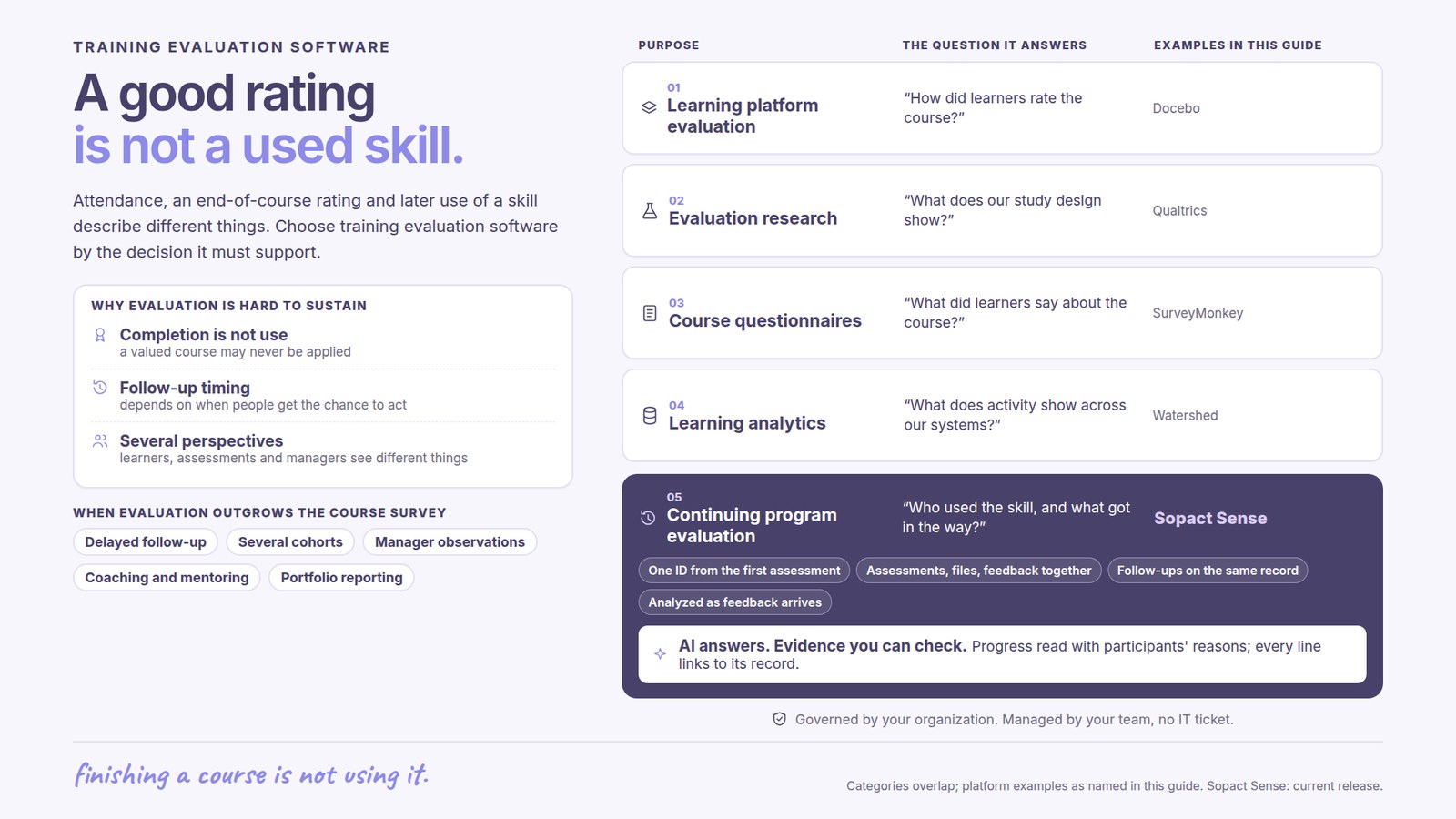
A learner can finish a course and value it without having an opportunity to use the skill. The next decision may concern a manager’s support, access to equipment or the relevance of the training. An evaluation that stops at the completion survey cannot distinguish those possibilities.
A participant who can apply a skill the next week differs from one waiting for a placement or assignment. The program needs follow-up that fits that opportunity. It also needs to retain the earlier assessment and intended outcome so a later answer can be interpreted in context.
Learners describe confidence and experience; an assessment can demonstrate knowledge; a manager may observe behavior. These sources should inform one another without being treated as interchangeable measures. Written explanations are particularly useful when a numerical result does not show what prevented application.
Course ratings help identify whether learners found the content useful and the teaching effective. Assessments show what they learned. Later feedback addresses another question: whether they could use that learning in their work or lives. Training evaluation software should fit the level of responsibility your team has.
For a corporate learning team, keeping questionnaires and reporting close to course administration can simplify the work. An LMS may already hold enrollment, completion and assessment information. Some also support delayed follow-up, making the existing LMS worth assessing before adding another platform.
Survey and research platforms suit teams designing their own evaluation studies. They offer flexibility in questions and analysis, but staff still need to decide which evidence demonstrates learning, application or results. A survey platform is not a substitute for an evaluation design.
Organizations with several learning systems may need to combine activity and performance information. This places more weight on connections to existing systems and shared analytics. It is a different purchase from a tool chiefly intended to collect participant feedback.
Leadership, workforce and community programs may combine courses with coaching, placements or mentoring. Their leaders need to understand participants’ starting points, experiences and later progress. Sopact is designed for this broader program context.
Sopact publishes this guide. The shortlist groups platforms by purpose; it is not an independent ranking. Linked product documentation supports the descriptions. Features and services depend on the selected product and agreement.
| Platform | Main buying need | What matters in this choice |
|---|---|---|
| Docebo — learning platform evaluation | LMS evaluation | Consider it when evaluation needs to sit within an established learning platform. Its documentation includes course evaluations and learner follow-up questionnaires. Compare the relevant modules and reporting with the work your learning team already performs. |
| Qualtrics — evaluation research | Research and experience | Relevant when the requirement is a flexible survey and research environment with analytical depth. Include the expertise needed to design the study and interpret its results. |
| SurveyMonkey — feedback questionnaires | Course questionnaires | A candidate for teams collecting course feedback and interpreting questionnaire results, including themes in comments. Consider the additional work needed to combine responses with earlier assessments or other program information. |
| Watershed — learning analytics | Learning analytics | Aggregates learning and performance information across systems, with a learning record store and reporting capabilities. Relevant when the main challenge is understanding activity across an existing learning ecosystem. |
| Sopact — programs and portfolios | Continuing program evaluation | Connects participant forms, files and feedback across program stages. Relevant when training is part of a longer relationship and leaders need to understand both progress and the reasons participants give for it. |
An AI summary attached to an end-of-course report may reduce reporting effort without improving later follow-up. The greater program benefit is making a learner’s new explanation available in the context of earlier assessments, while the team still has an opportunity to respond.
Sopact supports analysis as responses are collected, together with participant-linked forms across stages. A program can use that combination to examine barriers to applying a skill alongside the learner’s earlier goals. This is the practical case for an AI-native evaluation process: recurring feedback becomes part of ongoing support and program improvement. It does not, on its own, establish that training caused a later result.
Docebo’s questionnaire documentation describes immediate learner feedback and later learner follow-up, with a configurable delay of 15–180 days. Manager follow-up is documented for instructor-led courses. An organization already using that environment should examine its evaluation options before purchasing another system solely to send a later questionnaire.
The broader decision is whether course-based evaluation covers the program’s responsibility. Mentoring, placements and alumni support may introduce information and stages beyond the course itself.
Watershed describes an analytics platform that stores learning records as xAPI statements, including data received through other formats. This is relevant when the organization needs to connect activity across an established learning ecosystem. Its value depends on the learning and performance data the organization can provide, not just on an end-of-course survey.
Qualtrics and SurveyMonkey can help teams collect and analyze evaluation responses. The analytical plan still matters: what evidence demonstrates learning, how later respondents relate to the original cohort, and which other influences could explain a result. A familiar questionnaire tool can be appropriate when that research responsibility is well supported.
Sopact’s participant-linked forms and qualitative analysis support a program view that can include initial goals, assessments and later feedback. Staff can consider a reported barrier alongside the learner’s earlier needs and decide what support to offer. That is particularly relevant when training sits within a longer workforce, leadership or development program.
Sopact also supports offline collection and multiple languages. Those capabilities matter for the delivery setting, while the central buying distinction remains how well the team can understand and use evidence across its entire program. Personalization and continuing support should be scoped around that responsibility.
Product documentation reviewed October 4, 2026. Descriptions reflect the linked offerings; confirm the edition and scope relevant to your organization.
Sopact connects the participant’s starting situation with course feedback and later updates. A team can examine reported progress alongside explanations of what helped or prevented application. This is useful for programs whose value depends on more than attendance or satisfaction.
Across several programs, leaders may need common measures without forcing every course or cohort into identical questions. Sopact’s program and portfolio positioning addresses that combination: local relevance for staff and consolidated learning for leadership. Continuing team support matters as courses, funder questions and follow-up priorities change.
The King Center customer story describes program evaluation using pre- and post-survey evidence and qualitative feedback. Sopact’s account of the relationship emphasizes personalization, customer ownership and continuing support. The practical relevance is helping the team adapt evaluation to its own programs while retaining a coherent view of results.
Start with the responsibility you need to improve. For evaluation inside an existing course-delivery environment, assess the LMS capabilities already available. For specialist research, prioritize study design and analysis. For an established multi-system learning ecosystem, consider learning analytics. For continuing participant programs, compare how earlier and later evidence informs support and improvement.
Then decide who will use the findings and when. An instructor needs feedback soon enough to adjust delivery; a program director may need later evidence of application. Include both audiences if both decisions matter. Agree who owns question changes, analysis and reporting, and what continuing vendor or advisory support is included.
An LMS organizes learning delivery and administration, and may include evaluation. A dedicated evaluation or analytics platform focuses on interpreting evidence. The products can overlap; the right choice depends on the work already covered and the questions still unanswered.
They can describe learners’ experiences and perceptions. Assessments and later evidence are needed for questions about learning and application. Strong satisfaction alone does not establish improved performance.
Sopact focuses on collecting and connecting evidence about programs and participants. Establish how it will work alongside course delivery and other learning-administration responsibilities.
Continue with a purpose
Related solution
Connect starting assessments, participant feedback and later skill use across cohorts.
Explore the solution →Continue learning
Plan evidence that distinguishes participation, learning and application.
Start learning →
Customer story
How open-ended feedback became usable insight for training and program discussions.
Read the story →Explore how starting assessments, training feedback and later follow-up could inform your next program decision.
See it with your workflow →