What is a grant management system?
A grant management system is software that organizes the work of giving or receiving grants on one connected record, from application and review through award, reporting and closeout. Its job is to keep responsibilities, deadlines and evidence together, so the people who make, monitor and report on grants work from the same history instead of rebuilding it from inboxes and exports.
Most people who look up the term already have one. In the video on this page, Unmesh Sheth, Sopact’s founder, describes the conversations he keeps having with grant managers who have spent years building workflows in Submittable, Fluxx or Foundant. Their systems work. What puzzles them is why, after all that configuration, the cycle still takes so long. This guide defines the category and explains that slowness, and what a single grantee ID changes about it.
Some platforms serve grantmakers, others serve organizations seeking funding, so settle which side you need first. A grantmaker provides funding, an applicant requests it, and a grantee receives an award under agreed terms. One organization can be both; keep its incoming and outgoing awards distinct.
Who uses a grant management system—and for which job?
The same product description can cover very different needs. A foundation reviewing applications needs different workflows from a university managing research awards or a nonprofit tracking reports owed to several funders.
On a narrow screen, scroll the table horizontally to read all columns.
| Team | Typical work | Requirement to check |
|---|---|---|
| Foundation or grantmaker | Open opportunities, review proposals, make awards and monitor grantees. | Reviewer access, decision records and recurring partner reporting. |
| Nonprofit receiving grants | Prepare applications, track obligations and coordinate reports to different funders. | Incoming-award deadlines, ownership and links to financial records. |
| Government program | Administer awards under the program’s applicable rules. | Required approvals, reporting formats and records controls. |
| University or research organization | Coordinate proposals, awarded projects and relevant subawards. | Research administration processes and interfaces with institutional systems. |
| Corporate giving team | Manage community funding and report on program objectives. | Eligibility, internal approvals and evidence across supported partners. |
Applicants, reviewers, program officers, finance staff and administrators need different views, and a good demonstration shows each one. An administrator’s screen says nothing about whether an applicant can finish the form on a phone.
When does a shared spreadsheet stop being enough?
A spreadsheet is a reasonable start when the process is small, access is controlled and ownership is clear. No grant count marks the point it fails; the strain comes from applications, reviewers, documents, deadlines, amendments and reporting cycles stacking up together.
The signs are practical. Staff cannot tell what is due or who owns it without asking around. Nobody can find the application behind a past decision. A staff handoff loses an amendment. Partners answer the same questions every cycle, and the quarterly report is rebuilt from scratch each time. A system reduces that work when it is configured around a clear process, and it can also reproduce a confusing process at larger scale, which is the problem section five describes. Settle the steps and ownership before you automate them.
How the grant lifecycle works: pre-award, award and post-award
The Grants.gov lifecycle describes three broad phases for US federal grants: pre-award, award and post-award, with implementation, reporting and closeout in the last. Private funders organize the work differently, but the three phases are a useful map.
- Prepare and applyOpportunity, eligibility, application and supporting documents
- Review and awardRubric, reviewer judgment, rationale and approved agreement
- Deliver and reportMilestones, financial information, partner updates and amendments
- Close and learnRequired closeout, final review and lessons for future funding
Illustrative workflow. Preserve source records and permissions across stages; follow the requirements of the actual award.
Pre-award: make the request and review it
The funder defines the opportunity and eligibility, and applicants submit proposals, budgets and documents. The team checks completeness, then assigns review against agreed criteria, with conflict-of-interest handling and a place for reviewers to record their reasoning. A software flag for missing information is a prompt for staff; the program’s rules decide what follows.
Award: record the decision and agree the plan
Authorized people make and document the decision. The agreement sets what is approved, which conditions apply and what reporting is required; keep it distinct from the original request and later amendments. Many funders now use the first conversation after approval to shape that reporting. Unmesh describes a 60–90-minute onboarding call that settles goals, responsibilities, the metrics to report and a theory of change. Transcribed, it becomes the reporting plan, so later reports are read against what was agreed rather than what was first proposed.
Post-award: manage delivery, reporting and closeout
The grantee delivers and reports; staff track deadlines, review financial and program information, handle approved changes and complete closeout, as the Grants.gov post-award guidance describes for federal awards. An award can close administratively while its longer-term effects are still being studied.
Why a heavily configured system can still feel slow
The pattern is easiest to see through one person. Meet Maya, a composite of the grant leads we talk to. Her foundation gives about $25M a year. She sees roughly 800 applications a cycle, manages 380 live grants, and her system holds 12,000 grantee profiles, all on the same heavily configured platform for more than a decade. In Unmesh’s words, nothing is broken, but everything is slow.
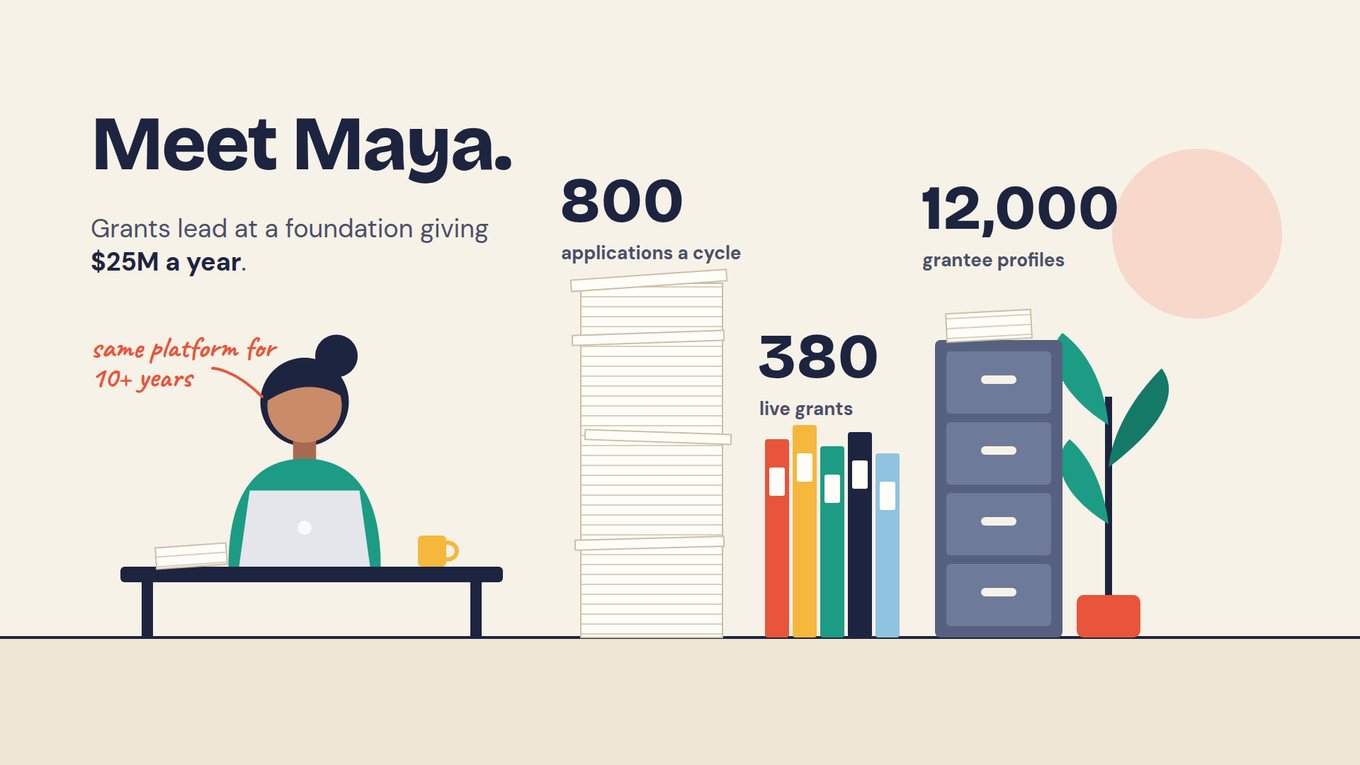
The slowness is accumulated configuration, not a fault. Over the years every exception turned into a custom field and every reviewer preference into another rubric version, which Unmesh says can add a couple of months to a review on its own. New programs brought approval steps, setup questions still go back to the vendor, and answers leave the system in an export. In Sopact’s experience with application programs, traditional application software typically takes two to three months to set up for a cycle, then another two to three months of reviewers reading, re-reading, scoring and selecting, so four to six months pass before a decision.
Some teams have added AI on top, which Unmesh calls lipstick on a pig: a summary button over the same fields and exports leaves the cycle as long as it was. What shortens it is structural. Each grantee needs one persistent record that the application, review, agreement and every report attach to, and software that reads the narratives and documents in that record rather than only storing them.
Watch the video here because it walks through Maya’s cycle before it says anything about software. Look for where Unmesh says to begin: the application process, with fellowships or scholarships ahead of large grants that need heavy due diligence.
Jump to: 1:08 — Meet Maya · 3:29 — Bought, configured, barely used · 6:30 — Think end to end, start with applications
Which features should grant management software provide?
Turn the lifecycle into a requirements list, then ask the question Maya’s story raises: after go-live, who will configure, maintain and use each capability? Mark each as essential, useful or out of scope, and record whether it is native, configured, integrated or a manual handoff.
On a narrow screen, scroll the table horizontally to read all columns.
| Capability | What to test | Important limit |
|---|---|---|
| Application intake | Save a draft, upload documents, validate fields and submit a revised application. | Required fields do not establish that an answer is correct. |
| Review and scoring | Assign reviewers, apply a rubric and preserve comments and disagreement. | A consistent form does not by itself remove bias. |
| Persistent record | Follow one grantee from application to final report under one ID, then add a second award. | Each award under the organization still needs its own identity. |
| Award records | Connect the approved award to its request, agreement and amendments. | Keep the approved version separate from the request. |
| Payment tracking | Distinguish scheduled, approved and completed payments. | Tracking a payment is different from executing or accounting for it. |
| Reporting and narrative | Collect metrics, narrative and attachments against agreed periods; ask what a narrative says and check the cited passage. | A received report, or an AI summary of it, still needs review. |
| Communication | Send reminders and keep material correspondence with the award. | Check permissions, delivery status and preferences. |
| Analysis and dashboards | Trace a figure to its records, definitions and sources. | Incompatible measures should not be combined automatically. |
| Administration and export | Manage roles, history, retention and a usable export. | Check the actual configuration and contract terms. |
Put accessibility, mobile use, language needs and reviewer onboarding into the trial. A feature that is hard to use adds support work and is the first to drift into a side spreadsheet.
Grant tracking, databases, CRMs and accounting: understand the boundaries
Grant tracking usually means keeping status, deadlines and basic award information; a management workflow adds intake, review, approvals and reporting. A grant database can mean your internal award records or a searchable directory of funding opportunities, and a directory helps find funding without managing what follows.
A CRM manages relationships and contacts. Some CRMs can be configured or extended for grants, so weigh the workflows, specialist modules, maintenance and integrations you would need rather than judging by the label. Accounting software keeps the books and financial controls. Grant software may track budgets and payment status or exchange data with finance; verify which, and avoid two conflicting payment records. In the sequence Unmesh recommends, the accounting connection comes last, through APIs or MCP servers.
A foundation can reasonably keep several systems. What it needs is a dependable connection between them: agreed identifiers, clear ownership, permissions and failures that surface instead of disappearing. An “all in one” description does not remove that design work.
Worked example: one grantee ID from application to outcome
Illustrative example. Community Learning Network applies for $50,000 to train 100 participants. After review, the funder approves $40,000 for an agreed target of 80 completions. The proposal stays in the record, but the approved agreement is the basis for monitoring.
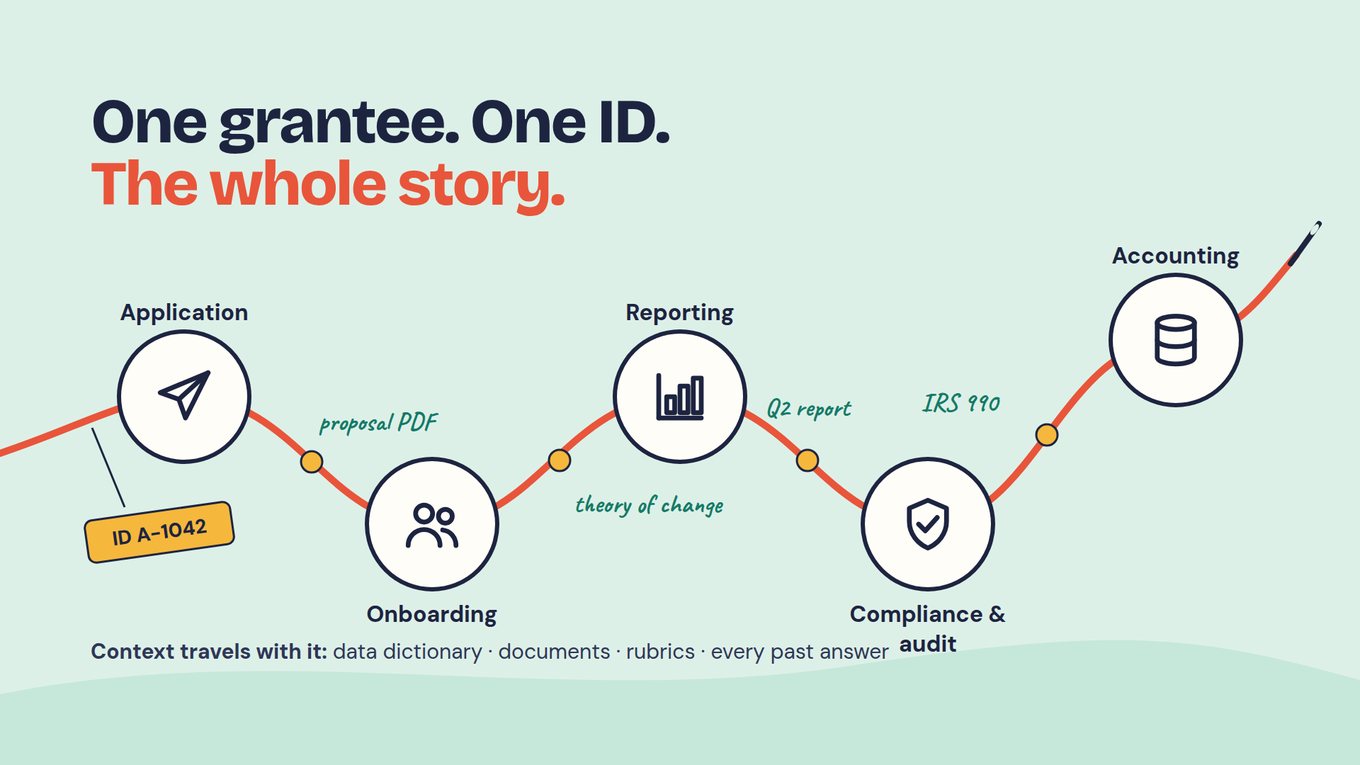
Give the organization one persistent ID and the award its own identifier beneath it. Everything that follows hangs on that thread: the proposal PDF, the review rationale, the theory of change from onboarding, each quarterly report, the compliance checks and the handoff to accounting. A second grant to the same organization shares the relationship but keeps its own figures. Because documents and past answers travel with the ID, a program officer or the AI Assistant can answer a question about this grantee without reassembling the file.
At quarter two the grantee reports 30 completions cumulatively against an agreed quarter-two milestone of 40: ten completions, or 25%, below it. The annual target of 80 answers a different question and should not replace the quarter-two benchmark.
Keep the question and denominator together
Quarter-two progress: 30 ÷ 40 = 75% of the agreed milestone. Annual target progress: 30 ÷ 80 = 37.5%. Both calculations are correct; they describe different comparisons.
The narrative blames a venue problem. Link that explanation to its report, and if the funder approves a revised milestone, record the amendment date and which reports use which plan. Compliance uses the same record: checks compare what a grantee reports with public sources such as IRS Form 990 filings, Bureau of Labor Statistics data or state registries, and the result is filed against the grantee’s ID.
Can a grant management system track outcomes and impact?
It can when the workflow is designed for it: baseline and follow-up collection, defined measures and the qualitative evidence that explains them. Training delivered is an activity, completion an output, sustained use of the skills a possible outcome. See the grant reporting guide for recurring submissions and the foundation board-reporting guide for turning reviewed evidence into a decision brief.
What AI changes in application and reporting review
When grant managers ask Unmesh how to use AI, he tells them to start with the application process: it is contained, it repeats every cycle, and it is where months of reading pile up. The deck reduces what AI contributes to three verbs. It reads every narrative, PDF and transcript, it scores against your rubric the same way on application one and application eight hundred, and it answers questions in plain language without an export.
In Sopact Sense that starts with the form, which asks open-ended questions whose answers give a reviewer context beside the profile fields. An Intelligence Cell analyzes each answer, essay or document as it arrives, using a prompt your team configures against the rubric. An Intelligence Row summarizes each applicant, and the AI Assistant answers questions across the pool with sources. Claude or ChatGPT can query the same data through MCP.
The four-minute walkthrough below makes the three verbs concrete. Eighty applications arrive and each is read on arrival, with barriers such as transportation, childcare or no clear goal drawn from the applicants’ own words. Then the reviewer asks which ten are strongest and gets a report for the committee; notice how much preparation is done before anyone opens a file.
Jump to: 1:14 — Designing an intake that listens · 2:13 — 80 applications, read as they arrive · 3:25 — “Which 10 are the best?”
After the award, grantee reports are read against the reporting plan when they land, and missing items are flagged against the grantee’s ID so staff can ask for the specific piece. Unmesh says customers describe work that used to take months now happening as daily business. Sopact’s Applications & Grants workflow covers application and review, and the portfolio workflow covers grantee evidence after award; neither replaces your payments, accounting or CRM.
Where the limits sit
People make award decisions. A draft score or summary is a starting point that a reviewer checks against the source passage, corrects where it is wrong and signs with their own reasoning; eligibility, funding and sensitive information need that review every time. Linked records show what changed for a grantee over time, but whether the grant caused the change is a question for evaluation design and data quality, not for software.
How to choose and implement a grant management system
Traditional grant-system implementations take six to nine months, Unmesh notes in the video, which is a long time to stake on a demonstration. Instead, keep the current system running, move one low-risk workflow first, such as a fellowship or scholarship application round, and add onboarding, reporting, compliance and accounting as each step proves itself. Either way, bring one completed cycle with an amendment, a late report and a difficult document, and ask every shortlisted provider to run the same work.
- Define scope. Identify grantmaker or recipient needs, essential stages and the systems that will remain.
- Map the records. Separate organizations, applications, awards, periods, payments and observations, and decide which ID ties them together.
- Agree acceptance tests. Include reviewer permissions, a traceable decision, correction history and a usable export.
- Test with users. Have applicants, reviewers, program staff and finance try their own tasks.
- Plan migration. Map historical fields, resolve duplicates and record what cannot be migrated reliably.
- Pilot a cycle. Compare the new process with the agreed requirements and fix gaps before scaling.
- Assign ownership. Decide who maintains forms, prompts, permissions, definitions and integrations once the vendor steps back.
For each integration, establish which system is authoritative and test what happens when an import fails. During migration, keep the original records and check a sample; a correct row count does not prove that dates, attachments or relationships arrived intact.
What does it cost, and when is free software enough?
Compare total cost over an agreed period: subscription or hosting, setup, migration, integrations, training, administration, applicant support and review. Ask which limits apply to users, awards, documents, storage, AI processing and exports. Count the configuration months each cycle as a cost too, since staff time spent rebuilding forms and rubrics is part of what the system costs.
Forms and spreadsheets work while the process is manageable. Open-source software offers control, but someone still has to configure, host, secure and maintain it, and hosted software needs governance and staff time as well. Before promising savings, estimate the hours now spent matching records, chasing submissions, preparing review packs and correcting reports, and let a pilot show which of them shrink. For prices, rely on current written proposals.
Customer practice: connected application evidence at PSM
Promotora Social México’s story describes connecting application material, documents, entity identifiers, rubric evidence and reviewer decisions. Its multilingual review shows why reviewers need the source, in its language, beside the score.
The published account describes integration and reporting work still being tested, so read it as a workflow direction rather than a finished grant-management replacement. Continue with the Grant Intelligence course, beginning with how the application, decision and awarded grant stay connected. For the reporting output, use the impact report writing guide and report examples and dashboards.
Frequently asked questions
What is a grant management system in simple terms?
It is software that organizes the work of giving or receiving grants on one connected record. Depending on the product, it supports applications, review, award decisions, agreements, payment tracking, grantee reporting and closeout. The point is continuity: anyone on the team can see what was requested, approved, reported and changed without reassembling the history from email and exports.
What is the difference between grant management and grant tracking?
Grant tracking keeps status, deadlines and basic award information. Grant management covers the wider work: intake, eligibility, review, decisions, agreements, reporting and closeout, plus the evidence that connects them. A tracker tells you a report is due; a management system holds the agreement that report is measured against and the reviewer’s notes on the last one.
What are the main stages of the grant lifecycle?
A useful structure is pre-award, award and post-award. Pre-award covers the opportunity, application, eligibility and review. Award covers the decision, the agreement and, increasingly, an onboarding conversation that sets the reporting plan. Post-award covers delivery, reporting, amendments and closeout. Your program’s actual requirements decide which stages you need to support.
Why does our grant management system still feel slow after years of configuration?
Usually because configuration has accumulated: custom fields for every exception, rubric versions for reviewer preferences, approval steps for each new program, and an export whenever someone needs an answer. Each change made sense at the time; together they lengthen every cycle, and AI added as a cosmetic layer rarely helps. What helps is one persistent ID per grantee that every document attaches to, software that reads narratives as they arrive, and moving one low-risk workflow first.
Can a CRM or accounting system manage grants?
A CRM can support grants through configuration, specialist modules or integrations; test the application, review, award and reporting workflows you need and who will maintain them. Accounting software keeps the books and financial controls, while grant software may track budgets and payment status or exchange data with it. Be clear whether a system schedules, approves, executes or accounts for a payment, and keep one authoritative payment record.
How does AI improve grant management?
AI reads what dashboards cannot: narratives, PDFs and interview transcripts. It can score applications against your rubric consistently across the pool, extract evidence from grantee reports, flag what is missing and answer plain-language questions with sources. In Sopact Sense an Intelligence Cell analyzes each answer or document as it arrives, and the AI Assistant answers across the portfolio. Reviewers check the sources, correct errors and make the decisions.
Is free or open-source software a good option?
It can be, depending on your process and technical capacity. Forms and spreadsheets work while volume is low and ownership is clear. Open-source software gives control, but your team takes on configuration, hosting, security, maintenance and support. Compare options on the total work each leaves with your staff, including the configuration each cycle needs, rather than on license price.