


Research platforms
Design a study, reach the right audience and develop defensible findings. Qualtrics and Sprig are relevant options; QuestionPro is another research platform to evaluate when the study’s methods drive the decision.


ENTERPRISE SURVEY SOFTWARE · A BUYER’S GUIDE
Enterprise survey software helps organizations design, distribute and analyze surveys across teams, departments or locations. It combines survey creation and reporting with shared administration, access controls and data handling.
Your survey results are in one place, interview notes in another, and each report requires someone to reconnect the history. If that is the problem, compare the complete collection-to-decision workflow—not just the survey editor.
DECISION INTELLIGENCE FOR PROGRAMS & PORTFOLIOS. Sopact is an AI-native data collection platform connecting forms, supported files, collected interview transcripts, feedback and history. Teams use that context to investigate change and decide where to act, while authorized owners maintain routine collection after setup.
THE SHORTLIST · SEVEN PLATFORMS
Recommendations by use case,
not a universal ranking.
| Platform | Consider it for | Tradeoff to understand | Explore |
|---|---|---|---|
| ✳ SopactDecision intelligence for programs & portfolios | AI-native data collection that connects evidence for ongoing decisions. | Needs an internal data owner and configured relationships; specialist operational functions must be checked separately. | Review ↗ |
| QualtricsResearch & experience | Research and broader experience-management programs. | Strong research and experience scope; select the products and administration model your program actually needs. | Review ↗ |
| SurveyMonkeyEnterprise surveys | Survey creation, shared administration and reporting. | Useful for survey-led decisions. Its multi-survey analysis excludes file uploads and contact custom data—not the entire platform. | Review ↗ |
| AlchemerSurveys & feedback workflows | Flexible surveys, connected workflows and multi-source feedback analysis. | Survey, Workflow and Pulse address different jobs; compare the proposed combination, not the survey editor alone. | Review ↗ |
| MedalliaEnterprise experience management | Experience signals, profiles and text analysis across touchpoints. | Best aligned with experience-management needs; program stages and evidence imports require a workflow-specific evaluation. | Review ↗ |
| Zonka FeedbackCustomer feedback | Feedback across customer touchpoints, with analysis and follow-up. | A customer-feedback option; verify supporting-document and recurring program requirements separately. | Review ↗ |
| SprigAI-supported research | Study design, fielding and research synthesis. | Study-centered research is distinct from maintaining continuing program records and follow-up. | Review ↗ |
✳ DECISION INTELLIGENCE FOR PROGRAMS & PORTFOLIOS
NARROW YOUR SHORTLIST
Different teams can collect similar answers using different definitions. Files sit elsewhere, and a central analyst becomes the only person who can prepare a report. Compare platforms on whether your teams can keep useful local workflows without losing consistent definitions, appropriate access and connected evidence.
Design a study, reach the right audience and develop defensible findings. Qualtrics and Sprig are relevant options; QuestionPro is another research platform to evaluate when the study’s methods drive the decision.
Connect customer or employee signals across locations and channels, then coordinate follow-up. Qualtrics and Medallia belong here. Evaluate the profiles, reporting and action workflows needed by your organization.
Let departments build and distribute surveys with shared administration, logic and reporting. SurveyMonkey Enterprise and Alchemer are relevant when the main job is managing survey work across teams.
Collect feedback at useful moments and route findings to the responsible team. Zonka Feedback and Survicate are options to evaluate for this workflow. It overlaps with broader experience management.
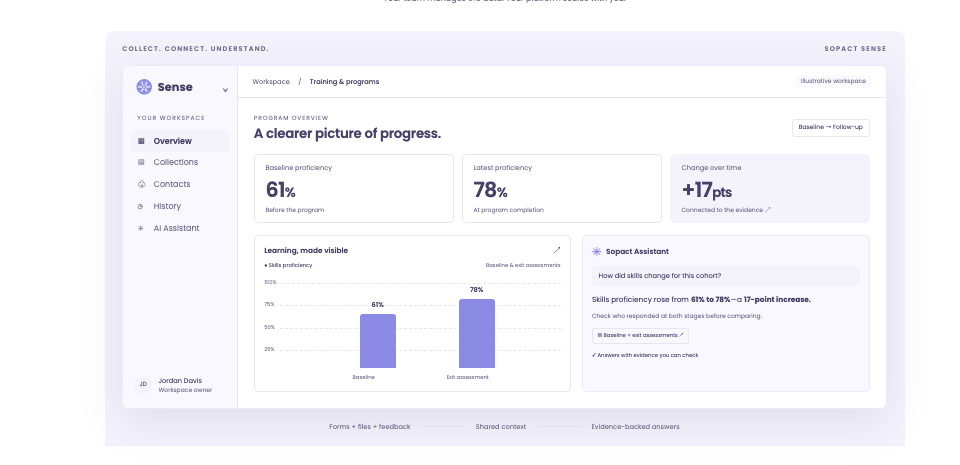
Use connected evidence to decide what to change, who needs support and what to check next. Sopact brings collection and AI-assisted analysis into the same workflow, with context that carries across stages. See what this means in practice ↓
These are buying needs, not rigid product boundaries. One organization may need more than one type.
Require: clear administrator, editor and viewer responsibilities, with access limited to the intended records. Verify that assistant answers and shared reports respect the required boundaries too; collection permissions alone do not establish this.
Request evidence: your required sign-in controls, account provisioning, retention rules, hosting location and independent security assessments. This comparison does not establish that Sopact or every listed platform meets each requirement.
Agree: which system owns the contact ID, what moves between systems, how often it updates and who resolves failures. Distinguish a native connector from an import or custom integration; they create different maintenance work.
Verify: which responses, IDs, dates, files and relationships can be exported in usable formats. Reconcile a sample against the source before migration. Control over forms is not, by itself, evidence of complete data portability.
Assign an owner: separate initial design and complex integrations from recurring work. In Sopact, the intended operating model is an authorized internal owner maintaining questions, contact relationships and collection stages after setup.
Keep the context: participant IDs, dates and shared definitions distinguish change in the same people from a different mix of respondents. Ask for the sources behind an AI interpretation and distinguish a possible explanation from a verified cause.
A requirements checklist, not a certification or feature checklist for every vendor. Verify the proposed product, plan and configuration before selecting it.
✳ DECISION INTELLIGENCE FOR PROGRAMS & PORTFOLIOS
It means connecting evidence to a practical decision, then collecting again to assess what happened. A participation score shows a change; interview notes and earlier records help the team investigate it.
Link surveys, files, interview transcripts and history to the relevant person or program. Keep collection dates and shared definitions in view.
Examine numbers alongside written feedback and earlier evidence. Follow up on possible explanations, missing context and sources worth checking.
The team chooses an action. The next collection stage helps it assess what happened after the change—not just produce another report.
Decide who needs follow-up, which delivery approach to adjust and what to ask next. Your data owner maintains routine collection changes within agreed permissions.
Identify which programs need attention and where to investigate before allocating support. Shared definitions help compare results; local context helps explain why they differ.
Why it matters: teams can investigate a change without rebuilding its history from separate files. AI helps them examine the evidence; people decide what to do.
How Sopact supports this workflow ↓✳ SOPACT · DECISION INTELLIGENCE FOR PROGRAMS & PORTFOLIOS
Sopact is an AI-native data collection platform for teams that revisit the same people, programs or portfolio organizations. The question is not only “What did they answer?” It is “What changed since last time—and what else do we know?”
Your internal data owner manages the recurring collection design after setup. Connected forms, files and history give analysis its context as the program evolves.
See it with your workflow ↗Authorized staff configure contact fields, questions and form relationships. Routine changes have an internal owner rather than becoming a new vendor project each time.
See the contact setup steps ↗Sopact documents analysis of open-text responses and PDF attachments while retaining the contact relationship. Intelligent Cell places its analysis beside the original response for review.
See the documented analysis example ↗Link multiple forms to the same contact object. Compare stages using configured identity and collection dates, rather than assuming two survey averages describe the same people.
See how form relationships work ↗When another option fits better: if you only need a standalone survey, the connected workflow may be unnecessary. Broad research or customer-experience requirements may favor Qualtrics or Medallia. Sopact still needs a responsible data owner; setup, complex migration and custom integrations may need specialist help.
Sopact’s documented PDF and contact-linked analysis is described in the Sense overview. The Intelligent Cell example demonstrates a derived result beside its source response.
CUSTOMER STORY · OPEN PLAY FOUNDATION
Ten programs.
One funder report.
CUSTOMER-REPORTED RESULTS
“I’m digitizing our entire business through Sopact.”
Marco Botha · CEO and co-founder, Open Play Foundation
Open Play’s published account describes ten programs combined into one funder report, broken down by facility, activity, coach and gender parity. Connected operational data also helped the team spot a water leak while it could act.
Read the customer account and evidence ↗Customer-reported experience, not an independent benchmark or a promised result.
COMPARE THE WORKFLOW
AI alone is not the distinction.
Test the collection-to-analysis workflow.
A trend is not a complete history. Ask each platform to connect the same person’s intake, supporting file and follow-up interview. Then have your own team change a question and explain the result.
Choose Qualtrics for a broader research and experience-management program. Shortlist Sopact when recurring program records and supporting evidence are the core workflow.
Configured contacts link forms and collection stages.
XM Directory maintains contact profiles and interaction history across programs.
Analyze written responses and supported files with their record relationship.
Imported-data projects support external data. Test your required document workflow.
An authorized internal owner maintains collection and analysis after setup.
Customer administrators manage directories. Establish responsibilities for the proposed deployment.
Sources: XM Directory · Imported data projects. Contact history is not exclusive to Sopact.
SurveyMonkey fits organization-wide survey work. Sopact is worth comparing when your analysis must retain supporting files and contact relationships across collection stages.
Configured contacts link forms and collection stages.
Multi-survey analysis combines results and tracks metrics over time.
Analyze written responses and supported files with their record relationship.
File Upload and Custom Data (Contacts) are excluded from multi-survey analysis.
An authorized internal owner maintains collection and analysis after setup.
Teams administer surveys and reporting. Confirm ownership of any connected systems.
Sources: Multi-survey analysis · Enterprise overview. The exclusions apply to this analysis feature, not the entire platform.
Alchemer combines flexible survey and feedback offerings. Compare Sopact when your primary requirement is continuing program collection linked to people and earlier evidence.
Configured contacts connect collection stages and earlier evidence.
Pulse tracks feedback themes and sentiment over time. Test your same-person, multi-stage collection requirements separately.
Analyze written responses and supported files with their record relationship.
Pulse analyzes open-text feedback from multiple sources. Mixed-source qualitative analysis is not exclusive to Sopact.
An authorized internal owner maintains collection and analysis after setup.
Survey tools support survey creation; workflow and Pulse offerings extend the process. Confirm product scope and who maintains connections.
Sources: Alchemer Survey · Alchemer Pulse. Compare the proposed configuration, not a survey builder alone.
Medallia is relevant for enterprise customer experience across touchpoints. Sopact focuses this comparison on ongoing program and portfolio evidence.
Configured contacts connect intake, follow-up and program evidence.
Experience profiles bring signals across touchpoints together. Test how your program stages map into that model.
Analyze written responses and supported files with their record relationship.
Text Analytics can process imported unstructured data, including case notes and chat transcripts, through documented import workflows.
An authorized internal owner maintains collection and analysis after setup.
Agree who owns configuration, imports and analysis changes in your deployment. Do not assume every routine change requires vendor services.
Sources: Medallia platform · Unstructured-data imports. Broader experience management may be the better fit for CX-led requirements.
THE OTHER ENTERPRISE OPTIONS
Open a review for the strength,
tradeoff and buying decision.
Strength: a broader research and experience-management environment, with contact profiles and interaction history in XM Directory.
Tradeoff to evaluate: which products, configuration and internal expertise your workflow requires. Services being available does not make them mandatory.
Choose it when: broader research and XM requirements drive the purchase. Consider Sopact when recurring, mixed-source program collection is the main job.
Read Qualtrics documentation ↗Strength: survey creation, shared administration and reporting across teams. Multi-survey analysis can track results over time.
Tradeoff to evaluate: how interview notes, documents and participant history contribute to the analysis—not just where they are stored.
Choose it when: survey responses provide the evidence you need. Consider Sopact when the answer depends on other records and collection stages too.
Explore SurveyMonkey Enterprise ↗Strength: survey creation and connected workflows, with Pulse for analyzing open-text feedback from multiple sources and tracking themes over time.
Tradeoff to evaluate: which products and integrations your workflow needs. Ask your intended owner to demonstrate both a collection change and the resulting analysis.
Choose it when: flexible enterprise surveys and feedback workflows are central. Compare Sopact when program records, supporting files and longitudinal collection need to stay connected.
Explore Alchemer Survey ↗ · See Pulse analysisStrength: experience management across touchpoints, with profiles and text analytics that can include imported unstructured evidence.
Tradeoff to evaluate: the configuration and data imports needed for your programs. Ask who maintains profiles, definitions and workflow changes after implementation.
Choose it when: organization-wide customer experience is the main requirement. Compare Sopact when teams need to collect and interpret recurring evidence across programs and portfolios.
Explore Medallia’s platform ↗Strength: customer feedback collection, AI-supported analysis and follow-up across channels.
Tradeoff to evaluate: whether your primary need is customer-experience action or connected evidence across recurring program stages.
Choose it when: understanding customer feedback and getting it to the right team are the main requirements. Test your specific contact-history and document-analysis needs separately.
Explore Zonka Feedback ↗Strength: research agents support study design, deployment, adaptive fielding and synthesis.
Tradeoff to evaluate: whether the study is the unit of work, or whether you need an ongoing program record spanning forms, files and follow-up.
Choose it when: your priority is designing and running research studies with AI assistance. Evaluate recurring collection and governance against your own workflow.
Explore Sprig ↗ START HERE · PART 1 OF 4
LOOP SESSIONS · A FOUR-PART VIDEO SERIES
Watch the series in order: how data collection has changed, how to analyze it while it matters, how to track change over time, and how to explain your results to funders.
Start with part 1 ↗BEFORE YOU SWITCH
Bring real records.
Let your own team do the work.
Shared administration, appropriate access, dependable collection and usable analysis across teams. Evaluate your actual requirements for identity, security, integrations, support and recurring reporting; the enterprise label alone does not establish that a product meets them.
Shortlist Qualtrics for broad research and experience management; SurveyMonkey Enterprise for organization-wide survey operations; Alchemer for flexible surveys and feedback workflows; and Medallia for customer-experience signals across touchpoints. Consider Sopact for recurring program collection that connects responses, files, interview transcripts and history. Zonka Feedback fits customer-feedback workflows; Sprig fits AI-supported research studies. The right choice depends on the workflow and enterprise controls you need.
Sopact is an AI-native data collection platform for recurring program and portfolio work. Configured contact relationships connect collection stages, while responses, files and interview transcripts contribute context for analysis. Authorized data owners maintain routine changes after setup. Other platforms also offer AI and text analysis; compare how the complete workflow fits your team.
Sopact is designed for authorized staff to maintain routine questions, contact fields and form relationships after setup. This is operational ownership—not a promise of zero assistance. Initial design, complex migration and custom integrations can still require specialist support. Have the person who will own the workflow demonstrate the next routine change.
Not necessarily. Decide which system owns contact identity and which handles collection and analysis. Confirm the imports, exports or integrations required; do not assume a native connector exists.
Clear responsibility for forms, definitions and access. Test who can edit, view and share information. Check assistant answers and shared reports separately rather than assuming record permissions cover every output.
Start with a representative sample of responses, contacts and files. Reconcile IDs, relationships and historical results before moving the full workflow. Keep the current process available until the pilot is accepted.
Yes. Sopact’s manual lists CSV/Excel downloads and shows how to download data from a survey’s data grid. That does not establish a complete export of attachments, relationships or configuration. Confirm those requirements separately before migration. Read the export instructions ↗
✳ DECISION INTELLIGENCE FOR PROGRAMS & PORTFOLIOS
Connect forms, files, and feedback across your programs and portfolios. See what’s changing, understand why, and act with confidence.
Bring a form, a supporting file and a follow-up question. See whether your team can connect them and explain the answer.
See it with your workflow ↗ ▷ Explore the platformHow we compared. This Sopact-authored guide compares workflow fit using vendor documentation, not hands-on testing of every platform. Sources are linked beside the relevant claims. Sopact’s contact, relationship, analysis and export instructions and the Open Play customer page were checked October 21, 2026. The homepage workspace is illustrative; customer outcomes are attributed accounts. Product configuration and enterprise requirements need separate confirmation. No pricing comparison or universal speed claim is made.