


Related solution
Network & Membership Intelligence
Connect chapter evidence, member feedback and recurring participation.
Explore the solution →

USE CASE / SOFTWARE GUIDE
Membership management software helps associations, federations and other member organizations maintain member records, administer enrollment and renewals, coordinate participation and communicate with their communities. Good software makes routine administration dependable and helps the organization understand whether members receive the value they joined for.
Those are related but different needs. A paid renewal records a transaction; it does not explain why a member stayed. Event attendance shows participation, while chapter updates, interviews and feedback explain the experience. When those sources remain separate, membership teams can report activity but still struggle to choose the next service or improve a struggling chapter.
AI makes open-ended feedback easier to analyze, but a summary of one survey is only part of the work. Sopact connects incoming forms, files and feedback with member, chapter and program context. Its role is decision intelligence across the network: helping teams understand changing needs and use that knowledge throughout the membership cycle.
Read enrollment, event participation and renewal in context.
Connect member feedback with local chapter knowledge.
Use what the network learns to shape services and support.
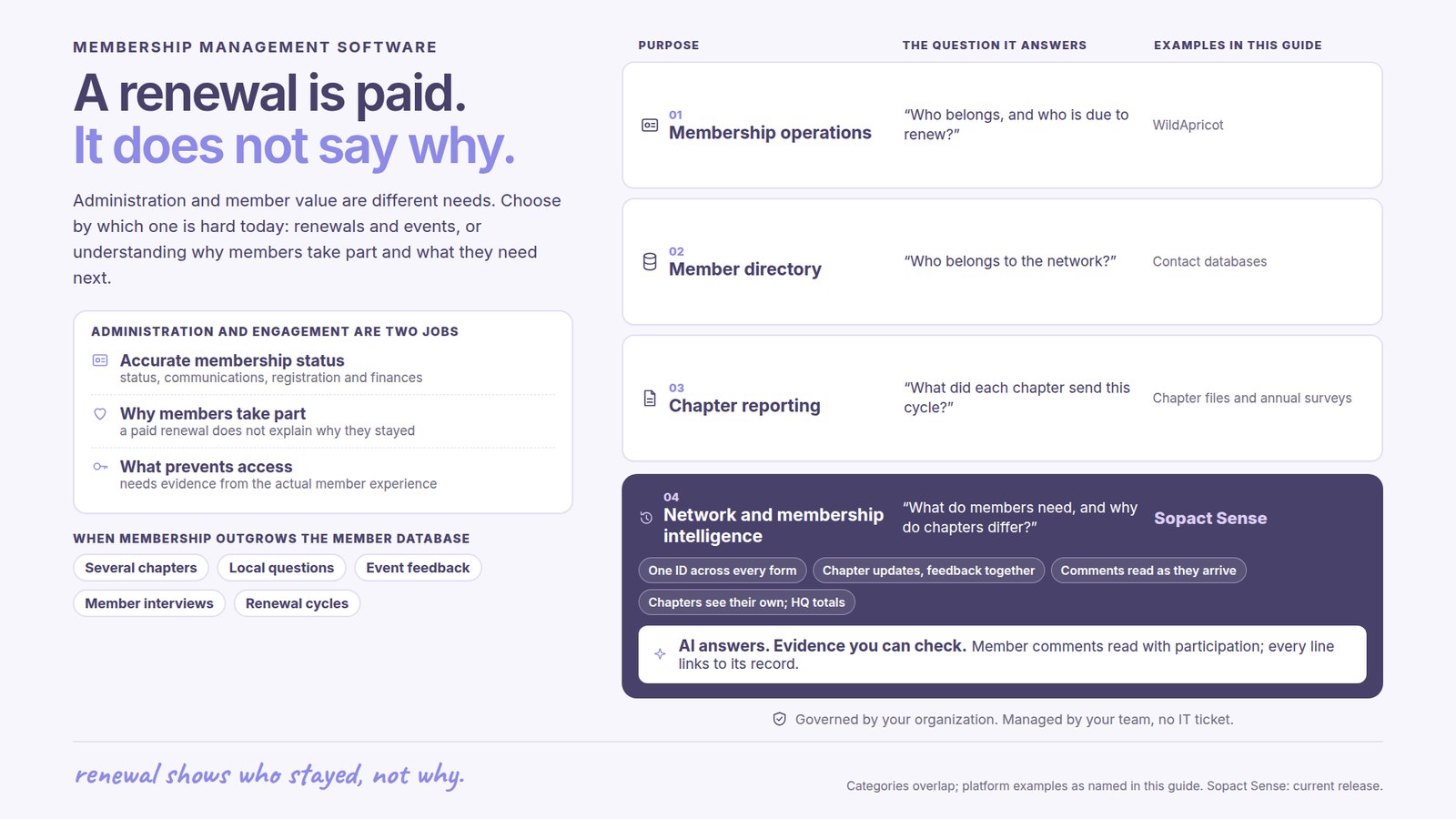
The administrative foundation includes accurate membership status, appropriate communications, registration and financial responsibilities. An organization should choose a system that performs the functions it needs reliably. A small professional association and a federation of member organizations may have very different requirements.
The next question is what members gain from the relationship. A contact database can tell staff who belongs. Understanding why people participate, what prevents access and which services remain useful requires evidence from the actual experience. Good purchasing decisions make both responsibilities explicit.
Sopact’s network and membership intelligence solution addresses this second need across chapter reports, member feedback and recurring programs. It can be scoped alongside the system that already manages dues and registration.
If staff mainly struggle with renewal reminders, payments or event administration, examine membership-management functionality first. WildApricot documents a member database, automated dues and renewals, event tools, communications and activity reporting. These are concrete operational capabilities, not simply a directory.
If the problem is explaining participation across chapters or using feedback between annual surveys, the purchase is also an evidence question. Sopact brings collection and analysis together so new comments and local updates remain usable alongside earlier participation and program information.
An organization need not replace a functioning administrative platform to improve its learning. Agree which system owns membership status and transactions, and which sources will inform analysis. Available exports or integrations determine the actual connection; a second platform should reduce repeated preparation.
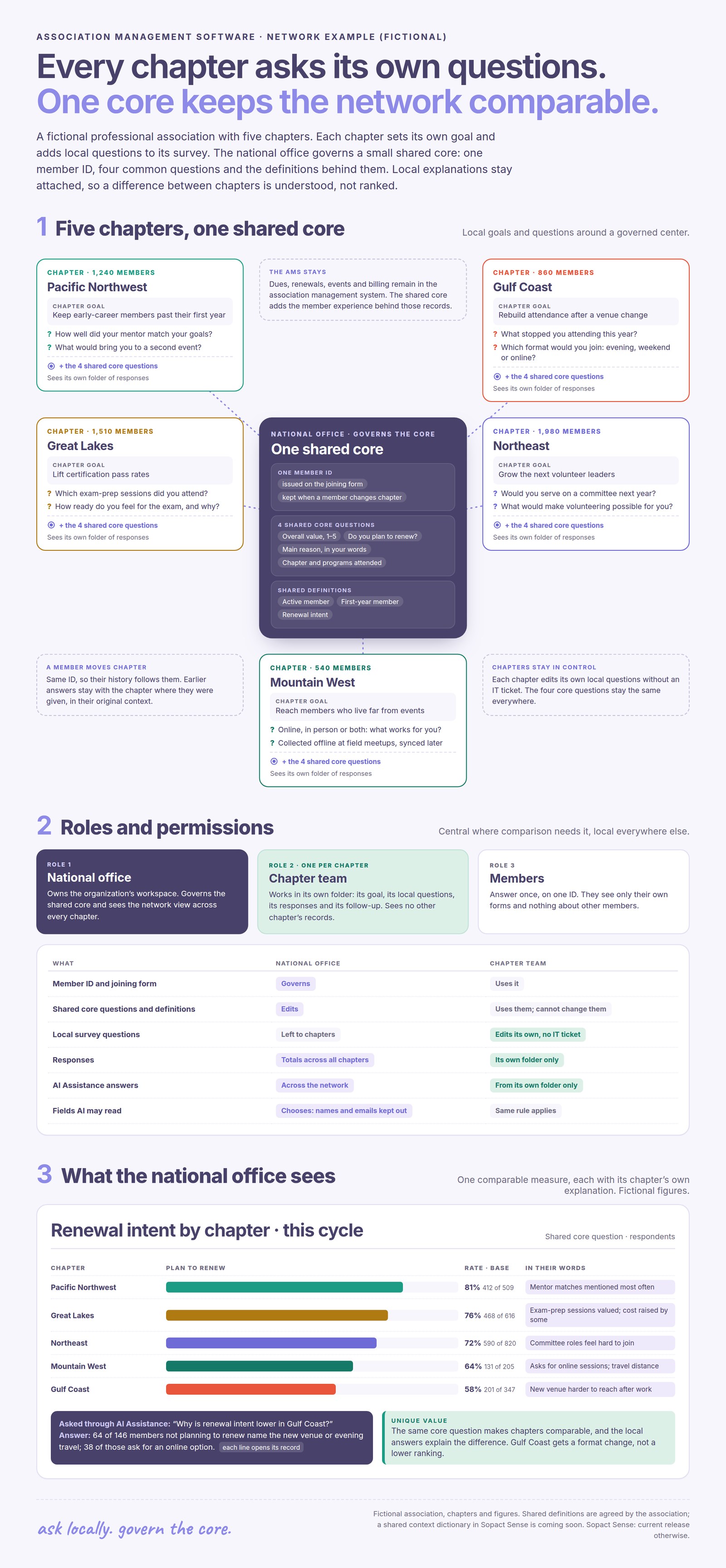
A lower attendance count can mean declining interest, a smaller eligible membership, a missing event file or a schedule that no longer fits. Headquarters needs the local explanation before deciding how to respond. A single network average can hide these differences.
Shared definitions make comparable measures useful: attendance should mean the same thing across the reporting period, and renewal should refer to members actually due to renew. Local questions can remain different when chapters serve different communities. This balance preserves comparability without discarding what makes the local program useful.
An illustrative example is a chapter with strong registration but weak attendance. Member comments about timing suggest a different question from comments about the relevance of the content. Connecting those comments with the event history helps the team choose whether to change the schedule, format or offer.
The example below shows a fictional association organized this way. Each chapter keeps its own goal and local questions, while the national office governs one member ID, a few shared core questions and their definitions, so renewal intent can be compared with each chapter’s reasons beside it.
Sopact connects surveys, chapter updates, interview material and agreed source-system data around the network’s questions. Incoming analysis becomes available through AI Assistance, so staff can investigate a new concern without treating every question as a separate coding project.
The value is continuity: the team can consider earlier needs, current feedback and what happened after a program change. Quantitative measures describe the pattern; qualitative evidence helps explain it. The source remains important when an apparent pattern needs closer review.
This supports practical decisions about chapter assistance, event design and member services. It does not establish that a particular activity caused renewal or that every disengaged member has the same reason. The next conversation can test the interpretation.
Each chapter team works in its own folder: it edits its local questions without an IT ticket and sees only its own responses, including through AI Assistance. The national office governs the shared core and sees totals across every chapter. The organization chooses which fields AI may read, so names and contact details can stay out of the analysis.
WorldSkills International’s published partnership story describes a planned shared data foundation across languages, teams and event cycles. The central requirement is the ability to keep asking new questions of connected evidence, including later participant follow-up.
The story describes an ongoing build, not a completed network-wide result. Its relevance to membership leaders is the problem: local collection must serve local teams while also contributing to a coherent wider picture. A report for one event should not consume the knowledge needed for the next cycle.
For Sopact, personalization and continuing team support are part of making that approach usable. The organization retains ownership of its questions and definitions as the network changes.
A useful return is less time reconciling chapter files, fewer repeated requests for the same information and a clearer explanation of what members need. Report coverage alongside findings so an incomplete chapter submission is not mistaken for weak performance.
Sopact’s typical setup estimate is two days to two weeks for an agreed collection and analysis scope. Historical membership records and connections to administrative systems affect that scope. Initial setup and a complete platform migration are different projects.
Choose around the decision that remains difficult today. If administration is the constraint, strengthen the membership system. If staff have plenty of records but cannot explain the member experience, connected analysis can make those records more useful.
It helps member organizations maintain records and coordinate enrollment, renewals, participation and communication. The required functions depend on the organization’s operating model.
A database organizes records. Membership intelligence connects those records with feedback and program evidence to understand needs, participation and change.
That is not the central purpose of this workflow. Sopact focuses on collection, analysis and decision intelligence; the administrative system can remain in place where it serves the organization well.
Yes. A shared set of definitions can support network reporting while chapter-specific questions preserve local context.
No. Attendance and renewal describe different behavior. Examine the relevant members, periods and feedback before interpreting their relationship.
No. In Sopact Sense each chapter team works in its own folder and sees only its own responses, including through AI Assistance. The national office sees totals across all chapters and governs the shared core questions.
Continue with a purpose
Related solution
Connect chapter evidence, member feedback and recurring participation.
Explore the solution →Continue learning
Learn how shared definitions and local context support useful network reporting.
Start learning →
Customer story
A partnership building connected evidence across Members, languages and event cycles.
Read the story →Explore how Sopact can connect chapter knowledge, member feedback and program participation around your network’s decisions.
See it with your workflow →