


What is a logframe template?
A logframe template is a blank four-by-four matrix with rows for goal, purpose, outputs and activities, and columns for the narrative, indicators, means of verification and assumptions, ready for your program's content. It turns a change model into a measurement plan a funder can sign.
The interactive template below has a blank draft and a fictional workforce example. Explore the example, edit your own rows, and export your plan. For how to read a matrix, see the logframe guide; for more worked cases, the logframe example.
THE SHORT VERSION
- Fill the matrix from the top down, starting with the goal and purpose, and write an assumption for every link between rows.
- Give each indicator one written definition (who counts, what qualifies, over what window) and name the record it comes from.
- Keep the definitions in a shared dictionary, so the matrix stays short and every report counts the same way.
FREE INTERACTIVE TEMPLATE
Make the first row yours.
Explore the workforce example, or start your own logframe. Edit a row, check what’s missing, then export a CSV for Excel or Google Sheets.
Your change model.
A workable logframe.
Build an editable four-by-four matrix. Define what counts, name the evidence, and make assumptions visible before the first report.
| Level & narrative | Indicator & definition | Means of verification | Assumption |
|---|
Start with one indicator you can explain.
Who counts? What qualifies? Over what time window? Ask a colleague to apply your definition to five real records. Would you count the same way?
Take the plan into practice.
Connect your forms, files, and feedback.
Based on Sopact’s Logframe Template: Editable Matrix and Step-by-Step Guide · Updated September 24, 2026. This tool checks missing text; it does not validate evidence or prove impact.
Read the example before you write your own. The fictional workforce fund shows how a narrative, indicator, source, and assumption fit together.
In the workforce example above, notice the bracket left in the outputs row. The agreement names “completed training” but the example never defined what counts as completion, so the cell says so. An open bracket is honest; a vague word such as “completed” is where two partners start counting differently.
How do you fill in each cell of the logframe template?
Work down the narrative column first, then across each row: indicator, source, assumption. Leave baselines and targets until every indicator has a definition and a source.
1. Narrative: one result per row
Write the purpose as a change for named people, not an activity completed. “Graduates placed and still employed” is a result; “run job-readiness workshops” belongs in the activities row.
2. Indicator: definition in the same cell
For a count, name the unit and how duplicates are handled; for a rate, name the numerator and denominator; for any outcome, name the window. Use more than one indicator only when each has a reporting use.
3. Baseline: unknown is not zero
Record the starting value and its date. If it is unknown, write “not yet established” and who will establish it; zero is a value, not a blank.
4. Target: a commitment, not a result
State the basis for each target and keep it in its own field, so a target is never read as an achievement.
5. Means of verification: the actual record
Name the form, survey, assessment or register, plus who collects it and when. “Project report” names where a number ends up, not where it comes from.
6. Assumption: something you can watch
Write the condition outside your control that the next row depends on, specifically enough to monitor, and give the important ones an owner and a review date.
The IFRC planning manual and the European Commission's logical framework guidance go deeper on each column. When a funder specifies its own format, use theirs.
Why does every indicator need a written definition behind it?
Because the indicator cell is too small to hold everything a partner needs to count the same way, so each indicator links to one entry in a shared data dictionary. The matrix stays readable, and the dictionary holds the detail.
Each entry runs in four steps: the metric and its plain definition, the dimension of impact it speaks to, a standard code if one fits, and how it may be added up across partners. Every entry also names its collection point, data type, disaggregation and source.
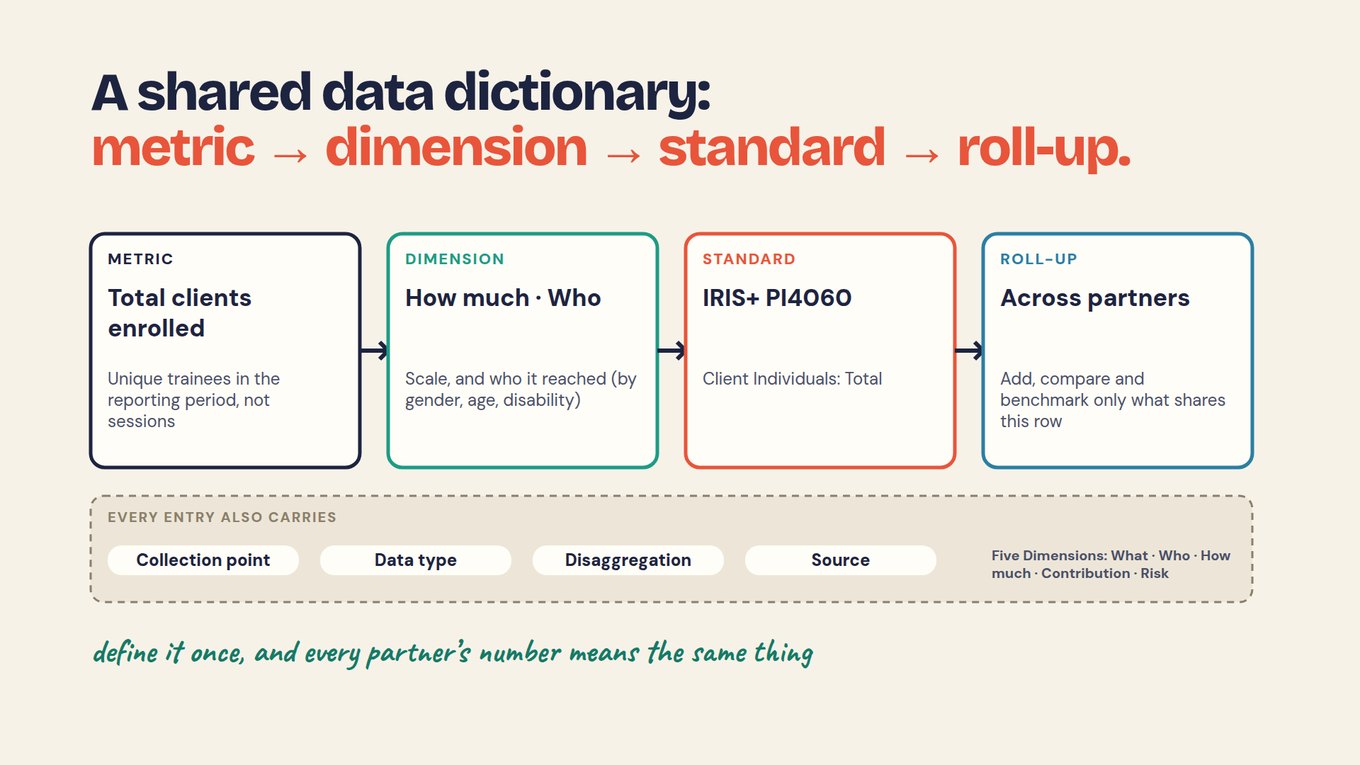
The standard is optional: IRIS+ PI4060 fits “enrolled”, but no code is needed for placement within 90 days. The shared data dictionary chapter shows how to write each entry, including the rule that a missing follow-up is unknown, never “not placed”.
How do you move the template into another funder's format?
Keep the content and change the labels: the logframe's goal, purpose, outputs and activities are the same levels a theory of change, logic model or results framework uses under other names. Rebuilding from scratch for each funder is how two funders end up with two different placement numbers.
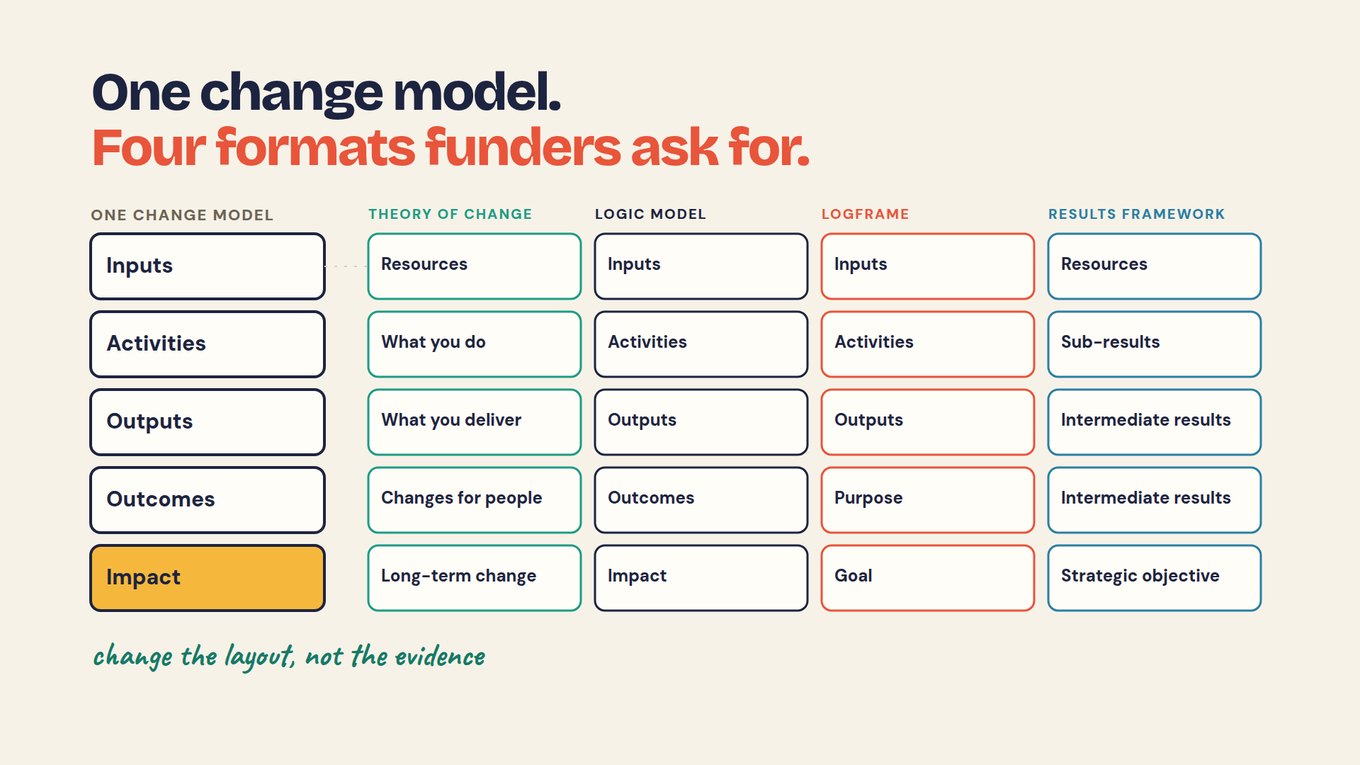
If you already have a theory of change or logic model, an AI tool can draft the matrix from it, provided it may not invent anything. The course chapter One change model, four formats shows the layouts side by side.
PROMPT · PASTE INTO CLAUDE, CHATGPT OR YOUR AI TOOL
Fill this logframe template from our change model and our reporting agreement.

Template: four rows (Goal, Purpose, Outputs, Activities) and four columns (narrative, indicator and definition, means of verification, assumption).

Rules:
1. Use only what is in our documents. Do not invent an indicator, definition, target, baseline or number.
2. Where a cell has nothing to fill it, write "not in our data".
3. Copy definitions and time windows word for word from the agreement.
4. Take assumptions only from our change model.
5. After the table, list every cell you left open and every place you had to choose between two readings.

Our change model:
[PASTE]
Our reporting agreement:
[PASTE]
How do you use one template across several partners or sites?
Agree a small shared core of indicators and definitions that every partner reports, and let each partner add its own rows below. The shared core is what makes a portfolio total honest; the local rows keep the template useful to the people delivering.
Before adding anything up, check that units, eligibility, periods and methods match. A partner that counts placements within six months cannot be added to partners counting within 90 days, however similar the labels look.
How do you keep the template useful once reports arrive?
Add the reported result beside each indicator in its own column, and keep the original target and definition untouched. For each review, note how complete the evidence is, what it means and the next action.
A missed target gets investigated, not hidden; incomplete evidence is reported as unknown, not as failure. If a definition changes, record what changed, who approved it and from which period it applies, and keep the earlier matrix with the reports that used it.
The video below argues that a logframe fails when it is filled in for a proposal and then shelved. Watch for how each cell is tied back to the records that feed it.
What are the most common logframe template mistakes?
Most mistakes blur a line the template is meant to keep: delivery versus change, target versus result, unknown versus zero.
Scroll horizontally to see all columns →
| Mistake | Better approach |
|---|---|
| Calling a workshop an outcome | Keep delivery in outputs; put the change in purpose |
| Using zero for an unknown baseline | Write “not yet established” and name who will find it |
| Entering a target as an achieved result | Keep targets and reported results in separate columns |
| Writing “survey” as the full source | Name the survey, population, timing and who collects it |
| Leaving a word such as “completed” undefined | Write the definition, or leave a visible open bracket |
| Changing a measure without a record | Log the change, who approved it and from when |
A filled template is a plan, not proof. Enrolled and completed are outputs; placement and retention depend on employers and each graduate's life too. Meeting a target is not evidence the program caused it without a comparison, follow-up answers carry self-report and non-response limits, and any AI-drafted cell is checked by a person against your documents.
How do you start? Fill one row of the template this week
Pick the purpose row, because it holds the outcomes funders read first, and complete it before touching the rest.
- Write the purpose as a change for named people, with a time frame.
- Choose one indicator and write its definition: who is counted, what qualifies, over what window.
- Name the form or record it comes from, who collects it and when.
- Write the assumption that links this row to the goal.
- Give the definition to a colleague with five real records and see whether they reach your count.
After the first row you have one indicator a funder can check and a partner can count, plus a pattern for the other three rows.
Put that first row into your plan.
Write the outcome, define one indicator, and name its source. You can return to the other rows later.
Start with the purpose row →Frequently asked questions
Can I edit the logframe template in Excel?
Yes. Select Your blank template in the builder, edit your rows, and choose Export CSV. Open the file in Excel or Google Sheets. The export includes separate columns for baseline and date, target and date, result and period, owner, and review notes. Missing values remain marked as not in our data.
Does every logframe have the same columns?
No. The common four are narrative, indicators, means of verification and assumptions, but many funders add baseline, target and milestone columns, and some put resources or costs in the activities row. Use the funder's required format when there is one. Whatever the layout, keep a written definition and a named source behind every indicator, so the content does not change when the columns do.
Should an unknown baseline be zero?
No. Zero is a value, not a blank. Write “not yet established”, name who will establish it and by when. Some delivery measures genuinely start at zero for a new program, such as sessions delivered; an outcome such as people already in work usually does not. The baseline's source and date matter as much as the number.
Does every indicator need a participant survey?
No. Enrollment forms, completion records, assessments, program records and outside statistics can all verify an indicator. In the workforce example, only placement and retention need a follow-up survey; enrollment and completion come from records the program already keeps. Choose the source from the indicator, and ask what records exist before adding a new survey.
Does meeting logframe targets prove the theory of change?
No. Meeting a target shows a defined result happened among the people you counted. It does not show that each link in the chain held or that the program caused the result. That needs a comparison chosen in advance, such as earlier cohorts or an outside figure on the same definition, and an account of who did not respond.
How often should I update the logframe?
Review it at each reporting point and revise it when evidence changes an assumption or a definition. Record what changed, why, who approved it and from which period it applies, and keep the earlier matrix with the reports that used it. Some funders require formal approval for changes; follow their process.
