play icon for videos
Use case

Survey Reporting: How to Turn Survey Data Into Reports That Drive Decisions | Sopact

Learn survey reporting methods that combine quantitative metrics with qualitative context. See real examples, templates, and AI-powered reporting that delivers in minutes.

TABLE OF CONTENT

Author: Unmesh Sheth

Last Updated:

February 20, 2026

Founder & CEO of Sopact with 35 years of experience in data systems and AI

Survey Reporting: From Raw Responses to Decision-Ready Evidence

Build survey reports that prove outcomes — not just satisfaction scores.

What Is Survey Reporting?

Survey reporting is the process of transforming raw survey responses into structured documents that communicate findings, reveal patterns, and drive decisions. Effective survey reporting goes beyond charts and tables — it connects quantitative metrics with qualitative context so stakeholders understand not just what happened, but why it happened and what to do next.

The quality of a survey report depends on three things: the data architecture behind it, the analytical methods applied, and the reporting structure used to present findings. Most organizations get the third part right — clean charts, clear headings, executive summary at the top — while the first two remain broken. They spend weeks cleaning data that should have been clean at collection, and they separate quantitative analysis from qualitative interpretation instead of integrating them.

This article covers both the craft of survey reporting (structure, visual hierarchy, audience layering, mixed-methods integration) and the architectural decisions that determine whether your reports contain real evidence or just reformatted data. For live examples of what these reports look like in practice, see our survey report examples with actual report links you can explore.

Three Categories of Survey Reporting Tools

When organizations search for tools to generate reports from survey data, they encounter three categories of solutions that serve fundamentally different purposes. Choosing the wrong category means your reports answer the wrong questions.

Survey platforms collect responses and generate dashboards of aggregate statistics. SurveyMonkey, Qualtrics, Typeform, and Alchemer produce NPS scores, satisfaction distributions, and response frequency charts. Their reports summarize what respondents said in quantitative terms — bar charts, pie charts, cross-tabulations. They work well for one-time market research, pulse checks, and customer experience measurement where aggregate numbers are the deliverable. But they cannot analyze open-ended text at scale, track participants over time, or connect qualitative explanations to quantitative outcomes.

Standalone analytics tools take exported survey data and add a layer of processing — theme extraction, sentiment scoring, trend visualization. This category includes tools like Thematic, BTInsights/SlideGen, and Caplena. They add qualitative depth to quantitative summaries. However, they operate on exported data batches with no participant identity, no longitudinal tracking, and no outcome measurement. The "report" is a sentiment dashboard, not an evidence document.

Stakeholder intelligence platforms connect survey data to persistent participant identities, correlate quantitative shifts with qualitative explanations per person, track outcomes across multiple timepoints, and generate reports that show what changed, for whom, why it changed based on participant narratives, and what program adjustments the evidence suggests. This is what organizations need when accountability requires evidence — for workforce training, scholarship programs, nonprofit evaluation, ESG portfolios, or any context where reports must prove outcomes over time.

The structural difference is architectural. Survey platforms and analytics tools analyze responses — aggregate data points detached from the people who provided them. Stakeholder intelligence platforms analyze participants — tracking the same person across surveys, interviews, and timepoints to reveal outcome trajectories that aggregate dashboards cannot show. This distinction determines which "automated report" you actually get: charts, themes, or evidence.

Three Categories of Survey Reporting Tools
The kind of "report" you get depends on which category you choose
1
Survey Platforms
Quantitative Dashboards — Charts from Closed-Ended Questions
Collect responses and generate aggregate statistics: NPS scores, satisfaction distributions, response counts, bar charts. No qualitative analysis. No participant tracking over time.
Examples: SurveyMonkey, Qualtrics, Typeform, Alchemer, Google Forms
The report you get: Bar charts and pie charts summarizing what respondents selected. Good for pulse checks and CX benchmarks.
2
Standalone Analytics Tools
Sentiment Dashboards — Theme Extraction from Exported Text
Take exported survey data and apply AI sentiment analysis, theme extraction, and trend detection. Operate on batch exports with no participant identity and no longitudinal tracking.
Examples: Thematic, BTInsights/SlideGen, Caplena, Chattermill
The report you get: Sentiment dashboards, word clouds, theme frequencies. No outcome evidence. No per-participant tracking.
3
Stakeholder Intelligence Platforms
Impact Reports — Outcomes Linked to Participant Journeys Over Time
Connect survey data to persistent participant identities. Correlate quantitative shifts with qualitative explanations per person. Track outcomes across timepoints. Generate evidence of what changed, for whom, and why.
Example: Sopact Sense — collection, AI analysis (Intelligent Suite), and continuous reporting in one platform
The report you get: Evidence documents showing participant trajectories, mixed-methods findings, and actionable recommendations — updated live.
Survey Platforms
Charts Only
Analytics Tools
Themes Only
Stakeholder Intelligence
Outcome Evidence
The Structural Difference
Survey platforms and analytics tools analyze responses — aggregate data points detached from people. Stakeholder intelligence platforms analyze participants — tracking the same person across surveys and timepoints to reveal trajectories that aggregate dashboards cannot show.

Why Most Survey Reports Fail

Survey reports fail for structural reasons that formatting cannot fix. The problem is not how findings are presented — it is what data exists to present and whether it connects.

The 80% Cleanup Problem

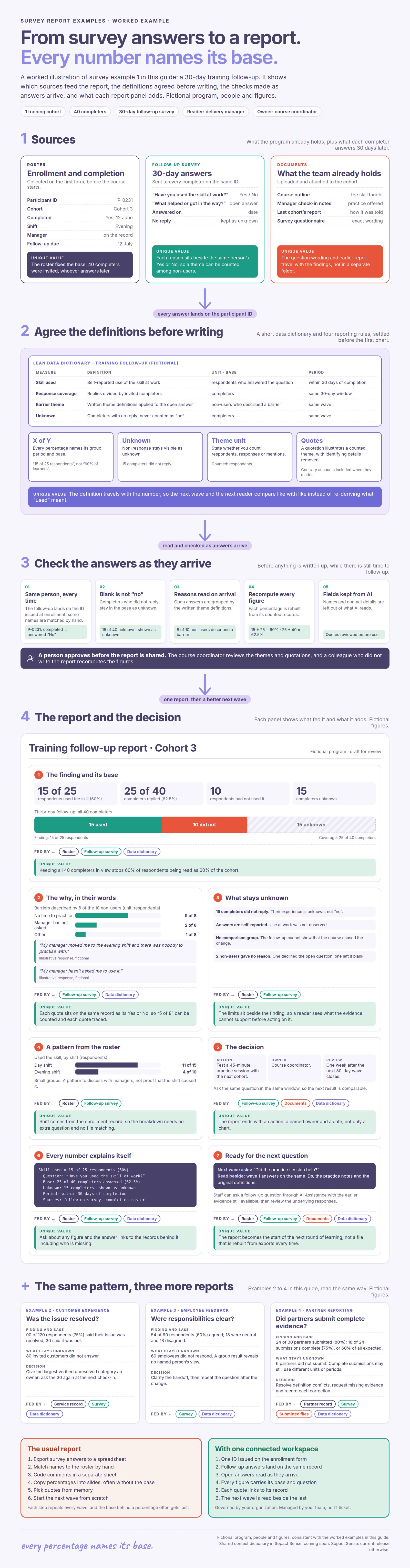
Traditional survey reporting workflows follow a fragmented pattern: collect data in one tool, export it, clean it in spreadsheets, deduplicate across sources, merge with qualitative data from another tool, analyze each dataset separately, then manually assemble a report. Research consistently shows that 80% of analyst time is spent on data preparation — cleaning, deduplicating, reformatting — rather than generating insights.

By the time the report reaches stakeholders, the findings are weeks or months old. Programs have already moved forward. Decisions have already been made. The report becomes a filing cabinet artifact rather than a decision tool.

Quantitative and Qualitative Live in Separate Silos

The most common failure in survey reporting is the separation of numbers from narratives. One section presents charts — satisfaction scores, completion rates, NPS. A different section presents qualitative themes — word clouds, theme frequencies, selected quotes. Stakeholders must connect the dots themselves, guessing at which stories explain which numbers.

Effective survey reporting requires mixed-methods integration where every quantitative finding is paired with qualitative context. "Confidence scores improved 23%" is a number. "Confidence scores improved 23%, driven primarily by peer learning groups (cited by 67% of participants) and hands-on practice (cited by 43%)" is evidence. For more on designing surveys that capture both data types, see survey design best practices.

Reports Describe the Past Instead of Guiding the Future

Most survey reports end with "here's what we found." The best survey reports end with "here's what this means and what to do next." Every major finding should connect to implications, recommendations, or next steps — otherwise your report becomes a filing cabinet item, not a decision document.

Action-oriented reporting requires a simple discipline: after every finding, ask "So what?" If the answer isn't in the report, the finding is incomplete.

Survey Report Structure That Actually Works

The architecture of a survey report determines whether stakeholders read it, trust it, and act on it. The following structure works across sectors — workforce training, education, nonprofit evaluation, ESG portfolios — because it's designed around how people actually consume reports, not how analysts produce them.

Layered Architecture for Multiple Audiences

Survey reports fail when they try to serve everyone with one document at one level of detail. Board members need a 30-second executive summary. Program staff need granular breakdowns. Funders need proof of outcomes. The solution is layered architecture — a single report with clear sections that let each audience find what they need without wading through irrelevant detail.

Layer 1: Executive Summary — Key findings, critical metrics, and 2-3 recommended actions in 250-400 words. Decision-ready for busy stakeholders.

Layer 2: Methodology & Context — Survey design, sample size, response rate, limitations. Establishes credibility without overwhelming.

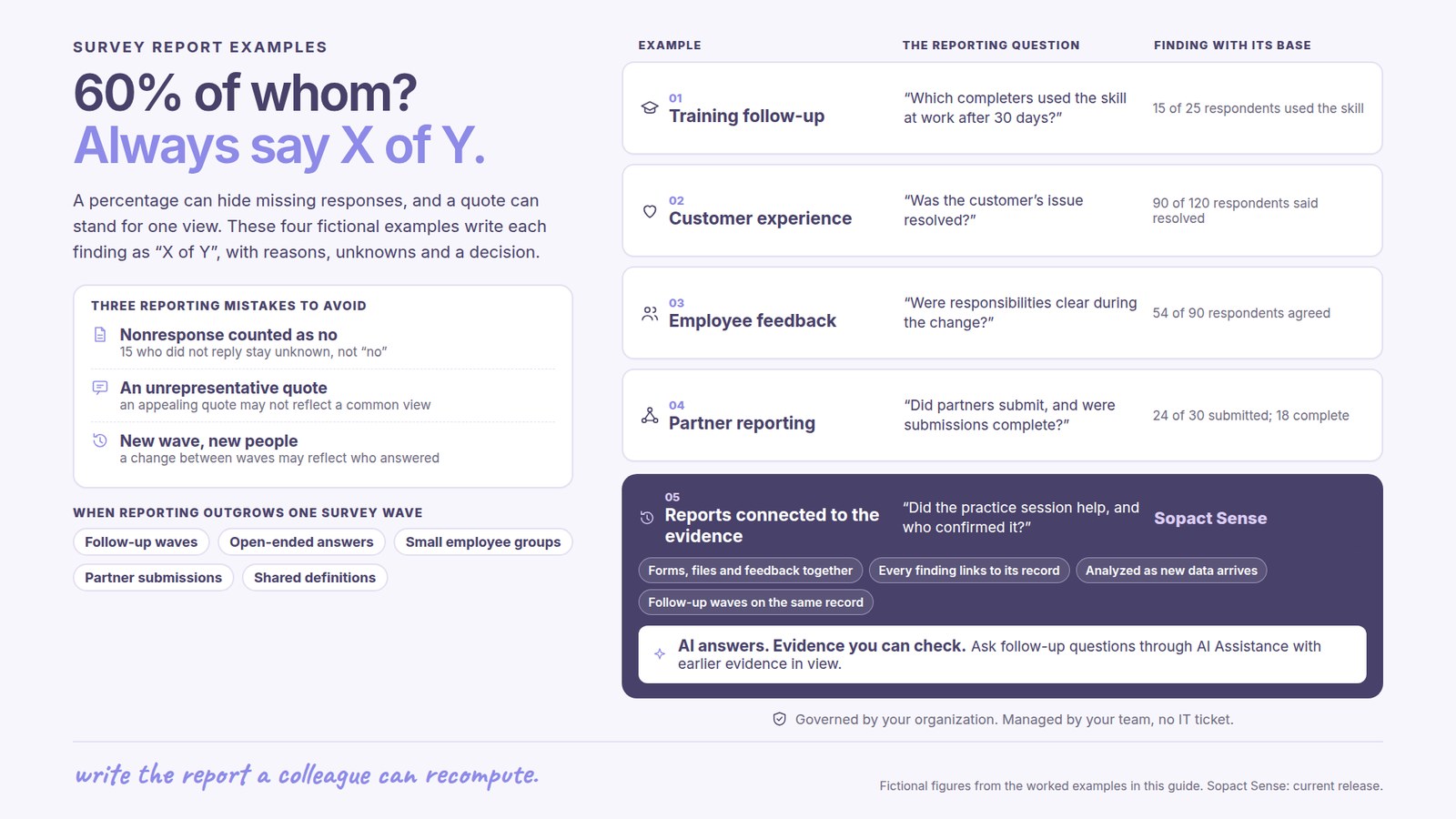
Layer 3: Findings — Each finding as a module: chart + interpretation + participant voice. This is where mixed-methods integration matters most. For an example of how this looks in practice, see the workforce training section in our survey report examples.

Layer 4: Recommendations — Specific next steps tied directly to evidence from the findings. Not generic advice — actionable steps that reference the data.

Layer 5: Appendix — Full data tables, survey instruments, detailed methodology. For those who want deep verification.

Mixed-Methods Integration in Every Finding

Numbers without stories are sterile. Stories without numbers lack credibility. The best survey reports pair every quantitative finding with qualitative context from the same participants.

Weak: "Test scores improved by 12 points."

Strong: "Test scores improved by 12 points (pre: 68 → post: 80). Participants attributed gains to 'hands-on labs' (mentioned in 67% of open-ended responses) and 'peer learning groups' (43%). One learner wrote: 'I finally understood loops when we debugged each other's code.'"

This kind of integrated reporting requires that your data architecture connects quantitative scores to qualitative responses per participant — which is why survey design decisions made before data collection determine what your report can contain.

Visual Hierarchy and Scanability

Few people read reports cover-to-cover. Most scan for what matters to them. Design for scanners: short paragraphs (2-5 sentences), frequent headers, bold key phrases, and visual elements every 300-400 words. Typography, color, and spacing create an information architecture where readers instinctively know what is important.

For ready-to-use report templates with these principles built in, see our impact report template.

Pre-Post Survey Reporting: The Gold Standard

The most powerful survey reports don't capture a single moment — they reveal trajectories. Pre-program, mid-program, and post-program surveys connected by unique participant IDs show how the same people change over time. This transforms reports from snapshots into evidence.

Why Pre-Post Design Changes Everything

Cross-sectional surveys tell you "70% of participants are satisfied." Pre-post surveys tell you "satisfaction increased from 45% to 78% over the program period, with the largest gains among first-generation participants." The first is a number. The second is evidence that connects an intervention to an outcome for a specific population.

Pre-post reporting requires three architectural foundations: identical question wording across timepoints, unique participant IDs that link responses automatically, and analysis that calculates individual-level change (not just aggregate snapshots). For a complete guide to designing these instruments, see pre and post surveys.

Longitudinal Tracking Across Program Cycles

Programs that run cohorts — training programs, scholarship cycles, accelerator batches — generate the richest survey reports when they track patterns across cohorts, not just within them. Which curriculum changes correlated with confidence improvements? Which mentorship models produced the strongest long-term outcomes? These questions require data architecture that persists across program cycles.

Live Reports That Update as Data Arrives

Static PDF reports are obsolete the moment they're exported. Live survey reports — shareable links that update as new responses arrive — give stakeholders current intelligence rather than historical documents. When a program director can see this week's confidence scores alongside last month's, they can adjust mid-cycle instead of waiting for an annual review.

See real examples of live pre-post reports in our survey report examples — including workforce training dashboards, scholarship outcome tracking, and ESG portfolio intelligence.

AI-Powered Survey Reporting: What Has Actually Changed

Large language models have transformed what's possible in survey reporting — but the transformation is not what most vendors claim. The analytics layer (theme extraction, sentiment analysis, summary generation) has been commoditized. Any team can paste survey data into Claude, ChatGPT, or Gemini and receive quality analysis in minutes. What has not been commoditized is data architecture — the structural decisions that determine whether AI produces reliable evidence or confident-sounding noise.

What LLMs Commoditized

Theme extraction from open-ended responses, sentiment classification, cross-tabulation summaries, and narrative report generation are now capabilities available through general-purpose AI at near-zero marginal cost. If you need a one-time summary of 500 survey responses, a direct LLM prompt works well.

What LLMs Cannot Do Without Data Architecture

LLMs cannot maintain persistent participant identities across surveys, track the same person's responses from pre-program to post-program, correlate qualitative themes with quantitative shifts per participant, generate reports that automatically update as new data arrives, or build cumulative organizational learning across cohorts. These capabilities require purpose-built infrastructure that structures data for AI analysis at the point of collection.

The Practical Implication for Survey Reporting

The question is no longer "which tool has the best AI?" — every tool has access to the same foundation models. The question is "how clean and connected is the data the AI analyzes?" When you feed messy, fragmented, duplicate-laden survey data into any LLM, you get messy, contradictory analysis. When you feed clean, structured, participant-linked data into the same LLM, you get insights that actually drive decisions.

This is where Sopact Sense's architecture proves its value. Rather than building proprietary analytics (which would just be commoditized), Sopact designed the data collection layer specifically for AI analysis. Every stakeholder gets a unique persistent ID through Sopact Contacts. Every response links to a contact record. Pre/mid/post surveys connect automatically. The Intelligent Suite — Cell, Row, Column, and Grid — orchestrates AI against perfectly structured data, producing reports that combine quantitative analysis with qualitative evidence in minutes.

AI-Powered Survey Reporting: What's Commoditized vs. What Requires Architecture
The analytics layer is free. The data layer is the differentiator.
Same AI models — dramatically different report quality depending on data structure ↓
✓ Any team can do this with an LLM
Paste survey CSV into Claude or ChatGPT
  • Extract themes from open-ended responses
  • Classify sentiment across text data
  • Summarize findings into narrative reports
  • Generate charts from structured data
  • Code qualitative responses into categories
  • Create one-time reports from exports
⚡ Requires purpose-built data architecture
What you need for real survey reporting
  • Track same participant across pre/mid/post surveys
  • Correlate qualitative themes with quantitative shifts per person
  • Reports that update automatically as new data arrives
  • Audit trails linking every insight to source data
  • Connect baselines to outcomes across program cycles
  • Cumulative learning across cohorts and years
80%
of analyst time spent cleaning data — not reporting
Minutes
from collection to report with clean-at-source data
10×
better AI output from structured vs. fragmented data
The question has changed
It's no longer "which tool has the best AI?" — every tool uses the same foundation models. The question is: how clean and connected is the data the AI analyzes? Clean data + any LLM = reliable evidence. Fragmented data + the best LLM = confident-sounding noise.

Survey Reporting by Sector

The principles of good survey reporting apply universally, but the specific metrics, audiences, and reporting cadences vary by sector. Here's how the framework adapts.

Workforce Training and Development

Workforce programs need survey reports that prove skill acquisition and career outcomes — not just satisfaction scores. Effective reports track confidence shifts from pre to post, correlate open-ended feedback with quantitative performance data, segment results by cohort demographics, and connect program completion to employment outcomes.

The key reporting challenge: stakeholders want both rigor (controlled pre-post comparisons) and stories (participant voices explaining what worked). Mixed-methods reporting solves this by design. See live workforce report examples in our survey report examples.

Scholarship and Grant Programs

Scholarship programs need survey reports that demonstrate selection quality and recipient outcomes. AI-powered essay analysis, rubric scoring, and bias detection transform the application review process. Post-award surveys tracking academic progress, confidence shifts, and career development create longitudinal evidence of program impact.

The key reporting challenge: connecting selection criteria to long-term outcomes across multiple award cycles. This requires persistent participant IDs that link application data to ongoing survey responses — architecture that most survey tools don't provide.

ESG and Impact Investment Portfolios

ESG portfolios need survey reports that aggregate disclosures from multiple companies into portfolio-level intelligence. Document analysis (sustainability reports, CSR disclosures, compliance filings) combined with structured survey data produces investment-grade evidence.

The key reporting challenge: standardizing qualitative narratives across diverse portfolio companies. AI-powered analysis can extract comparable themes from heterogeneous documents — but only when the data architecture supports document ingestion alongside structured survey responses.

Nonprofit Program Evaluation

Nonprofits need survey reports that satisfy multiple audiences simultaneously: funders want outcome metrics, board members want strategic insights, program staff want operational guidance. The layered architecture described above solves this — one data source, multiple views — when built on an impact report template designed for multi-audience reporting.

How to Build Your First Survey Report

This is the practical workflow — the steps from survey design through final report delivery.

Step 1: Design for the Report, Not Just the Survey

Start with the report structure you need, then design survey questions that produce the data to fill it. Most organizations do this backwards — designing surveys first, then discovering their data doesn't support the report they need. Define your analysis prompts before writing a single question. For question design guidance, see survey design best practices.

Step 2: Collect Clean Data at Source

Use unique participant IDs from the first survey. Set validation rules that prevent data quality problems instead of creating cleanup work. Pair every quantitative question with a qualitative follow-up on the same topic. This isn't about adding complexity — it's about preventing the 80% cleanup tax that makes traditional survey reporting so slow.

Step 3: Run Integrated Analysis

Analyze quantitative and qualitative data together, not in separate workflows. AI-powered analysis can identify themes in open-ended responses, correlate them with quantitative scores, and generate evidence-linked findings — in minutes rather than the weeks required for manual coding.

Step 4: Structure the Report for Your Audience

Use the layered architecture: executive summary → methodology → findings (each as chart + interpretation + participant voice) → recommendations → appendix. Every finding connects to a "so what" and a "now what."

Step 5: Deliver Living Reports, Not Static PDFs

Share reports as live links that update as new data arrives. Stakeholders see current intelligence. Programs adapt mid-cycle. Reports become decision tools rather than historical documents.

See It in Practice
From theory to proof — explore real reports and ready-to-use templates
📊 Survey Report Examples
Live reports from workforce training, scholarship programs, and ESG portfolios. See how pre-mid-post design and AI analysis deliver insights in minutes.
View Examples →
📋 Impact Report Template
AI-ready template for living impact reports. Executive summaries, outcome metrics, participant voices — all from clean, evidence-based data.
Get Template →

Frequently Asked Questions

What is survey reporting?

Survey reporting is the process of transforming raw survey responses into structured documents that communicate findings, reveal patterns, and drive decisions. Effective survey reporting integrates quantitative metrics (satisfaction scores, completion rates, pre-post comparisons) with qualitative context (participant narratives, theme analysis, evidence-linked explanations) so stakeholders understand what changed, why it changed, and what to do next. The quality of a survey report depends on data architecture, analytical methods, and report structure.

Is there a tool that can generate impact reports from survey data automatically?

Yes, but the right tool depends on what kind of report you need. Survey platforms like SurveyMonkey and Qualtrics generate quantitative dashboards from closed-ended questions. Standalone analytics tools like Thematic and Caplena generate sentiment summaries from text data. Stakeholder intelligence platforms like Sopact Sense generate impact reports that connect participant outcomes to program decisions over time, correlating quantitative shifts with qualitative explanations through persistent participant IDs and AI-powered analysis. For live examples, see sopact.com/use-case/survey-report-examples.

What should a survey report include?

A survey report should include five layers: an executive summary with key findings and recommendations (250-400 words), methodology and context (survey design, sample size, response rates, limitations), findings presented as integrated modules (chart + interpretation + participant voice for each finding), specific recommendations tied to evidence, and an appendix with full data tables and instruments. The most effective reports pair every quantitative metric with qualitative context from the same participants.

How do you write a good survey report?

Start by designing for your report before designing your survey — define what findings you need, then create questions that produce the supporting data. Collect clean data with unique participant IDs from the first touchpoint. Analyze quantitative and qualitative data together rather than in separate workflows. Structure findings as evidence modules (metric + context + voice). End every finding with implications and next steps. Deliver as a live link that updates rather than a static PDF.

What is the difference between survey reporting and impact reporting?

Survey reporting summarizes what respondents said at a point in time. Impact reporting tracks how specific participants change across multiple timepoints, correlates quantitative outcomes with qualitative explanations, and generates evidence that connects program activities to measurable results. The difference is architectural: survey reports analyze responses (aggregate snapshots), impact reports analyze participants (longitudinal trajectories). Organizations that need accountability and evidence need impact reporting infrastructure — see our impact report template for the framework.

Can I use ChatGPT or Claude to create survey reports?

For one-time analysis of exported survey data — theme extraction, sentiment analysis, summary generation — yes. Direct LLM use works well for ad hoc reporting. For organizational-scale survey reporting, direct LLM use hits three limitations: no persistent participant IDs across surveys, no longitudinal tracking, and no automatic report updates as new data arrives. AI-native platforms like Sopact Sense solve these by structuring data at collection, maintaining audit trails, and linking participant records across time.

How often should survey reports be updated?

The traditional annual reporting cycle is being replaced by continuous intelligence. Live survey reports that update as new responses arrive give stakeholders current data rather than historical snapshots. For programs running cohorts, reports should update at each data collection touchpoint (pre, mid, post, follow-up). For ongoing feedback collection, weekly or monthly reporting cycles keep insights actionable.

What makes a survey report actionable?

An actionable survey report connects every finding to a decision. After presenting "confidence scores improved 23%," the report explains why (qualitative evidence from participants), identifies who improved most and least (segmented analysis), and recommends specific program adjustments based on the evidence. Reports that end with "here's what we found" are informational. Reports that end with "here's what this means and what to do next" are actionable.

How do you combine qualitative and quantitative data in a survey report?

Pair every quantitative metric with qualitative context from the same participants. Instead of presenting charts in one section and quotes in another, create integrated finding modules: the metric (what changed), the context (why it changed, based on participant narratives), and the evidence (specific quotes linked to specific data points). This requires data architecture where quantitative scores and qualitative responses are linked by participant ID — see qualitative and quantitative surveys for design guidance.

What is a survey report template?

A survey report template is a reusable framework that defines the structure, sections, and formatting for presenting survey findings. Effective templates include placeholders for executive summary, methodology, integrated findings, recommendations, and appendix — designed so that clean data can populate the structure automatically rather than requiring manual assembly. For AI-ready templates that generate reports from structured data, see our impact report template.

How long should a survey report be?

Report length should match audience needs, not data volume. Executive summaries: 1-2 pages. Full reports for program staff: 10-20 pages. Technical appendices: as needed. The 300-word rule helps: never go more than 300 words without a visual element (chart, callout, table). Shorter is better when the data supports it — a 5-page report with integrated evidence beats a 50-page report with separated numbers and narratives.

Next Steps
Stop spending 80% of your time cleaning data. See how AI-native architecture delivers survey reports in minutes — with evidence your stakeholders trust.
▶️
Watch the Platform Demo
See how Sopact Sense collects clean data, runs AI analysis, and generates survey reports — in a single workflow.
Watch Demo →
📊
Explore Real Survey Reports
Live examples from workforce training, scholarships, and ESG portfolios with actual report links you can explore.
View Examples →

Upload feature in Sopact Sense is a Multi Model agent showing you can upload long-form documents, images, videos

AI-Native

Upload text, images, video, and long-form documents and let our agentic AI transform them into actionable insights instantly.
Sopact Sense Team collaboration. seamlessly invite team members

Smart Collaborative

Enables seamless team collaboration making it simple to co-design forms, align data across departments, and engage stakeholders to correct or complete information.
Unique Id and unique links eliminates duplicates and provides data accuracy

True data integrity

Every respondent gets a unique ID and link. Automatically eliminating duplicates, spotting typos, and enabling in-form corrections.
Sopact Sense is self driven, improve and correct your forms quickly

Self-Driven

Update questions, add new fields, or tweak logic yourself, no developers required. Launch improvements in minutes, not weeks.