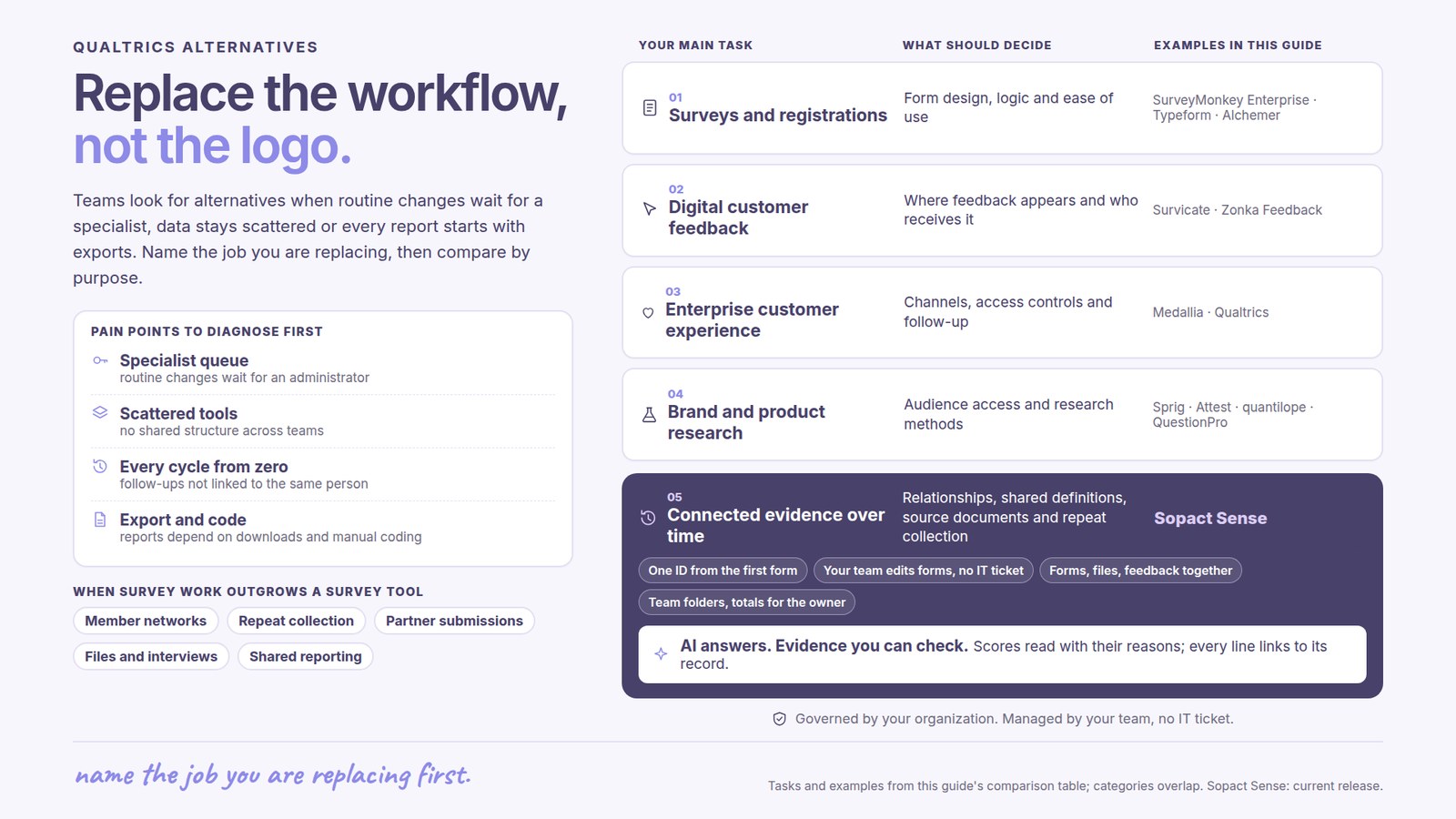
What common pain points lead Qualtrics users to look for alternatives?
The survey may work well while the wider process remains difficult. A program manager needs to change a question but waits for an administrator. Several teams collect similar information in different tools. A report takes weeks of exports, cleanup and manual coding. When the next collection cycle starts, someone has to assemble the history again.
These are workflow problems to diagnose before choosing a replacement. Some can be resolved in an existing Qualtrics deployment; others point to a different type of platform. The useful question is which parts of the work your team needs to own and how the data should stay connected.
Routine changes depend on a specialist
When program staff cannot adjust forms, analysis definitions or reporting without a central administrator or consultant, small changes join a queue. Identify the changes staff make every cycle and the ones that genuinely need specialist help. A better fit gives authorized team members control over routine work and makes support available when they need it.
Too many collection tools, no shared structure
One team uses Qualtrics, another uses Microsoft Forms, and local partners submit spreadsheets or files. Similar questions use different labels, reporting periods or definitions. The problem is not simply the number of tools: the organization has no agreed way to bring their information together. Replacing one survey tool will not, by itself, resolve that.
Every cycle starts from zero
A completion survey and a six-month follow-up need to describe the same participant. If the records are disconnected, staff must reconstruct that relationship before they can examine changes in employment, skills or participation. Look for continuity across collection periods, including how the system handles changed contact details and missing responses.
Analysis still depends on downloads and manual work
Exporting results, cleaning columns, translating comments and coding open-ended answers can leave one analyst responsible for every report. Qualtrics already offers text analysis; its Text iQ documentation describes reusable topics and automated tagging. The decision is whether your configured workflow can produce the required analysis at the pace your team needs, with access to the responses behind a finding.
The program evolves, but support is concentrated at launch
Programs add new questions, participants, partner organizations and reporting requirements. Establish how those changes will be supported after implementation. Customer control and continuing vendor support belong in the same discussion: the team should be able to manage its program while drawing on help throughout its lifetime.
What should a better workflow look like?
For a recurring program, collection should create information the team can use again. Consider a training or competition program that wants to understand participants’ progress six months later. A useful workflow connects the initial record, later responses and supporting evidence without rebuilding the report from separate files each time.
- Agree a shared core. Define the participant identifier, program, collection date and measures that teams need to combine. Let local teams ask additional questions without changing the shared meaning.
- Bring the required sources together. Map surveys, forms, spreadsheets and documents to that structure. For any tool you plan to keep, establish the actual import or integration method and who maintains it.
- Keep the participant’s history. Link baseline and follow-up records to the right person and program. Make duplicate candidates and missing follow-ups visible. Preserve anonymity where it was promised.
- Analyze scores and explanations together. Apply agreed themes to written responses, review uncertain interpretations and inspect the source material. Compare the same eligible groups across periods.
- Put the finding into the program team’s hands. Give staff a usable answer, its supporting evidence and responsibility for the next action. Let authorized owners refine collection as the program changes, with ongoing support.
This is the workflow to evaluate when the requirement spans programs and portfolios. A market research study or a broad customer experience operation may need a different sequence. Match the platform to that purpose before comparing individual features.
How to choose a Qualtrics alternative
1. Define the job you are replacing
Write down one complete recurring task, from collection to the decision it supports. For example: “Connect competition feedback with a six-month career follow-up, compare results across participating organizations, and let the program team investigate the written explanations.” List the existing steps, owners and delays. This becomes the selection brief.
2. Shortlist the right category of platform
Separate research, broad experience management, survey operations, digital feedback and continuing program evidence. A tool can be excellent at one without replacing all the others. Use the category table below to choose a small, relevant shortlist. For a wider explanation of these categories, see enterprise survey software.
3. Turn each pain point into an acceptance requirement
| Current problem | What the replacement must support | What to establish before choosing |
|---|---|---|
| Routine changes wait for a specialist | Authorized staff can maintain forms, definitions and reports | Which tasks the team owns and where expert support remains necessary |
| Local tools produce incompatible data | Shared definitions with room for program-specific collection | Source mappings, supported connections and responsibility for exceptions |
| Participant history is rebuilt each cycle | Continuity between initial records and later follow-up | Identifiers, historical import, duplicate handling and missing-response reporting |
| Open-ended analysis takes too long | Reusable qualitative definitions and reviewable analysis | How new responses, revised themes, languages and corrections are handled |
| Reports arrive after the decision | A repeatable reporting process with clear ownership | Time to a usable answer and the manual work still required |
| Help ends after implementation | Support as each program changes | Named responsibilities, included assistance and the process for requesting help |
4. Walk through a complete cycle with the intended operator
Ask each shortlisted vendor to demonstrate the same workflow: bring in earlier records, collect an update, analyze written answers, revise a definition and produce the next report. Include a missing response and a correction. Have the person who will run the program participate, so the comparison reveals both the software’s capabilities and the work left with your team.
For qualitative research, examine whether the platform supports your method: interviews, open-ended survey responses, topic coding or another approach. A fluent summary is useful only when it answers the right research question and the reviewer can inspect its basis. The survey analysis guide shows how numerical results and written explanations belong together.
5. Agree migration, ownership and continuing support
Before switching, document which survey logic, historical records, files, dashboards and integrations must carry forward. Assign an owner to each part. Agree how program-specific changes will be handled after launch, what assistance is included and what requires a separate engagement. Run a parallel cycle where continuity matters, then decide when the old workflow can be retired.
Compare value across repeated cycles: timely answers, less reconstruction, appropriate controls and a team that can maintain the work. License cost is one part of that decision; it should not replace an assessment of whether the workflow solves the original problem.
Which type of Qualtrics alternative do you need?
| Your main task | Start by comparing | What should decide the choice? |
|---|---|---|
| Send surveys or collect registrations | SurveyMonkey Enterprise, Typeform, Alchemer | Form design, survey logic, response limits and ease of use |
| Collect customer feedback on a website or in an app | Survicate, Zonka Feedback, Alchemer | Where feedback appears and how it reaches the team responsible |
| Run customer experience across a large organization | Medallia, Qualtrics | Channels, access controls, operational connections and follow-up |
| Run employee engagement surveys | Culture Amp, Qualtrics, Medallia | Survey design, benchmarks, confidentiality and manager reporting |
| Track brands or test product ideas | Sprig, Attest, quantilope, QuestionPro | Audience access, research methods and study support |
| Connect member, customer or development evidence over time | Sopact | Relationships, shared definitions, source documents and repeat collection |
| Manage academic or clinical research data | REDCap | Institutional availability and study requirements |
Product details appear in the linked profiles below. These are editorial fit judgments based on vendor documentation, not hands-on performance scores.
Qualtrics alternatives to consider by purpose
Sopact — connected collection across people, teams and time
Fits: Membership networks and teams combining recurring surveys with files, interviews and other records.
Strength: Shared definitions and history give analysis context from collection onward.
Check: Who will own the data, which connections need setup, and whether the required permissions and workflow fit the plan.
SurveyMonkey — everyday surveys
Fits: Teams collecting feedback through familiar survey workflows.
Strength: Survey plans for individuals and teams, with more extensive enterprise options.
Check: Response allowances, team requirements and integration access. A Salesforce connection can link responses to existing records; check which package you need.
Survicate — digital customer feedback
Fits: Product and customer teams collecting feedback through websites, apps and email.
Strength: Targeted surveys, customer attributes and a hub for analyzing feedback.
Check: Response limits, data point limits and the integrations included in your tier.
Zonka Feedback — customer feedback and follow-up
Fits: Customer experience, support and location teams collecting feedback across digital and in-person services.
Strength: Zonka Feedback combines surveys with support tickets, reviews and conversations. Teams can analyze recurring themes, assign issues to owners and automate follow-up. Collection includes website, in-app, email, SMS, kiosks and offline surveys.
Check: Which channels, integrations and AI features are included. For membership networks, demonstrate chapter relationships and shared reporting definitions; for employee development, demonstrate the required assessment history and access rules.
Medallia — broad customer and employee experience
Fits: Organizations coordinating feedback and action across channels and teams.
Strength: Customer and employee listening within a broader experience platform.
Check: Required channels, implementation scope and who manages the program.
Sprig — enterprise research
Sprig is an option for teams gathering and analyzing research and feedback to guide product and experience decisions. Include it when that is the workflow being replaced; assess study methods, distribution and how findings reach the team making the decision.
Alchemer — surveys with connected follow-up
Fits: Teams combining survey collection with business workflows.
Strength: Survey tools, integrations and automation options.
Check: Which products and connections are included. Ask for a demonstration of your reporting and follow-up requirements.
Typeform — forms and focused questionnaires
Fits: Registration, intake and shorter questionnaires where the form experience matters.
Strength: Form building and connections to downstream tools.
Check: Response allowances and where you will manage later records and reporting.
Attest — consumer research and brand tracking
Fits: Brand and consumer insights teams researching external audiences.
Strength: Consumer research for brand tracking, concept testing and product decisions, with research support.
Check: Market coverage, audience requirements and the studies included in your agreement.
quantilope — advanced consumer research
Fits: Research teams needing structured consumer studies and automated research methods.
Strength: A platform focused on consumer research rather than routine member or program administration.
Check: Required methods, sample, study design and researcher support.
QuestionPro — surveys and research
Fits: Teams comparing general survey tools and more specialized research capabilities.
Strength: Survey and research products, including support for conjoint analysis.
Check: Which product includes your required methods, audience access and reporting.
Why the King Center moved from Qualtrics to Sopact
The King Center moved from Qualtrics to Sopact for self-governance, personalization and continuing support for its programs. The distinction is how the team runs its work over time: it can manage its own data, tailor collection and analysis to each program, and work with the Sopact team throughout the program’s lifetime.
Self-governance: the organization retains ownership of its data and day-to-day program workflow. Personalization: collection and reporting can reflect each program’s questions and context. Continuing support: Sopact’s team stays involved as the program develops and its needs change.
Sopact connects forms, files and feedback across programs and portfolios. For a program team, that means bringing participant information, assessments and later follow-up into the same decision process. Customer ownership and ongoing support work together; choosing self-governance does not mean managing implementation and every later change alone.
What this means when comparing Sopact with Qualtrics
Qualtrics is a strong fit for research and customer or employee experience programs. Sopact’s focus here is a team workspace for recurring information from several sources. The diagram shows how collection, history, shared definitions, analysis and permissions work together.
For example, a membership team needs to read a renewal survey alongside attendance files, chapter updates and earlier participation. The question is not just “What did members say?” It is “Which members need support, and what do their records tell us?”
- Membership: Connect member feedback with dated chapter affiliations, participation and local reports.
- Customer experience: Read a complaint, the service action and later feedback together.
- Employee development: Compare an agreed goal with later assessments and reflections, while keeping anonymous engagement feedback anonymous.
Qualtrics also supports connected records, hierarchies and repeated surveys. The diagram describes Sopact’s approach; it does not establish that these capabilities are exclusive. Compare how each product handles your sources, definitions and team responsibilities in a working demonstration. See Qualtrics hierarchy documentation.
WorldSkills: connect collection across chapters and event teams
WorldSkills described a familiar problem in distributed organizations: chapters and event teams choose their own collection tools, including SurveyMonkey, JotForm, Microsoft Forms and Excel. Each tool may serve a local need, but different structures and disconnected records make organization-wide learning difficult.
- Information stays in separate systems. Local teams collect answers without a shared schema for combining them.
- Follow-up loses the earlier context. A competition survey should connect to a later question about salary or career changes. Without a continuing participant record, each cycle starts again.
- A central analyst becomes the bottleneck. Teams download results, send spreadsheets for consolidation and rebuild charts for reports.
- Analysis arrives late. Cleaning, translation, open-response coding and consolidation across stakeholder groups consume substantial staff time. WorldSkills described reports arriving 9–12 months after the event.
- Existing tools need a shared destination. The organization wanted to understand whether local collection could continue while information came together centrally, without repeated manual transfers.
WorldSkills raised these requirements while planning a shared data foundation. The buying question was: how can local teams keep useful flexibility while the organization shares definitions, follows participants over time and brings results together?
The practical question is: Which members are getting value, where is participation falling, and what should the network do next?
What to compare
| Your membership task | A useful starting point | What Sopact adds to the comparison |
|---|---|---|
| Ask members about an event | SurveyMonkey, Typeform or Qualtrics | Whether answers need to connect to earlier activity and later follow-up |
| Run a detailed member research study | Qualtrics or QuestionPro | Whether chapter reports and other evidence must be reviewed alongside the study |
| Manage dues and membership administration | Your association management system | Collection and analysis of evidence that sits outside that system |
| Compare participation across chapters and periods | Sopact alongside existing membership records | Common counting rules, dated affiliations, local explanations and missing reports |
How Sopact helps
Sopact’s membership solution connects local updates with member activity and reporting periods. That lets a network examine chapter differences without losing the explanation behind them. Explore Membership & Networks.
The useful questions are specific:
- Did participation fall, or has a chapter not submitted its attendance file?
- Are chapters counting unique people or total visits?
- Which chapter did a member belong to when an event happened?
- What did local coordinators report, and what changed in the next period?
Illustrative example: A chapter reports fewer attendees. Its coordinator describes a scheduling problem, but one event file is also missing. The network can address the incomplete record before treating the total as evidence of disengagement.
Keep the membership system for the administrative work it already handles. Agree which exports or connections supply membership status and activity to Sopact. An existing integration is not automatically a complete network reporting process.
A fair comparison with Qualtrics and SurveyMonkey
Qualtrics supports organizational hierarchies, and SurveyMonkey can connect survey responses to Salesforce records. The association-specific question is how well the configured solution handles changing affiliations, local submissions, shared measures and supporting documents. Qualtrics hierarchy documentation, SurveyMonkey Salesforce documentation.
Four data collection patterns to compare
Here are four common ways a team might collect information. Use the examples to describe your needs before choosing a platform.
| Collection pattern | Membership & networks | Customer experience | Employee experience |
|---|---|---|---|
| 1. Direct surveys — ask a group for information | Member needs survey or event feedback | Satisfaction survey or service check-in | Engagement survey or learning feedback |
| 2. Repeated follow-ups — collect at several points in time | Joining, participation and renewal | Onboarding, service follow-up and renewal | Onboarding, development and later reflection |
| 3. Collection across teams — combine local submissions | Chapters submit activity, files and explanations | Locations or partners submit service records | Departments submit approved learning and program updates |
| 4. Collection triggered by another system — ask after an event | Registration or renewal starts a follow-up | A completed service starts a feedback request | A training milestone starts a check-in |
For each pattern, keep the date, reporting period and relevant member, customer, employee or team identifier. Attach supporting files and interviews where needed. Anonymous surveys remain anonymous.
For triggered collection, confirm the actual connection during setup: what event starts it, how the correct record is identified, and what happens if delivery fails. Do not assume every platform connects to every membership, customer or HR system out of the box.
How Sopact brings the work together
Five capabilities connect collection to a decision your team can check. Here is an illustrative feedback example.
Explore what changed.
Check response mix before comparing
What to compare: Can your team collect different sources, keep the history, apply shared definitions, review new evidence and control access in the same workflow? Ask each shortlisted vendor to demonstrate those steps with your use case.
Customer experience: connect feedback to what happened next
For customer experience, distinguish collecting digital feedback from running a broad listening-and-action program. Survicate and Zonka Feedback are relevant to digital feedback workflows; Medallia and Qualtrics serve broader experience programs. Compare the channels, routing, integrations and operating responsibilities you need. Sopact becomes relevant when a defined program question also requires supporting records and later follow-up. Medallia’s feedback management overview explains its broader scope.
Employee experience: see what changed after development
Separate anonymous employee engagement from named development or training follow-up. Engagement programs may need benchmarks, confidentiality controls and manager reporting. Development evaluation may need baseline assessments, agreed goals and evidence of later application. Preserve those boundaries when selecting a platform. See training evaluation software for that buying decision.
Qualitative analysis needs a deeper comparison
Qualtrics already supports sophisticated text analysis. Its Text iQ documentation describes topic definitions and hierarchies, and its automated text analytics can build topic models with AI. A comparison that reduces Qualtrics to charts and Sopact to “AI analysis” misses the actual buying decision.
Sopact's argument is about the depth and ownership of a recurring workflow. Your team defines what matters, applies those definitions across eligible evidence, improves them when new material arrives, and inspects the resulting analysis alongside the relevant numbers and history. The operating question is how much work is required to keep doing that well.
Consider a growing association with thousands of written member responses. A broad “participation barrier” category initially seems useful. Later, staff need to separate scheduling, travel and unclear eligibility. The important demonstration is what happens to the historical responses, current comparisons and review responsibilities when that definition changes.
| Test the depth | Ask the vendor to demonstrate | What to record |
|---|---|---|
| Coverage | Apply the reviewed definitions to the full eligible dataset and expose exclusions or uncertain cases. | Which records were analyzed and why others were omitted. |
| Definition changes | Revise a category and reprocess the affected evidence. | Changed classifications, version context and review effort. |
| Connected interpretation | Compare the revised themes with participation or scores for the right period. | Matching rules, denominators and supporting comments. |
| Evidence inspection | Open the permitted records behind a count or explanation. | Whether a reviewer can check the finding without rebuilding the analysis. |
| Team ownership | Have the intended operator repeat the process and handle an exception. | Routine changes the team can maintain and specialist work that remains. |
Use the same test across the shortlist. This distinguishes a useful summary feature from a sustainable analysis process without inventing numerical vendor ratings. More complete coverage also does not remove bias in who answered, or establish that an observed relationship is causal.
Watch: improve the analysis without another manual coding project
The video explains why revising definitions can become the hidden burden of qualitative work. Use that argument to test the complete workflow, not just a first AI-generated answer.
Compare total ownership across repeated cycles
Measure setup, integrations, survey maintenance, codebook design, reprocessing, evidence review and reporting. A strong first demonstration is not enough if routine changes depend on a specialist your team cannot readily access.
For illustration, manually coding 4,000 comments at three minutes each takes 200 hours. Revisiting half after a definition changes adds 100 hours. These assumptions describe a possible manual workload, not measured Sopact savings. Compare them with the actual automated processing and human review required in your pilot.
The goal is to reduce repetitive application and reconstruction while keeping people responsible for definitions, permissions and interpretation. Give an ordinary authorized team member the follow-up question, rather than letting the vendor prepare every answer.
Common questions
What should a team check before switching away from Qualtrics?
Check the workflow that needs to improve, historical data and survey logic that must carry forward, required research methods, access controls, integrations, ongoing team ownership and vendor support. Compare a complete recurring cycle before committing to a replacement. Use the selection guide above to turn each requirement into a concrete acceptance condition.
What is the best Qualtrics alternative for associations?
For event feedback, start with survey tools such as SurveyMonkey or Typeform. For detailed research, compare Qualtrics and QuestionPro. Consider Sopact when the question requires chapter updates, member activity, documents and follow-up across periods. Check how each option works with your membership system.
Is a credit union’s member experience the same use case?
No. Credit union member experience often involves financial service interactions. Association networks often need chapter participation, events and renewal reporting. Medallia’s marketplace lists a dedicated Credit Union Experience offering; assess that separately from association workflows. Medallia Xchange.
Can Attest replace Qualtrics for brand tracking and concept testing?
Attest is a relevant candidate for those tasks. Compare target audiences, markets, study design, consistency across tracking periods and total research cost. That is a different buying decision from connecting the history of known members or program participants. Attest research platform.
Which alternatives should I compare for advanced research methods?
Include quantilope and QuestionPro, then check the exact methods and packages. Conjoint studies examine trade-offs between product features; MaxDiff studies identify relative priorities. Do not assume a general survey plan includes every method. Sopact’s focus here is connected operational and program evidence, rather than a replacement for specialized research design.
How do Sopact and Qualtrics compare for outcome measurement?
Qualtrics can support repeated surveys. Sopact is worth comparing when the question also needs applications, assessments, notes or documents attached to the same people over time. Check whether the results distinguish actual change among repeat respondents from differences in who answered each survey.
Can we keep our survey history?
That depends on what can be exported and mapped. Preserve respondent IDs, dates, questions, answer codes and survey versions. A response export does not automatically recreate survey logic, permissions, dashboards or integrations in another product.
Which alternatives support academic research?
Check whether your institution provides REDCap and whether its deployment meets the study requirements. Institutional research workflows are a different evaluation from recurring member or customer evidence.
Choose what to retain before deciding what to replace
A platform change is worthwhile when it improves a specific operating requirement. Keep a working research or experience program where it meets the need. If the unresolved question spans program records, supporting documents and earlier collection periods, define that evidence workflow separately before comparing a replacement with a complementary arrangement.
| Situation | Decision to investigate | Evidence to carry forward |
|---|---|---|
| Your survey and analysis requirements are met. | Retain the current setup and improve only the identified gap. | Definitions, source records and ownership of the next cycle. |
| Survey collection works, but program context is assembled elsewhere. | Compare a configured connection or focused evidence workflow. | Identifiers, source permissions, reporting periods and the work to maintain the connection. |
| The wider workflow fails agreed operational requirements. | Evaluate a broader replacement through a parallel cycle. | Survey logic, historical responses, comparable measures and accepted reconciliation results. |
Use the enterprise survey adoption checklist to scope continuity, then examine the worked analysis example to judge the evidence a final report should retain.
Planning changes after the first reporting cycle
Choose one member, customer or development workflow with recurring collection. Include two periods, a corrected record, a missing contribution and a supporting document. Demonstrate the initial analysis, then change a definition and inspect the affected results.
Keep the source system until records, access and reporting reconcile. Decide what to keep, connect or replace from the observed work. Preserve the specialized research methods, benchmarks or channel coverage your organization actually requires.