


Related solution
Network & Membership Intelligence
Connect joining evidence with member feedback.
Explore the solution →

USE CASE / SOFTWARE GUIDE
Membership registration software helps organizations collect joining information, manage applications or approvals and establish a member’s relationship with the organization. Good software makes joining clear for the applicant and gives staff reliable information to support onboarding and later participation.
Registration can involve an individual, an organization or a group enrolled by one person. Payment and approval may happen at different times. A completed form can still leave staff unsure who actually joined, which membership applies or what the new member wants from the organization.
AI can help staff understand written interests and application evidence as it arrives. Sopact focuses on carrying that knowledge into onboarding, program feedback and continuing questions through AI Assistance. Dues, checkout and renewal transactions belong in the appropriate membership or payment system.
Distinguish the applicant, membership and payment responsibility.
Use stated needs to inform onboarding.
Connect later participation and feedback with the initial purpose.
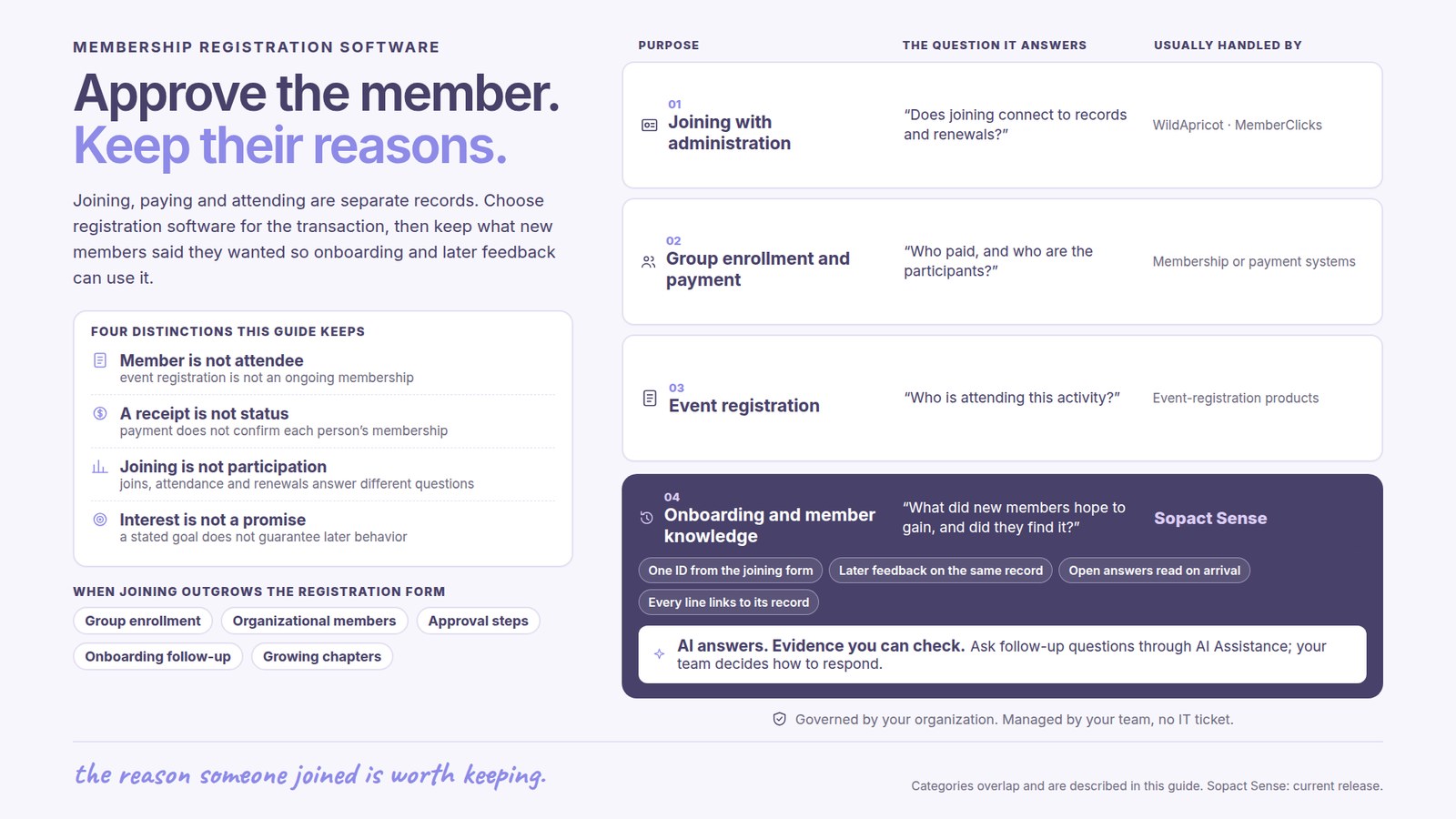
Membership establishes an ongoing relationship and may have an approval process, term and renewal date. Event registration reserves participation in a particular activity. Someone can attend an event without becoming a member, and a member can join without registering for an event.
Software should preserve those distinctions so staff do not treat an event attendee as a paid member or assume that a completed application confirms an approved membership. The organization’s actual rules determine what each status means.
For an organizational membership, the relationship may include an organization and several associated people. The system needs to support the way those relationships are managed rather than flattening every contact into a separate identical membership.
If one coordinator registers several people and pays once, evaluate that transaction directly in the registration system. The buyer needs to know who the payer is, who the participants are and how substitutions or partial changes are handled.
These are transaction requirements, not simply a reason to add more fields to a survey. A payment receipt does not automatically explain each person’s membership status or whether they attended a later activity.
Sopact’s role in this guide is the evidence used for onboarding and program understanding. Do not choose it on an assumption that it provides the group checkout, dues ledger or renewal billing functions required by your organization.
An AMS is relevant when joining needs to connect directly with membership administration. WildApricot documents membership records, renewals, recurring payments and self-service. MemberClicks also combines dues and renewals with events and communications.
A dedicated event-registration product may be appropriate for attendance and event transactions. Confirm the specific group and payment behavior needed rather than inferring it from a broad feature label.
Sopact is relevant where applications and onboarding evidence need to become continuing member knowledge. It can complement the system that already manages the transaction, with the source exchange and responsibilities agreed explicitly.
A joining form may explain a member’s professional interests, goals or support needs. That information loses value if it is never used after the application is approved. Useful onboarding makes the next interaction more relevant.
For a fictional professional network, new members might say they want mentoring while their early participation consists only of introductory events. Reading the joining evidence with later feedback can help the team understand whether people found the support they sought.
Sopact analyzes incoming evidence and keeps it available through AI Assistance in the agreed workflow. Staff can use the context in program planning and follow-up without preparing another spreadsheet of application comments. The team decides how to respond; a stated interest is not a guarantee of future behavior.
Registration shows a person’s intention or status at a point in time. Attendance shows participation under an agreed evidence rule. Renewal describes continuation of membership. These measures answer different questions.
A high joining total may coexist with low participation. A member may renew while still reporting an unmet need. Connecting these facts helps the organization improve its services without pretending that one number fully describes member value.
The reporting period and group matter. Compare renewal among members actually due to renew, and keep incomplete participation evidence visible. A changing member mix can affect the result even when the underlying program has not changed.
A growing network needs local flexibility and shared understanding. Chapters may collect different feedback, while the organization needs consistent meaning around joining, participation and continued membership.
The WorldSkills International story describes a planned shared evidence foundation across a Member network. It is relevant to continuing learning; it does not establish that Sopact replaced registration payments or achieved a measured renewal increase.
Sopact’s typical setup estimate is two days to two weeks for an agreed workflow. Available source records and connections affect that scope. Personalization and continuing team support help staff own the evidence as onboarding and program needs evolve.
It supports joining information, applications or approvals and the establishment of a membership relationship.
No. Membership is an ongoing organizational relationship; event registration concerns participation in a specific activity.
Treat group enrollment and payment as explicit requirements for the transaction system, including individual participant records and later changes.
That is not its role in the workflow described here. Sopact connects registration-related evidence with onboarding and continuing analysis.
It can explain what members hoped to gain and help the organization interpret later participation and feedback.
Continue with a purpose
Related solution
Connect joining evidence with member feedback.
Explore the solution →Continue learning
Explore continuity across collection and reporting cycles.
Start learning →
Customer story
A planned foundation for continuing Member-network learning.
Read the story →Explore how Sopact can connect application interests, onboarding and later feedback around the value your network provides.
See it with your workflow →