


What is a logic model template?
A logic model template is a blank worksheet with five columns, inputs, activities, outputs, outcomes and impact, plus a row for the assumptions between them and a companion indicator table, which you fill in to show how a program's work should lead to change. Copy the text template below or download the CSV.
It is a planning aid, not a funder form; when a funder sends its own layout, fill theirs with the same content. For the concept, read what a logic model is.
THE SHORT VERSION
- Copy the five-column template, fill it from the long-term change backward, and write one assumption under each arrow.
- Keep outputs (what you deliver) and outcomes (what changes for people) in separate columns, each with a unit or a time window.
- Fill the companion indicator table as well: each row becomes a data dictionary entry that funder and partners count the same way.
Where can I get a free logic model template?
Download the blank CSV for Excel or Google Sheets, or copy the text template into any document; both hold the same five columns, with assumptions and evidence underneath. The CSV puts the chain in one row, with rows for assumptions and evidence questions beneath.
Download the blank logic model template — CSV for Excel or Google Sheets →
The text template runs from impact down to inputs on purpose, so you fill it backward from the change.
TEMPLATE · COPY INTO A DOCUMENT OR SPREADSHEET
LOGIC MODEL · [Program name] · drafted [date] by [names]

IMPACT: the long-term change, and who experiences it
  [ ]
OUTCOMES: what changes for people, each with a time window
  1. [ ]  by [when]
  2. [ ]  by [when]
OUTPUTS: what we deliver, each with a unit
  1. [ ]  unit: [unique people / sessions / ...]
  2. [ ]  unit: [ ]
ACTIVITIES: the main pieces of work
  [ ]
INPUTS: what we need for every cohort
  [ ]

ASSUMPTIONS: what must be true under each arrow
  Inputs → Activities: [ ]
  Activities → Outputs: [ ]
  Outputs → Outcomes: [ ]
  Outcomes → Impact: [ ]

INDICATORS: one row per output and outcome (table below)
How do you fill in each box of a logic model template?
Work from right to left: name the long-term change, then the outcomes that lead there, then what you deliver, what you do and what you need, and apply one test to each box before moving on. The table gives the test.
Scroll horizontally to see all columns →
| Box | What to write | Test before moving on |
|---|---|---|
| Impact | The long-term change and who experiences it | Is it a change for people, not a service? |
| Outcomes | Changes for people, each with a time window | Could you ask a participant whether it happened? |
| Outputs | What you deliver, with a unit | Is the unit clear: unique people, not visits? |
| Activities | The main work, not a task list | Does each activity feed an output? |
| Inputs | People, money, partners, materials | Do they exist for every cohort? |
| Assumptions | What must hold under each arrow | Which one would change your plan if wrong? |
Satisfaction with a session is not an outcome; later use of the skill is. The CDC's program-description guidance treats context as part of the model, and its logic model components resource lists assumptions as a component.
What does a filled-in logic model template look like?
Here is the template filled in by one of the four job-training programs (funded partners A to D) of the course's fictional regional workforce fund, using the levels agreed on its onboarding call. Read it from the bottom up, as the arrows run.
Scroll horizontally to see all columns →
| Box | Filled in (fictional) | Assumption to reach the next box |
|---|---|---|
| Inputs | Trainers, mentors, employer contacts | Trainers and mentors are available for every cohort |
| Activities | Training sessions and mentoring | The skills taught are ones local employers hire for |
| Outputs | Participants enrolled (unique people); completed training | Employers value the certification |
| Outcomes | Placed in a job within 90 days of exit; retained in the same job at 12 months; starting wage, by track | The first job fits well enough to keep, and leads to a living wage |
| Impact | Graduates in living-wage jobs | The change the partner named on the call |
The arrow to watch is outputs to outcomes. If graduates complete but are not placed within 90 days, the fix may be employer contacts or transport rather than more training.
What goes in the companion indicator table?
One row per output and outcome: the indicator, a plain definition someone else could count from, when it is due and where it comes from; add a dimension and a roll-up rule and each row becomes a data dictionary entry. Copy the columns and replace the rows.
Scroll horizontally to see all columns →
| Indicator | Plain definition | Due · source | Dimension · roll-up |
|---|---|---|---|
| Participants enrolled | Unique people in the period, not sessions | Quarterly · enrollment form | How much, Who · IRIS+ PI4060 · add across partners |
| Completed training | Finished the track | Quarterly · completion record | How much · add across partners |
| Placed in a job | Paid work within 90 days of exit | Quarterly · placement survey | What, How much · add only 90-day counts |
| Retained | Same job at 12 months | Annual · 12-month follow-up | How much, Risk · add, show unknowns |
| Starting wage | Hourly, by track | Annual · placement survey | How much · compare by track, never one average |
The slide follows the first row all the way: a metric with its definition, the dimension it answers, an optional standard code and the rule for adding it up across partners.
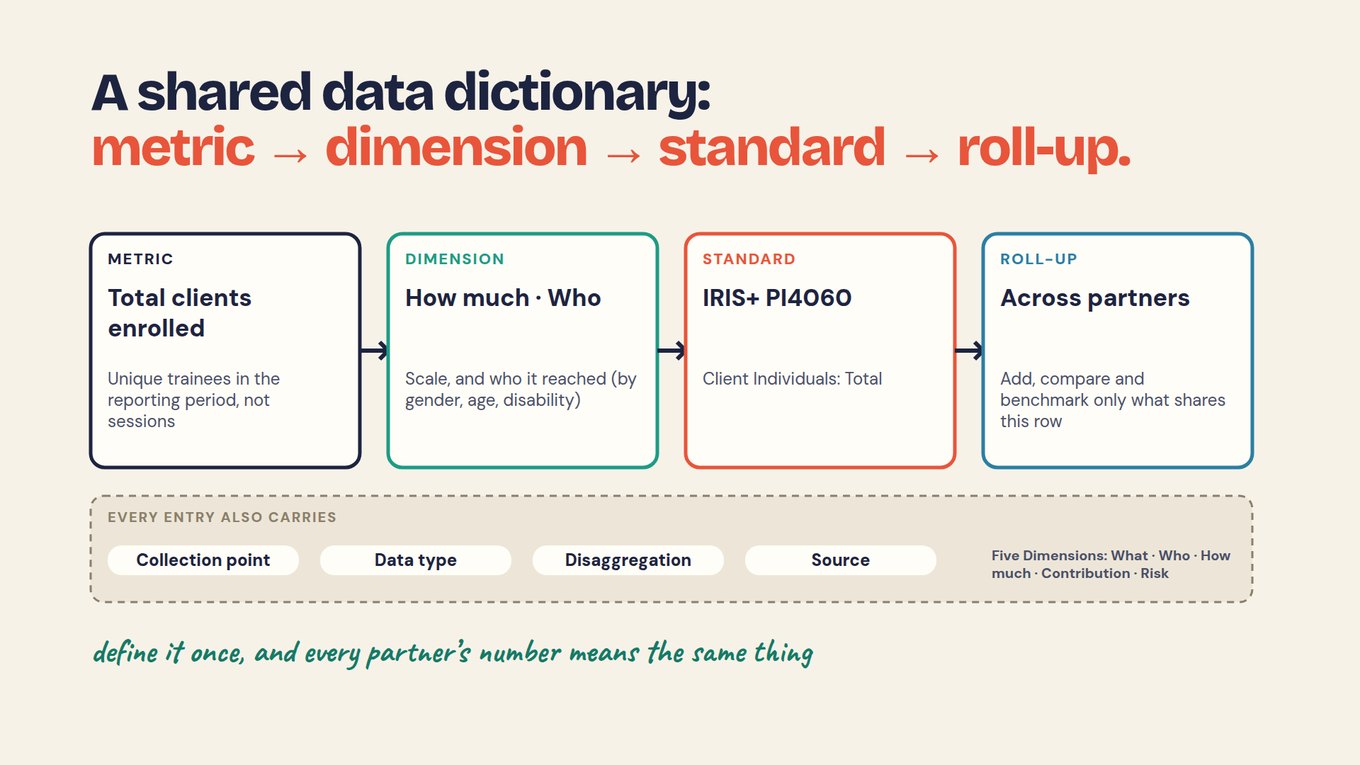
Two more fields matter most: a missing-value rule, so a person with no follow-up answer counts as unknown rather than "not placed", and an owner who approves changes. The chapter A shared data dictionary builds each entry and tests it on real records.
Can an AI tool fill in a logic model template for you?
It can draft one from program notes or an onboarding-call transcript, if you forbid it to invent anything and then check every box against what was said. Use the result as a list of questions, not a finished model.
PROMPT · PASTE INTO CLAUDE, CHATGPT OR YOUR AI TOOL
Fill in the logic model template below from our notes or call transcript.

Rules:
1. Use only what the text says. Do not invent activities, outcomes, targets or numbers.
2. Fill from IMPACT down to INPUTS. Outputs are what we deliver, with a unit; outcomes are changes for people, with a time window.
3. Write one assumption under each arrow.
4. Then build the indicator table: one row per output and outcome with indicator, plain definition, due date and source form.
5. Where the text is silent, write "not in our data". Never fill a gap with a guess.
6. End with the questions we must settle before sharing this with a funder.

Template:
[PASTE THE TEMPLATE ABOVE]

Our notes or transcript:
[PASTE]
A funder can run this step live: AHA Ventures' head of impact drafts each company's logic model and data dictionary during the onboarding call.
Can several sites or partners share one logic model template?
Yes, if they share the outcomes and their definitions and keep their own activities: whatever gets added up must mean the same thing everywhere, while local delivery can differ. Show those differences in the activities column instead of implying uniform delivery.
Matching headings are not enough. In the fictional fund, Partners A, B and D counted placements within 90 days: 42, 31 and 27, a total of 100. Partner C counted within six months and reported 55, so its number is held until C confirms the 90-day count.
Agree only the few shared definitions a comparison needs, and keep extra local questions where they help local decisions.
What can a filled-in template not tell you?
Whether the change happened, or whether your program caused it: a template records the intended path, and only evidence collected over time can test it. Completion records support the outputs box; they say nothing yet about placement.
Report follow-up results against the people who answered, with the unknowns shown, rather than as a share of everyone enrolled. A rise in placements during a strong hiring season may owe more to the season than the training, so causal claims need a comparison, such as earlier cohorts.
Follow-up answers are self-reported and some people never reply. Check any AI draft against the records, let people decide what results mean, and review the model yearly, keeping the old one with the reports that used it.
The video below looks at why most logic models are filed after approval and never tested. Watch for the structure it proposes, then compare it with your filled template.
Which template do you need: logic model, theory of change, logframe or results framework?
The one your funder asks for, because all four hold the same five levels; fill the logic model first, then re-lay the same content under the other labels. Each layout adds something, and each invites one wrong assumption.
Scroll horizontally to see all columns →
| Template | What it adds | What to avoid assuming |
|---|---|---|
| Logic model | Components and intended links in one row | That it must be linear or cannot hold assumptions |
| Theory of change | Why and how change is expected, in context | That every program needs the same six-box layout |
| Logframe | Indicators, means of verification and assumptions per row | That completed cells prove the pathway works |
| Results framework | A top-down view from one strategic objective | That the objective is one program's alone to deliver |
The slide shows the relabelling. Your filled template's content stays put; only the column names change, which is how the chapter One change model, four formats keeps one set of numbers across funders.
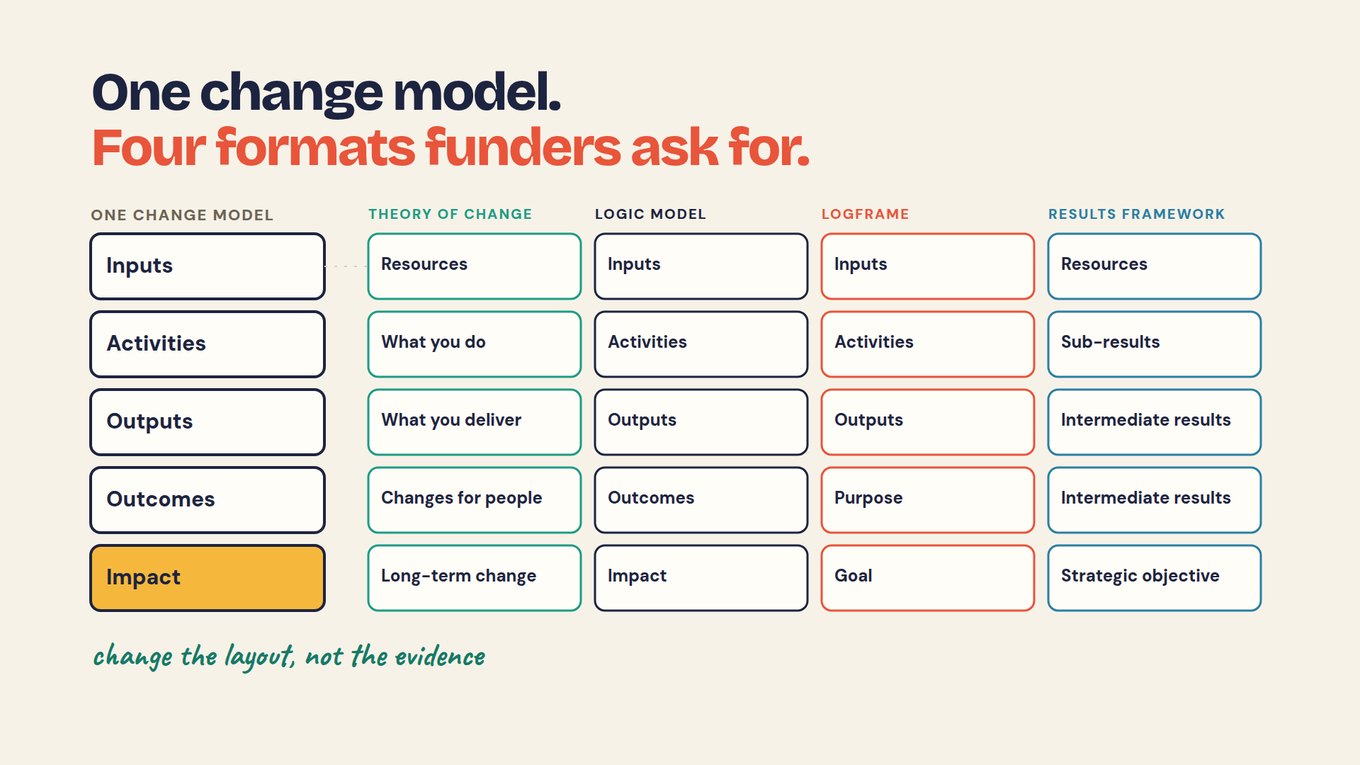
For those layouts, use the theory of change template or the logframe template. The video introduces the reasoning a logic model compresses into boxes; watch how it separates outputs, outcomes and impact, then check your columns.
Start with one program's template this week
Fill the template for one program you already run, with the people who deliver it, before you build models for everything. One cycle is enough to learn what your template is missing.
- Copy the text template and write the impact line: the change, and who experiences it.
- Add two or three outcomes with time windows, then outputs with units, activities and inputs.
- Write one assumption under each arrow and circle the one you are least sure of.
- Fill the indicator table, using forms you already run as sources, and write "not in our data" where none exists.
- Ask one participant, one staff member and your funder's contact to mark what is wrong.
After the first cycle you have a filled template, a five-row indicator table ready to become dictionary entries and one assumption to test in the next report.
Frequently asked questions
Can I use this logic model template in Excel?
Yes. Download the CSV and open or import it in Excel or Google Sheets, then replace the starter text and save it in the format you prefer. The text template on this page works in any document. Keep the indicator table on a second sheet so the model itself stays readable on one page.
What is the difference between outputs and outcomes?
Outputs describe what the program delivered, such as participants enrolled or people who completed training. Outcomes describe what changed for those people, such as a job within 90 days of exit or the same job at 12 months. Evidence of delivery does not show the later change, so each needs its own indicator.
Can a logic model include assumptions?
Yes. Assumptions can sit under each arrow in the template or in notes beside it, and they are not reserved for a theory of change. Write what must be true for the next box to follow, such as "employers value the certification", and mark the one that would most change your plan if it proved wrong.
Must a logic model be linear?
No. A single row is one useful layout, and the template starts that way because it is readable. Programs where several activities feed one outcome, or where results feed back into delivery, may need branches or notes. Keep the main template on one page and move the detail into the indicator table or a short note.
Is a logic model template useful before any data is collected?
Yes. That is when it helps most, because it tells you which forms and follow-ups you will need. Filling the indicator table shows which outcomes have no source yet. Later reviews should keep the intended path separate from observed results, so the template is never read as a report of what happened.
