


Own routine changes
Authorized staff can maintain collection design after setup, with support when needed.


KoboToolbox Alternatives · BUYER’S GUIDE
Field data collection software helps research and nonprofit teams gather information during visits, including in low-connectivity settings. KoboToolbox alternatives differ in field quality controls, continuing casework and how collected evidence becomes usable program insight.
For KoboToolbox alternatives, compare SurveyCTO for supervised field research, ODK for configurable collection and CommCare for continuing frontline cases. Choose Sopact’s approach when the unresolved work is connecting collected responses with supported files, history and program analysis.
✳ DECISION INTELLIGENCE FOR PROGRAMS & PORTFOLIOS
Sopact is an AI-native data collection platform. It connects forms, supported files, interview transcripts, feedback and history so teams can investigate change and decide where to act.
For teams using KoboToolbox, the reason to consider Sopact is the work beyond field collection: connect responses with documents and history, then use that context in recurring program decisions.
START HERE
Four alternatives, plus KoboToolbox as the baseline. Keep your field requirements visible while comparing what happens next.
| Option | Consider it for | Tradeoff to understand | Explore |
|---|---|---|---|
| SopactAI-native data collection | Forms, documents and program history analyzed together | Needs an internal data owner and configured relationships; specialist operational functions must be checked separately. | Review ↗ |
| KoboToolbox | Humanitarian field surveys and linked projects | Preserve a working field workflow; linked projects do not by themselves establish analysis of every supporting document. | Review ↗ |
| SurveyCTO | Research collection with quality supervision | Field quality and review controls matter. Any downstream analysis must preserve approval status and corrections. | Review ↗ |
| ODK | Configurable field forms with persistent subjects | Entities support repeat collection; specialist referrals and case operations need separate evaluation. | Review ↗ |
| CommCare | Ongoing frontline cases and follow-up | Case continuity supports frontline work; mixed-source program analysis is a separate buying requirement. | Review ↗ |
NARROW THE CHOICE
SurveyCTO and ODK belong on a field-collection shortlist. CommCare matters when visits are part of continuing casework. Sopact is relevant when the missing piece is connecting responses with program history, supported documents and qualitative evidence that staff need for the next decision.
✳ DECISION INTELLIGENCE FOR PROGRAMS & PORTFOLIOS
AI-native data collection.
Better decisions.
Sopact is an AI-native data collection platform. An authorized program owner can maintain connected forms and contacts, bring in supported files and interview transcripts, and analyze the evidence in context. The value is a continuing collection-and-analysis process—not another isolated survey or a chart assembled at the end.
Documented foundations: contact setup , form relationships and supported evidence .
Explore this workflow ↗Authorized staff can maintain collection design after setup, with support when needed.
Connect field responses with supported reports and interview transcripts.
Keep baseline and follow-up connected to the same participant.
Review quantitative findings with qualitative explanations and their sources.
Shared definitions make results comparable; verify access across collection, analysis and reports.
A follow-up response arrives alongside a relevant interview transcript or partner report.
Connect the evidence to the appropriate person, program, date and agreed definitions.
Review the result and its sources before changing support or collecting the next update.
Self-service configuration is not exclusive to Sopact. Compare the full recurring workflow. After setup, can your authorized data owner change a question, connect the next collection stage and check the resulting analysis? Verify the workflow with your team’s permissions. Initial design, training and complex integrations still need an owner.
See how contact fields are configured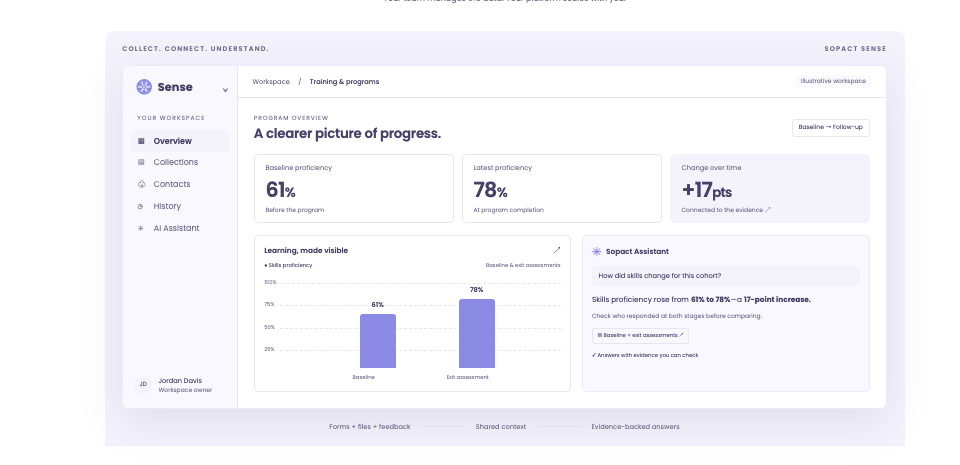
DIRECT COMPARISON
| Decision | What other options offer | Where to evaluate Sopact |
|---|---|---|
| Workflow ownership | Kobo provides customer-managed forms and linked projects. | Evaluate internal ownership of the whole cycle: questions, connected stages, definitions and reviewed analysis. |
| Evidence beyond the form | Kobo’s documented qualitative workspace analyzes audio responses. | Bring supported files and collected transcripts into the program analysis alongside form responses. |
| Change over time | Kobo links projects; ODK Entities and CommCare cases also support continuity. | Connect follow-up with relevant history and examine missing responses before interpreting change. |
| Numbers and explanations | Field tools provide their own reporting and analytical capabilities. | Examine quantitative results and supporting qualitative evidence together, with human review. |
| Multiple programs | Shared reporting still needs agreed definitions and accountable owners, whichever tool you use. | Use a shared data dictionary and governed collection design to make cross-program results interpretable. Verify access in analysis and shared reports. |
Claims are bounded to the documented features. Sources and practical limitations are linked in the reviews below. No hands-on parity test is claimed.
THE OTHER OPTIONS
A shorter shortlist is useful only if it keeps the functions you rely on.
Why consider it: Dynamic data attachments connect projects for repeat collection. Its audio-analysis workspace supports manual and AI-assisted qualitative coding.
Check before choosing: The documented qualitative-analysis feature covers audio responses, not ordinary text answers. Test the wider evidence workflow separately.
Read the vendor’s documentationWhy consider it: Combines field collection, case workflows and quality monitoring. Data Explorer provides built-in exploration—not merely an export destination.
Check before choosing: Check the exact offline, review and analytical workflow your study needs before changing platforms.
Read the vendor’s documentationWhy consider it: Entities connect forms around a continuing subject such as a person or place.
Check before choosing: Map specialized casework before switching; flexible forms do not automatically reproduce a complete service-delivery application.
Read the vendor’s documentationWhy consider it: Case histories, assignments and referrals support repeated frontline work. A no-code builder lets teams configure mobile workflows.
Check before choosing: Evaluate the required case operations as well as reporting. A connected-analysis product is not automatically an equivalent frontline app.
Read the vendor’s documentationA CLOSER LOOK
Start with SurveyCTO when field supervision and data-quality review drive the purchase. Evaluate ODK when you want flexible forms with persistent Entities. Retain KoboToolbox when its collection workflow already works. These are collection choices; the mixed-source analysis requirement deserves its own evaluation.
SurveyCTO quality monitoring · ODK Entities · Kobo linked projects
BEFORE YOU SWITCH
Use an approved sample. Let the person who will own the workflow run this test.
BUYING QUESTIONS
Choose by workflow: SurveyCTO or ODK for field collection, CommCare for continuing frontline cases, and Sopact for connected program collection and mixed-source analysis. None is a universal replacement.
Yes. Linked projects support repeat collection, and Kobo documents manual and AI-assisted analysis of audio responses. Evaluate the specific evidence types and follow-up workflow you need.
Potentially. Confirm an authorized transfer, stable identifiers, corrections, permissions and update responsibility. This guide does not establish a ready-made native integration.
BRING YOUR REAL WORKFLOW
Bring a form, a supporting file and the decision your team needs to make. See how the collection and analysis fit together.
Prepared by Sopact, a vendor included in this guide. Selection follows the workflow each article addresses. Product statements draw on the linked public documentation; recommendations are editorial judgments, not independent testing. Verify the proposed product, configuration, source handling and controls before purchasing.
Sources reviewed October 21, 2026. Documentation can change. Customer accounts are attributed; illustrations are labeled. The guide does not establish guaranteed accuracy, security certification or a universal implementation timeline.