


Related solution
Program & Portfolio Intelligence
Connect program evidence with current questions and decisions.
Explore the solution →

USE CASE / SOFTWARE GUIDE
Data collection software helps organizations gather and organize information from people, activities and documents so it can be used for research, service delivery and reporting. Good software preserves what the information means, where it came from and how it relates to the question being answered. The right choice depends on whether your team is conducting field visits, running surveys or bringing evidence together across programs and portfolios.
These are different jobs. An enumerator needs a reliable way to record a household interview. A research team needs to design and distribute a survey. A program leader may need to understand survey scores, open-ended feedback, interview transcripts and a lengthy partner report together. Collecting each source successfully does not, by itself, make them comparable or useful in one report.
AI-native data collection extends the work from capturing information to interpreting it in context as it arrives. Sopact is designed around that program and portfolio need: connect multiple sources, establish shared meaning through a data dictionary, and use the evidence for traceable analysis and reporting. Staff can ask current questions through AI Assistance and review the sources behind an answer.
Surveys, numbers, feedback, interview transcripts and reports.
A data dictionary defines measures, populations and reporting periods.
Incoming analysis supports source-backed answers and reviewed reports.
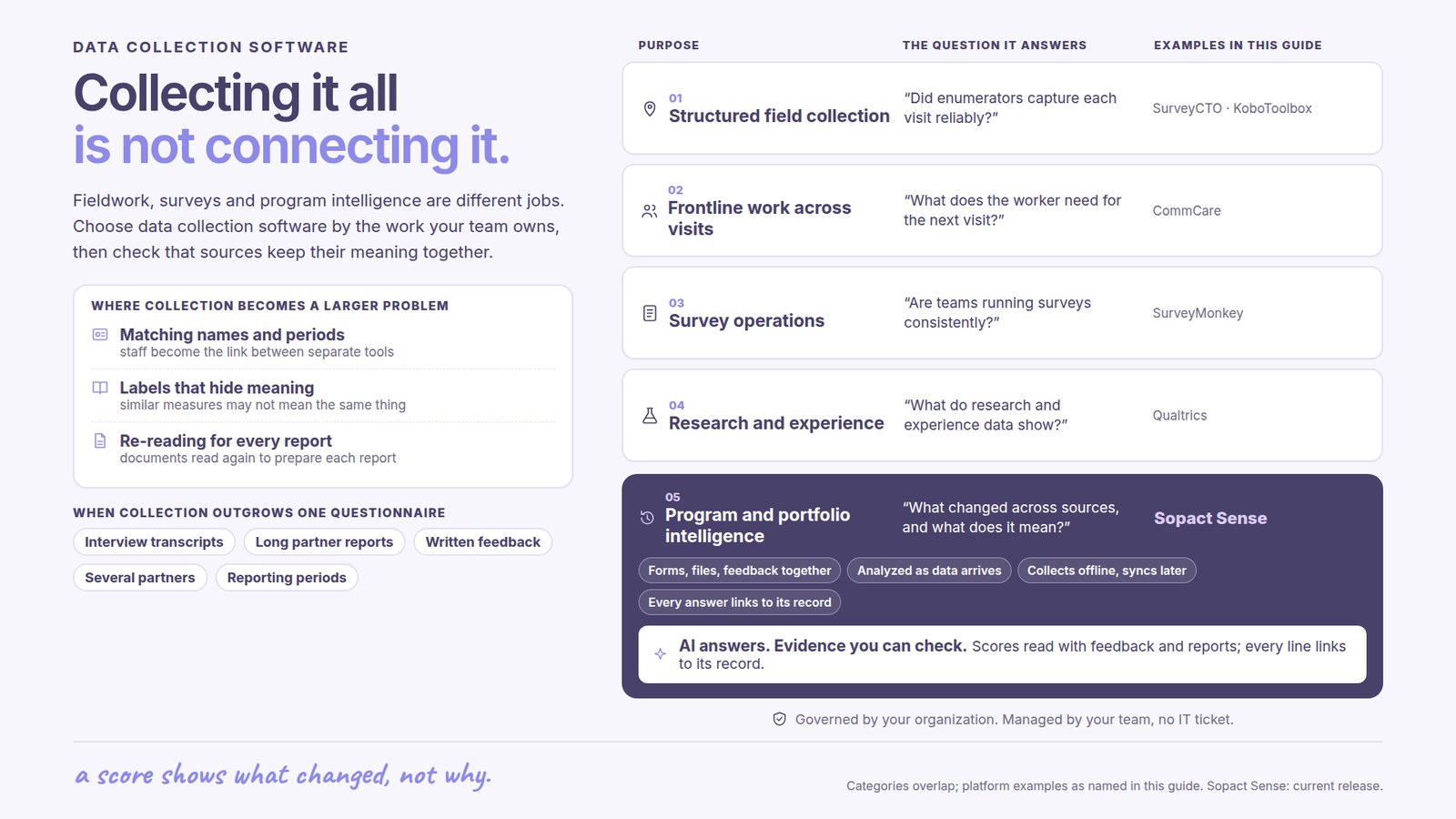
Start with the responsibility your team owns. These categories describe common buying needs; individual platforms can serve more than one.
| Buying purpose | Representative platforms | What the team needs to accomplish |
|---|---|---|
| Field research and frontline collection | SurveyCTO, KoboToolbox, CommCare | Help enumerators or frontline workers collect reliable information during interviews and visits, including low-connectivity conditions and repeat visits. |
| Survey-led research and feedback | SurveyMonkey, Qualtrics | Design questionnaires, reach respondents, manage research or feedback programs, and analyze the resulting responses. |
| AI-native program and portfolio intelligence | Sopact | Connect quantitative and qualitative evidence from multiple sources, apply shared context, and keep analysis useful for reporting and continuing decisions. |
A tablet interview, an employee survey and a portfolio review may all involve “data collection,” but success looks different in each. Choose the category around the work that must be completed, then compare platforms within that purpose.
In fieldwork, quality depends on what happens during the visit: the right questions, reliable capture, clear validation and a dependable return of records to the central team. In survey research, questionnaire design, distribution, respondent quality and analysis are central.
Program and portfolio teams face an additional challenge. Their evidence is rarely contained in one questionnaire. A score shows what changed; a participant’s explanation helps establish why; an interview adds circumstances; a partner report describes delivery and exceptions. If each stays in a separate tool or file, staff become the connection between them.
That manual connection creates three recurring costs. Staff reconcile names and periods, decide whether similarly labeled measures mean the same thing, and repeatedly read documents to prepare each report. Adding another form does little to remove those costs. The collection strategy needs to include shared meaning and the reporting decisions that follow.
Field collection is often conducted by enumerators interviewing respondents or by staff recording observations during service delivery. Reliable offline work, relevant earlier records and oversight of collection are important buying considerations.
SurveyCTO supports enumerator and case datasets and reuse of earlier information in later forms, including documented offline workflows. That matters when a research team needs organized assignments and consistent information across visits.
KoboToolbox supports linked project data through dynamic attachments. It is relevant when field teams need flexible forms and reuse of previously collected information. The relationships and availability of updated data on collection devices are part of the field design.
CommCare maintains client or household case histories and supports offline work, shared caseloads and referrals. Its focus includes helping a frontline worker carry out the next service interaction with the relevant history available.
These platforms should be evaluated around the realities of field delivery. Their ability to maintain related records is valuable. A separate question is how a program leader will combine those records with interview narratives, external reports and portfolio definitions for broader analysis.
Survey-led collection usually begins with a questionnaire and a target audience. The team needs to ask appropriate questions, reach respondents and interpret the answers. Online distribution is common, but the category is broader than online-only forms.
SurveyMonkey Enterprise combines survey creation and collection with team administration, shared resources and integrations such as Salesforce and Power BI. Its AI features include analysis of responses, and the platform also offers offline collection.
It belongs in a shortlist when the organization’s main need is to run surveys consistently across teams and put their results into existing work. For a program collecting many kinds of evidence, the buying question expands to how those survey results will be interpreted alongside documents and earlier program history.
Qualtrics serves research and experience-management needs that extend beyond a single questionnaire. Its imported-data projects can analyze external operational data alongside experience data, using capabilities such as Text iQ, Stats iQ and crosstabs.
It is relevant when survey-led research and organizational experience programs are central. For program or portfolio reporting, examine the proposed workflow around the actual mix of sources and definitions. Existing AI, imports and integrations deserve consideration; the distinction is how the complete workflow serves your particular decision.
Sopact is designed for teams whose questions cross forms, files, people and reporting periods. Training providers, accelerators, grantmakers and distributed networks need to understand the program as a whole. Their evidence includes both what can be counted and what needs to be read.
A useful evidence base can include registration and assessment responses, quantitative results, written feedback, interview transcripts, mentor notes and substantial partner reports. A 200-page report, for example, may contain explanations and commitments that a survey total cannot express. Its value comes from relating the relevant material to the program’s questions and other evidence.
Sopact supports collecting new information and bringing relevant existing records into the agreed workflow. Imports and integrations should cover the actual sources involved. This allows a team to retain a useful survey or field tool while improving how the organization understands the evidence it produces.
A data dictionary establishes the meaning of the measures used in analysis: who is counted, what qualifies, which period applies and how a result should be interpreted. Program goals and earlier records add the surrounding context. This makes it possible to examine a partner’s narrative and numerical results against the same agreed questions.
Sopact’s configured analysis runs as incoming responses and documents are collected. Staff can use that analysis through AI Assistance while the program is underway. The benefit is being able to ask about a developing issue with the relevant evidence already connected, rather than assemble another collection of exports and documents first.
This is the AI-native value for this use case: collection, context, analysis and reporting form a continuing workflow. The advantage is the reduction in repeated interpretation and reconciliation across the program, with people retaining responsibility for conclusions and action.
A data dictionary provides common meaning across sources. It is especially useful when several partners, chapters or teams use different forms and terminology. They can retain local questions while agreeing on the measures that need to be compared.
Consider three illustrative definitions:
These distinctions change the report. A partner’s “reach” figure may describe event visits while another counts distinct people. A narrative may describe a six-month result while a spreadsheet records a three-month result. Shared definitions help the team identify which figures can be combined and which need to remain separate or be clarified.
For Sopact’s program and portfolio approach, the dictionary supplies essential context for the questions asked of mixed data. It helps staff review the interpretation against the agreed meaning, instead of accepting a fluent answer built around ambiguous labels. The data dictionary guide explains the definitions in more detail.
Consider a training portfolio with assessments, participant comments, mentor interviews and partner reports. A leader wants to know which cohorts are progressing and where support needs to change. The quantitative results establish the pattern; the qualitative material helps explain it; the dictionary establishes what “progress” means for that program.
Sopact brings these parts into the same analytical workflow. Staff can explore a result through AI Assistance and examine the supporting responses or documents. The resulting report has a clearer basis than a narrative assembled from whichever spreadsheet and quotations happened to be available at the deadline.
Traceability means a reviewer can examine the source behind a statement. Accuracy also depends on using the right definition, population and period. Together, these make errors easier to find and conclusions easier to defend. An AI answer still needs appropriate review, especially when sources disagree or important evidence is missing.
Real-time value comes from analysis being available as new data arrives in the configured workflow. A new partner report or participant response can inform a current question instead of waiting for the next manual reporting exercise. Offline evidence becomes available for central analysis after it synchronizes.
Current analysis and an approved report are different stages. Staff can investigate and respond sooner, while final reporting still follows the organization’s review process. The same collected evidence can support both the immediate program decision and the later board or funder report.
Marco Botha, CEO of Open Play Foundation, originally sought a better way to understand impact. In his conversation with Sopact, he described paper records collected from facilities and entered into Excel, leaving him roughly a month and a half behind the activity before the data was available. Collection was happening; useful information arrived too late.
“I wanted a better way to capture data. I wanted to ensure that my data was cleaner.”
Marco Botha, CEO, Open Play Foundation
Open Play now uses Sopact across participation, coaching, maintenance and water-resource monitoring. The team holds a Monday data meeting to examine the previous week and plan the next. The collected information has become part of daily management.
Water readings submitted by a staff member each Wednesday help Marco examine changes in use and compare them with earlier patterns. Maintenance photographs help him understand a problem and arrange a response. Participation records help the team investigate retention across coaches, activities and session times.
Marco asked AI Assistance to find inefficiencies the team might not be noticing. He described it surfacing a decline in girls' retention over roughly six weeks and raising a possible connection with late-afternoon sessions and safe travel home. Earlier sessions or transport became options to investigate. This was a question the connected analysis brought to the team, rather than a metric Marco had already chosen to monitor.
Marco described learning through conversations with AI Assistance, asking follow-up questions instead of relying only on a fixed dashboard. He estimated that around 80% of his team's time in the system goes toward driving efficiencies. His description places day-to-day management at the center of the value.
“It's changed the way we do business.”
Marco Botha, Open Play Foundation
The Open Play story also describes evidence from ten programs contributing to one funder report. The story also describes a water leak surfacing through the data. Collection created value beyond its original measurement purpose: it helped the team notice an operational issue and decide how to respond. That is the program-intelligence value: connected information remains useful for new questions after the original response has been collected.
For enumerator-led studies or frontline visits, begin with the field process. For research and feedback, begin with survey design, respondent reach and organizational analysis. For recurring program or portfolio decisions, begin with the sources that must be understood together, the shared definitions and the reports the team needs to explain.
Sopact’s typical setup estimate is two days to two weeks for an agreed workflow; historical data and integrations affect scope. The team retains ownership of routine collection and analysis, with personalization and continuing Sopact support as its needs change. Sopact also supports offline collection and multiple languages.
The most useful demonstration follows one real question across the relevant sources, through its agreed definitions, to an answer and the evidence behind it. That shows whether the platform improves the work your team is buying it to do.
Three common buying purposes are field research and frontline collection, survey-led research and feedback, and connected program or portfolio intelligence. Platforms overlap, so choose around the work and evidence your team needs to manage.
Sopact focuses on connecting surveys, quantitative records, qualitative feedback, interview transcripts and reports with shared program context. Incoming analysis supports AI Assistance and traceable reporting across the sources. Survey platforms are relevant when questionnaire-led research or feedback is the central workflow.
A dictionary defines what measures mean, which population and period they describe, and how results can be compared. This helps teams combine compatible evidence and recognize differences hidden behind similar labels.
Yes, an agreed workflow can bring relevant existing evidence into Sopact through imports or integrations. The scope depends on the actual tools, records, documents and update requirements; a connection should not be assumed for every source.
Configured analysis becomes available as data arrives, helping staff examine current evidence through AI Assistance. Offline records must synchronize first. Source review and approval of a final report remain part of the organization’s process.
Continue with a purpose
Related solution
Connect program evidence with current questions and decisions.
Explore the solution →Continue learning
Define what your measures mean before combining results across sources.
Start learning →
Customer story
From facility records to weekly decisions and a funder report.
Read the story →Explore how Sopact combines collection, shared definitions and incoming analysis for reporting your team can trace and explain.
See it with your workflow →