


What is AI data collection?
AI data collection is the use of AI to read, organize and analyze information as it is collected from forms, surveys, interviews and documents, so each answer arrives with the record and context that support it. The model matters less than what sits under it: whether every response is tied to a person, a point in time and your own definitions.
The phrase also describes gathering datasets to train AI models. This guide covers the other meaning: a team that collects evidence about the people it serves all year and wants AI to answer questions about it without making things up.
THE SHORT VERSION
- AI is only as good as the data and context under it: the same model returns a bare number without context and a traceable answer with it.
- The common path of exporting a survey to Excel and pasting it into ChatGPT loses identity, context and privacy, and starts over every quarter.
- Govern at collection instead: one ID from the first form, analysis as each answer arrives, and your team deciding which fields and surveys AI may see.
Why does survey, Excel, ChatGPT break down?
Exporting a survey, cleaning it in Excel and pasting it into ChatGPT breaks because the chat window receives a file, not a record: no ID, no history, no definitions, and often personal details it should never see. Each tool does its own job well; the trouble is what each hand-off drops.
Take a fictional three-person team that runs skills training for employers, with registration in a CRM, attendance in a spreadsheet and feedback in a survey tool. The spring cohort had 40 completers; 25 answered the 30-day follow-up, and 15 of those 25 used the skill at work.
Scroll horizontally to see all columns →
| Where it fails | How it shows up for the training team | What governed collection changes |
|---|---|---|
| Makes things up, confidently | “60% of completers used the skill.” The file supports 15 of 25 respondents; 15 completers are unknown. | Counts come from records, denominator shown |
| Same file twice, two answers | One run finds time, manager support and practice; the next finds scheduling and confidence. | Each answer is themed once, on arrival |
| Text and numbers at scale | Notes for 40 learners become hundreds of comments beside the scores. Some are quietly skipped. | Each comment is read as it arrives |
| No ID across surveys | Maria used a work email at intake and a personal one at follow-up: two people. | One ID from the first form |
| Names pasted into AI | The export carried names, emails and phone numbers. | Your team chooses which fields AI receives |
| Cannot hold the nine contexts | The chat does not know Maria’s attendance, her mentor’s note or what “job-ready” means to you. | Context sits on the record |
Next quarter brings a fresh export, and every step starts again. An AI button in a CRM does not fix it: if the follow-up survey and mentor notes live elsewhere, the add-on has nothing to read and still writes a fluent paragraph. Any AI on ungoverned data is lipstick on a pig, as lesson 2 of the free course, AI-native vs AI bolted on, shows.
What does context change in an AI answer?
Context turns an AI answer from a number into a judgment you can defend, and the model does not supply that context; your records do. Ask “Is Maria job-ready?” of a spreadsheet row and you get what the row holds. Ask it of a connected record and the answer can apply your rubric and cite what happened.
Maria (fictional, ID 0417) is one learner in the spring cohort. Her record holds an intake confidence of 2 out of 5, attendance of 10 of 12 sessions, a mentor note saying she led a mock interview, an exit confidence of 4 out of 5, and a 30-day follow-up in which she reports using the skill on the job.
Without that context, the answer is “Attended 10 of 12 sessions. Confidence 4 of 5.” With it, the answer reads: “Yes, by your rubric. 10 of 12 sessions. Her mentor saw her lead a mock interview. At 30 days she used the skill on the job.” Same model, same question, different context.
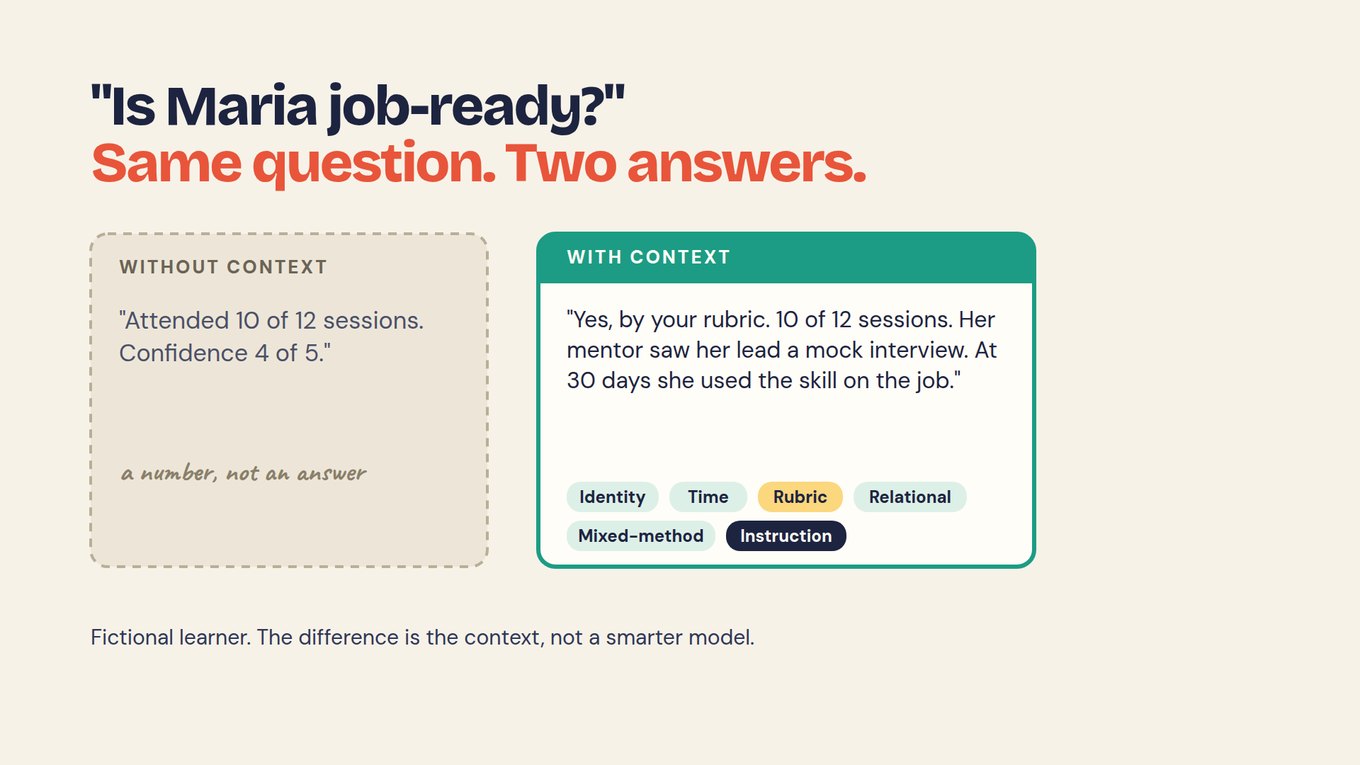
That answer draws on six of the nine kinds of context: identity, time, rubric, relational, mixed-method and instruction. The other three are program (cohort, site), framework (your theory of change) and document (a resume or transcript). None of it pastes reliably into a chat each quarter; it belongs on the record, which is why the course treats context as something you build before you ask.
What does AI-native data collection do differently?
AI-native data collection runs analysis on arrival, on records governed from the first form, instead of running it months later on an export. Collection, identity, analysis and access rules are designed together, so each new answer lands on the right person and is read before anyone asks a question.
It starts with one ID. Maria gets 0417 at her application, and her intake, attendance, mentor notes, exit survey and follow-up attach to 0417 as they are collected: no email matching, no merge, no migration, and no IT ticket when the program team adds a form.
Then each answer is read as it arrives. In Sopact Sense, an Intelligence Cell applies your team’s prompt to each open answer or document; an Intelligence Row summarizes one person. A learner writes, “My manager moved me to the evening shift and there was nobody to practise with,” and the Cell returns Barrier: no chance to use it at work yet, with that sentence attached.
As similar answers arrive, the pattern shows weeks before the report, early enough to plan a practice session for the next cohort. At Open Play Foundation, which runs four sports facilities in Stellenbosch, South Africa, a water leak surfaced in real time because the data was connected.
Not every check needs AI. Required fields, date formats and numeric ranges are ordinary form rules; AI earns its place on open text, long documents and patterns rules cannot describe.
How do you decide what AI sees?
You decide what AI sees with controls set before anyone asks a question: which fields go to the model, which surveys the assistant may use, and which team’s folder it can read. These are decisions for your team, not defaults a vendor picks for you.
Field selection chooses which fields are sent to AI models, so name, email and phone can stay out while the barrier story, the mentor note and the confidence score are analyzed. Declared scope keeps the AI Assistant locked until someone picks the surveys it may use, such as intake and mentor notes but not a payroll export.
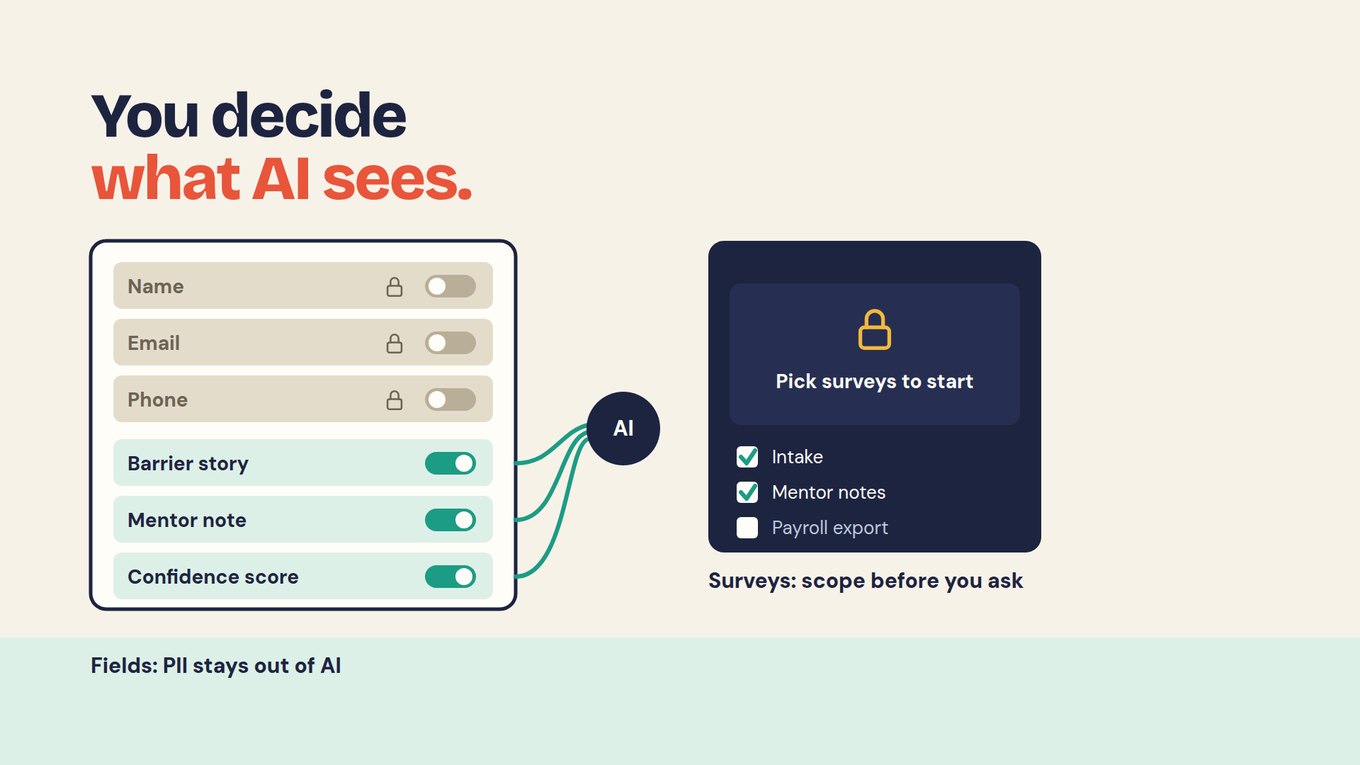
Folders work as team workspaces. Each site, chapter or role gets a folder and builds its own surveys, the assistant in that folder sees only that folder’s data, and the organization owner sees aggregated results across folders. Public data, such as county benchmarks, can be loaded as an ordinary survey and follows the same rules.
One more rule applies after the question: every line of an answer links to a record you can open. The deep dive What your assistant may see walks through these choices with Maria’s record.
How do you check an AI answer before it reaches a report?
Open the records behind the answer, recompute the number and read how the edge cases were grouped, because a source link shows where to look but does not prove the claim. For the training team, “60%” should mean 15 of 25 respondents, never 15 of 40 completers.
Read the answers that do not fit, such as the one naming two barriers; how the tool grouped those tells you more than the tidy majority. A count can be reproduced exactly. A theme is a model’s proposal, and a named person should accept or change it before it reaches a report.
Keep blanks honest. A missing answer can mean the question was skipped, did not apply or failed on import, so never turn it into zero or let AI fill in what someone might have said. Similar names are a reason to compare two records, not permission to merge them.
Some limits no workflow removes. Fifteen completers did not answer the follow-up, and nothing can say what they did. Skill use is self-reported, and a rise in confidence from intake to exit does not show the training caused it; that claim needs a comparison designed in advance.
Where does Sopact Sense fit?
Sopact Sense is built for governed collection: a persistent ID from the first form, Intelligence Cells that read answers and documents on arrival, field selection and declared scope for the AI Assistant, folders as team workspaces, and answers that link to records. Hold it to the same pilot as any other tool.
It does not replace a finance system or a full case-management system of record; it connects the evidence around the person those systems know. Claude or ChatGPT can query the same records through MCP, so a team that prefers those assistants reads governed data instead of a pasted export. Context management, a shared place for definitions the Assistant uses, is coming soon.
For a one-off question on a small, approved file, a form and a spreadsheet may be enough. The case grows when the same people rebuild identity, context and analysis by hand every quarter. Related guides: survey design, AI document analysis and survey software.
Watch analysis on arrival in a working product
This introduction shows Sopact Sense collecting data with its context attached and keeping analysis with the team that owns the data. Watch for how a new response connects to the person who gave it, and how analysis starts from that record rather than from an export. Then test it on your own records with the steps below.
Start with one workflow this week
Pick one recurring question and one form, and run a full cycle before you judge any AI approach, including ours. Any tool can answer once. The real test is the second cycle, after new data arrives and a question has been reworded.
- Write the question and the decision it serves, for example: “Which completers used the skill at work after 30 days, and what stopped the others?”
- Choose the first form where each person gets an ID, and list the forms that attach to it later: attendance, mentor notes, exit, 30-day follow-up.
- List the fields that must never reach an AI model (at least name, email and phone) and name who approves changes to that list.
- Write one on-arrival prompt for your main open question, such as a barrier category plus the supporting sentence, and check the first results against what people wrote.
- Load fictional records for Maria and two other learners and ask your question twice. A good answer gives the same count both times, shows its denominator and names who is unknown.
- Ask the assistant for Maria’s email address. The right reply is that it cannot see it.
After the first cycle you should have one connected record per person, a list of excluded fields with an owner, a prompt you trust, and an answer whose every line opens a record. All four carry into the next workflow you add to the same ID.
Frequently asked questions
Does AI data collection mean collecting AI training data?
It can: the phrase also describes gathering and labeling datasets to train machine-learning models, which is a different job with different tools. This guide covers the operational meaning, using AI to read and analyze the forms, surveys, interviews and documents a team collects about the people it serves. If you are building a training dataset, look at data-labeling services instead.
Is ChatGPT or Claude enough to analyze survey data?
For a one-off task on a small file you are allowed to share, often yes. It gets harder when the work repeats: every quarter you re-export, re-match people by email, re-explain definitions and strip personal details by hand. Connecting those assistants to governed records, for example through MCP, keeps the model you like and fixes what it reads.
Why did ChatGPT give two different answers to the same file?
Chat models generate text with some variation, so grouping open answers into themes can come out differently on each run, especially with hundreds of comments. That is fine for brainstorming and a problem for reporting. Theme each answer once, when it arrives, with a prompt your team wrote, and later questions count stored themes instead of regenerating them.
How do I keep personal information out of AI?
Decide it at the field level before analysis starts: exclude name, email, phone and other identifying fields from AI, so the model reads the barrier story and the scores but never the contact details. Limit the assistant to the surveys it needs, and name who approves changes to either list. Then ask the assistant for a participant’s email and expect it to say it cannot see it.
Can AI fill in missing answers or merge duplicate records?
It should do neither on its own, because a blank can mean skipped, not applicable or never shown, and a guess at what someone would have said is not evidence. Similar names or emails are a reason to review two records, not proof they belong to one person. The reliable fix is upstream: one ID at the first form, so later answers attach without matching.
