


What is an impact dashboard?
An impact dashboard is a shared view of the outcomes a program or portfolio agreed to track, where each tile shows a count, the definition behind it, who it covers and where the number came from. Teams use it to review progress, spot gaps and prepare reports.
The charts are the smallest part of the work. A total is honest only when every part means the same thing, so the real build happens in the agreement and the data dictionary behind the tiles.
THE SHORT VERSION
- Give a metric a tile only once it has one written definition, and add partner or site numbers together only when they follow it.
- Show a number that was counted another way on its own line, marked as held, instead of folding it into the total or dropping it.
- Let every tile open the records behind it, with its denominator and the people not yet counted in plain view.
What should an impact dashboard show?
For each outcome, show what was delivered, what changed, how much of the group the evidence covers, anything held back, and where each number came from. Delivery counts still matter, but they sit beside outcomes rather than standing in for them.
Scroll horizontally to see all columns →
| Layer | Example tile | Question it answers |
|---|---|---|
| Delivery | Participants enrolled, unique people | What took place, and for whom? |
| Outcome | Placed in a job within 90 days of exit | What changed? |
| Coverage | Follow-up answers out of people eligible | How much of the group does this represent? |
| Held | A partner number counted another way | What is waiting on a definition? |
| Source | Link to each report or record | Where can a reader check it? |
| Action | Owner and date for each open question | Who follows up, and by when? |
Label outputs and outcomes plainly. Enrollment tells you the program ran and who took part; placement tells you something changed for them. For the operational view of sessions and staffing, see the program dashboard guide, and for finances and fundraising, the organization-wide dashboard guide.
What are some impact dashboard examples?
Four common kinds are training and workforce, youth and education, grant and investment portfolios, and membership networks. Each has its own core tiles; all need definitions before totals.
Training and workforce programs
Enrolled as unique people, completed, placed within a set window, retained at 12 months, and starting wage by track. A placement tile without its window cannot be compared with anything.
Youth development and education
Progress on agreed measures, with student, parent and staff views kept apart. Three observations about one young person are not three participants, so count each person once, on one ID.
Grant and investment portfolios
Shared metrics across funded partners, each partner's status beside its number, and totals only where definitions match. The worked example below is this kind.
Membership networks and federations
Member activity and reported benefit, built on a small core every chapter reports, with local questions around it. Keep a member organization's experience apart from that of the people it serves.
Which numbers can a portfolio dashboard add up?
Only numbers that follow the same written definition. Anything counted another way waits on its own line until the partner confirms the agreed count.
Take a fictional regional workforce fund with four job-training partners, A to D, the running example of the course this page draws on. On the onboarding call, fund and partners agreed five metrics, including "placed in a job within 90 days of exit". Partners A, B and D reported 42, 31 and 27 placements on that definition; Partner C reported 55, counted within six months.
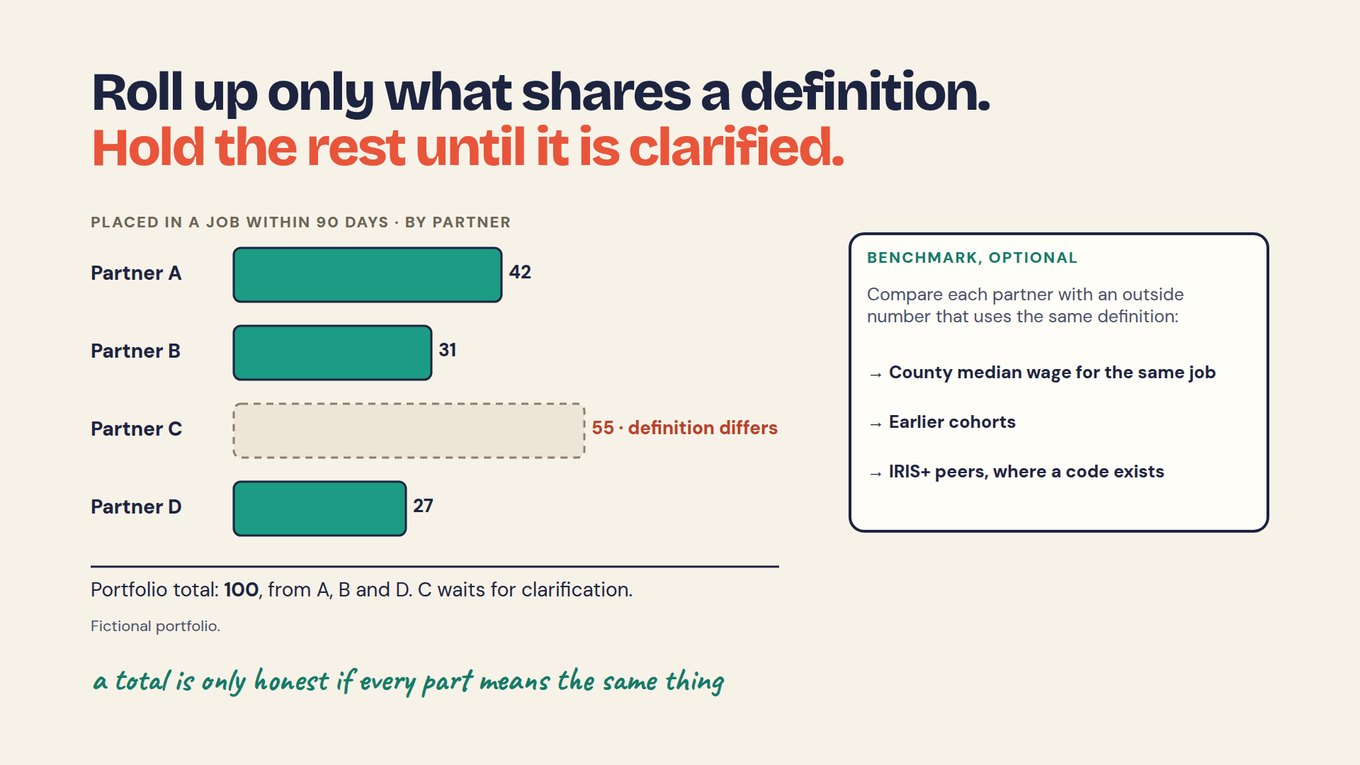
The tile reads 100: 42 + 31 + 27. Adding C would show 155, a bigger number that mixes two measures. When C sends its 90-day count, that count joins the total; it can be no higher than 55, since every placement within 90 days also falls within six months.
The same rule covers breakdowns. Split a tile by gender, age or disability only where every partner collected the same categories, as written in the shared data dictionary, and show a blank category as "not recorded", never as zero.
How should a dashboard show a number it cannot add yet?
Give each partner's number a status and show all of them, so a reader sees the total, what is held and why at a glance. The status comes from checking each report against the agreement.
Scroll horizontally to see all columns →
| Status | Partner C example (fictional) | What the dashboard shows |
|---|---|---|
| Matches | 80 enrolled, unique people | Counted in the total |
| Different | Placements within six months, not 90 days | Own line, marked held, with the question sent |
| Missing | Retention at 12 months not reported | "Not yet reported", never zero |
| Not split | One average starting wage, not by track | Left out of the by-track tile, with a note |
Write the note into the tile, not a footnote: "Placed within 90 days: 100 people, from Partners A, B and D. Partner C reported 55 within six months; we have asked for its 90-day count." Readers quote headlines, and footnotes rarely travel with them.
Each held line carries an owner and the question sent: "Can you count placements within 90 days, as agreed?" The chapter Check each partner report against the agreement shows how statuses are set.
How do you make every dashboard tile traceable?
Attach a short source note to each tile, naming the definition it follows, the records it was counted from and what it leaves out, and link the number to those records. Anyone who recounts it should then get the same answer.
For the placement tile the note is three lines: the definition (within 90 days of exit), the source (placement surveys from A, B and D) and the exclusion (Partner C, held). Show denominators too. In a separate fictional course, 40 completed and 25 answered the follow-up. If 15 used the skill, write "15 of 25 respondents", not "60% used the skill", because 15 completers never answered.
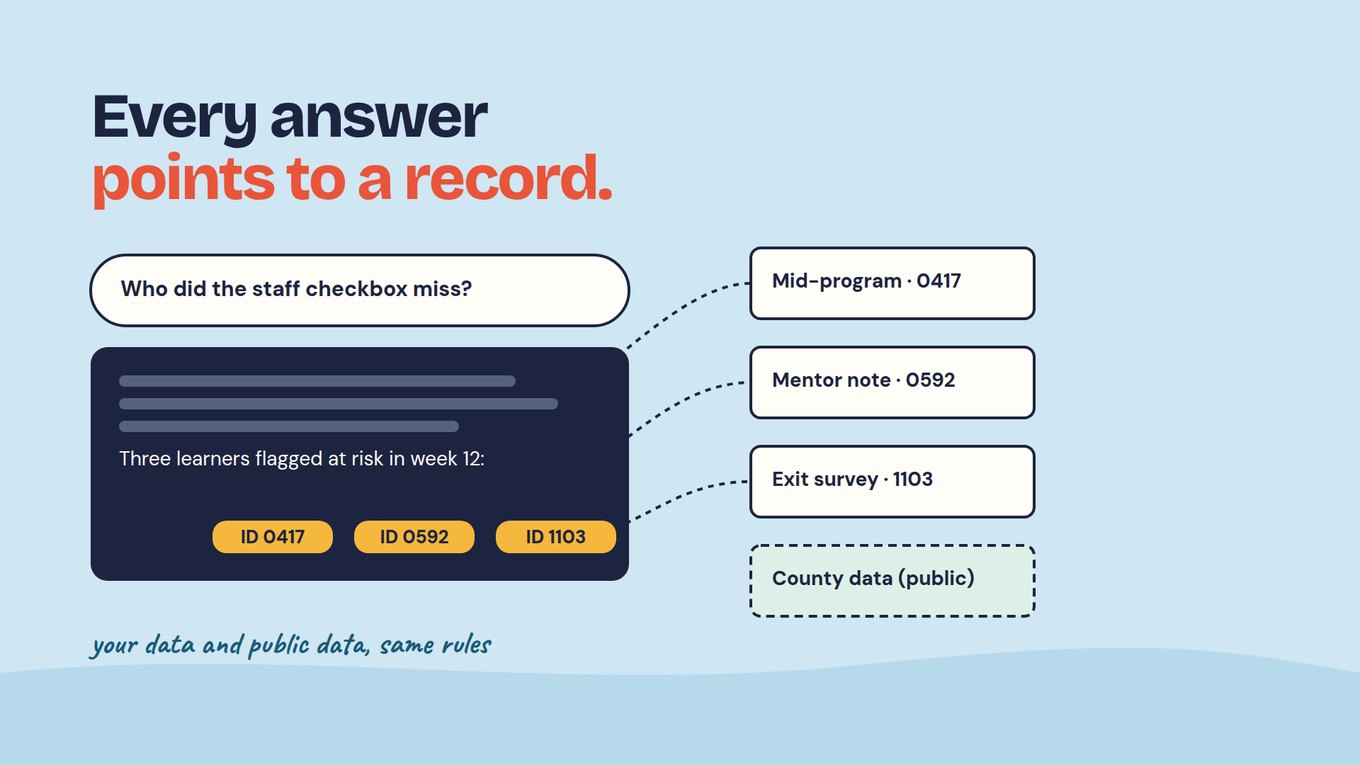
The slide shows a different fictional training program: a claim about three learners names them, and each ID opens a survey or mentor note. Make every number match its source covers source notes in depth.
The video below suggests a test for your next meeting: when someone challenges a number on the dashboard, watch what people open. If the answer lives in a private spreadsheet, the problem is trust, not the chart.
How do you build an impact dashboard, step by step?
Work from the decision back to the tiles: agree the metrics, define each one, check every feed, add up the matches, then connect each tile to its source. Drawing the charts comes last.
- Name the decision. Who reads the dashboard, and what will they decide with it: a partner review, a board update, a program change?
- Take the metrics from the agreement. The workforce fund has five: enrolled, completed, placed within 90 days, retained at 12 months, and starting wage by track.
- Write one dictionary row per tile. Definition, dimension, an IRIS+ code where one fits, breakdown, source and roll-up rule. Enrolled means unique trainees, not sessions (IRIS+ PI4060).
- Check each feed. Mark every partner number matches, different, missing or not split.
- Add up the matches. Put held numbers on their own line and a denominator beside every rate.
- Trace, then test. Give each tile its source note and recount two tiles by hand before the first meeting.
Keep a dated copy of each dashboard you send, and a change log beside the dictionary: what changed, who approved it, which tiles moved and why.
Do you need BI software to build an impact dashboard?
No: a spreadsheet or a BI tool can carry a good impact dashboard, because the hard part sits upstream in the definitions, the IDs and the check. Choose the tool your team can maintain.
Charting tools draw clear tiles. No chart can make two partners count placements the same way, or link a participant's intake to their follow-up across separate files; that is fixed where data is collected and agreed.
That upstream layer is where Sopact Sense works. Each person or partner keeps one ID from the first form; each partner's data can sit in its own folder, whose AI Assistant sees only that folder while the portfolio owner sees aggregated results; and every line of an answer links to a record you can open.
The short video shows portfolio reporting drawn from several sources into one connected record. Watch for each recipient's report being built from the same records: that is what keeps a tile and a written report in agreement.
PROMPT · PASTE INTO CLAUDE, CHATGPT OR YOUR AI TOOL
Prepare one portfolio dashboard tile.
Definition from our data dictionary: [paste the row]
Each partner's number and how it was counted: [paste]
Rules:
- Add only numbers that follow the definition exactly; list every other number as held, with the reason.
- Show each count with its denominator.
- Never invent or estimate a number. If something is missing, write "not in our data".
- Name the report each number came from.
Return: the total, partners included, held lines, and one question per held partner.
What can an impact dashboard not tell you?
A dashboard shows what was counted, not why it happened: a rise in placements does not prove the training caused it, and an outcome tile covers only the people who answered. Say so on the dashboard, not only in the report.
Outputs are not outcomes: 80 enrolled at Partner C says the program ran, not that anyone's working life changed. A before-and-after change needs a comparison, such as earlier cohorts on the same definition, before it suggests anything about cause.
Self-report and non-response shape every outcome tile, which is why coverage sits beside it. A comparison is not a ranking: a partner placing fewer people may serve those furthest from work. When AI drafts a summary, a person checks each line against the record.
Start with one dashboard tile this quarter
Pick one outcome every partner or site reports, and build its tile end to end before adding a second.
- Choose the metric, such as placements, and write its definition, window and denominator as one dictionary row.
- Collect each partner's or site's number with a line on how it was counted.
- Mark each number matches, different, missing or not split, and send one question for each difference.
- Add only the matches, and show held numbers on their own line with the question already sent.
- Write the tile's source note and recount it by hand from the records.
- Use the tile in one real review, and note the question it could not answer.
After the first cycle you have one tile anyone can recount, a list of held numbers with owners, and a dictionary row ready to copy for the next metric.
Frequently asked questions
What should an impact dashboard include?
The outcomes you agreed to track, each with its count, definition, period and denominator, plus delivery figures labelled as outputs. Add coverage beside every survey-based outcome, a line for each held number and why, and a link from every tile to its source. Five well-defined tiles serve a review better than twenty loose ones.
What is the difference between an impact dashboard and an impact report?
A dashboard shows selected counts for regular review, often with filters and trends. A report adds the reading around them: what happened, what it means, what remains uncertain and what will change. Both use the same definitions and period, so a dashboard figure matches the same figure in the impact report.
Can an impact dashboard prove a program caused the change?
No, not on its own. A dashboard can display results from an evaluation, but the design behind them decides whether a causal claim holds. A trend, a before-and-after change or a participant's explanation does not establish cause. Earlier cohorts or outside data on the same definition help you read a result without proving it.
How do you combine results from partners who measure differently?
Do not combine them until they measure the same thing. Write one definition per metric, agree it with every partner, and check each report against it. Add the numbers that match, show the rest on their own lines as held, and ask each partner a specific question, such as whether it can count placements within 90 days as agreed.
Should every tile link to a person's record?
No. Link to individual records only where the question needs it and people have agreed to it. Many tiles can trace to a partner report, a batch of survey answers or a calculation without exposing anyone. What matters is that an authorized reviewer can follow any number back to where it was counted, and get the same result.
