


Related solution
Case Management
Bring participant evidence into daily support and program understanding.
Explore the solution →

USE CASE / SOFTWARE GUIDE
Nonprofit case management software helps service organizations coordinate intake, participant support, case notes, follow-up and reporting. Good software supports the person receiving services and helps the organization understand what its work is achieving. The same evidence should be useful to frontline staff, program leaders and the people accountable to funders.
Many nonprofits record services reliably but struggle to connect those records with participant feedback and later outcomes. Staff repeat data entry across programs, reports depend on a central analyst and qualitative evidence remains in individual files. The result is extra work before anyone can explain what changed or what support is needed.
AI can help make notes, feedback and documents usable alongside structured results as they arrive. Sopact brings this analysis into the program workflow so understanding outcomes becomes part of ongoing service delivery, with reporting drawing from the same connected evidence.
Keep goals, service history and new feedback understandable.
Examine recurring needs while the team can respond.
Connect funder reporting to definitions and source evidence.
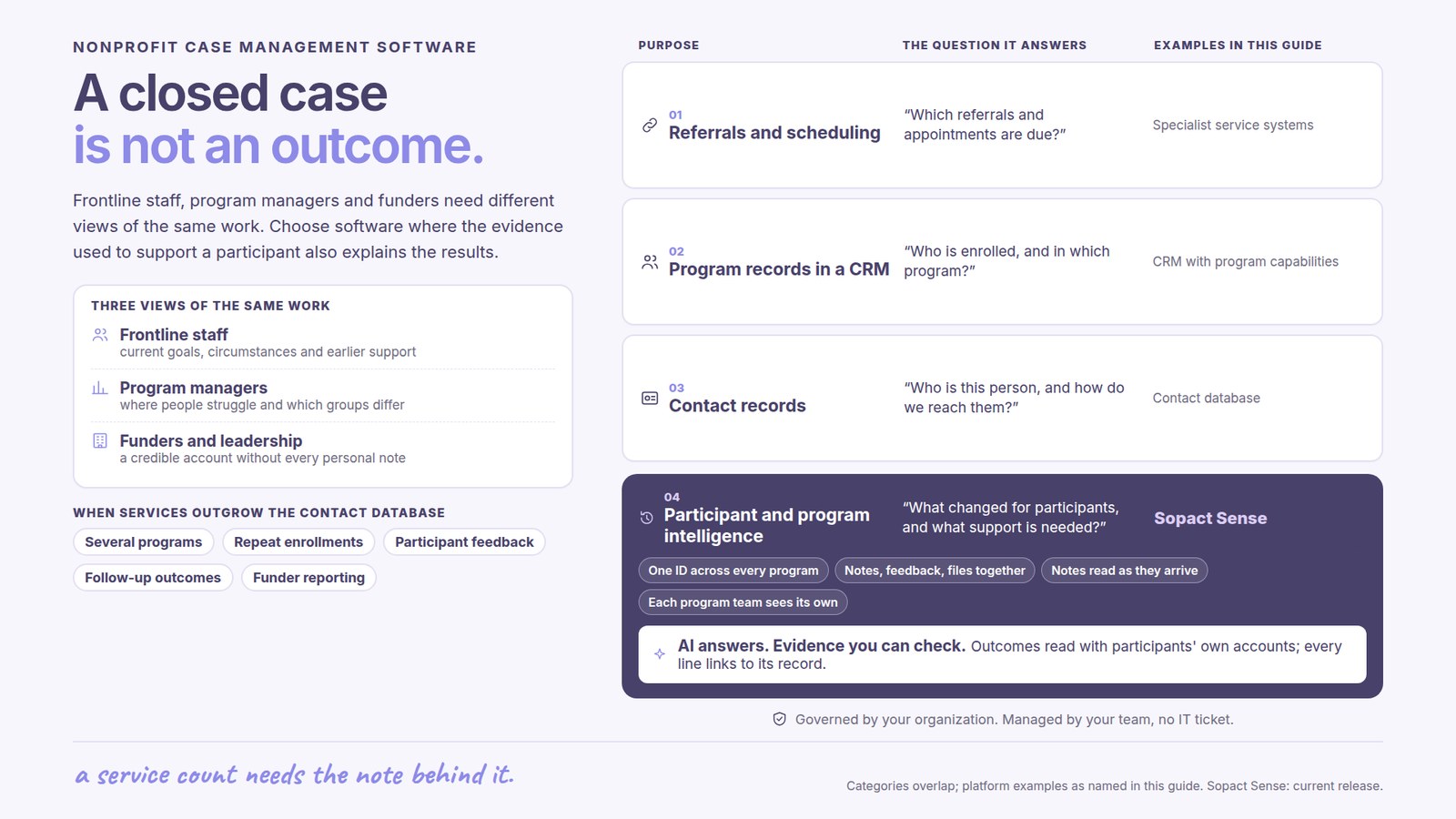
A worker preparing for a meeting needs the person’s goals, recent circumstances and earlier support. The record should make that preparation easier while preserving the detail that matters to the conversation.
A manager needs to understand where people are struggling, which groups have different experiences and whether the current response is useful. Individual notes and survey comments can reveal this context when they are examined together with participation and progress.
External reporting usually needs an aggregate explanation of services and outcomes, not access to every personal note. Clear definitions and traceable evidence let the organization explain the result without asking staff to rebuild the whole program history for each audience.
One participant may receive mentoring, training and other support from different teams. Each program has its own enrollment, service activity and expected outcomes, while the person’s experience continues across them. A useful system keeps those differences without losing the connection.
That distinction improves service and reporting. Staff can understand relevant earlier support, and leadership can distinguish unique people from total enrollments or service encounters. A large activity count should not be mistaken for the number of people served.
Local programs may also need different questions. Shared definitions for common measures can support organization-wide understanding while local details remain available. The purpose is useful comparison across the portfolio, not forcing every service into an identical form.
A completed appointment shows that a service occurred. The note may explain that a participant’s circumstances changed or that the agreed support no longer fits. Feedback adds the participant’s own perspective. Reading these sources together gives staff a stronger basis for the next conversation.
At program level, recurring explanations can reveal a practical improvement. Several participants might describe difficulty attending at a particular time even when they value the service. A response could involve reviewing scheduling or support arrangements.
Sopact connects qualitative and quantitative evidence with its program context. Analysis runs as information arrives in the configured workflow, and AI Assistance helps staff explore the connected material. Staff retain responsibility for interpreting circumstances and deciding the response.
Outcome measurement is most useful when it draws on evidence the program already needs. Intake establishes the starting situation; assessments and notes describe progress; later feedback explains whether support remained useful. The team should not need to create a separate measurement project before it can learn from those records.
This is the core of Sopact’s nonprofit value: the evidence used to support a participant also informs program understanding and reporting. New analysis remains available for continuing questions, rather than ending with a one-time summary of a document.
For a training service, a completed course, improved assessment and later employment update describe different results. Reading them with participant feedback helps the organization explain the journey. Observed change is useful evidence, while a claim about how much the program caused requires an appropriate evaluation approach.
A shared data dictionary should explain terms such as enrollment, completion and outcome achieved. Two programs may use the same label differently. Combining their totals is meaningful only when the definitions and populations support the comparison.
A result among follow-up respondents is different from a result for everyone enrolled. Unknown outcomes should remain visible. The report can explain both the observed change and how much of the intended group the evidence covers.
Participant accounts and staff observations can explain barriers, unexpected benefits or differences across groups. They should remain connected to their source and context. A compelling quote illustrates an experience; it does not prove how common that experience is.
The impact reporting software guide develops the reporting side of this work for different audiences.
Nonprofits differ in the administration they require. Some need extensive referrals, service scheduling or prescribed reporting. Others already have functioning operational systems and need better understanding of the evidence those systems produce.
A CRM with dedicated program capabilities may meet some needs; a contact database alone may not. Specialist systems can remain important where they support required operations. Agree the role of each system and the available data exchange instead of assuming a universal replacement.
Sopact’s Case Management solution emphasizes connected participant and program intelligence. For named platforms and their documented purposes, see the nonprofit case-management shortlist.
Sopact’s typical setup estimate is two days to two weeks for an agreed scope. Include the initial programs, available historical evidence and reporting questions in that discussion. Complex migration and external systems need explicit planning.
Self-governance means the nonprofit can own its routine collection and analysis, with personalization and continuing Sopact team support as programs change. The benefit is less dependence on repeated manual consolidation and a clearer body of organizational knowledge.
The most useful system helps staff serve people today and explain the work tomorrow. Assess its value through better preparation for participant conversations, earlier understanding of recurring needs and reporting that draws from the ongoing record.
It supports intake, participant records, services, notes, follow-up and reporting. Good software makes that evidence useful to staff, program managers and funder-facing teams.
Yes. The person’s history can stay connected while each enrollment, service and reporting context remains distinct. This helps avoid confusing unique participants with program activity.
Service records, defined outcomes, follow-up coverage and qualitative evidence can contribute to a funder report. Shared definitions and source context make the reported results easier to explain.
AI can make incoming notes, feedback and documents easier to analyze alongside structured measures. The benefit is earlier understanding during service delivery, with people interpreting the evidence and deciding what to do.
No. Closure is an administrative status. Outcomes describe changes in a participant’s circumstances and may require evidence collected later.
Continue with a purpose
Related solution
Bring participant evidence into daily support and program understanding.
Explore the solution →Continue learning
Explore how connected records support service and program decisions.
Start learning →
Customer story
An implementation connecting participant evidence across programs and years.
Read the story →See how Sopact can make intake, notes, feedback and outcomes useful across your nonprofit’s services and reporting.
See it with your workflow →