


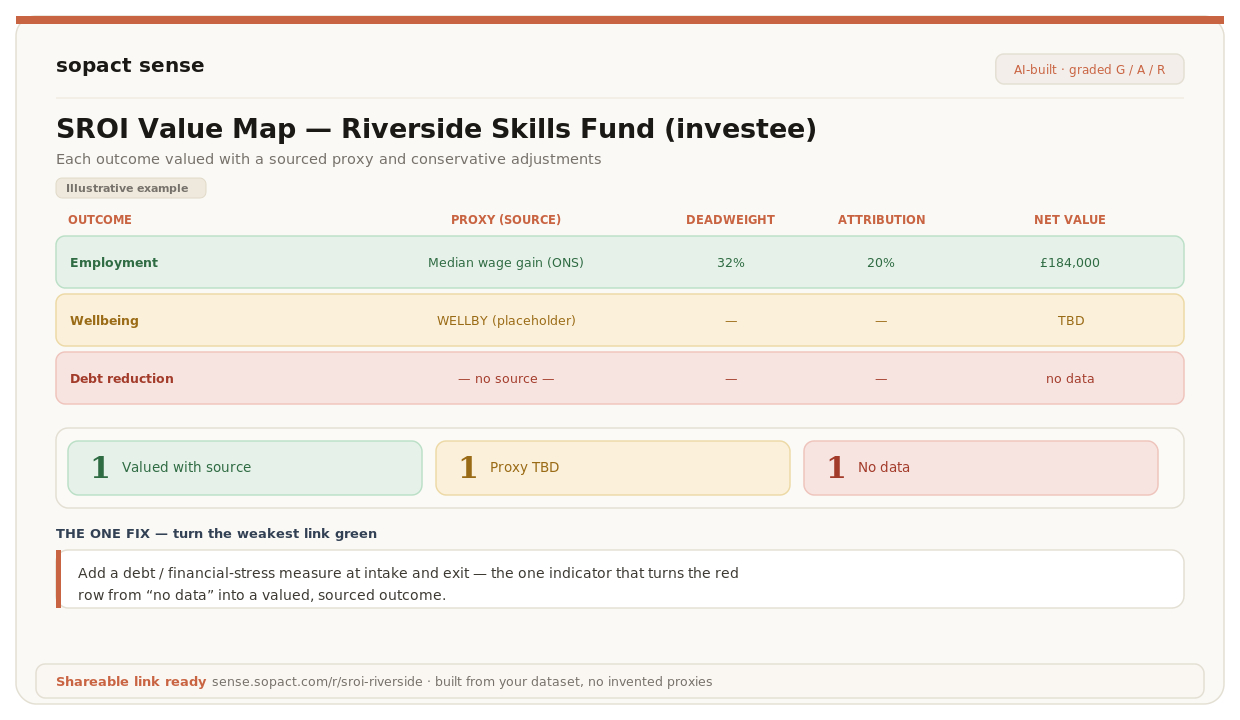
Use this only when valuation serves your decision. The numerical examples in these specialist readings are separate fictional exercises, not additional findings about the Foundation training team.
What belongs in an SROI impact map?
The SROI Guide uses the term Impact Map; “value map” is also used for the working table linking outcomes to value. Keep the evidence and calculation transparent whichever label your team uses. Social Value International’s Guide to SROI provides the underlying sequence from scope and stakeholders through outcomes, valuation, impact adjustments, calculation and reporting.
Use a workbook or connected set of tables when a single sheet becomes too wide. The following compact structure keeps the analysis readable. It is a practical worksheet layout, not an official certification template.
| Record | Include |
|---|---|
| Scope and inputs | Activity, period, analysis purpose, stakeholder boundary and resources invested. |
| Outcome and evidence | Stakeholder, change, indicator, quantity, observation period and source ID. |
| Valuation | Method or proxy, unit, source, applicability and any exclusions. |
| Contribution and time | Deadweight, attribution, displacement, duration and later-year drop-off with reasons. |
| Review and calculation | Status, owner, unresolved questions, formula and model version. |
Assign a stable outcome ID and source references so the narrative, calculation and evidence register can point to the same row. Keep raw evidence separate from approved interpretations. A revised proxy should not erase the source and reasoning used in the previous report.
Define the boundary before entering values
Write down the activity, delivery period, stakeholders, purpose and whether this is a forecast or an evaluation. Then identify the resources invested for that scope. Include relevant non-cash contributions where the analysis calls for them, with a documented valuation approach. Do not use only one funder’s grant as the denominator while counting all the benefits of a wider program without explaining and justifying that boundary.
Decide how the team will review materiality. A small number of people can experience an important negative outcome, so a low count alone is not a reason to exclude it. Social Value International’s principles call for stakeholder involvement and a fair account of what matters. Record the reason for including or excluding an outcome.
Write outcomes before choosing proxies
Begin with the change people experience. “Attended a workshop” is an output. “Can use the new skill at work” is a possible outcome, which still needs evidence. Ask affected people what changed, what did not and whether anything became worse.
Social Value International’s guidance on understanding change includes intended and unintended, positive and negative changes. Do not limit the map to the favorable outcomes already named in a funding proposal.
Split a row when it combines different stakeholders, outcomes or units. Keep “participant earnings change” distinct from “employer recruitment costs,” for example. Before adding them together, examine whether their boundaries overlap or whether one figure already includes the other effect.
Worked example: a map that keeps gaps visible
Use this fictional training-cohort example. The approved release A contains 80 starters, 60 known employment statuses at 90-day follow-up and 36 participants employed at that point. This is enough to describe point-in-time employment with its coverage limitation. It is not yet enough to value a full year of earnings.
| Outcome candidate | Evidence available | Review action |
|---|---|---|
| Employment at 90 days | 36 employed among 60 known statuses; 80 starters. | Report status and coverage. Do not substitute a year of earnings. |
| Improved financial wellbeing | No approved outcome measure supplied in this exercise. | Define the change with participants and plan evidence collection. |
| Transport burden | 12 of 18 purposively selected interviewees mention difficulties. | Investigate the theme and its scope; do not extrapolate to all starters. |
This first map contains no monetary total. That is intentional. A useful map can show that the next task is collecting or reviewing evidence, rather than selecting a dollar value. “Not yet valued” is different from zero value.
The transport row also shows why interviews belong in the evidence model. A reviewed theme can identify an issue worth investigating even when it cannot support a population estimate or a monetary amount. Keep the source excerpts and sampling context with the row.
Add valuation and adjustment fields with reasons
For a row that is ready to value, document the chosen unit, value, source, geography, currency and year. Add a rationale for why that method represents this stakeholder’s outcome. The related lesson on financial proxies provides the selection worksheet.
Record the assumptions used to avoid overclaiming: what would have happened anyway, the contribution of others, any displacement and the duration of the outcome. If value continues into later years, explain the drop-off assumption. Keep missing-data coverage separate from drop-off; unanswered follow-up is not automatically the same thing as declining continuing value.
Do not populate a missing field with zero so a formula will run. Use “not applicable” only with an explanation. For example, a one-year model may not apply later-year drop-off, but that does not establish a zero deadweight assumption. Each field answers a different question.
Check the units before calculating
Take one proposed row and read its units aloud. Are you multiplying people by a value per person-year, events by a value per event, or hours by a value per hour? A mismatch here can multiply the estimate without adding any real outcome.
Suppose a separate fictional arithmetic exercise contains 10 people, each with an outcome sustained for six months, and a hypothetical value of 100 currency units per person-month. The unadjusted amount is 10 × 6 × 100 = 6,000 units. If the value were instead per person-year, that multiplication would be wrong. These are invented teaching values, not a proxy recommendation or a customer result.
This amount is not the SROI ratio or the final impact value. Contribution assumptions, possible overlap and other material outcomes still need examination. The ratio lesson later explains how timing and inputs enter the calculation.
Prevent double counting and keep negative outcomes in view
Ask whether two rows represent different outcomes or two descriptions of the same change. “Reduced financial stress” and “improved wellbeing” might overlap, depending on the measures and valuation methods. Separate labels do not establish that both amounts can be added.
Likewise, follow an outcome chain before valuing every step. If increased skill leads to employment and income, adding a full value for each stage may count the same benefit repeatedly. Document what each value includes and why the combination is appropriate.
Do not erase a material adverse outcome because the current model cannot price it. Keep it in the narrative and evidence register, explain the valuation gap and assess how its exclusion affects the interpretation of the total. A positive monetary subtotal is not a complete account when important harms remain outside it.
Fix a weak row with an evidence plan
Adding one intake question may seem enough to complete the row. Usually the plan needs more detail. For the earnings row, identify the measure, comparison period, follow-up timing, privacy arrangements, source and reviewer. Explain how you will distinguish changed earnings from employment status alone.
Give the action an owner and a collection point in the workflow. State what the new evidence could support and what it still would not establish. Better earnings data, for example, does not automatically resolve what would have happened without the program.
Keep the map version with its evidence release. When new data arrives, review the affected row and record the change. Do not rewrite the historical model without preserving the earlier assumptions.
Add this to your plan
Record what you decided in this chapter in the same working evidence plan you started in Foundations, so definitions, sources and checks stay in one place.