


Related solution
Training & Programs
Connect starting assessments, participant feedback and later skill use across cohorts.
Explore the solution →

Survey analysis software · Practical guide
Survey analysis software turns questionnaire responses into findings by calculating results, comparing groups and interpreting open-ended answers. Good software helps a team understand both the pattern in the numbers and the experiences behind it, with enough context to judge who responded and what the findings support. Researchers, customer teams and program leaders use those findings to decide what to investigate or improve.
A chart can be correct and still lead to the wrong conclusion. Different people may answer the follow-up, comments may describe several unrelated problems under one theme, and a translated response may lose its intended meaning. Teams need to connect the numbers, respondent groups and original words before deciding what to change. Repeating that work for each survey or cohort is often the real analytical burden.
AI can group comments and summarize findings, but where it sits in the process matters. AI added at the reporting stage helps interpret a collected batch. An AI-native approach brings analysis into collection and retains the connection between the answer, participant and program stage. The value is earlier access to useful feedback and less repeated preparation as new responses arrive.
Sopact applies this AI-native approach to recurring program analysis. It connects survey responses with participant history, files and later feedback, so teams can interpret a result in the context of a program rather than a single questionnaire. Its value is combining numerical progress with participants’ explanations and making that learning useful across programs and portfolios.
What do scores and response patterns show?
What do participants say about their experience?
Where should the program respond or improve?
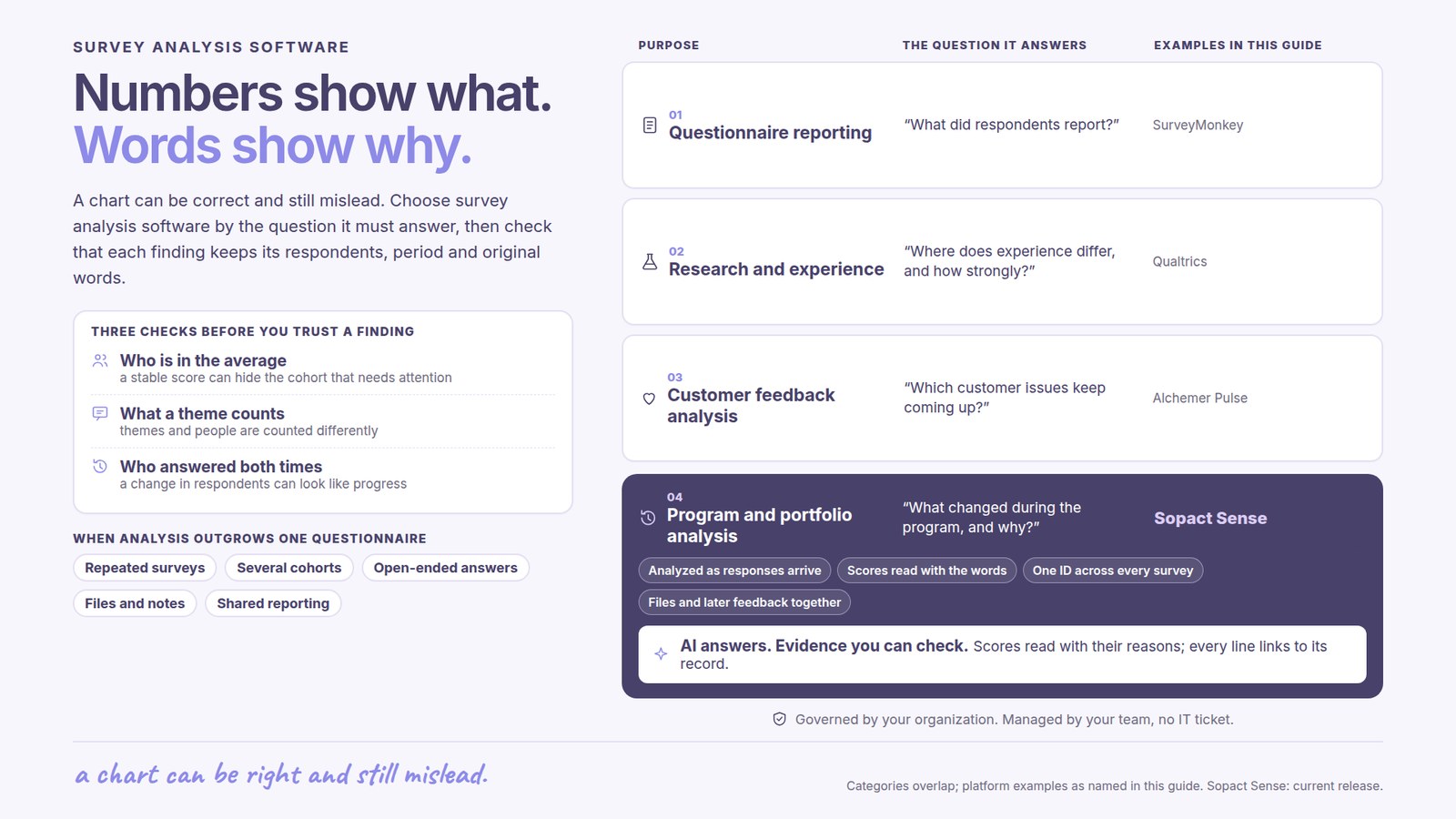
An overall satisfaction score may remain stable while one location or cohort reports a worsening experience. The team needs meaningful comparisons and enough responses to interpret them. A difference between groups is a reason to investigate, not automatic evidence that the program caused it.
A response may mention several issues. Counting those themes is different from counting people, and a summary of recent comments is different from a complete historical analysis. Readers need to know which responses were included and how a theme relates to the original words. Otherwise, a confident narrative can disguise a narrow or changing evidence base.
Combining two survey reports does not necessarily connect the same people across time. For program evaluation, staff may need to distinguish participants who improved from changes in who responded. Related files and later comments can help explain a pattern, provided their participant and collection context remain clear.
“What did respondents say?” and “How are participants progressing?” require different kinds of analysis. Both may involve a survey, but the second question also depends on when people responded, their earlier circumstances and what happened during the program.
For an event evaluation or a defined customer survey, teams may mainly need response distributions, group comparisons and themes from comments. A survey platform can keep collection and reporting together. The benefit is a report colleagues can understand without moving every answer into a spreadsheet.
Research teams may need to investigate relationships between measures, compare segments or assess the strength of a finding. Experience teams may analyze feedback across several customer touchpoints. These needs place more weight on analytical methods, text analysis and reporting across the organization. Statistical features still require appropriate interpretation.
Program leaders need to know what changed and why. A training survey may show high satisfaction even when participants later struggle to apply a skill. A useful analysis connects those later explanations with the earlier feedback. This is the context in which Sopact’s program and portfolio focus becomes relevant.
Sopact publishes this guide. The shortlist groups platforms by purpose; it is not an independent ranking. Linked product documentation supports the descriptions. Features and services depend on the selected product and agreement.
For a closer comparison of research and survey-led requirements, see Qualtrics versus SurveyMonkey. For a particular satisfaction measure, NPS versus CSAT explains the different questions and calculations before you choose a reporting tool.
| Platform | Main buying need | What matters in this choice |
|---|---|---|
| SurveyMonkey — questionnaire reporting | Questionnaire reporting | Survey reporting, thematic analysis and multi-survey dashboards support recurring questionnaire work. Compare the available plan, analytical coverage and the participant context your team needs. Cross-survey reporting is available; continuing program records are a separate buying requirement. |
| Qualtrics — research and experience analysis | Research and experience | Its analysis environment includes text and statistical capabilities, with availability depending on the license. Relevant when the team needs depth in research or experience measurement. The buying decision includes who will interpret advanced analysis and maintain the reporting. |
| Alchemer Pulse — continuing feedback analysis | Feedback analysis | Theme and sentiment analysis help teams interpret feedback and identify experience issues. Consider it when customer feedback is the central source of insight. Distinguish the Pulse analysis product from the survey capabilities included in an Alchemer subscription. |
| Sopact — program and portfolio analysis | Connected program analysis | Connects survey responses with forms, files and follow-up. Relevant when a finding needs participant and program context: what changed, how people explain it and where staff should focus support or improvement. |
All these approaches can involve AI or text analysis. The choice is not whether a platform can summarize comments. It is whether the analysis preserves the context required for your decision and gives the responsible team a practical way to use it.
A team can add AI to its reporting process and still spend time assembling each new dataset before analysis begins. For recurring programs, the more consequential change is making interpretation part of the incoming evidence process, with the original response and participant context available together.
Sopact supports automatic analysis of incoming responses and analysis stored alongside source data. A later learner explanation can therefore become usable during the program, instead of waiting for another spreadsheet exercise. Individual response analysis and a reviewed portfolio report remain different outputs; buyers should examine both the arrival of new evidence and how their broader findings are updated.
SurveyMonkey’s thematic analysis groups eligible text responses and allows staff to inspect themes on individual answers. New responses require refreshing the thematic analysis. Its analysis documentation also includes multi-survey dashboards. These dashboards let teams report across several surveys in one place.
The remaining question for a program buyer is whether the reporting preserves the participant relationships and surrounding evidence needed for the decision. Cross-survey comparison and a continuing participant history are related but different requirements.
Qualtrics documents using Text iQ topics and sentiment in Stats iQ. This matters when a research team wants to investigate relationships between feedback themes and measured responses. This approach suits teams that need to examine statistical relationships as part of their research, with the expertise to interpret them.
Alchemer Pulse emphasizes AI-assisted interpretation of open text. It belongs in a feedback-analysis shortlist where identifying experience issues is central. Compare the sources, reporting scope and product package being proposed; Pulse should not be treated as a feature automatically included in every Alchemer Survey plan.
Sopact documents storing analysis alongside its source response and retaining participant relationships across forms and supporting material. That supports a program manager’s need to examine a reported improvement together with earlier goals and later explanations. The distinguishing value is how those sources inform the continuing program, rather than the existence of text analysis itself.
Choose the approach that produces a finding the responsible team can use: a researched relationship, a customer issue to address, or a participant need requiring support. Include the effort to keep that analysis current as new responses arrive.
Product documentation reviewed October 4, 2026. Descriptions reflect the linked offerings; confirm the edition and scope relevant to your organization.
Sopact brings forms, files and feedback into a continuing view of programs and portfolios. For a leadership program, this can connect participants’ starting goals, end-of-program feedback and later accounts of how they applied the learning. Leaders can examine both the reported change and the reasons participants give for it.
At a portfolio level, programs may ask different questions while sharing measures leadership needs across the organization. Sopact’s value is helping teams retain that local relevance while bringing results together. It should be evaluated against the actual reporting responsibilities of program staff, rather than presented as a universal substitute for enterprise research software.
According to Sopact’s published King Center story, pre- and post-survey evidence from seven programs was brought into one analyzed view. Staff could examine recurring themes and feedback across locations while retaining the program context. This is evidence of a connected program-analysis workflow; the story does not establish that analysis alone caused better participant outcomes.
The product documentation shows analysis stored beside a source response and follow-up forms connected to the same participant. Together, those capabilities are relevant when scores and comments need to be interpreted alongside later feedback. Agree the questions, respondent matching and review responsibilities for your program; a summary still needs human interpretation.
A program can receive positive ratings while participants still need help applying what they learned. Buyers should be able to examine that difference in the finished analysis, not just see a theme count or a confident summary.
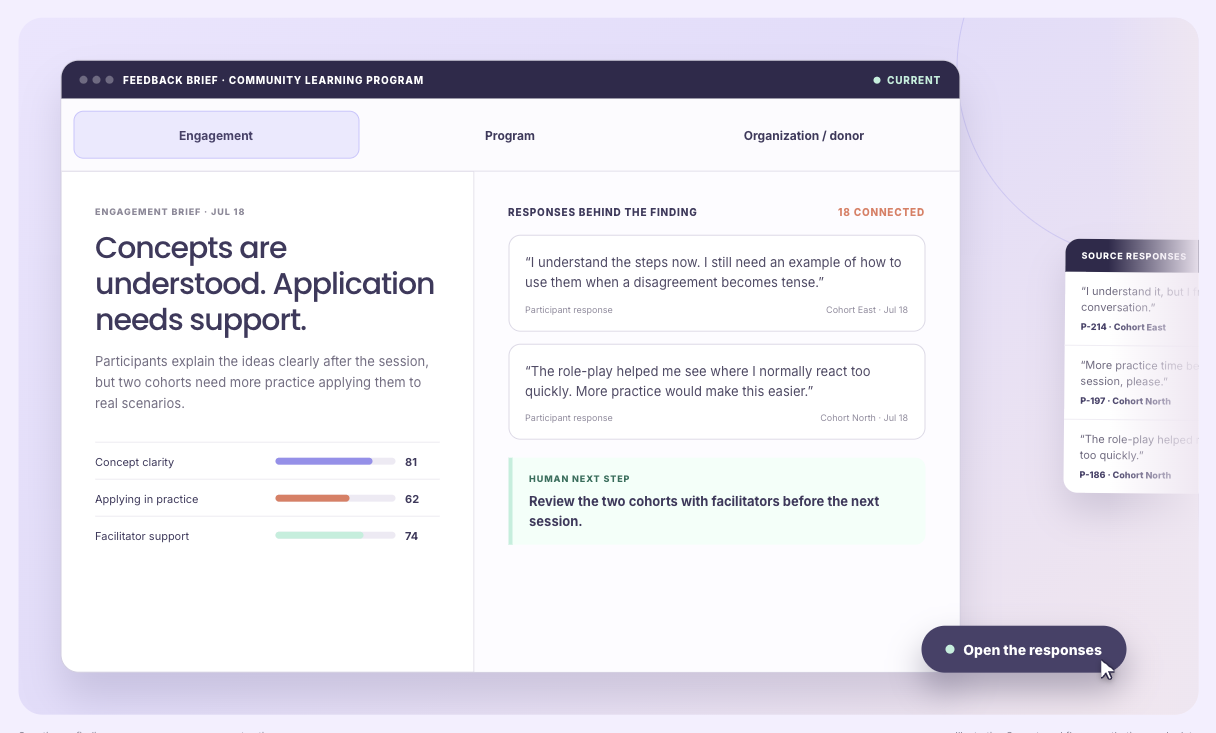
Keep the question, response scale, group and collection period visible. A score from one workshop cannot explain all programs, and a high overall average can hide a group that needs support. Theme counts need their own base: one person may mention several themes.
Comments can suggest why a pattern appears. Staff should be able to inspect the original responses, correct a proposed theme and retain an answer that contradicts the main interpretation. A plausible explanation is a reason to investigate, not proof of cause.
In an illustrative leadership program, participants may rate a session highly but say they lack opportunities to practise. The team might add a practice session and later ask about skill use. Comparing the appropriate respondents can show reported change; it cannot, on its own, prove the added session caused that change.
The Academy lesson on connecting quantitative and qualitative survey data explains the method. The step-by-step survey analysis guide covers quality checks and interpretation. In a product evaluation, ask to see both the finding and the source material your team would use to review it.
Begin with one recurring decision: improving a course, prioritizing a service issue or reviewing progress across programs. Identify the information needed for that decision and where it currently lives. A single survey may already contain it; a continuing program may require earlier responses and other material.
Then compare the finished analysis. Can its intended audience understand the finding, the people it describes and the evidence behind it? Finally, include ongoing ownership: who can adapt questions, interpret results and maintain reporting, and what vendor or analytical support they receive.
SurveyMonkey provides numerical survey results and text analysis; Qualtrics connects Text iQ variables with Stats iQ analysis, subject to the available product. Evaluate Sopact when ratings and explanations also need participant history and later program evidence. Check the response base and original comments behind a reported theme. See SurveyMonkey’s analysis documentation and Qualtrics’ text-and-statistical analysis documentation.
It can when the selected workflow accepts the relevant transcript or document format and retains the source context. Confirm file, language and volume limits for the proposed product; a survey text feature does not establish support for every interview format. Compare the reviewed themes, exceptions and source passages, and distinguish analysis of new responses from refreshing a portfolio-level report.
No. Software can calculate results and assist interpretation, but study design and complex statistical questions may still require research expertise. Choose according to the analytical decisions your team must make.
Many platforms can group comments into themes and produce summaries. The quality of that assistance depends on the responses and the method. Supporting answers should remain available so staff can check meaning and exceptions.
A survey report describes responses to a questionnaire. Program analysis may combine those responses with earlier assessments, participation information, documents and later feedback to understand progress and decide what to change.
Continue with a purpose
Related solution
Connect starting assessments, participant feedback and later skill use across cohorts.
Explore the solution →Continue learning
Learn how numerical results and participants’ explanations can inform the same analysis.
Start learning →
Customer story
How open-ended feedback became usable insight for training and program discussions.
Read the story →Explore how your team could interpret scores, written feedback and follow-up together across its programs.