Which Tactiv alternative fits your grant program?
A Tactiv alternative is worth evaluating when collection already works and the slow part comes after it: reading each grantee report against what was agreed, finding what is missing and turning the evidence into a decision someone can defend. If contracts, approvals and payments are the problem instead, you need a different comparison, and any replacement has to cover both jobs if your team relies on both.
Unmesh Sheth, Sopact’s founder, hears a version of this from grant managers who have run established platforms for years. The reports arrive on schedule; then a program manager spends days opening each one, matching the narrative to the outcome it was meant to show, checking the reporting period and deciding which figures can go into a portfolio summary. Nothing failed. The work between collection and a decision was never designed into the process.
This guide is for a program manager deciding whether to improve the Tactiv setup, connect a focused workflow beside it or replace it, with a pilot small enough to finish within one reporting cycle.
What Tactiv already supports
Tactiv’s Enquire covers the grant lifecycle. Tactiv describes application collection, assessment, grant agreements, payment and contract milestones, client reports and program-level aggregation of reporting indicators, along with contact and account notes and recipient access throughout the funding lifecycle (Source: Tactiv grant management). Its documentation also describes scheduled reporting, stakeholder-specific outputs, exports in spreadsheet and structured-data formats, and reusable application, workflow, reporting and contract templates (reporting documentation; template configuration).
Changing vendors would not introduce outcome reporting for the first time. The question for your evaluation is narrower: in the setup you have configured, how much of the reading, checking and follow-up still falls to staff once a report has arrived?
The work between a report arriving and a decision
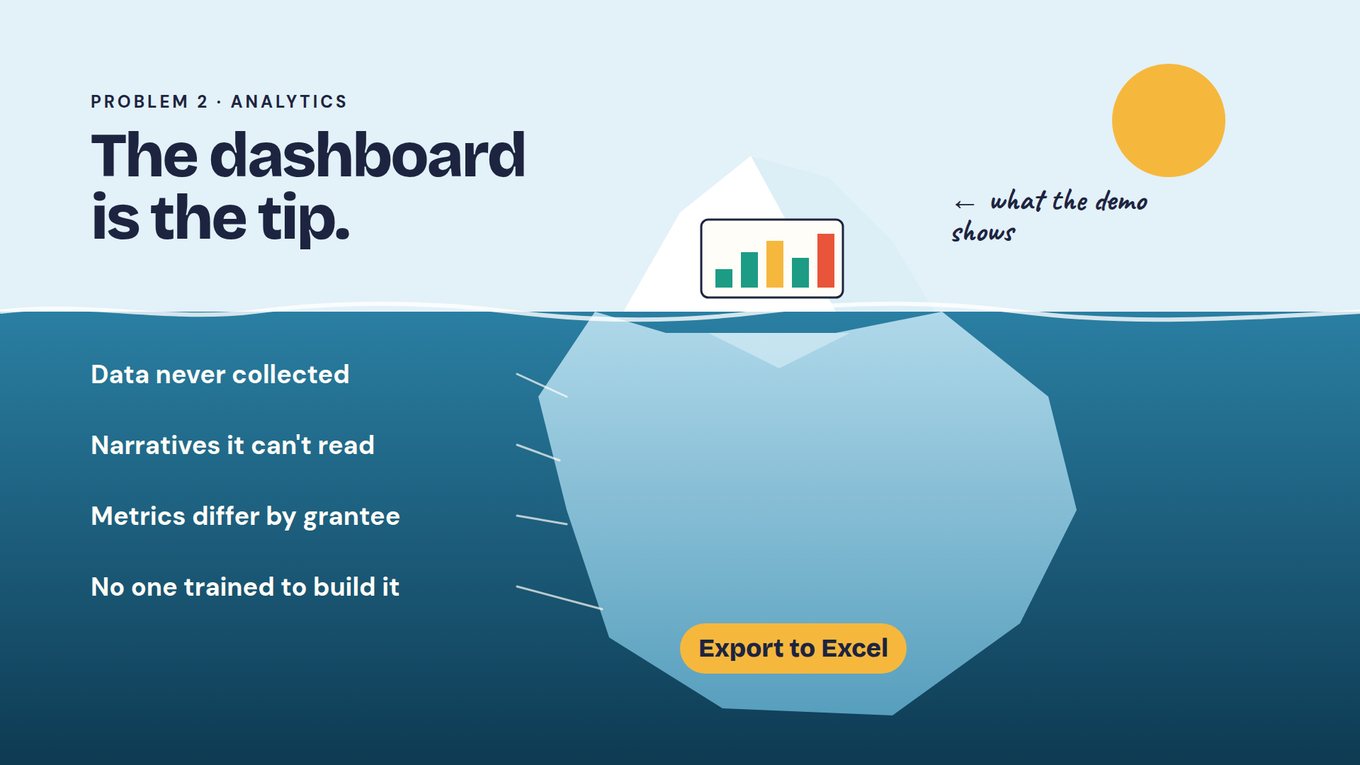
In the video on this page, Unmesh follows Maya, a composite of the grant leads we talk to, through a Monday of questions from the board, the CEO and finance, and explains why the dashboard cannot answer them. He gives four reasons, drawn in the slide below as the part of the iceberg a demo never shows: data nobody collected, narratives a chart cannot read, metrics that differ from grantee to grantee, and no one on staff trained to build the report. He adds the consequence funders feel most: donors grow frustrated when the report does not match the story they heard.
Take a fictional regional fund with two programs, employment support and community facilities, and one organization holding a grant in each. Each award keeps its own identifier, commitments and reporting period under the shared organization record. When the organization sends one annual narrative covering both, somebody has to decide which paragraphs belong to which grant, whether the figures match the period, and whether its employment numbers can sit beside other grantees’ at all. That is usually the program manager, working from an export.
This is where AI helps: not as a summary of an uploaded file, but as a reader that already knows which grant, period and commitments each report belongs to, so the program manager checks its work instead of reading from scratch.
WATCH · WHERE REPORTING TIME GOES
Why the report arrives and the answer still takes a week
Watch this before you compare vendors. At 4:49 Unmesh explains why dashboards cannot answer the questions a funder actually gets. From 11:08 he describes the approach this page tests: an onboarding conversation that sets the reporting plan, grantees updating documents they already keep, and a rubric that checks each submission for what is complete and what is missing. At 12:43 he adds the portfolio context, meaning a data dictionary, reporting requirements, timelines and red flags, that makes later comparisons possible.
Jump to: 4:49 — Why dashboards cannot answer · 11:08 — Onboarding sets the reporting plan · 12:43 — Portfolio context and red flags
Use this in your evaluation: Pick one grantee report from your last cycle and write down every step between its arrival and a figure you could show the board, with who did each step and how long it took. That list is the workflow to compare in both products.
Keep common definitions without forcing every grantee into one form
The tempting fix for inconsistent reporting is one form for every grantee. The regional fund’s two programs do not share outcomes, and a form that asks both the same questions produces blanks and workarounds. What they do share is a short list the fund genuinely asks across grants: organization, award, program, reporting period, submission status and the indicators agreed at award.
Unmesh calls this the context of the portfolio: a data dictionary, the reporting requirements, the timelines and the red flags. It is what later makes benchmarks possible, because an assistant reading against written definitions can tell two figures that share a heading from two that share a meaning. The table shows what one entry per program might look like.
| Dictionary entry | Employment support | Community facilities |
|---|---|---|
| Indicator | Participants placed in work | People using the facility |
| Definition | Unique participants who started paid work during the period | Unique individuals who used the facility, not total visits |
| Reporting period | Each grant quarter | Each grant year |
| Source the grantee already keeps | Placement tracker | Booking records and the annual social audit |
| Red flag | Placements exceed enrolled participants, or dates fall outside the award | Figure reported as visits, or no source document attached |
| Can it be combined? | With other employment grants using the same definition | Only with facilities grants that also count individuals |
Two rules keep the dictionary honest. When a definition changes, record the version and decide whether earlier figures can be recalculated or must stay separate. And treat an unsubmitted report as missing evidence, never as a zero.
Let grantees update the documents they already keep
Set the reporting plan at award, not at the first deadline. Unmesh describes funders who treat onboarding as the start of a relationship: a 60–90-minute call soon after approval that settles goals, responsibilities, the metrics to be reported and the theory of change. The transcript of that call can draft the plan, and both sides agree it before anything is collected. Keep one distinction from the application stage: a target in a proposal is not an approved commitment until it is agreed here.
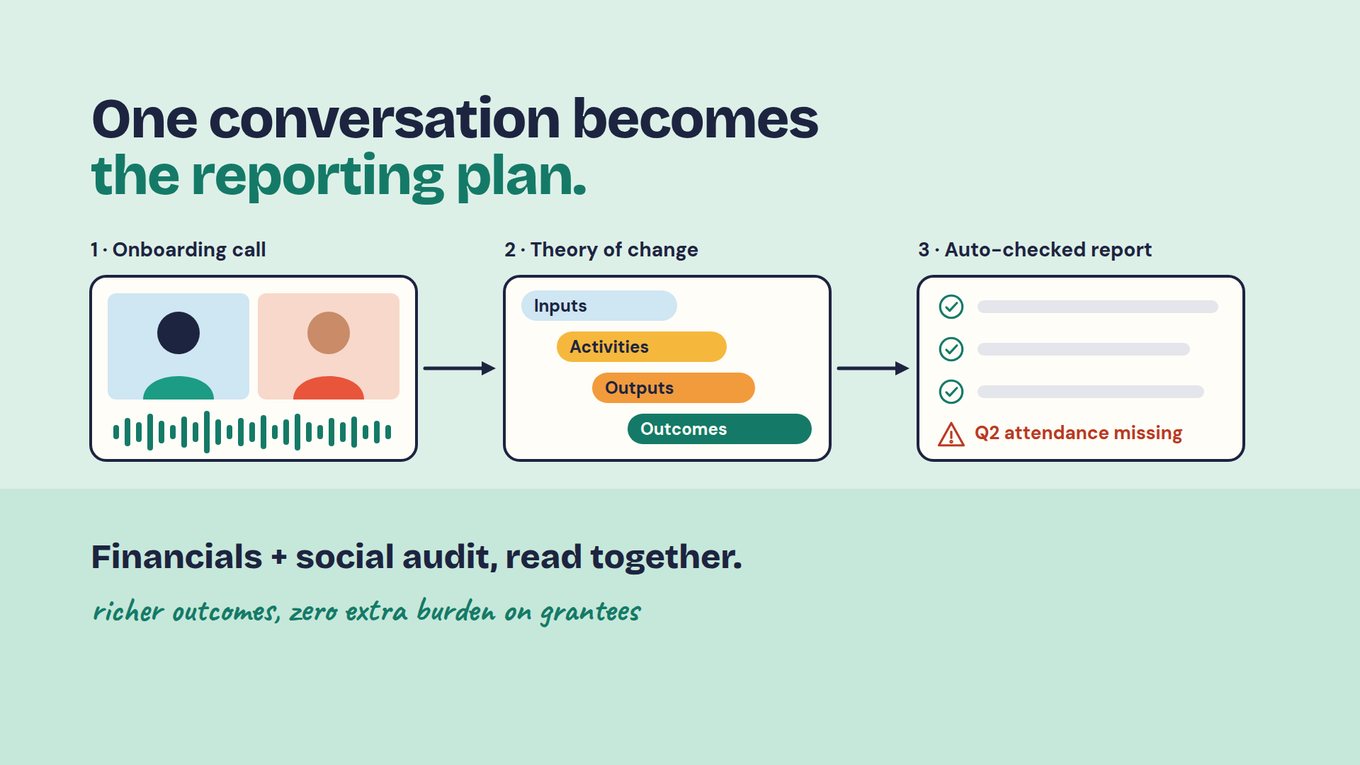
The second change is what the grantee is asked to do. Instead of keying the same figures into another portal, the grantee updates the social audit, financial report or placement tracker it already maintains and uploads it. A rubric written against the reporting plan checks the submission on arrival: which agreed metrics are present, whether the period is right, whether the narrative supports the number and what is missing. Because every grantee has one persistent unique ID from application through reporting, the request for the missing piece goes back to the right organization and award, and the answer lands on the same record.
What checking on arrival looks like in practice
In Sopact, each check is an Intelligence Cell: a prompt your team writes that reads each answer, document or report as it is submitted. An Intelligence Row keeps a running summary for each grantee, and the AI Assistant answers plain-language questions across the portfolio with the source passages attached; Claude or ChatGPT can query the same records through MCP. Here is how the regional fund’s annual narrative would be divided between the check and the people who own the decision.
| On arrival, the check | A named person then |
|---|---|
| Matches the upload to the organization, award and reporting period | Confirms the split when one document covers both grants |
| Lists each agreed indicator as reported, missing or unclear | Sends the request for the missing figure through the grantee’s record |
| Compares each figure with its dictionary definition | Decides whether a figure reported as visits can be restated or must stay separate |
| Flags narrative claims the numbers do not support | Judges whether the claim needs evidence or a conversation |
| Adds the result to the grantee’s summary, with sources | Approves what goes into the portfolio or board report |
Compare Tactiv and Sopact on the same report
Give both vendors the same authorized reports, including an incomplete one and one covering two grants, and ask each to take them from arrival to a reviewed finding.
| Work to evaluate | What to establish in Tactiv | What to demonstrate in Sopact |
|---|---|---|
| Funding administration | How your configured approvals, agreements, milestones and payment processes meet requirements. | Exactly which steps the proposed workflow covers and which stay in a finance or grant-administration system. |
| Report on arrival | How client reports and indicator definitions handle the incomplete report and the two-grant narrative in your current setup. | The completeness check against the reporting plan, the finding for each indicator and the passage behind it. |
| Portfolio view | Program-level aggregation of your indicators, with the source detail behind a total. | A plain-language question answered across grantees, with incompatible definitions kept apart. |
| Reporting and access | Scheduled outputs, stakeholder-specific views and permissions. | A finding traced to authorized source records, and what a restricted user cannot see. |
This is a demonstration agenda, not a claim that either product lacks what the other column describes.
Test self-management through an ordinary change
A demonstration built by a specialist hides the work your team will inherit. Ask the person who will own the program to make a routine change in each product: add a follow-up question, revise an indicator definition or build a view for the next board meeting, and on the Sopact side, edit the prompt that checks completeness.
Watch whether that person understands what the change affects, can test it before it goes live and can reverse it, and note where technical help is needed. Then check what happened to reports already submitted under the old definition. Keep configuration rights separate from decision authority too: a staff member who edits a reporting form should not automatically approve funding or see reviewers’ confidential comments.
Run a contained pilot on one program’s reporting
Unmesh’s advice in the video is to move one low-risk workflow at a time and keep the current system running while you do. A full grant-system implementation, he notes, typically takes six to nine months; a pilot on one program’s reporting cycle does not need to. Choose one program and a representative set of authorized records, and include the difficult ones: a repeat applicant, two grants to one organization, an amended commitment, an incomplete report and a document whose narrative contradicts a structured answer.
- Agree the baseline. Record how staff prepare, check and summarize this program’s reports today, including follow-up time.
- Write the plan and the dictionary. Agreed indicators, periods and sources for each award; a definition and red-flag rule for each indicator.
- Check imported relationships. Match organizations, awards, periods and files, and resolve duplicates before analysis.
- Collect updated documents. Grantees upload the records they already keep, and the completeness check runs as each arrives.
- Review the findings. Reviewers open the source behind each finding, record overrides with reasons and confirm that missing evidence shows as missing.
- Change something mid-cycle. Revise one definition and check its effect on reports already reviewed.
- Test the handoff and the exit. Confirm how approved results return to Tactiv and what can be exported if the pilot ends.
Measure the whole cycle rather than the speed of a first draft: preparation, checking, clarification requests and report assembly, plus the cost of reconciling two systems if you keep both. Do not collect the same live report in two systems unless contributors know which copy is authoritative, and verify that an export carries every attachment, version and permission.
Be clear about what the pilot settles. It can show whether your team spends less time between a report arriving and a decision, and whether reviewers trust what the check surfaces. People still make funding decisions, and every AI finding is checked against its source before anyone relies on it. A cited passage shows where a statement came from, not that it is accurate, and a pilot cannot show that funded work caused the outcomes grantees report; that needs an evaluation design of its own.
Improve, connect or replace?
Improve the current setup when Tactiv already supports the required work and the main issue is configuration, unclear definitions or staff adoption. A process problem can follow you into a new platform, and the data dictionary is worth writing either way.
Connect a focused Sopact workflow when grant administration works well but the reading and checking after collection is where the time goes. Define the authoritative source, who synchronizes what and how corrections flow before expanding it.
Consider replacement only after the pilot shows that the new arrangement covers required operations, keeps usable history and has clear ownership. For a broader shortlist, see grant software alternatives. For the full operating process, see grant management software.
Common questions
Does Tactiv support outcome reporting?
Yes. Tactiv’s published grant-management documentation describes outcome indicators, client reports and program-level aggregation, along with scheduled reporting and exports. Evaluate the specific work you still need to improve rather than assuming those functions are absent. The open question is usually how much reading, checking and follow-up staff still do after a report arrives, and whether that work can move to the moment of submission.
Do we need one reporting form for every grantee?
No. Agree a short common set, such as organization, award, program, period, status and agreed indicators, and let each program keep the questions that fit its work. A data dictionary records each indicator’s definition, period, source and red-flag rule, so similarly named figures are combined only when they mean the same thing. Grantees can then update documents they already keep, such as a social audit or financial report, instead of retyping figures into a new form.
Does choosing Sopact require replacing Tactiv?
No. A focused reporting or analysis workflow for one program can run beside a retained system, which is the approach Unmesh recommends: keep the current system running and move one low-risk workflow at a time. Before starting, agree which system is authoritative for each record, how approved results return to Tactiv and how corrections are handled. Two poorly connected systems can add work rather than remove it.
Should AI make grant decisions?
No. Authorized people make funding and reporting decisions. AI can check each report against the agreed plan, surface missing or unclear evidence and prepare findings with their sources, so reviewers start from an organized record. Reviewers still test its errors and omissions, record their reasons when they disagree and approve what is shared. A fluent explanation is not an accountable assessment.