


Apply this guide to an impact investment portfolio
In the portfolio intelligence course, use this guide during company onboarding to define the core metrics selected from the theory of change. Bring the theory of change and metric decisions from the onboarding call, supported by the transcript or confirmed notes. Leave with approved dictionary entries and collection timing.
Use those entries for quarterly collection. When a donor or LP requires framework codes, continue to the IRIS+ and standards-mapping article and videos. Then return to personalized donor and LP reporting. Keep company-specific measures where their meaning differs.
Academy / Measurement & reporting
Course progress and additional readings
Measurement & reporting
You will learn: how to turn the metrics in your agreement into dictionary entries that link each metric to a dimension, an optional standard and a roll-up, with a template and a prompt to start.
Who this is for: both roads. Funders who have signed a reporting agreement and want every partner's numbers to add up, and funded partners who want to know exactly what each reported number must mean. Bring the list of metrics from your agreement.
What is a data dictionary, and why should funder and partner share one?
In short: a data dictionary writes down what each reported number means, where it comes from and how it may be added up. When the funder and every funded partner use the same one, a number from one partner means the same thing as a number from another.
The reporting agreement lists the metrics. The dictionary gives each a definition someone else can apply without guessing, so "placed in a job" cannot mean 90 days in one report and six months in the next.
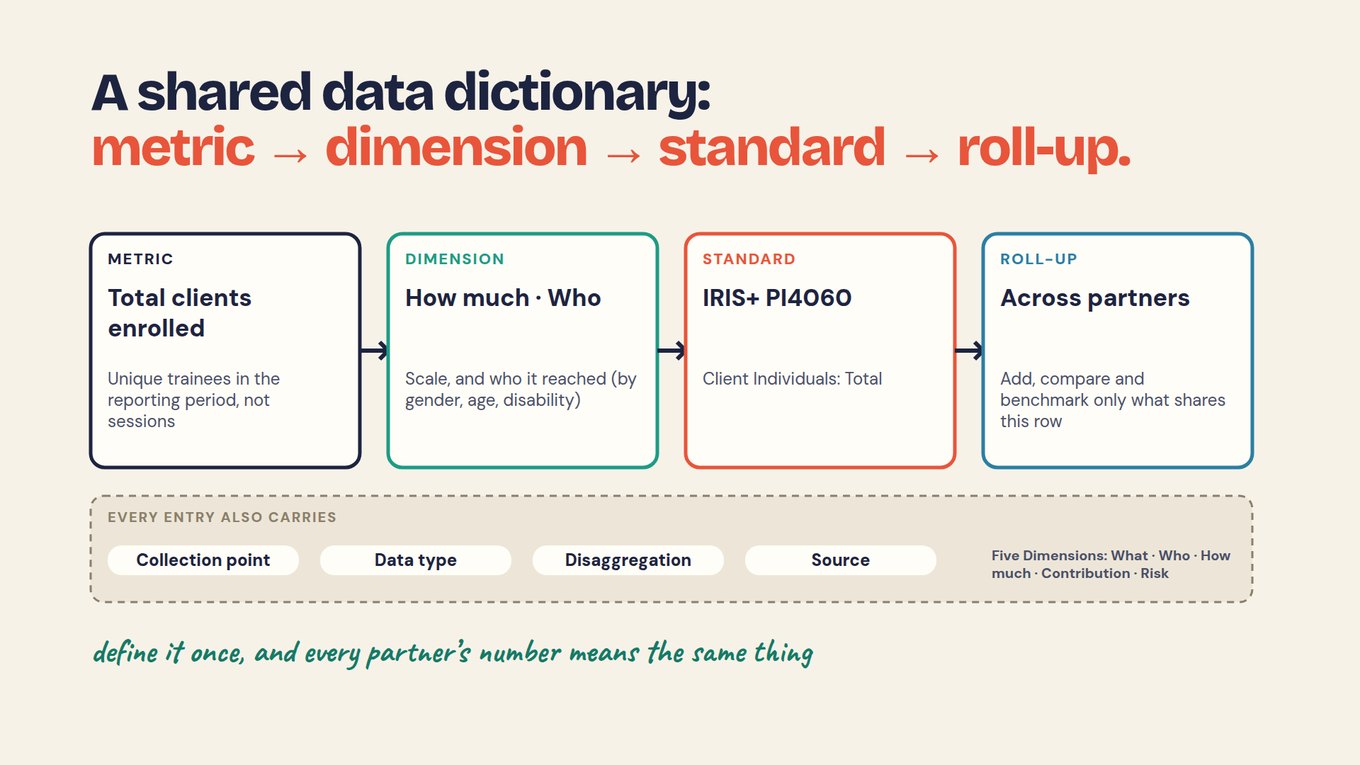
Build each entry in four layers. Start with the metric and its plain definition. Link it to a dimension of impact, which says what kind of evidence it is. Add a standard code if one fits. Then say how it rolls up across partners.
In a fictional impact fund, the portfolio manager and investee develop the theory of change and agree core metrics during the onboarding call. Existing documents inform that conversation; a consented transcript or confirmed notes supports drafts that both sides review. The approved dictionary then supplies the definitions for recurring collection and donor or LP reporting.
Auroville International USA channels more than $1M a year to about 80 project partners, who report every quarter. It defines terms such as a "complete quarterly report" and a "clean-water beneficiary" once, so five different water projects count the same person the same way.
What does every dictionary entry need?
In short: eight things: a plain definition, the collection point, the data type, the unit, the disaggregation, the source, a missing-value rule and an owner. If a colleague can apply the entry to real records and get your count, it is complete.
The definition says who is counted, what qualifies and when. Collection point and source name the form the value comes from. Data type and unit stop one partner sending a percentage while another sends a headcount.
The missing-value rule matters most. A person with no follow-up answer is unknown, not "not placed". Keep unknown separate from no, and report how many are unknown. The owner is the person who approves a change to the definition.
ONE COMPLETE ENTRY · FICTIONAL EXAMPLE
How do the Five Dimensions of Impact fit in?
In short: use them as a guide to what kind of evidence each metric is, not as a form to fill for every row. They show which questions your list already answers and which it leaves open.
The Five Dimensions of Impact, maintained by Impact Frontiers, ask five questions of any outcome. Tag each dictionary entry with the one or two it answers.
| Dimension | The question | In the workforce example |
|---|---|---|
| What | What changes for people? | Placed in a job within 90 days |
| Who | Who experiences it, and who is missing? | Enrolled, by gender, age, disability |
| How much | How many, how deep, how long? | Count enrolled; wage by track; retained at 12 months |
| Contribution | What part did the program play? | Compare with earlier cohorts or county data |
| Risk | What could make the result differ? | Placements that do not last a year |
"How much" covers scale, depth and duration, so one headcount cannot answer it alone. If no metric touches Contribution or Risk, write that down as a known gap rather than adding metrics nobody will collect.
Do you need IRIS+ codes in your dictionary?
In short: no. A standard code is optional. Add one when a funder asks for it or when you want to compare with others who use the same code, and only when your definition truly matches the standard's.
IRIS+, from the Global Impact Investing Network, is a catalog of metric definitions with codes. An IRIS+-aligned dictionary for a job training program uses its metrics for counting clients.
| IRIS+ code | What it counts |
|---|---|
| PI4060 | Client Individuals: Total |
| PI8330 | Female clients |
| PI8732 | New clients |
| PI9327 | Active clients |
A code is a label, not a definition you can skip. Read the standard's own wording before you map to it. If your "placed in a job" uses a 90-day window and a standard does not, record the difference beside the code.
A Sopact demo that builds an IRIS+-aligned dictionary for a job training and placement program, using demo data. Watch for metric definitions mapped to IRIS+ codes, the Five Dimensions beside each metric, and the report flagging missing numbers when a source was not selected. Watch on YouTube ↗
How do you build a data dictionary from your agreement?
In short: take each metric in the agreement, write its entry in the four layers, then test it on a handful of real records. Stop when every agreed metric has an entry; do not add metrics the agreement does not need.
01 · LIST
Copy every metric from the agreement, with its timing and reporting rhythm.
02 · DEFINE
Write who counts, what qualifies, when, and the missing-value rule.
03 · TAG
Add one or two dimensions and, only if it fits, a standard code.
04 · TEST
Give a colleague five records. Do they get your count?
Test with awkward records: a person who enrolled twice, a missing follow-up, a late answer.
Here is a starting dictionary for the fictional workforce fund, drawn from its agreement. Copy the columns into a spreadsheet and replace the rows with your own.
| Metric | Definition | Dimension · standard | Collection · roll-up |
|---|---|---|---|
| Total clients enrolled | Unique trainees in the reporting period, not sessions; quarterly | How much · Who · IRIS+ PI4060 | Enrollment form · add across partners |
| Placed in a job | Completers in paid work within 90 days of exit | What · How much · no code | Placement survey · add counts that share the 90-day rule |
| Retained | Same job at 12 months; annual | How much · Risk · no code | 12-month follow-up · add counts, show unknowns |
| Starting wage | Hourly wage at placement, by track; annual | How much · no code | Placement survey · compare by track, never one average |
If the agreement lives in a table, an AI tool can draft these rows. Treat the draft as a list of questions to settle.
Prompt · paste into Claude, ChatGPT or your AI tool
Below is the metrics table from our reporting agreement between [FUNDER] and [FUNDED PARTNER].

Draft one data dictionary row per metric. For each row give:
metric name, plain definition (who is counted, what qualifies, when),
collection point, data type, unit, disaggregation, source,
missing-value rule, owner, Five Dimensions of Impact tag (one or two of
What, Who, How much, Contribution, Risk), and roll-up rule across partners.

Rules:
- Use only what the agreement says. Where it is silent, write "ASK: [question]".
- Do not suggest an IRIS+ code unless I ask. If I ask, quote the code and its
  name and say where our definition differs.
- Missing answers are "unknown", never zero or "no".
- Return a table, then a short list of the ASK questions.

[PASTE AGREEMENT TABLE]
How do you share the dictionary and keep it current?
In short: the funder sends the same dictionary to every funded partner before the first report, and the team keeps a short change log whenever a definition moves. Shared definitions are what make adding up possible.
For the funder, the dictionary is the ruler for every report that arrives. It is how you check each partner report against the agreement, and it decides which numbers you may roll up and benchmark. In the fictional fund, Partner C reported placements within six months, so its count cannot be added to the 90-day counts from A, B and D until C confirms.
For the funded partner, the dictionary tells you what each funder means. When several funders use different words for the same count, map each ask to one entry as shown in map every funder's ask to one evidence base.
Definitions change. Keep a change log as a team practice: the date, old and new wording, who approved it and which reports are affected. A 30-day and a 90-day follow-up are different metrics, so give the new one its own row rather than overwriting the old.
ASK ANY TOOL, INCLUDING OURS
Paste your dictionary and one partner's report into any AI tool and ask: "Which numbers in this report do not match a definition in the dictionary, and what question should we send?" In Sopact Sense, the AI Assistant answers only from the surveys you select, and each answer links to records you can open. A context layer that holds your dictionary and applies it to every question is coming soon.
What a dictionary cannot do.
It cannot make numbers comparable after the fact if partners collected different things. It does not prove the program caused the change, and an IRIS+ code does not fix a weak definition. Its job is narrower: to make sure that when two people say the same word, they count the same people.
Try it on your own reporting
- Pick the three metrics from your agreement that you report most often.
- Write an entry for each with all eight parts, including the missing-value rule and owner.
- Tag each with one or two of the Five Dimensions. Note which dimensions none of them touch.
- Give a colleague five real records and one entry. Compare their count with yours.
Check your reasoning
In the fictional fund, "Placed in a job" fails the first test: one reader counts a trainee who started work on day 95. The entry says "within 90 days of exit", so that person is not counted, and people with no answer stay unknown. The Five Dimensions tags show nothing answers Contribution yet: a gap to note, not a reason to add a metric.
Questions teams ask
What is the difference between a data dictionary and an indicator list?
An indicator list names what you will report, such as "placements". A data dictionary says exactly how each one is counted: who qualifies, when, from which source, in what unit, how missing answers are treated and who owns the rule. Two partners can share an indicator list and still send numbers that cannot be added. They cannot share a dictionary and do that without the difference showing.
Who should own the data dictionary, the funder or the funded partner?
For metrics in a funder's agreement, the funder usually owns the definition and shares it with every partner, because it needs to add the numbers up. Each partner owns how it collects the value. A funded partner reporting to several funders keeps its own dictionary too, with a note where each funder's definition differs. Whoever owns an entry approves changes to it.
Should every metric map to IRIS+?
No. Map a metric to an IRIS+ code when a funder asks for it or when you want to compare with others using the same code. Many useful program metrics have no exact match. A forced mapping is worse than none, because it tells readers two numbers are comparable when they are not. Where you do map, record any difference between your definition and the standard's.
How many metrics should a data dictionary have?
As many as the agreement requires and no more. Five well-defined metrics that every partner can collect are worth more than twenty that half the partners skip. If a metric supports no decision and no one asked for it, leave it out.
Can AI build our data dictionary for us?
AI can draft entries from an agreement, a call transcript or a spreadsheet, and it is good at spotting vague definitions. It should not decide the definition. Ask it to mark every gap as a question, then have the owner settle each one and test the entry on real records before partners start using it.